Message Areas - "Signals won't turn green"
Train-Sim.Com Message Areas
"Signals won't turn green"
Email this topic to a friend
Printer-friendly version of this topic
Bookmark this topic (Registered users only)
Previous Topic | Next Topic Conferences MSTS Route Design (Protected) Original message
crow357 (110 posts)
Feb-03-02, 04:51 PM (EST) "Signals won't turn green" I've placed all interlocking signals on my route. When a train leaves a signal block the signal doesn't turn green. The signals seem to work otherwise. I've been very carefull not to place a signal too close the the red line of a switch. Also, the signal masts are a goodly distance from the red pyramid that you place between the tracks when first "planting" a signal.All of my signals are doing this not just a couple. I've searched the forum and found one guy that had a similar problem, but it was only one signal on his route.I'm using the Marias route BNSF signals.Sure would appreciate a thought or two.Thanks,
Art Alert Edit | Reply | Reply With Quote | Top
Table of Contents
Subject Author Message Date ID RE: Signals won't turn green Daylighter Feb-03-02 1 RE: Signals won't turn green crow357 Feb-03-02 2 RE: Signals won't turn green Daylighter Feb-03-02 3 RE: Signals won't turn green crow357 Feb-03-02 4 RE: Signals won't turn green crow357 Feb-03-02 5 RE: Signals won't turn green crow357 Feb-04-02 6 RE: Signals won't turn green sniper297 Feb-04-02 7 RE: Signals won't turn green crow357 Feb-04-02 8 RE: Signals won't turn green sniper297 Feb-04-02 9
Lobby | Topics | Previous Topic | Next Topic
Messages in this topic
Daylighter (67 posts)
Feb-03-02, 05:20 PM (EST) 1. "RE: Signals won't turn green" LAST EDITED ON Feb-03-02 AT 05:27 PM (EST)LAST EDITED ON Feb-03-02 AT 05:23 PM (EST)I'll take a shot at this one, but keep in mind I'm relatively new at this myself. Hopefully one of the signal gurus will chime in and clarify or correct anything I may mis-state.First, when you say you installed "All" interlocking signals on your route, do you mean that all the mainline block signals are interlocking types, or that you have installed all the necessary yard interlocking signals?Mainline blocks, such as passing sidings and train seperation blocks, do not use "interlocking" signals. Interlocking signals are used at the entrance of yard areas, areas with several potential paths, that are controlled manually by a yard tower. I assume that in the sim they are controlled relavent to the path that is specified in the ACTIVITY editor, which in turn sets the switches for the speciied path, and the switches control signal display. I would not expect an "interlocking" signal to change unless a switch throw and therefore a path was changed - BUT, I have not installed ANY interlocking signals myself yet.I have installed mainline and passing siding block signals. Use "absolute signals at the departure end of passing sidings to prevent trains from entering an occupied block. Use "permissive" signals on the mainline between two passing sidings to control multi-train seperation on a single mainline (path). These signals will change depending upon block occupancy, and should turn green after a train has passed. This may get you past your current problem. If it does, be prepared for more. You should be able to find your answers in the archives and check the readme's included with Marias Pass 3 and the signals available for download.There are still several signal issues to be sorted out and many experienced with them are working on it.Good Luck! Remove | Alert Edit | Reply | Reply With Quote | Top
crow357 (110 posts)
Feb-03-02, 05:31 PM (EST) 2. "RE: Signals won't turn green" LAST EDITED ON Feb-03-02 AT 05:32 PM (EST)Ok, I think I see where I went wrong. I'm only talking about passing sidings. Instead of having 1 signal in front of a switch leading to the passing siding that indicates occupancy on either route, have 2 signals on the other side of the switch (one on each passing siding).I didn't d/l Marias 3 so I don't know what's in that read me.. sorry.Here's a picture of what I have now (ignore the underlines)
---*-\-----------/------
______-----------The "*" is the dual signal controlling the entrance to the passing siding. I should change this to:----\-*-------------/--------
_____-*------------- Remove | Alert Edit | Reply | Reply With Quote | Top
Daylighter (67 posts)
Feb-03-02, 05:42 PM (EST) 3. "RE: Signals won't turn green" I have only used "single aspect" signals myself, not the double or triple light BNSF style signals. In my case, I used a double head "absolute" signal at the points end of an entrance to a passing siding from a single track mainline. You must "link" each head to one of the passing lanes. Standard practice is to link the top head to the straight line route through the switch, and the bottom head to the curved "diverging" route through the switch. By the way, you should keep the signal mast directly adjacent to the track marker, or at least as close as possible, so that trains will not overun a "stop" indication by coming up to the aspect that is past the actual track marker. Remove | Alert Edit | Reply | Reply With Quote | Top
crow357 (110 posts)
Feb-03-02, 06:21 PM (EST) 4. "RE: Signals won't turn green" Yeah, I've got em linked.. Remove | Alert Edit | Reply | Reply With Quote | Top
crow357 (110 posts)
Feb-03-02, 08:33 PM (EST) 5. "RE: Signals won't turn green" Ok, I've got most of em to work. Still got a couple though. I've deleted and created and moved and nudged and deleted and created, etc., etc.Gonna go watch the 2nd half of the Super Bowl and let this problem simmer. Remove | Alert Edit | Reply | Reply With Quote | Top
crow357 (110 posts)
Feb-04-02, 07:09 AM (EST) 6. "RE: Signals won't turn green" Ok, the Super Bowl didn't help. I've still got signals that won't turn green even though there are no cars in that signal block.Sorry to be a bother. Remove | Alert Edit | Reply | Reply With Quote | Top
sniper297 (1501 posts)
Feb-04-02, 11:19 AM (EST) 7. "RE: Signals won't turn green" LAST EDITED ON Feb-04-02 AT 11:32 AM (EST)The problem is, when you fool around with interlocking signals, you're getting into the overlap area between the route editor and the activity editor. Interval signals are always active, and work more or less correctly. Interlocking signals, even the single head unlinked type, default to an inactive state and always default to red in their "sleep" state. The only time they "wake up" and show the indications they're supposed to is when there is an active path thru them to "tickle" them "awake". What I call the "active" path is the path ahead of the train that hasn't been driven yet, it appears to me that the path is "erased" behind the train, and any interlocking signals go back to sleep after passage until tickled awake by the next active path advancing ahead of the next train. That's why you can't back up thru an interlocking, or run around and go thru the same interlocking twice, unless the path has been set up (with reversing points and whatnot) to do it exactly that way in the activity editor.
None of this is apparent in explore route mode, since explore route uses a different kind of path logic for the player train, which activates all the interlocking signals. No AI traffic in explore route mode tho, so no point to the signals anyway.
I'm using a totally different approach that probably wouldn't work correctly for the traditional activity, my activities are set up so that the player has a short path that does not intersect the AI traffic paths on the mainline at all. The player has to make his own path by throwing manual switches in the yards and industrial districts, on the mainline he drives only thru the straight track since auto switches default to straight ahead, and the AI train is set up in the activity editor to always take the curve. The AI train also always has priority, so in spite of the fact that all the signals that the player goes thru are the permissive intervals, he has to obey them anyway to avoid ending up on the wrong track.
In this diagram (compressed, obviously), intervals are green, interlockings are red, distant signals are yellow. I'm using Hank's North American switchstand set for the BNSF signals and the distant searchlights. 
The double head interlocks guard the exit from the siding that the AI train uses, and are linked to the entrance to the next siding. The entry from the single track to the double track is guarded only by an interval, the straight track (player) exit onto the singletrack is an interval. The distant signals are linked to the straight track for the next siding. The unlinked single head interlocks on the AI tracks are to make the intervals indicate correctly after the traffic passes and the switch resets, and also space out the sequence of the automatic switch throws.
An overtaking meet, the AI train will be coming from the left. The signal for me is go-granny-go, green interval plus green distant signal. If I went now, the AI train would have to stop and wait, since once the engine passes the switch points, HAL9000 (AI dispatcher) won't set the switches for the AI path until I'm clear.
Now the near switch is set for the curve, the interval goes red. If I was booking along at 30 and this signal suddenly turned red, running thru it would cause no problems since the distant signal shows the far switch is still set for straight. Trying to back up once the engine passes the switchpoints is impossible, since the train would split the switch, and the back of the player train has to clear the switch points and be all the way on the single track section before the path tracer detects it and sets the red signal for the AI train. Pulling forward just far enough to foul the switch would result in a collision since the lower signal head would still be green, so once you overrun a switch that's set against you it's necessary to keep going ahead. Note the interlocking indicates red over green, since it's first link is to the curve and the second link to the straight, backwards from normal practice.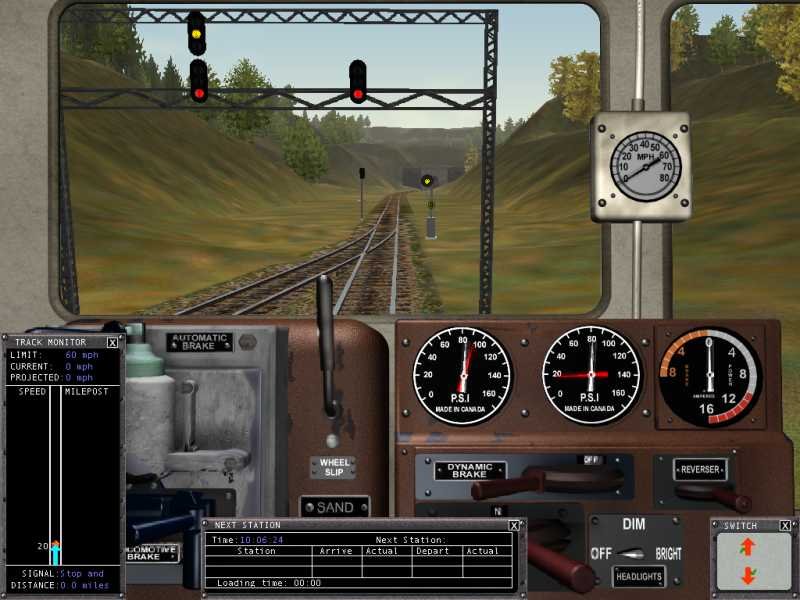
About 20 seconds later, as indicated by the distant signal, the far switch throws. This timing is dependent on the spacing of the first unlinked interlocking beyond the linked doublehead, combined with the SignalNumClearAhead value in the sigcfg.dat file and the speed of the AI train. If the player train was on the single track section it would interrupt this sequence, and the far switch would not throw until the player cleared the other end. Note that the interlock has flipped because it's linked to the far switch. It shows yellow over red instead of green over red because the active path advancing ahead of the AI train hasn't tickled the next unlinked interlock beyond the far switch awake yet, so that signal would still be red.
Now that next signal wakes up, so the approaching AI train gets a green.All this is kind of tough to explain, and again my method is highly unlikely to work with the traditional type activity, and so far I can run AI traffic in only one direction at a time. I'll be uploading PO&N5 in the next couple of weeks, anyone who wants to try this method could reverse engineer it from the route, probably easier to understand it that way.It's a real beast, and annoying as hell when you have to program each activity perfectly and the player has to follow the path rigidly to make it work at all, so that's why I went with this screwy setup instead of the traditional method. No fun sitting at a signal that indicates stop when it has no reason to.
Remove | Alert Edit | Reply | Reply With Quote | Top
crow357 (110 posts)
Feb-04-02, 02:38 PM (EST) 8. "RE: Signals won't turn green" Wow, Thanks for your response Sniper. You've just explained exactly what's going on with my route.May God grant you a 1000 beautiful girlfriends!Art Remove | Alert Edit | Reply | Reply With Quote | Top
sniper297 (1501 posts)
Feb-04-02, 11:50 PM (EST) 9. "RE: Signals won't turn green" Hey, all the pages are back! Here's some links to previous threads, now that the forum is back up.http://www.train-sim.com/dcforum/DCForumID6/2670.html
http://www.train-sim.com/dcforum/DCForumID6/2595.html
http://www.train-sim.com/dcforum/DCForumID6/2444.html
http://www.train-sim.com/dcforum/DCForumID6/2386.html
http://www.train-sim.com/dcforum/DCForumID7/585.htmlGive you a good idea of what I tried and it didn't work, no sense each of us re-inventing the wheel individually. If you ever do get yours working, when you get to the activity editor, change the AI service "expected performance" down around 25 to 40 to slow it down. Under 25 they sometimes stop for no reason, between 25 and 30 most of the default consists (2xdash9,37oil, 2xgp38,35mixed, etc.) will do about 15 to 20 mph. The service obstinately resets itself to 75 every time you open the activity editor, I've found that setting to 25, "use as template" to create a clone, then deleting the original, cures that problem.
Run about 10 minutes apart, looks like one of the old Atari Centipede games!A thousand girlfriends hey? I suppose I oughtta do a count with Valentine's Day coming up, but I think I got that many already. And they're all beautiful. Remove | Alert Edit | Reply | Reply With Quote | Top
Lock | Archive | Remove
Lobby | Topics | Previous Topic | Next Topic
Restored from the Train-Sim.Com archive, captured March 9, 2002. About this archive.