Message Areas - "Signal stuff again"
Train-Sim.Com Message Areas
"Signal stuff again"
Email this topic to a friend
Printer-friendly version of this topic
Bookmark this topic (Registered users only)
Previous Topic | Next Topic Conferences MSTS Route Design (Protected) Original message
sniper297 (942 posts)
Nov-21-01, 11:34 AM (EST) "Signal stuff again" That other thread was getting kind of lengthy, and since I'm putting pictures in here I think I better start a new one. Thanks for all the tips, altho I tried the experiment of making a test track with just 250 meter straights, one passing siding, one linked and two unlinked interlockings at each end, and a USbuffer section at each end. No luck, the behavior is still unpredictable, is heavily dependent on the path and starting point, and never works the same way twice. So for now I've given up on interlockings, and I'm playing with only the BNSF interval signals, using the gradient plate on all but the ones for the dedicated AI traffic passing sidings. It looks like that might work, at first I thought I was going to have to place two signals at the bitter end of every last yard track and spur on the entire route, but with the gradient plate the red signal is non restricting, so it don't matter when you're going into a yard, and any loose consists on the spur would make it red anyway. I haven't tried the AI traffic on this setup yet, but that's the next step. Essentially I've divided it into blocks based on diverging/converging, each double track section is a block, the single track sections are each one block, not divided again until it hits the next diverging section. With this setup there is still a possibility of a cornfield meet if both trains enter the single track section on a yellow at the same time, but dividing the single track would produce those stalemate conditions where the player would be forced to back up to the preceeding automatic switch diverging, with no guarantee that the Artificial Stupidity (supposed to be "Artificial Intelligence", but I haven't found any in this sim) would get the traffic train going again and switch it to the proper passing track. It also restricts following movements, the following train would have to wait until the leader clears the signal at the next diverging, but that was fairly common on short lines with light traffic in the "olden days" anyway. (And if you're looking for authenticity with John Fowlis' PO&N Pioneer Train Set, you need to stick with the unsignalled version 4 and hire a bunch of guys to frantically wave flags and lanterns, even after I'm done with V5.)Anybody still awake after reading all that? Really? Somebody give Boweavel a shove, he's snoring too loud. OK, here's some pictures for you guys who can't read.
Starting at Huff refinery, backing all the way to Chippewa Falls, last signal was yellow instead of green because of it being the last one at that end of the line. Moving forward again, manual switch, signal clear for the main, approach for the siding. Throwing the switch for the siding doesn't change the indications;
 Altho it makes a difference at the other end, the switch is set against me, signal red.
 That's OK tho, with the permissive gradient plate I can go thru it anyway. Approaching the next diverging, automatic switch this time for the AI passing siding.
 Coming up to single track again, even tho the block ahead is clear, since the switch is set for the straight track the signal is red on the siding.
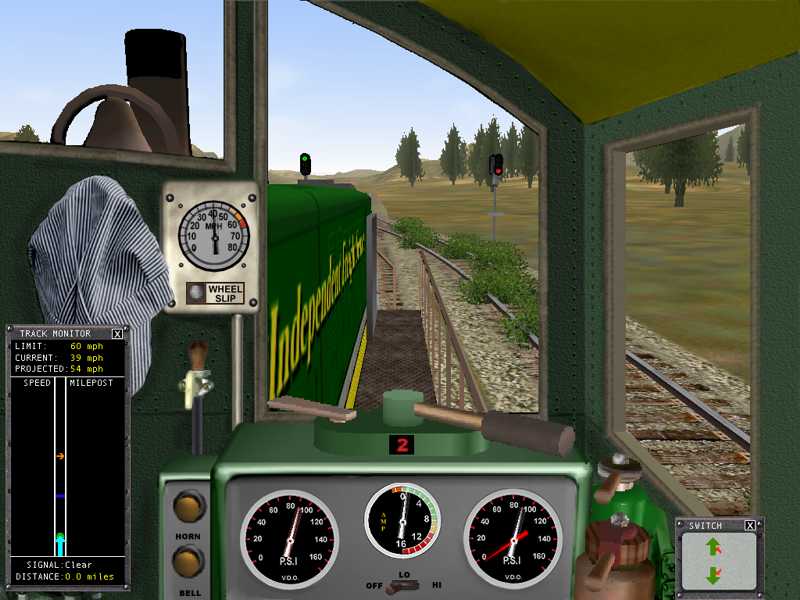 After running back and forth a few times, I set one of the switches for the yard, and without reseting it behind me I pull forward onto the single track, stop and reverse.
 Signal red, because it's now tracing a path into the refinery tracks, and altho there are no cars in there, there aren't any signals either. So the signal logic defaults to red, since it's looking for the status of the next signal and there ain't one. With the gradient plate it don't matter, don't even need to ask that bonehead dispatcher for permission, just drive on through. You don't wanna go faster than 20mph in a yard anyway.Well, now to try it with some AI traffic to see what happens, still gotta spawn the traffic with an automatic switch and keep it out of the sections with manual switches, and I seriously doubt I'll ever be able to set up a double saw-by meet, but it's a start.Again, thanks for all the help, guys.Jim Ward
Port Ogden and Northern
As UNreal as it gets. Alert Edit | Reply | Reply With Quote | Top
Table of Contents
Subject Author Message Date ID RE: Signal stuff again zander Nov-21-01 1 RE: Signal stuff again rgarber Nov-21-01 2 RE: Signal stuff again ace6879 Nov-21-01 3 RE: Signal stuff again sniper297 Nov-23-01 4 RE: Signal stuff again rgarber Nov-24-01 5 RE: Signal stuff again sniper297 Nov-25-01 6 RE: Signal stuff again patm41 Nov-26-01 7 RE: Signal stuff again sniper297 Nov-26-01 8
Lobby | Topics | Previous Topic | Next Topic
Messages in this topic
zander (25 posts)
Nov-21-01, 03:40 PM (EST) 1. "RE: Signal stuff again" Ok whats the reason to change your signals only to blocs - i tested it 1 doublehead at start and normal interlocking in the double line exatly same thing on the other end . and last not least a third pair of signals on the last corner on your triangle - and it was working perfect in explore mode .No ideer how to put a picture in this message field. Remove | Alert Edit | Reply | Reply With Quote | Top
rgarber (621 posts)
Nov-21-01, 03:54 PM (EST) 2. "RE: Signal stuff again" *while chomping on sandwhich* the guy lost me eons ago... Rich Garber Remove | Alert Edit | Reply | Reply With Quote | Top
ace6879 (311 posts)
Nov-21-01, 04:43 PM (EST) 3. "RE: Signal stuff again" OMG!!!!!! L-O-V-E the weed covered track!!!!Nice shots as well!!
Kelley Remove | Alert Edit | Reply | Reply With Quote | Top
sniper297 (942 posts)
Nov-23-01, 11:07 PM (EST) 4. "RE: Signal stuff again" Well, tried a bunch of other variations, still not working right. I find it very wierd that the interlockings work OK for the AI paths but not for the player, possibly the AI dispatcher feels a kinship with his equally intelligent AI engineer, and sneers at us puny humans with our substandard brains. Here's an idea, if the game ends when you go thru a red, and the dispatcher never gives you a green, don't go thru the red signal, somersault over it.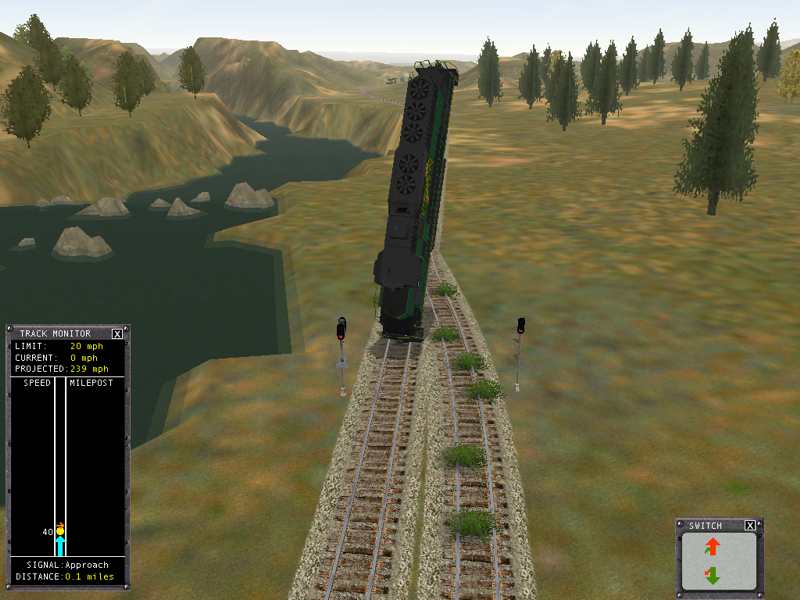 Actually, this is what happens when the dispatcher changes the switch on you while you're between sidings. Note that the switch is set for the curve, but the engine decided to take the straight anyway. At least the engine knew which was the player path. Remove | Alert Edit | Reply | Reply With Quote | Top
rgarber (621 posts)
Nov-24-01, 00:41 AM (EST) 5. "RE: Signal stuff again" Does that mean the summersault trick didn't work? Remove | Alert Edit | Reply | Reply With Quote | Top
sniper297 (942 posts)
Nov-25-01, 11:28 PM (EST) 6. "RE: Signal stuff again" If I could get it to land on the rails again, it might. Well, here's a new twist, no interlockings or signals for the diverging paths, only for converging. Unlinked interlockings and restrictive intervals on the AI passing tracks, permissive interval signals elsewhere. This seems to be working, and also note it's important that the "player drivable path" checkbox is selected for all the AI service paths, otherwise the dispatcher will set all the auto switches for the AI train's path as soon as it spawns, if that catches you between sidings it's game over. Yeah, I know the interlockings work fine in explore route mode, but any kind of signals are pointless when you're the only train on the track. For my personal requirements, signals must restrict the player's movements when AND ONLY WHEN there is a potential traffic conflict, this nonsense of having a stop signal after the AI train has disappeared off the route is not acceptable, neither is a red light that won't let you get into a siding to pick up a cut of cars because the signal is absolute stop due to the fact that there is a cut of cars on the siding. I think I've finally accomplished that, and if the signal looks funny because it has a gradient plate in a flat area, that's too bad for the nitpickers, I don't care as long as they work right. The rivet counters are welcome to hack V5 themselves after I finish and get the signals the way they want them, I wish them luck. I only have the one section working without errors so far, now I gotta lay more track for passing sidings in other sections, and get those set up the same way. Long way to go, and it's almost sunset.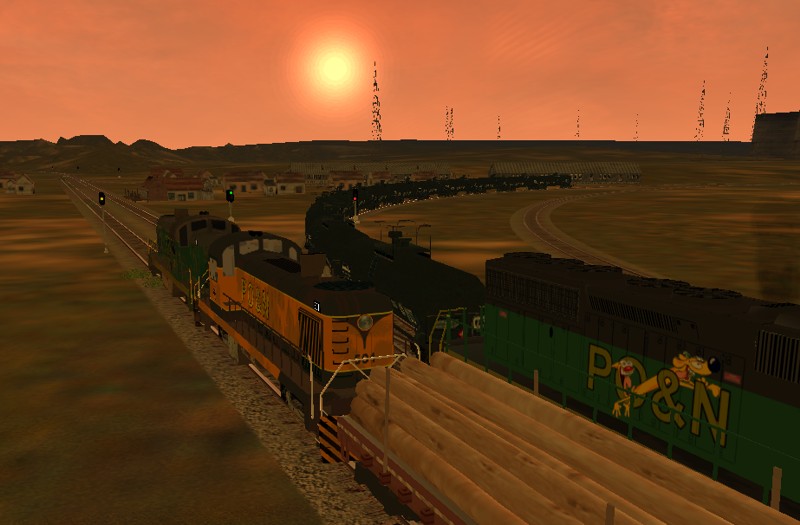 Remove | Alert Edit | Reply | Reply With Quote | Top
patm41 (353 posts)
Nov-26-01, 00:00 AM (EST) 7. "RE: Signal stuff again" Shame on you !!! thats not a PO&N loco or a hijacked EastMetronice pic though Remove | Alert Edit | Reply | Reply With Quote | Top
sniper297 (942 posts)
Nov-26-01, 00:32 AM (EST) 8. "RE: Signal stuff again" Actually, all three are PO&N locos, available in the file library. The green Alco and the SD40 were skinned by Kevin Shea (Cadman), and John Fowlis himself did the orange Alco. Those are original tankers, but the log flats are Jon Davis's mower set, sunset by Jak Fearon, of course. I didn't skin any of that, all are available in the file library (if it ever works again), along with a PO&N DD40 and SW1200 by the guy the Huff refinery is named after. That's what's so great about sharing these things, pool our talents and we get more out of it than we put into it. Remove | Alert Edit | Reply | Reply With Quote | Top
Lock | Archive | Remove
Lobby | Topics | Previous Topic | Next Topic
Restored from the Train-Sim.Com archive, captured January 23, 2002. About this archive.