Train-Sim.Com
MSTS Activity Design

Lehigh Valley Route activity signal problems

Notice to all visitors and members of the Train-Sim.Com message forums:
If you plan on using a signature banner in your posts, we would like to remind you that there is a maximum size for banners. That maximum is 450 pixels wide by 120 pixels high, and not to exceed 25k. Your compliance is appreciated. FORUM RULES Problems? There are two common reasons for problems with logging in and posting messages. The first is that you are running a firewall that prevents your messages from being sent to the server. The other is that you have cookies disabled; the DCForum software requires cookies to work properly.

Previous Topic | Next Topic

Printer-friendly copy Email this topic to a friend

Reading Topic #2243

Member since Aug-7-04 · 43 posts

Hi everyone,
Made a simple activity on the Lehigh Route without any AI trains....just a simple switching chore ("Activities Made Simple" by Otto Wipfel) Problem is...I cant pass any signal! Everyone I approach is red...and when I pass, it the activity ends saying "ignored red stop signal". Is there a way I can change the signal? My start point and end point go thru the area I want the activity to be...again without AI trains.
Any thoughts???
Thanks

FrankG
NJ
MP 9: Vineland Secondary
http://www.sjrail.com/

Alert | IP

Printer-friendly page | Edit | Reply | Reply With Quote | Top

RE: Lehigh Valley Route activity signal problems, sniper297, Sep-08-04, 01:09 AM, (1) RE: Lehigh Valley Route activity signal problems, robertreedy, Sep-08-04, 11:18 AM, (2) RE: Lehigh Valley Route activity signal problems, sniper297, Sep-08-04, 02:35 PM, (3) RE: Lehigh Valley Route activity signal problems, frankgi, Sep-08-04, 04:47 PM, (4) RE: Lehigh Valley Route activity signal problems, sniper297, Sep-08-04, 05:12 PM, (5) RE: Lehigh Valley Route activity signal problems, frankgi, Sep-08-04, 06:16 PM, (6) RE: Lehigh Valley Route activity signal problems, robertreedy, Sep-08-04, 08:11 PM, (7) RE: Lehigh Valley Route activity signal problems, sniper297, Sep-10-04, 00:26 AM, (8)

Conferences | Topics | Previous Topic | Next Topic

Charter Member · 6669 posts

RE: Lehigh Valley Route activity signal problems

Otto's tutorial is very good, but with one glaring flaw - a short player path does not make an activity freestyle. What makes it freestyle (go wherever, do whatever) is the way the track is layed out and the signals are set up.http://www.train-sim.com/dcforum/DCForumID7/2240.htmlI don't have Lehigh Valley, but my guess is the signals you're trying to go thru are Type 1, the absolute signals that are "asleep" unless there's an active path thru them. Alternatives are;1. Make the path extend thru all the signals, with reverse points where necessary. That puts a damper on the freestyle aspect, since once you've run the path you can't run it again without restarting the activity, since the path is erased behind you, and with Type 1 signals no pathee, no green lightee.2. Delete all the signals in the route editor, or replace them with the Type 2 "always awake" permissive signals. That prevents running heavy AI traffic without a lot of screwing around, but then the player path won't be an issue.3. Dump all them "prototype at any price" routes and download ponver8.zip, the route designed specifically for freestyle operations combined with AI traffic trains.Lehigh Valley Route activity signal problems – image 1

Alert | IP

Printer-friendly page | Edit | Reply | Reply With Quote | Top

Charter Member · 1413 posts

RE: Lehigh Valley Route activity signal problems

Click to send message via ICQ

LAST EDITED ON Sep-08-04 AT 11:20 AM (EDT)

Frank, I'm going to 'hijack' the original for a moment, but it might do both of us (plus plenty others) some good if there is a viable alternative.Sniper, (Hank, and others) ..I have little to no knowledge of signal programming, but would there be any possible way of re-working the sigscr.dat to accommodate the use of 'freestyle' activities. For example re-assigning (or re-defining) the Type 1 sigals as a Type 2?I know there's no such thing as a free ride (especially in MSTS), but it seems like the sigcfg.dat is the visual part, whereas the sigscr.dat is the determing factor in how the signals react.For some of us with everything already (incorrectly) in place, has anyone with more programming skills than myself tried anything like this with any positive results?Or is this completely out in left field, completely out of the ball-park?RobertR .. ADF-M&RM at http://www.adfrr.com

Alert | IP

Printer-friendly page | Edit | Reply | Reply With Quote | Top

Charter Member · 6669 posts

RE: Lehigh Valley Route activity signal problems

Might be worth trying. In the sigscr.dat file for each route;if (!enabled ||In the script defines it as Type 1, the BNSF Interlockings all have this line.if ( // !enabled ||The double forward slash "//" is "skip", which makes it so it don't use that line. The BNSF Interlockings use that script, so they're enabled by default.So what you could do is go thru the sigscr.dat file and find all the if (!enabled ||lines, and change them to if ( // !enabled ||And see what happens. I suspect that altho the BNSF Interlocking signals would now be "awake" by default instead of "asleep", they would display correct indications without the need for an actual path, but probably screw up the AI traffic logic. Again if you're not planning to run heavy AI traffic you don't really need absolute signals anyway, trouble is an AI train reads a permissive red as "boogie on til you hit something", so changing the if enabled line probably won't prevent closely following AI trains from running into each other.Last item is the permissive VS absolute number itself, that's in the sigcfg.dat line;SignalAspects ( 6
SignalAspect ( STOP "Red" SpeedMPH ( 0 ) )
SignalAspect ( STOP_AND_PROCEED "Red" SpeedMPH ( 20 ) )
SignalAspect ( RESTRICTING "Red" SpeedMPH ( 20 ) )
SignalAspect ( APPROACH_1 "Yellow" SpeedMPH ( 40 ) SignalFlags ( ASAP ) )
SignalAspect ( APPROACH_2 "Flashing Yellow" SpeedMPH ( 40 ) SignalFlags ( ASAP ) )
SignalAspect ( CLEAR_2 "Green" )
)Have to either remove the "SignalAspect ( STOP" line and change the "SignalAspects ( 6" to "SignalAspects ( 5", or change the "SpeedMPH ( 0 )" to "SpeedMPH ( 20 )", I haven't done enough experimenting with this to know for sure exactly how the permissive VS absolute logic works. I do know that if you're approaching a trailing point switch set against you while off the path, that signal will be red regardless of whether it's enabled or not, so it does need to be permissive.

Alert | IP

Printer-friendly page | Edit | Reply | Reply With Quote | Top

Member since Aug-7-04 · 43 posts

RE: Lehigh Valley Route activity signal problems

Thanks Sniper and RobertR,
I will try those remedies......installed this route 3 weeks ago, but this is my first attempt to create an activity on it. I travel past my consist (stoed on a siding) to couple on to, and the signal light is green ...no problem. I back into the siding and couple to the consist. When I move forward, the signal changes to red...and I get the "activity over/ ignored red light" window. I even tried moving the consit around to different tracks. No luck. I am not even using a AI train! I will try some more. Thanks for your responces.

FrankG
NJ
MP 9: Vineland Secondary
http://www.sjrail.com/

Alert | IP

Printer-friendly page | Edit | Reply | Reply With Quote | Top

Charter Member · 6669 posts

RE: Lehigh Valley Route activity signal problems

Hee-hee, well, that's why the Port Ogden & Northern was born in the first place, I had the exact same problem on the default Marias Pass. Put some cars on the sidings at Cutbank and Columbia Falls, make a simple player path from Whitefish to Shelby, then drive. Signal clear when I go thru it, back into the siding to pick up cars, now the signal is red?! "The moving pen, having writ, moves on", as you run the path it's erased behind you, so to go thru any Type 1 signal you need a double reverse point. Once that's done don't screw up and forget a set-out, cuz then the third time thru the same signal it's red.So I finally said the hell with it and made my own route, with all manual switches and no signals;http://www.train-sim.com/cgi/dcforum/dcboard.cgi?az=show_thread&om=3850&forum=DCForumID6After that I got greedy, wanted to have my cake and eat it too, so I started trying to add signals in such a way that I could have AI traffic, but still do whatever I wanted in an activity. That took a LONG time to figure out;http://www.train-sim.com/cgi/dcforum/dcboard.cgi?az=show_thread&om=2386&forum=DCForumID6&archive=yes http://www.train-sim.com/cgi/dcforum/dcboard.cgi?az=show_thread&om=2444&forum=DCForumID6&archive=yes http://www.train-sim.com/cgi/dcforum/dcboard.cgi?az=show_thread&om=2595&forum=DCForumID6&archive=yes http://www.train-sim.com/cgi/dcforum/dcboard.cgi?az=show_thread&om=2670&forum=DCForumID6&archive=yes And when I finally did, I didn't keep it a secret;http://www.train-sim.com/cgi/dcforum/dcboard.cgi?az=show_thread&om=3909&forum=DCForumID6&archive=yes But other than Phil Skene (Austral Bay), nobody else seemed to be interested in anything but "paint-by-numbers" activities.

Alert | IP

Printer-friendly page | Edit | Reply | Reply With Quote | Top

Charter Member · 1413 posts

RE: Lehigh Valley Route activity signal problems

Click to send message via ICQ

I'll second Franks thanks above for the information."And see what happens. I suspect that altho the BNSF Interlocking signals would now be "awake" by default instead of "asleep", they would display correct indications without the need for an actual path, but probably screw up the AI traffic logic."Since about 60% of mine is double track, a variation of this might work by changing the linked absolutes with permissives on the double track, but leaving as is on the single track."Again if you're not planning to run heavy AI traffic you don't really need absolute signals anyway, trouble is an AI train reads a permissive red as "boogie on til you hit something", so changing the if enabled line probably won't prevent closely following AI trains from running into each other."I've had a funny experience with this on a couple of occasions and not sure what to attribute it to, but is as follows ..Started a second train (fast passenger), wrongly calculating the time, which put it starting at the beginning of a block while the previous AI (slow freight) was towards the end with 2 permissives ahead. I was at the end of this parade in a yard view enabled area and went to check it out, to see what was happening.To make a long story short, everytime the passenger caught up with the freight - even in mid-block - it would stop momentarily, then start back up, continuing this until the freight came to the red absolute. When the freight stopped at the absolute, the passenger train pulled slowly up to within about 100 meters of the freight and stopped, waiting for it to go.I've had this happen a couple of times in different places and have come to the conclusion (maybe wrongfully so without many more trials) that an AI will not usually run into another AI .. it wants a player train to massacre The only time I've had a crash with AI vs AI is when literally putting one on top of another, but that is usually caught in the AE.Strange bird this MSTS!RobertR .. ADF-M&RM at http://www.adfrr.com

Alert | IP

Printer-friendly page | Edit | Reply | Reply With Quote | Top

Charter Member · 6669 posts

RE: Lehigh Valley Route activity signal problems

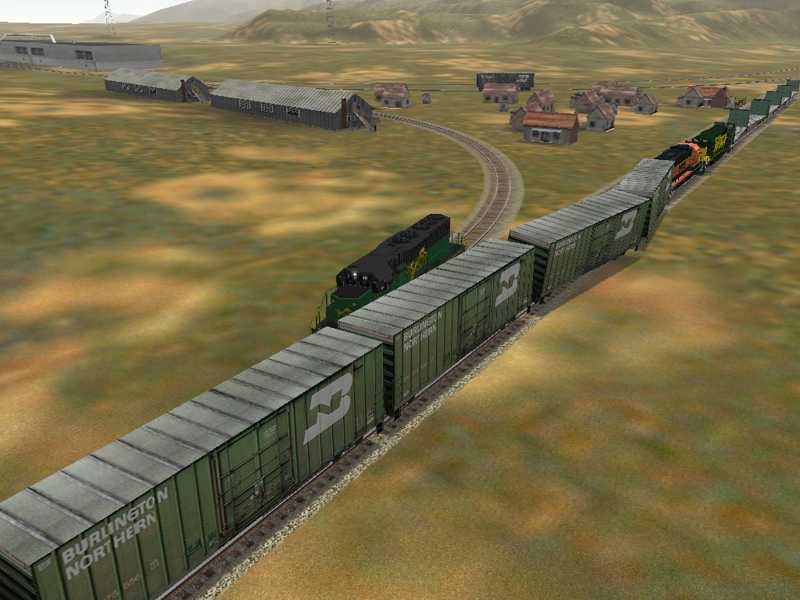
Yeah, the only thing predictable about MSTS is it's gonna be unpredictable. Lots of people have said that AI trains won't crash into each other, but my early experiments with signals managed to come up with combinations that turned all the AI trains into Kamikazes on a demolition derby route.Lehigh Valley Route activity signal problems – image 2This one had nothing but interval signals, no interlockings, the player train is the single green engine on the side track. I had to prove it was possible to Rich Garber once, and made a great scene with three East Metro geeps in a 3 way collision, but that was in the main MSTS forum and the thread got lost in one of the server crashes.

Alert | IP


[ Home | MSTS Forum | MSTS FAQ | How To... | File Library ] Copyright © 2004 by Nels Anderson. All Rights Reserved.

Restored from the Train-Sim.Com archive, captured October 23, 2004. About this archive.