Train-Sim.Com
MSTS Route Design

Multiple track textures in the same route

Notice to all visitors and members of the Train-Sim.Com message forums:
If you plan on using a signature banner in your posts, we would like to remind you that there is a maximum size for banners. That maximum is 450 pixels wide by 120 pixels high, and not to exceed 25k. Your compliance is appreciated. FORUM RULES Problems? There are two common reasons for problems with logging in and posting messages. The first is that you are running a firewall that prevents your messages from being sent to the server. The other is that you have cookies disabled; the DCForum software requires cookies to work properly.

Previous Topic | Next Topic

Printer-friendly copy Email this topic to a friend

Reading Topic #12321

Charter Member · 912 posts

There has been an interesting thread on uktrainsim.com recently about multiple track textures in the same route achieved by aliasing track sections in the World files. I know Sniper achieved this on P&ON but used a different method.If this has been discussed here previously then my apologies, but I thought it might be of interest to some.I have been fiddling with this, and got the following to work fine, two diffent textures on adjoining tracks.Multiple track textures in the same route – image 1Sorry about the gaudy colour, this was just for demonstration purposes.Method:-
1. Build the route, and note the track sections you wish to replace. In this case a single a1t100mstrt.s - Write down it's x,y,z positions and .W file details from the RE
2. Copy a1t100mstrt.s to route's Shapes folder along with it's .sd file
3. Rename to a1t100mstrtxxx.s, similarly rename .sd file and edit the .sd internally to give the same .s file name, and change the ESD from 2 to 1
4. Uncompress a1t100mstrtxxx.s with Route-Riter or SFM, edit the texture names from acleantrack1.ace and acleantrack2.ace to xacleantrack etc
5. Make copies of acleantrack1.ace and acleantrack2.ace in your Textures and Textures\Snow folders and rename copies to xacleantrack etc
6. Using TGATools2 and Paint Shop Pro or similar, produce your new track textures.
7. Find the .W files from 1. above, and uncompress them if necessary.
8. Locate the track sections in the .W files and change the Filename entry from
FileName ( a1t100mstrt.s ) to
FileName ( ../../Routes/MyRoute/Shapes/a1t100mstrtxxx.s )
Where MyRoute is the name of the route you are editing.
9. Run MSTS and off you go with multi track textures.I have altered Route-Riter so that it accepts aliased shapes, v5.2.51 is at http://members.optusnet.com.au/virtualtrains now.Mike

Alert | IP

Printer-friendly page | Edit | Reply | Reply With Quote | Top

RE: Multiple track textures in the same route., sniper297, Aug-07-04, 11:15 PM, (1) RE: Multiple track textures in the same route., OTTODAD, Aug-08-04, 12:08 PM, (3) RE: Multiple track textures in the same route., wacampbell, Aug-08-04, 10:35 AM, (2) RE: Multiple track textures in the same route., sniper297, Aug-08-04, 01:33 PM, (4) PAINT IT BLACK!!, sniper297, Aug-11-04, 00:27 AM, (5) RE: PAINT IT BLACK!!, OTTODAD, Aug-11-04, 07:10 AM, (6) RE: Multiple track textures in the same route., LooseCannon17, Aug-11-04, 09:40 AM, (7) Push Poke Peek Pop Jump?, sniper297, Aug-11-04, 01:39 PM, (8) RE: Push Poke Peek Pop Jump?, OTTODAD, Aug-11-04, 03:32 PM, (9) RE: Push Poke Peek Pop Jump?, sniper297, Aug-11-04, 04:34 PM, (10) As Lo-o-ong as you love me so-o-o-o...., sniper297, Aug-13-04, 01:46 AM, (11) RE: As Lo-o-ong as you love me so-o-o-o...., OTTODAD, Aug-13-04, 03:24 PM, (12) RE: As Lo-o-ong as you love me so-o-o-o...., sniper297, Aug-13-04, 05:26 PM, (13) RE: As Lo-o-ong as you love me so-o-o-o...., OTTODAD, Aug-14-04, 08:53 AM, (14)

Conferences | Topics | Previous Topic | Next Topic

Charter Member · 6411 posts

RE: Multiple track textures in the same route.

Different method is right. I tried a direct replacement once, but something in the datablock refers by default to the global shapes folder."../../Routes/MyRoute/Shapes/", if I'm not mistaken that's starting in the \Global\Shapes\ folder, so "../../" would be "up two" to the root of \Train Simulator, then point it back down into the proper folder. I gotta try this, I was thinking about replacing all the tracks in the coal mine, but when I tried the direct replacement I didn't think of aliasing, and quickly found out that wouldn't work since it points any track section to the global shapes folder. Okay, so let it go there, then redirect it back to the route's shapes folder from there! Ingenious, Mike!

Alert | IP

Printer-friendly page | Edit | Reply | Reply With Quote | Top

Charter Member · 5680 posts

RE: Multiple track textures in the same route.

Jim,how about using the Concrete ties range of tracks which have their own trackbed texture files which could be replaced with any other Acleantrack1 of your choice but not the rails. Would not work with switches however.O t t o

Alert | IP

Printer-friendly page | Edit | Reply | Reply With Quote | Top

Member since Jun-30-02 · 278 posts

RE: Multiple track textures in the same route.

I have been using this technique on my L&PS route. It allows one to do more than just modify the track texture. You can use it to modify the track shapes themselves. At various location, I have added bridge guardrails, switch guardrails, joint bars etc. It gives the route builder a lot of flexibility. It also overcomes some of the problems with fine tuning the terrain under the track. You can make custom track sections with ballast profiles, embankments, etc to fill in the gaps under the track.The technique can withstand a TDB rebuild and allows custom track sections without modifying the TSECTION.DAT - everything is in the route folder.We discussed it last spring - although it was buried a little - in this thread:http://www.train-sim.com/dcforum/DCForumID6/11798.html#5
Wayne
Building the L&PS

Alert | IP

Printer-friendly page | Edit | Reply | Reply With Quote | Top

Charter Member · 6411 posts

RE: Multiple track textures in the same route.

Yup, just goes to show great minds think alike, Wayne. I read your post but I had already done the "tricky tracks" thing with placing fake track sections over real ones, so didn't pay much attention to the whole idea at the time. This coalmine thing was a different animal tho, rather than having three or four tracks in each area with a different texture I wanted the whole quad to have (1) darker ballast, and (2) no snow texture. Covering all that with tricky tracks, especially considering most of it is steep grades, woulda taken me 275,000 years give or take a millineum or so. Consequently I shelved the idea, considering I'm unlikely to live another 275,000 years and my descendants were probably gonna be reluctant to carry on all that tedium.Anyway, so far so good, after getting past 10 zillion (give or take a trillion or so) errors caused by tYp!nG M!$t@kEs I got the whole quad converted. First thing is to copy all the a1t and a2t sections you need to a temp folder, use Route Riter to decompress all the S files, then make a bat file;Copy a1t*.* c1t*.*
Copy a2t*.* c2t*.*I used "c" for "coal track", and what the bat does is copy a1t10mtrstrt.s to c1t10mtrstrt.s, a1tendpnt10dlft.sd to c1tendpnt10dlft.sd, and so on. (Advantage there is I can do EDIT REPLACE in the W file, replace "filename a1t" with "filename c1t", replace all and I'm done.)Then all the old s and sd files were deleted from the temp folder, opened all the sd files in wordpad and changed the a1t to c1t, then opened the .s files, edit, find "ace", and replace the ace file names. Found out the hard way there's no shortcut on that, I opened the 10 meter straight and did this;images ( 2
image ( ACoalTrack1.ace )
image ( ADirtyTrack2.ace )
)Then just copied and pasted that section over the ace file section in all the other track sections.Multiple track textures in the same route – image 2Oooops. Well, the only thing KUJU has been consistent on so far is their inconsistency, I dunno why I expected all track shapes to have the same format. Some of the shorter straight sections list the ballast texture first and rail texture second, but most track sections are the reverse of that.Another oddball, since these are considered real track sections, the info in the datablock goes by the real track section formula, so changing the ESD Alternative texture in the SD file to 0 has no effect, it still looks for a snow texture. Copying the base texture into the snow folder fixes that, now there's no snow on the tracks in winter.Multiple track textures in the same route – image 3Still gotta do something about that leaky roof. Anyway, it's a good start, need to make s1t track sections for the RGS sub, some kind of sand texture so I don't have that oddity of driving thru the desert in the winter and seeing snow on the ballast.
Alert | IP

Printer-friendly page | Edit | Reply | Reply With Quote | Top

Charter Member · 6411 posts

PAINT IT BLACK!!

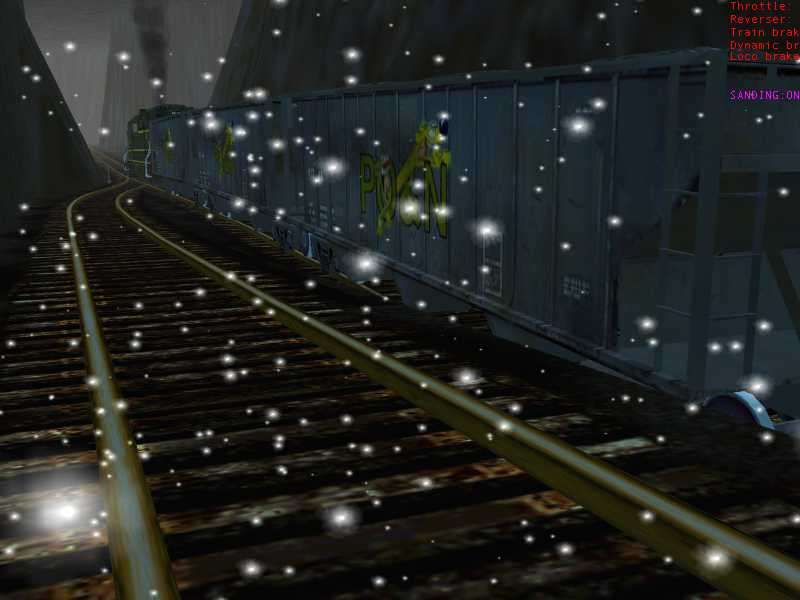
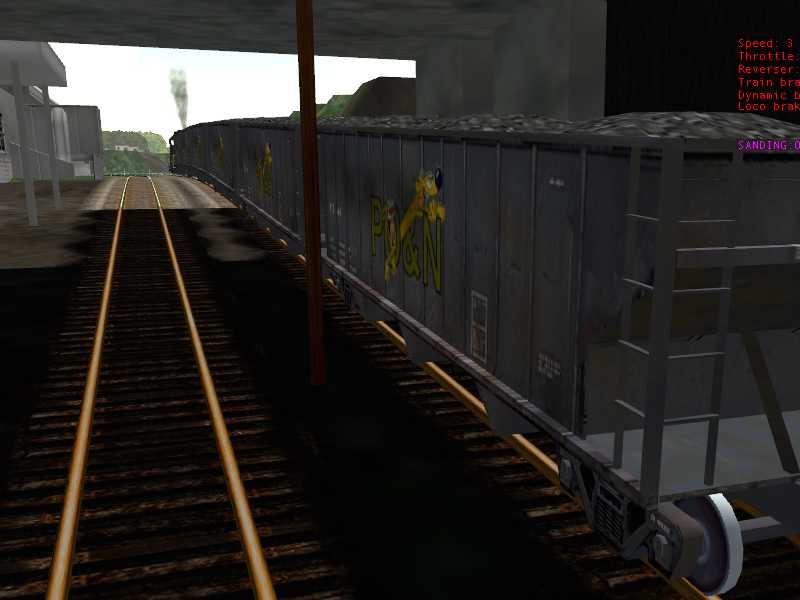
Well, thanks to Marc "Hack" Nelson from 3Dtrains;http://www.train-sim.com/dcforum/DCForumID6/12325.htmlUsing decapod's Shape File manager I got dark and dingy coal tracks in the daytime now. Cloning the default track sections to use a different texture, I renamed the cloned sections to c1t or c2t, so I could do a quick and easy replacement in wordpad.Multiple track textures in the same route – image 4The whole thing isn't visible in the window, I replaced "FileName ( a1t" with "FileName ( ../../Routes/Portogden9/Shapes/c1t", then clicked on "Replace All", and did the same for the a2t to aliased c2t. That replaced every track section on the quad tile, so now I needed to do some cleanup work. Examining the track sections above ground, I found the shaft entrance track was at -10 meters, and everything above ground was higher than that. So I did an "EDIT FIND" for "POSITION", and every track section that was "Position ( 527.532 -9.873085 -57.4083 ) or higher (center number is altitude above or below sea level in meters) got replaced with the default a1t heading.End result;Multiple track textures in the same route – image 5Normal track textures above ground,Multiple track textures in the same route – image 6Changeover right at the shaft entrance,Multiple track textures in the same route – image 7Nice and dark inside at 10 AM.Multiple track textures in the same route – image 8I dealt with dynamic track just by burying the ties and ballast, who spilled all this coal?! As Marc pointed out in the other thread, DrkShd means lights won't shine on it at all, and of course other objects that are brightly lit by the sunshine; Multiple track textures in the same route – image 9Are even more brightly lit when the headlight is turned on;Multiple track textures in the same route – image 10Can't have everything, I suppose I could clone some of these objects and make them DrkShd too, but nothing can be done with the engines and cars. Still, it's a drastic improvement, don't have to do the coalmine activities at midnight just to get the right effect.

Alert | IP

Printer-friendly page | Edit | Reply | Reply With Quote | Top

Charter Member · 5680 posts

RE: PAINT IT BLACK!!

Looking good, Jim !How did you manage to make the transition of track gradients look so smooth, no kinks visible anywhere ? Would be great to be able to "Bend" tracks dynamically both horizontally as well as vertically ! O t t o

Alert | IP

Printer-friendly page | Edit | Reply | Reply With Quote | Top

Charter Member · 273 posts

RE: Multiple track textures in the same route.

Hello all,Should you be interested in using Scale Rails, two completely different track textures and rail colours can be used side by side.Scale Rails gas pieces named SR_1tEnd_w_10dL.s and the same for concrete ties, only using a _c_ instead of a _w_. The End Piece is just reference. If you copy the textures that the wood ties use, and rename them as the concrete ties, you now have two sets of wood tie pieces to use. There is a texture as well, I think it is for bridge joyces, that can be copied as the new rail texture. You now have a wooden tie mainline with the shiny rail, and a rusty brown texture for sidings or branchlines.I posted a thread on this already, but it probably made it to page two before anyone really read it.Screenshot you ask? Sure:http://www.mltdownloads.net/forums/index.php?showtopic=111Hope this helps.LC17
"46 and 2 are just ahead of me"
www.mltdownloads.net - Another free source of Maple Leaf Tracks products repaintsMultiple track textures in the same route – image 11

Alert | IP

Printer-friendly page | Edit | Reply | Reply With Quote | Top

Charter Member · 6411 posts

Push Poke Peek Pop Jump?

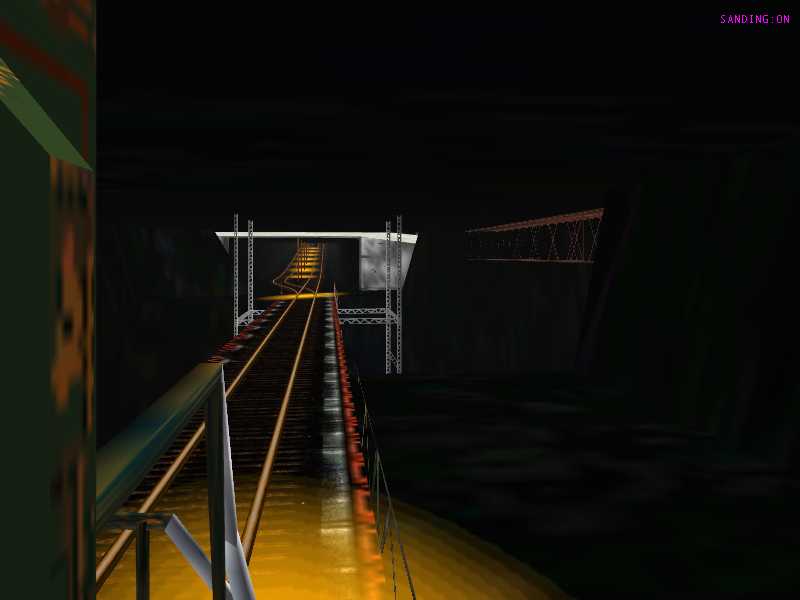
Otto, I'm surprised an old programmer like you even has to ask, maybe you oughtta lay off the cognac for a while! (HIC!)As you know, computers can't draw curved lines, they fake curves with a series of very short straight lines. The shorter the straight line and the more there are, the stronger the illusion of an actual curve. Track sections are the same, I want to go from zero to a 5.25% grade, I use short track sections with gradually increasing angles. 10 meter straights work just fine, if you want to be really crazy you can use 7 meter straights or even 2 meter dynamic sections. Fanatics would probably even go with 0.150, 0.300, 0.450, and so on, I've found that you can get away with 0.600, 1.200, 1.800, 2.400, and then 3.000. Take a look at the coal mine main shaft on the 9 beta, I didn't change any of the track there, only the cloned track shapes, and of course the scenicking has been completed since then. 56k dialuppers are gonna groan, but let's look from the bottom up;Multiple track textures in the same route – image 12Halfway to China 300 feet down, the switches are level, transitions are 10 meter straights in 0.600 degree increments.Multiple track textures in the same route – image 13Bridge over the big cavern is level,Multiple track textures in the same route – image 14So is the switch beyond,Multiple track textures in the same route – image 15And the endpoint curve that connects to the doubletrack. The A2t10mtrStrt sections are .6, 1.2, 1.8, 2.4, and then 3.0 for the 250 meter straight. So it changes from zero to 3 degrees (5.25% grade) in 40 meters. Same thing at the top of the shaft where it levels back out again;Multiple track textures in the same route – image 16Multiple track textures in the same route – image 17You really don't have to go crazy with grade transitions, most places I used 0.450 increments and it looks just fine. Here I wanted a more dramatic effect, but even with the 0.600 increments it still appears curved to me.Unsecured Ordinance, yeah, I think most of us have seen that; http://www.train-sim.com/dcforum/DCForumID6/12337.htmlAnd BTW, Marc insists all you heretics call it "Scale Rail" without the "S"! Pretty much the same thing, Scale Rail (singular not plural) can be uncompressed, opened in wordpad, and change the textures to something else, then renamed to clone them. Using this aliasing thingy you could have 600 zillion different track textures in a single route without adding anything to the global shapes folder if you wanna go totally wacko.
Alert | IP

Printer-friendly page | Edit | Reply | Reply With Quote | Top

Charter Member · 5680 posts

RE: Push Poke Peek Pop Jump?

Hi Jim !I learned from an earlier post of yours that using shorter track sections would almost eliminate kinks showing in gradient changes. Just thought you might have found an easier way of doing it ! I usually use 10 metres straight tracks, trying to avoid curves for reasons you also pointed out before.Using multiple Track textures I have done partially with "Concrete" tracks and Y-Tracks, but "Cloning" them to other file names with their own ?cleanTracks would they TDB-Rebuild O.K. if necessary ?O t t o

Alert | IP

Printer-friendly page | Edit | Reply | Reply With Quote | Top

Charter Member · 6411 posts

RE: Push Poke Peek Pop Jump?

Yeah, see this link:http://www.train-sim.com/dcforum/DCForumID6/12337.htmlI found out the strange way, when I was having trouble with the TDB rebuild before I placed signals, I used Route Riter to replace all the 500r20d and 1000r20d sections with 10d sections. Didn't work, that's when I went to isolating different W files to find the problem ones. Then I ran the rebuild, figuring the info was taken from the shape file itself, and I could fill in the gaps created with additional 10d curve sections. Much to my surprise there were the visible gaps in the track, but the TDB rebuild connected them all together in a continuous line leaving no gaps in the TDB line. So direct replacement of any track object shape with any other shape doesn't affect the TDB rebuild, since the info for the TDB rebuild is actually taken from the position and Qdirection lines. The middle number for position is altitude in meters of the pivot end above or below sea level, the other two are probably X and Z coordinates. I suspect the length is somewhere in the Qdirection, QDirection ( 0.00663948 -0.819 -0.014235 0.573579 ). I haven't played with those numbers yet, the thing to do would be create a one tile test route and place a single piece of track, then rotate it around to see how the numbers change. But I suspect the reason for four number groups is, instead of azimuth and elevation, they're X and Z coordinates for both ends, hence the "vector-no vector" when that gets screwed up.Anyway, bottom line is placing a section of track and aligning it generates those position and Qdirection numbers, if you replace the shape with whatever the numbers aren't gonn change unless you later go into the RE and manually rotate the object.

Alert | IP

Printer-friendly page | Edit | Reply | Reply With Quote | Top

Charter Member · 6411 posts

As Lo-o-ong as you love me so-o-o-o....

Let it snow, let it snow, let it snow!Hee-hee, no snow here today but I wouldn't be surprised. Coolest summer on record this year, currently in the low 50s here in the Windy City. Mid August and my blasted furnace is running. The hell with global warming, I'm moving in with Bill Burnett down in Georgia.Anyway, since we're in a new ice age, I guess I oughtta forget trying to keep snow out of the desert. I copied the base desert terrtex to the terrtex\snow folder, and then someone pointed out it looked wierd with no snow on the burning desert sands but the tracks were covered with ice. So I figured maybe this was the cure, and cloned a bunch of track sections, copied the base aDesertTrack1.ace into the textures\snow folder. After running Rat Ridder on it to check for errors, found 5 track sections I missed and cloned those, fixed the tYp!nG m!$takE$ and tried it out.Multiple track textures in the same route – image 18Coming thru Stevens Point, Brrrrr. Snow on the ground, snow on the tracks.Multiple track textures in the same route – image 19No snow on the ground or tracks, but even if I cloned all the shapes like that bridge for ESD zero, and got rid of the water, I still have the winter sky and snowflakes falling down.Anyway, it looks pretty good in the summer, so I might as well go with the flow and let it snow in the desert in the winter. I personally always drive in the summer sunshine anyway, I don't get to see enough of it in real life.

Alert | IP

Printer-friendly page | Edit | Reply | Reply With Quote | Top

Charter Member · 5680 posts

RE: As Lo-o-ong as you love me so-o-o-o....

Hi Jim,came across a link in a message from Sebastian over at the 3D-ScaleRail Forum showing pictures of you converting a Route to ScaleRail. Not sure whether it was a PON or not.But your desire to introduce multiple textures side by side in your PON-9 would be dealt a blow using ScaleRail, there not being enough choice other than concrete and wood ties, one type of rail and no way to use other tricks ? Also not sure how converting DYNAMIC tracks would look, said to be possible ?O t t o

Alert | IP

Printer-friendly page | Edit | Reply | Reply With Quote | Top

Charter Member · 6411 posts

RE: As Lo-o-ong as you love me so-o-o-o....

LAST EDITED ON Aug-13-04 AT 05:27 PM (EST)

Yeah, that was PO&N 8:http://www.train-sim.com/dcforum/DCForumID3/24290.htmlThe zips in the first post are replacement .w files with scale rail for PO&N 8, won't work on 9 since the track has changed. I do intend to make an alternate update patch for V9 using Scale Rail, but I gotta get 9 finished first. And it does look funny in spots because so far nobody has figured out where dynamic track gets its shape from. Not the overall shape, it's a variable length/radius and doesn't have a fixed shape overhead, but it does have a fixed cross section that conforms to the same cross section as the snap track sections. I suspect the only cure for dynamic track will be to eliminate it completely, using Marc's shorty straights and curves instead. He has so many different radius curves from 60 to 500 it should be possible to connect anything without dynamic track.As for scale rail screwing this up, no. Same as XYZZtop tracks, with the aliasing in the .w file to point back to the route's shapes folder, you can take any track section from the global shapes folder, decompress and clone the shape, dump it into the route's shapes folder, then use this method to replace the shape file name in the W file with the alias in front of the filename. I currently have two different cloned track sets, the coal mine tracks and the desert tracks, and because of the aliasing it won't require any changes to the end user's global folder. Same thing with Scale Rail, those can be cloned and aliased to the route's shapes folder to create as many different Scale Rail track textures as you want. Copy a Scale Rail shape from the global shapes folder, decompress and rename it, edit to use a different texture, pop it into the route's shapes folder, alias to it in the .w file. Repeat until crazy, you could conceivably have a different texture for each track section in the route. EDIT:Almost forgot Otto, check this out;http://www.train-sim.com/dcforum/DCForumID15/3951.html

Alert | IP

Printer-friendly page | Edit | Reply | Reply With Quote | Top

Charter Member · 5680 posts

RE: As Lo-o-ong as you love me so-o-o-o....

Hi Jim !Thanks for that link ! I must have been up to my eyeballs with doing something to completely miss that post of your's !Had the BNSF Lady Signal box and asked John Hopkins to get in touch with you about you including the Cyndi Ranch into the PON-9 and perhaps get some pictures of it and it's surroundings from Lisa after she has recovered a little. But you are doing a fantastic job without them and I could image the area where the ranch is looking very much like it. Yes, it was my copy of the BNSFLADY Dash-9 without the "Ottodad" he downloaded for Mark from my Web Site after the funeral.We now got permission from Chuck (NALW) to use all their Cabviews, THANKS CHUCK and as soon as John lets me have them all to make sure I don't miss one will amend the BNSFLADY DASH-9 in the File Library, making it a completely "Stand-Alone" Trainset, at the moment not including any NALW Cabviews, only links to them for those who have them already !Looking forward to the PON-9 and BNSF LADY Town very much and am sure that it will help her Grandson Mark come to terms with Gran not being there any more and make all her MSTS friends feel better, having something of hers to keep her memory alive !There's one little thing I could do for you and other sharp-eyed users of Rolling Stock. Can I raise that Dynamite waggon's wheels to stop it running at almost ties level ? Don't think I got it. Any more like that I can download from somewhere and add to the by ENOCELL, OKRASA and myself improved range of US2 freight waggons available from: www.otto-wipfel.co.uk/downloads/us2-pack.zip ?Take Care, O t t o.P.S.: According to the ScaleRail Forum at 3D-Trains there is a way to apply ScaleRail textures to DYN tracks but looks a bit complicated to me. You will have enough work on your hands completing the PON-9 without having to do a ScaleRail Conversion as well ?One thing at a time !

Alert | IP


[ Home | MSTS Forum | MSTS FAQ | How To... | File Library ] Copyright © 2004 by Nels Anderson. All Rights Reserved.

Restored from the Train-Sim.Com archive, captured August 21, 2004. About this archive.