Well, Mousy was supposed to write a tutoriaI on this, I dunno where Mousy went, maybe a cat ate him. BAD putty-tat! A lot of people are hollering for replacement of tracks with ScaleRail (not "scalerails"!) in assorted routes, so here's the quick and easy way to do it.If you understand the route folder structure;http://www.train-sim.com/cgi/dcforum/dcboard.cgi?az=show_thread&om=4559&forum=DCForumID6&ar chive=yesYou'll know that what you actually drive on is the track database, contained in the root files RouteName.tdb and RouteName.tit. (For "RouteName" substitute whatever the name of the route is.) The track you actually see in the game is not there, it's in the \RouteName\World folder, in all the .w files.TrackObj (
UiD ( 2 )
SectionIdx ( 8 )
Elevation ( 0 )
CollideFlags ( 551 )
FileName ( A2t100mstrt.s )
StaticFlags ( 00200180 )
Position ( -781.388 -0.873085 -932.009 )
QDirection ( 0 0.0872863 0 0.996183 )
VDbId ( 4294967294 )
StaticDetailLevel ( 0 )
)I can replace that shape file name with anything in the global shapes folder, or alias it back to the route's shapes folder;TrackObj (
UiD ( 2 )
SectionIdx ( 8 )
Elevation ( 0 )
CollideFlags ( 551 )
FileName ( ../../Routes/Portogden9B/Shapes/US2farm.s )
StaticFlags ( 00200180 )
Position ( -781.388 -0.873085 -932.009 )
QDirection ( 0 0.0872863 0 0.996183 )
VDbId ( 4294967294 )
StaticDetailLevel ( 0 )
)And since the track database is unaffected, the train will drive as tho it was on the a2t100 meter straight track.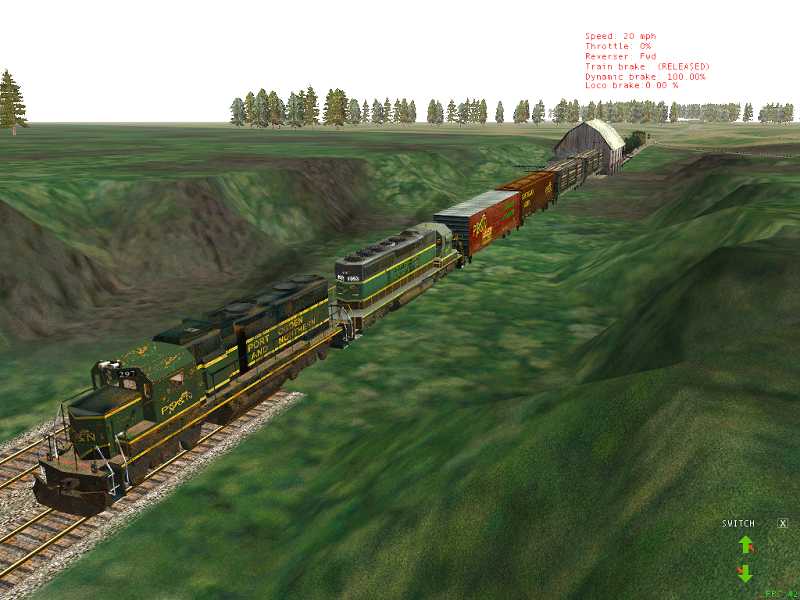 This gets even wierder, the information for the advanced TDB rebuild is not taken from the shape file, it's taken from the position and Qdirection lines, the shape file is totally ignored by the TDB rebuild. So even with that barn in place of a track section a TDB rebuild would work exactly the same, provided I don't change the position and Qdirection lines.So all the default track shapes in a route can be replaced with the Scale Rail equivelant sections by using Route Riter's "Replace Shape in W" button. First off you need the Scale Rail beta from www.3Dtrains.com , plus Route Riter from the file library installed. Before starting, did you make a backup copy of the \World folder from the route? Good for you, now make another backup just to be sure!Here's mousy's list;http://www.train-sim.com/dcforum/User_files/4119a42044767e28.txtThat's only a partial, and for concrete ties substitute a "c" for the "w", SR_1tStr_w_010m.s is a 10 meter straight with wood ties, SR_1tStr_c_010m.s is the same with concrete ties. To do this, get an idea of what track sections are actually used in the route;
 Or just go down the list and replace them all.
 Route Riter won't hurt anything if you try to replace a non-existant shape, it will just skip past it, so replacing a 5d left switch when you don't have any 5d left switches in the route will just make it skip past the replacement.After each track section is replaced with the equivelant ScaleRails section, there's no need to rebuild the TDB, since each ScaleRail that has an equivelant default is the same dimensions as the default it replaces. I did nothing more than use mousy's compiled list of equivelant track sections, and ran down the list typing the first shape in the top box and second in the bottom, then hit okay for each one.Manual replacement of switches with linked signals requires clicking on a switch, removing all the links, deleting the switch, placing the new switch and aligning and elevating as necessary, then relinking all the signals. Then move on to the next switch and do it again, and so on ad tedium. "Replace Shapes in W" will just go thru and replace every instance of the shape, no need to unlink and relink signals or T flip or adjust for grade.Only word of warning, the "Okay" button should be considered the plunger for a detonator, and you should make sure you have the correct corresponding shape in each window before clicking Okay. It's easy to get a rythym going to make the process fast, but if you copy "A1tPnt10dRgt.s" from Mousy's text and paste into the top window, then copy "SR_1tSwt_w_a10dR.s" and paste in the bottom window, click Okay, you just replaced all the automatic 10d right switches in the route with 10d right ScaleRail autoswitches. If you now select "A1tPnt10dLft.s" and paste into the top window, get distracted and click Okay before copying and pasting "SR_1tSwt_w_a10dL.s" in the bottom window, then you just replaced all the 10d left autoswitches with 10d right ScaleRail autoswitches, since "SR_1tSwt_w_a10dR.s" was still in the bottom "replace with" window. If that happens there's no undo, so other than going thru the whole route and replacing by hand, the only fix is to restore the backup W files and start over. Best bet is to doublecheck that you have the right filenames in the right windows before clicking okay each time. Taking a break and backing up the partially completed W files is a good idea, you can pick up where you left off without any problem. The whole process should take less than an hour even on the biggest routes.After replacing all the "snap track" sections, if you're really ambitious you can go thru the route deleting all the dynamic track and replacing with the odd short curve and straight sections of Scale Rail, still a lot faster than replacing everything by hand. If you run across a whole bunch of 45 yard curves or something that you forgot to replace, just save, exit the route editor, and fire up Route Riter again to replace that one shape.Those of you with Port Ogden & Northern version 8 can get a replacement set of W files here:http://www.train-sim.com/dcforum/DCForumID3/24290.html
Printer-friendly page | Edit | Reply | Reply With Quote | Top
RE: Replacing default tracks with Scale Rail the Mousy , jdtrainman, Aug-11-04, 02:12 AM, (1) RE: Replacing default tracks with Scale Rail the Mousy, robertreedy, Aug-16-04, 08:53 PM, (2) RE: Replacing default tracks with Scale Rail the Mousy, sniper297, Aug-16-04, 11:50 PM, (3) RE: Replacing default tracks with Scale Rail the Mousy , OkrasaGhia, Aug-17-04, 11:11 AM, (4) RE: Replacing default tracks with Scale Rail the Mousy, sniper297, Aug-17-04, 01:24 PM, (5) RE: Replacing default tracks with Scale Rail the Mousy, OkrasaGhia, Aug-18-04, 10:33 AM, (6) RE: Replacing default tracks with Scale Rail every whic, yellowdog, Nov-17-04, 12:33 PM, (7) RE: Replacing default tracks with Scale Rail the Mousy, robertreedy, Nov-17-04, 05:50 PM, (8) NUKE THE WEENIES!!, sniper297, Nov-18-04, 00:39 AM, (9) RE: NUKE THE WEENIES!!, OTTODAD, Nov-18-04, 08:36 AM, (10) It's all fun and games til someone loses his weiner, yellowdog, Nov-18-04, 10:09 AM, (11) RE: It's all fun and games til someone loses his weiner, yellowdog, Nov-18-04, 11:15 AM, (12) RE: It's all fun and games til someone loses his weiner, robertreedy, Nov-18-04, 11:25 AM, (13) RE: It's all fun and games til someone loses his weiner, yellowdog, Nov-18-04, 12:50 PM, (14) RE: It's all fun and games til someone loses his weiner, robertreedy, Nov-18-04, 05:40 PM, (15) RE: It's all fun and games til someone loses his weiner, yellowdog, Nov-19-04, 11:01 AM, (16) RE: It's all fun and games til someone loses his weiner, westerngy, Nov-19-04, 12:59 PM, (17)
Conferences | Topics | Previous Topic | Next Topic


 To replace this switch with a Scale Rail switch in the traditional route editor method, I have to delete the switch and then place a Scale Rail switch where it was. As soon as I select the switch tho, I get the linked signal message, so I have to unlink the signals to select and delete this switch. Then I place the new switch, and have to relink the signals as they were before without making any m!$t@ke$. Some switches have one doublehead signal linked thru the base, others have more than one signal - and multiply this process by hundreds of linked switches in the route, and it's obvious that a global replacement is (A) a lot faster, and (B) considerably more Murphy proof, since each switch you do manually increases the odds that you're gonna relink one of them signals sdrawkcab.Add to all that the usual gremlins in the route editor, replacing a linked switch the normal way affects three files;http://www.train-sim.com/cgi/dcforum/dcboard.cgi?az=show_thread&om=4559&forum=DCForumID6&archive=yesThe .w file for the visual display of the actual shape,