Message Areas - "Blurry locomotives?"
Train-Sim.Com Message Areas
"Blurry locomotives???"
Email this topic to a friend
Printer-friendly version of this topic
Bookmark this topic (Registered users only)
Previous Topic | Next Topic Conferences MSTS Engine And Livery Skinning (Protected) Original message
Macster (425 posts)
Feb-24-02, 08:56 PM (EST) "Blurry locomotives???" Evening.I was wondering how to get rid the blurry paint schemes on some locomotives, it is kinda hard doing screenshots and having the locomotive pop into it's full detail about the time it is going out of camera.I noticed that the new Microsoft Patch changed the distance on the GP38-2 and Dash 9-44CW schemes, before it comes back into it's full detail.thanks in advanceBrian E. Bundridge
Seattle, WA USA Alert Edit | Reply | Reply With Quote | Top
Table of Contents
Subject Author Message Date ID RE: Blurry locomotives??? Macster Feb-24-02 1 RE: Blurry locomotives??? Kuchinator Feb-24-02 2 RE: Blurry locomotives??? Macster Mar-01-02 3 RE: Blurry locomotives??? Macster Mar-01-02 4 RE: Blurry locomotives??? SP9800 Mar-01-02 5 RE: Blurry locomotives??? kenm62 Mar-01-02 6 RE: Blurry locomotives??? SP9800 Mar-01-02 7 RE: Blurry locomotives??? kenm62 Mar-01-02 8 RE: Blurry locomotives??? SP9800 Mar-01-02 9 RE: Blurry locomotives??? Macster Mar-02-02 10
Lobby | Topics | Previous Topic | Next Topic
Messages in this topic
Macster (425 posts)
Feb-24-02, 09:57 PM (EST) 1. "RE: Blurry locomotives???" I managed to clear up SOME of distance issue, but it is still there. Help!! delete this line
ESD_Software_DLev ( 2 )but save your .SD file before doing soBrian E. Bundridge
Seattle, WA USA Remove | Alert Edit | Reply | Reply With Quote | Top
Kuchinator (673 posts)
Feb-24-02, 11:20 PM (EST) 2. "RE: Blurry locomotives???" most blurry textures are part of the s file. need to change its rendering to mip linear and not point linear.-Christopher-
Visit My Aviation Photo Gallery Remove | Alert Edit | Reply | Reply With Quote | Top
Macster (425 posts)
Mar-01-02, 05:17 AM (EST) 3. "RE: Blurry locomotives???" LAST EDITED ON Mar-01-02 AT 05:18 AM (EST)How the heck do you do that? someone told me to use FFEdit and change something to -3.... I tried, got stuck and confused, me and MSDOS prompt don't get along very well Justin Cornell....Thanks for the great locos...but....if you can, please do some kind of fix for this problem (redo the .S file)Thank you.Brian E. Bundridge
Seattle, WA USA Remove | Alert Edit | Reply | Reply With Quote | Top
Macster (425 posts)
Mar-01-02, 05:36 AM (EST) 4. "RE: Blurry locomotives???" An example.....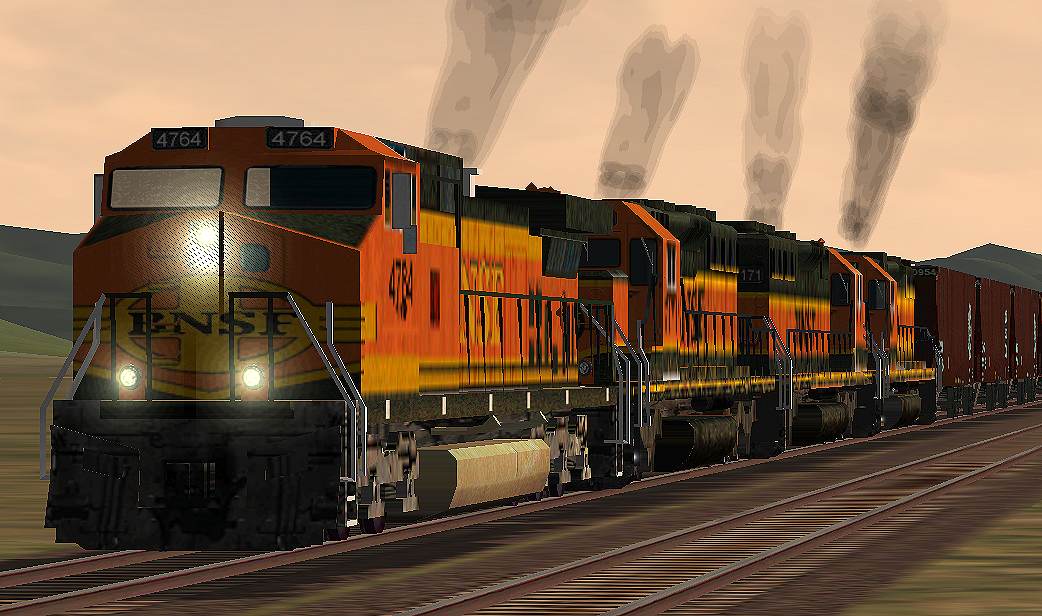
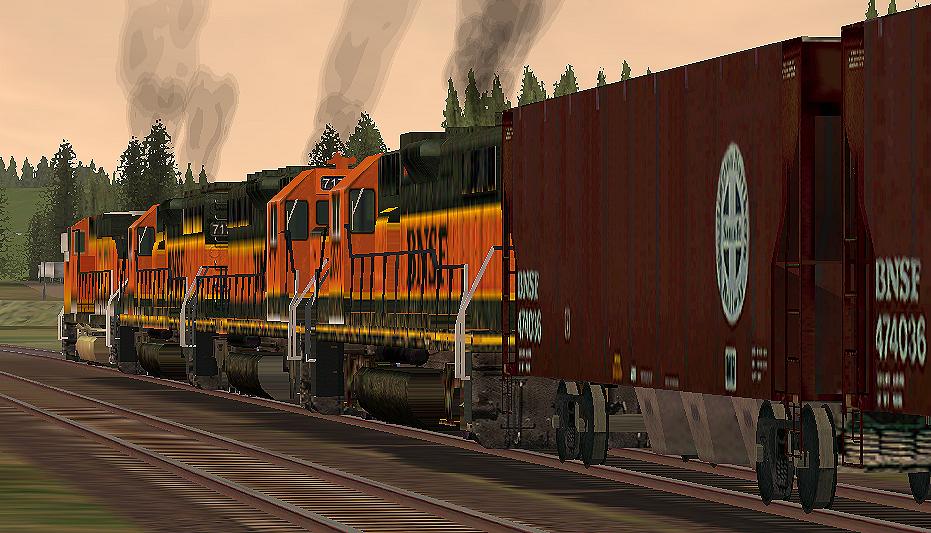
I used the Sharpen feature to clear it up some... Any and all help would be very GREATFUL.Brian E. Bundridge
Seattle, WA USA Remove | Alert Edit | Reply | Reply With Quote | Top
SP9800 (226 posts)
Mar-01-02, 02:35 PM (EST) 5. "RE: Blurry locomotives???" I think this thread will explain what you need to do.http://www.train-sim.com/cgi/dcforum/dcboard.cgi?az=show_thread&om=733&forum=DCForumID5&archive=yes Remove | Alert Edit | Reply | Reply With Quote | Top
kenm62 (249 posts)
Mar-01-02, 05:47 PM (EST) 6. "RE: Blurry locomotives???" >I think this thread will explain what you need to do.
>
>http://www.train-sim.com/cgi/dcforum/dcboard.cgi?az=show_thread&om=733&forum=DCForumID5&archive=yes I doubt that's the problem. Those are default locos which would already have the correct "-3" settings in the .s file. I would first check the MSTS Display settings and turn them up if needed. If that doesn't work, try running the MSTS Troubleshooter and check the settings there. One last cause could be the video card:
I had a guy e-mail me about "corrupt" textures with a couple of my repaints. I took a look at them and couldn't find anything wrong. No one else complained, either. About a month later, he e-mailed me, telling me that he had replaced his video card and now everything was fine with the skins! I hope that's not your case.
Ken Martello
Kenm62's MSTS Website Remove | Alert Edit | Reply | Reply With Quote | Top
SP9800 (226 posts)
Mar-01-02, 07:07 PM (EST) 7. "RE: Blurry locomotives???" >I doubt that's the problem.
>Those are default locos which
>would already have the correct
>"-3" settings in the .s
>file. Actually, they are not. They are replacements for the default models made by Justin Cornell. Don't you notice how un-crappy the Dash 9 looks? Remove | Alert Edit | Reply | Reply With Quote | Top
kenm62 (249 posts)
Mar-01-02, 09:21 PM (EST) 8. "RE: Blurry locomotives???" >>I doubt that's the problem. Those are default locos which
>>would already have the correct "-3" settings in the .s file.
>
>Actually, they are not. They are replacements for the default
>models made by Justin Cornell. Don't you notice how
>un-crappy the Dash 9 looks?
>You are correct, I just checked the .S for Justin's Dash9 and it does not have the "-3" fix in it. I do think the GP-38 is a default, though.Brian, if you want, I can e-mail you a fixed .S file for the Dash9. Just let me know.Ken Martello
Kenm62's MSTS Website Remove | Alert Edit | Reply | Reply With Quote | Top
SP9800 (226 posts)
Mar-01-02, 09:37 PM (EST) 9. "RE: Blurry locomotives???" Those engines were all by Justin Cornell. They are from a package that includes two new Dash 9s, two new SD40-2s, and a new GP38-2. Remove | Alert Edit | Reply | Reply With Quote | Top
Macster (425 posts)
Mar-02-02, 02:50 AM (EST) 10. "RE: Blurry locomotives???" Update:I changed all of the .S files to -3....didn't have much of a change, went to -1, looks alot better, however, surprising, it still has that bit of "blurriness" so, I'm going to hunt in the Tech docs and see if there is anything else I could possibly change. I have a good reason to believe there is something more to this problem then changing something.I'll post 2 more screens in a few.Brian E. Bundridge
Seattle, WA USA Remove | Alert Edit | Reply | Reply With Quote | Top
Lock | Archive | Remove
Lobby | Topics | Previous Topic | Next Topic
Restored from the Train-Sim.Com archive, captured March 7, 2002. About this archive.