Notice to all visitors and members of the Train-Sim.Com message forums: If you plan on using a signature banner in your posts, we would like to remind you that there is a maximum size for banners. That maximum is 450 pixels wide by 120 pixels high, and not to exceed 25k. Your compliance is appreciated. FORUM RULES Problems? There are two common reasons for problems with logging in and posting messages. The first is that you are running a firewall that prevents your messages from being sent to the server. The other is that you have cookies disabled; the DCForum software requires cookies to work properly.
Got some problems I'd like to ask you all........ 1. White 'spots' with the terrain. For example, out in the distance instead of textures there are white 'spots'. Any fixes?2. Engines are messed up graphically(SD40-2 in particuar). Specs P4 -2.2 512 Ram 120 gig Geforce 4 - 64 Greg HighV0lt6ge - AIM/AOL gregoryis411@hotmail.com
'No matter how far we've come, I can't wait to see tomorrow.' Linkin Park - With You
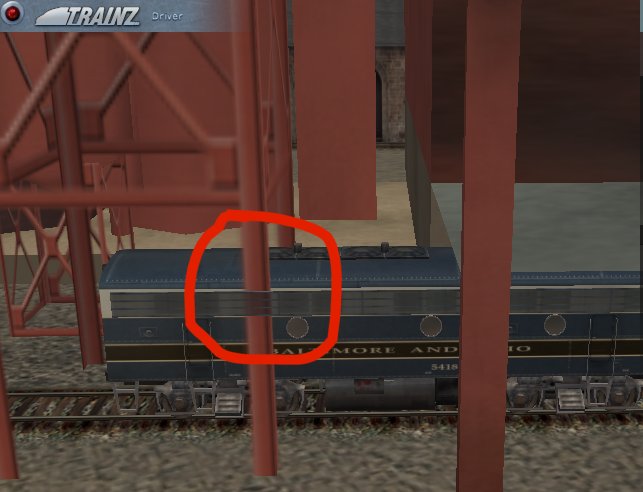
<<1. White 'spots' with the terrain.>> Maybe the scenery draw distance levels are not set high enough for the route.<<2. Engines are messed up graphically>> Not sure what to say about this.You should post pics of the deficiencies you see and maybe Auran will address them. I have tried to tell them about the grill on the f-units having problems with transparencies involving other scenery but nothing was done.
1. White 'spots' with the terrain.Turning on the shadows should fix it.2. Engines are messed up graphicallySlider for trains polycount should be set to max...I have tried to tell them about the grill on the f-units having problems with transparencies involving other scenery but nothing was done.They know about it. To fix this sort of bugs would require quite a bit of coding, though. What you see is problem the game engine has with sorting alpha-mapped polygons -- it's similar in nature to msTS trees and objects disappearing behind some windows and other transparent geometry.
For the white spots try checking shadows in the advanced options.That cleared it up for me.For the messed up engine make sure your poly count slider is maxed or close to it under the driver options.If none of this helps maybe we can figure something else out.
thanks for your help guys. As soon as I get the internet back up on the new computer I'll post some pics.Greg HighV0lt6ge - AIM/AOL gregoryis411@hotmail.com
'No matter how far we've come, I can't wait to see tomorrow.' Linkin Park - With You