Message Areas - "Transparency? Thats weird… "
Train-Sim.Com Message Areas
"Transparency? Thats weird....."
Email this topic to a friend
Printer-friendly version of this topic
Bookmark this topic (Registered users only)
Previous Topic | Next Topic Conferences MSTS Engine And Livery Skinning (Protected) Original message
Greendragon (31 posts)
Aug-14-01, 10:59 PM (EST) "Transparency? Thats weird....." Take a look at these recent pictures of my MARC train project.
Looks okay...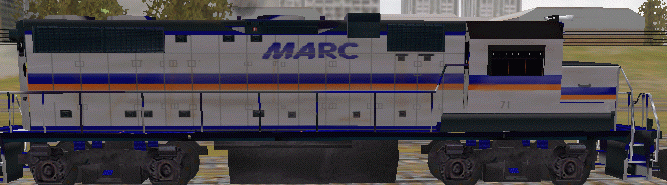
but..
on the front, the cab windows are transparent,but not on the sides.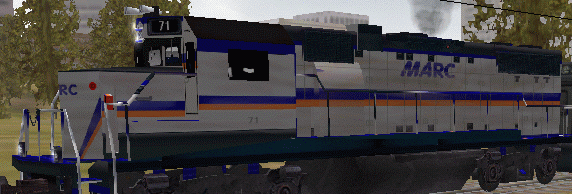
how do i fix this?
I use Photoshop 6 for this engine and cars.
there will also be a simple control cab car too.
Thanks for your help,
Nick Alert Edit | Reply | Reply With Quote | Top
Table of Contents
Subject Author Message Date ID RE: Transparency? Thats weird..... Xacto Aug-15-01 1 RE: Transparency? Thats weird..... Greendragon Aug-15-01 2 RE: Transparency? Thats weird..... Xacto Aug-15-01 3
Lobby | Topics | Previous Topic | Next Topic
Messages in this topic
Xacto (252 posts)
Aug-15-01, 00:12 AM (EST) 1. "RE: Transparency? Thats weird....." Does the side of the cab use a different texture than the front? If so, then you might not have a proper alpha channel for the texture, or it's not named correctly (TransNorm, etc). If it is part of the same texture as the front, then you are missing the white on the alpha mask in that area. Also, any texture with transparency needs to be a 32 bit TGA.Cliff Remove | Alert Edit | Reply | Reply With Quote | Top
Greendragon (31 posts)
Aug-15-01, 09:32 PM (EST) 2. "RE: Transparency? Thats weird....." Yes the side of the cab is on a different texture. I save all my tga's as 32 bit. And the alpha channel is called alpha 1.
Anything ele that could affect this? I'm also having the same problems with my ATSF GP38.
Thanks,
Nick Remove | Alert Edit | Reply | Reply With Quote | Top
Xacto (252 posts)
Aug-15-01, 11:15 PM (EST) 3. "RE: Transparency? Thats weird....." LAST EDITED ON Aug-15-01 AT 11:16 PM (EST)Open up the TGA and check the info on it (in PSP7 that would be "image", "image information") It should show 1 for the number of alphas. If it does, then the alpha channel is not correct. Load the mask from the alpha channel and make sure that the area where the windows are is white (255,255,255). Also be sure the correct alpha for the texture is saved. If you have two TGA's with alphas open, sometimes you end up saving the wrong alpha to a TGA.If all else fails, send me the texture and I'll take a look.Cliffsxdesigns@rcn.com Remove | Alert Edit | Reply | Reply With Quote | Top
Lock | Archive | Remove
Lobby | Topics | Previous Topic | Next Topic
Restored from the Train-Sim.Com archive, captured August 25, 2001. About this archive.