Notice to all visitors and members of the Train-Sim.Com message forums: If you plan on using a signature banner in your posts, we would like to remind you that there is a maximum size for banners. That maximum is 450 pixels wide by 120 pixels high, and not to exceed 25k. Your compliance is appreciated. FORUM RULES Problems? There are two common reasons for problems with logging in and posting messages. The first is that you are running a firewall that prevents your messages from being sent to the server. The other is that you have cookies disabled; the DCForum software requires cookies to work properly.
In light of my reecent troubles with repainting rolling stock, I think its about time someone typed up a list of instructions to successfully repainting locos and cars. Many of us troubled repainters would greatly benefit from this. premium add-ons
uhh, that doesnt look like tga tool to me O.oThough, it does look easier, i meant like renaming the .sd, .s, and .eng files and turning them into a whole different loco. Thats what i want for a tutorial premium add-ons
I am by no means an expert on repainting...but I have just uploaded my repaint of Matt Austin's interurban car into a Pacific Electric Railway interurban. It's available in the File Library as PEredcar.zip. I have done just what you are asking about with this car. I made it into an entirely new car. I can write something on it, just give me your email address and I can send it to you off-list. But basically, here is what you will need to do:You will need TGAtools2 and an image editor (Microsoft Paint will do for now). Now first, create a new folder and name it what you would like your locomotive to be named, say ATSF just as an example. I would put this folder on your desktop for convenience. Now, copy and paste all the folders and files (Cabview, Sound, .eng, .s, .sd, and .ace files) that you will be basing your "new" locomotive on into this folder. One important thing to remember if you want to create an entirely new locomotive this way is that everything must be referenced and named correctly. Now, open the .eng file with WordPad. You'll see an entry like this at the top. Change the "Wagon" line so that it shows EXACTLY the same name you have given to the new folder you created a moment ago. We'll keeping going with the "ATSF" example. So, you'd change the name to ATSF. Here, you should also change the name of the "WagonShape" entry to ATSF.s Then select "save as" and save the .eng file with the name "ATSF.eng". Be sure to save the file in Unicode Text format! EXAMPLE: Wagon ( ATSF Type ( Engine ) WagonShape ( ATSF.s )Now, remember that the .s file the .eng entry calls for must exist in the folder and be named EXACTLY as it is in the entry. So, in this example, you would rename the .s file in your folder to ATSF.s Also, rename the .sd file to ATSF.sd. Next, open the .sd file with wordpad. You will see a line that looks like this at the top. Change the "Shape" entry to show ATSF.s
Shape ( ATSF.sSave the file in Unicode Text form with the name ATSF.sdThat's it. You will have then created an entirely new locomotive. Just replace my "ATSF" example with whatever you want to name your locomotive. Copy or cut and paste the folder directly into your MSTS Trainset folder. Make a consist for it and it will show up in the list of available trains to drive. As far as repainting goes, that's a little bit more complicated, but not nearly as tricky as you would think. The Pacific Electric trolley I mentioned is the first repaint I've ever done, and I did have a few small problems at first. But it seems like what is usually the problem is that the alpha channel (which determines which parts of the model are solid and which parts are transparent) was lost when I saved a texture file wrong. In fact, my earlier post about that is probably still in this forum. I think the title was "windows not transparent after repaint." It was a very simple problem with the alpha channel, and there were a couple other members that helped me with that. It's a piece of cake. Chris
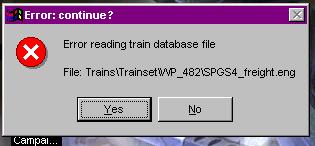
i did that all, but im still getting this message I have no idea whats still looking for the original .eng file. Ive replaced all the names! I had this same problem with the HC Speedster, but i dont remember how i fixed it premium add-ons
Okay, it looks like what is probably happening is that you still have a consist file that is calling for that locomotive. Do you get the error message when you first load Microsoft Train Simulator, or when you try to load a particular route, or is it a particular activity that gives you the error? I was assuming that you still had the original locomotive, and you just wanted to add a new locomotive, using the original as a template. If you delete a locomotive, it's a common mistake to forget that you might have a consist using that locomotive, and then you'll get an error message because MSTS is looking for the loco's .eng file. That's why if you want to remove a locomotive, it's a good idea to look at your consist files and check to see if you have a consist calling for it - then delete the consist file first before you delete the loco. You can have a locomotive with no consist...it won't show up in your list of driveable trains, but at least you won't get error messages. If you don't have ConBuilder already, I would definitely suggest downloading it. It can check your consist files for missing locomotives or bad files.Also, I suggest that if you want to do a repaint of a locomotive, KEEP the original, but just go ahead and create an entirely new folder with renamed files, as discussed in the earlier post.If you've checked your consists already, or for any other reason you are still having problems, go ahead and email me your locomotive folder and I will check out your files and see if I can find out what might be the problem. Those .eng and .wag files are kinda tricky sometimes, and one line or even one character off can throw everything off. My email address is gatecityca@aol.comChris
ive deleted everything im aware of thats calling for the original .eng file. However, im getting the same problem with ANOTHER loco, my dash 8 repaint. And my e-mail doesnt work right now because of some security thing >< premium add-ons
>uhh, that doesnt look like tga tool to meYou asked for "instructions to successfully repainting locos and cars" - I don't see TGATool mentioned anywhere in your original post.Cheers! Marc - 3DTrains http://www.3dtrains.comPro Series Super Packs