Notice to all visitors and members of the Train-Sim.Com message forums: If you plan on using a signature banner in your posts, we would like to remind you that there is a maximum size for banners. That maximum is 450 pixels wide by 120 pixels high, and not to exceed 25k. Your compliance is appreciated. FORUM RULES Problems? There are two common reasons for problems with logging in and posting messages. The first is that you are running a firewall that prevents your messages from being sent to the server. The other is that you have cookies disabled; the DCForum software requires cookies to work properly.
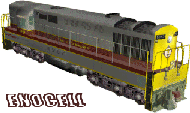
This is my first attempt at a reskin/repaint with a new retruck to more closely match the colors of the big blow and SD45, just looking for some input where I might improve. The truck reskin used a photo of an actual truck from a GP 30. Thanks to all for advice on what tools to use! Heres a screenshot,
The trucks and tank look nice. I would tone down the access doors with a shade of gray and some darker yellow. The doors will stand out less when not out lined in black.Pete
I would suggest the same on the doors and stuff but maybe also a "light" shade of "weathering would make it look a little more realistic Chris Love MSTS NALW Rocks GO Big Boy!!!! TA, Please Do 611 & 1218 Wanting the GS4, 1522, ETC. SUPER CHIEF: *Raton Pass* Big Boy YEAH GO 4005!! Lovin it 611, J all the WAY!! A Y6
Thanks for the input thus far, any and all comments are welcome as when I maybe get good enough I'll have some new or different things to upload for everyone to have. Considering a UP wide vision caboose next, we'll see. Thanks again! John:D
The retruck? Fairly easy, find a photo of the truck you want,scan it or use a photo off the I net I suppose it would work too, Mine was a photo from my personal archive. The sequence should go something like this,I used photoshop to make corrections in the photo (color contrast etc.) used its export function to save as a bitmap. Then I used Irfan view to resize the image format to the 256x256 required by the gp30's files. Next I used the TgaTool 2 to make any last minute retouches and create the alpha channel saving the new ace file. The new ace once placed into the GP30 file is renamed to the origional files name so the program will recognize it. Heres the big trick! Examine the origional trucks image with the Tga Tool, the whole truck fits end to end the whole width of the image. The first thing to do after getting the photo you want to use is to use a editor to create a frame around the truck image so the truck fits the rectangle end to end, cut and copy that image to a temporary folder as this becomes your working image, then its off to Irfan view to to the resize to 256x256. This works real good. If anyone is interested in this truck and it poses no problem with the GP30 author I'd be glad to upload this as a single compressed Ace file, so others caqn enjoy it too! Take Care John:7