Message Areas - "%$#^%#@ bleeding video card"
Train-Sim.Com Message Areas
"%$#^%#@ bleeding video card"
Email this topic to a friend
Printer-friendly version of this topic
Bookmark this topic (Registered users only)
Previous Topic | Next Topic Conferences MSTS Engine And Livery Skinning (Protected) Original message
traininbrain (14 posts)
Jan-17-02, 01:54 PM (EST) "%$#^%#@ bleeding video card" Greetings everyone. This is a picture of my latest paint job,
a sd 9 in Burlington colours. This is a repaint of Justin
Cornell's excellent model. Look closely and you can see some stripes are missing. My
4 meg video card is probably at fault. When I look at other peoples screen shots ,I know it's time for an upgrade ! A quick question. Any hints on applying logos and such.
Is this a case of making it yourself or is there an easier way?
This particular loco had "Everywhere West" on one side and
maybe "route of the Zephers" on the other. tia Alert Edit | Reply | Reply With Quote | Top
Table of Contents
Subject Author Message Date ID RE: %$#^%#@ bleeding video card Kuchinator Jan-17-02 1 RE: %$#^%#@ bleeding video card tro1086 Jan-18-02 2 RE: %$#^%#@ bleeding video card traininbrain Jan-19-02 3 RE: %$#^%#@ bleeding video card Kuchinator Jan-19-02 4 RE: %$#^%#@ bleeding video card kwk100 Jan-19-02 5
Lobby | Topics | Previous Topic | Next Topic
Messages in this topic
Kuchinator (523 posts)
Jan-17-02, 06:47 PM (EST) 1. "RE: %$#^%#@ bleeding video card" holy crap it runs on a 4mb card?? well the terrain is extremly pixalized, looks like it was using a combination of hardware and software rendering.
-Christopher-
Visit My Aviation Photo Gallery Remove | Alert Edit | Reply | Reply With Quote | Top
tro1086 (84 posts)
Jan-18-02, 01:00 AM (EST) 2. "RE: %$#^%#@ bleeding video card" AHHHHHHHHHHHHHHHH reminds me of running games on my old 166 Gateway, all pixelized, heheYou must have one bad ass processor to be able to run on a 4mb vid card, and a crap load `a RAM too!!Trevor Remove | Alert Edit | Reply | Reply With Quote | Top
traininbrain (14 posts)
Jan-19-02, 00:15 AM (EST) 3. "RE: %$#^%#@ bleeding video card" 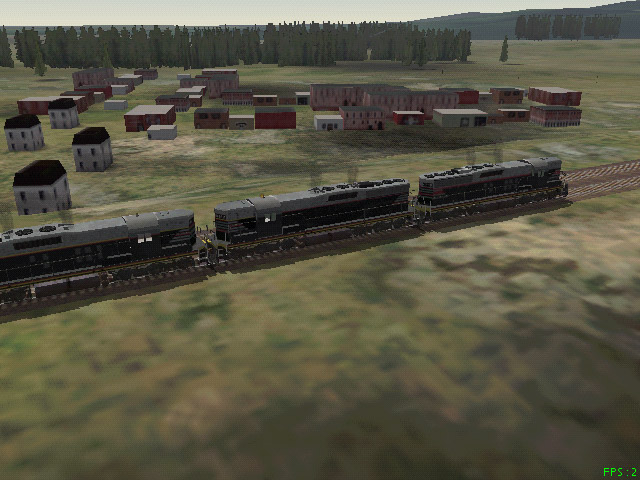 No roads on this RR. A p2 266 64 meg ram. Just made the cut
for the game. Fps 2 (most of the time) - once saw 16 .
The game has run fine , but as you see the graphics suck.
Remove | Alert Edit | Reply | Reply With Quote | Top
Kuchinator (523 posts)
Jan-19-02, 00:26 AM (EST) 4. "RE: %$#^%#@ bleeding video card" LAST EDITED ON Jan-19-02 AT 00:40 AM (EST)i wouldnt exaclty call 2fps most of the time running good. but just my opnion. im running the game on a laptop with 800mhz celeron with 256mb ram and a 8mb video card and usually get 15-20fps
ok listen very closley. you..... need...... to.... get...... a...... new....... computer....... just some friendly advice.
-Christopher-
Visit My Aviation Photo Gallery Remove | Alert Edit | Reply | Reply With Quote | Top
kwk100 (52 posts)
Jan-19-02, 02:54 AM (EST) 5. "RE: %$#^%#@ bleeding video card" That is one nice locomotive!kwk100 Remove | Alert Edit | Reply | Reply With Quote | Top
Lock | Archive | Remove
Lobby | Topics | Previous Topic | Next Topic
Restored from the Train-Sim.Com archive, captured March 2, 2002. About this archive.