Message Areas - "Switches not Working"
Train-Sim.Com Message Areas
"Switches not Working"
Email this topic to a friend
Printer-friendly version of this topic
Bookmark this topic (Registered users only)
Previous Topic | Next Topic Conferences MSTS Activity Design (Protected) Original message
keithmj (34 posts)
Dec-25-01, 08:53 PM (EST) "Switches not Working" Hello Everyone: I have a simple Question. I made a route up and the wyes and switches work fine as long as I am in explorer, but as soon as I run a activity ( just one ) for that route, none of the switches want to switch. I know it is something simple. I thought that someone could give me some insight while I search thru the forums. Thank You, KMJ CHUG-ON () Alert Edit | Reply | Reply With Quote | Top
Table of Contents
Subject Author Message Date ID RE: Switches not Working sniper297 Dec-25-01 1 RE: Switches not Working keithmj Dec-26-01 2
Lobby | Topics | Previous Topic | Next Topic
Messages in this topic
sniper297 (1150 posts)
Dec-25-01, 09:58 PM (EST) 1. "RE: Switches not Working" Two kinds of switches, automatic and manual. The manual ones all have a mnl.s at the end in the object selector. You can throw either switch manually in explore route mode, but in an activity only the manual switches can be player controlled. So why not replace all of them with manual switches? Well, depends on whether you want AI traffic trains or not, manual switches screw up traffic trains. (That's why you can throw the auto switches in explore route mode, no possibility of AI traffic, so no AI dispatcher.) What I did originally was to use only manual switches in my route, so you could go anywhere you wanted even in an activity. Now I'm adding signals for AI traffic, and the compromise I came up with was to route the AI traffic around the switching districts on passing paths, so they never go thru a manual switch, and therefore can't get stuck.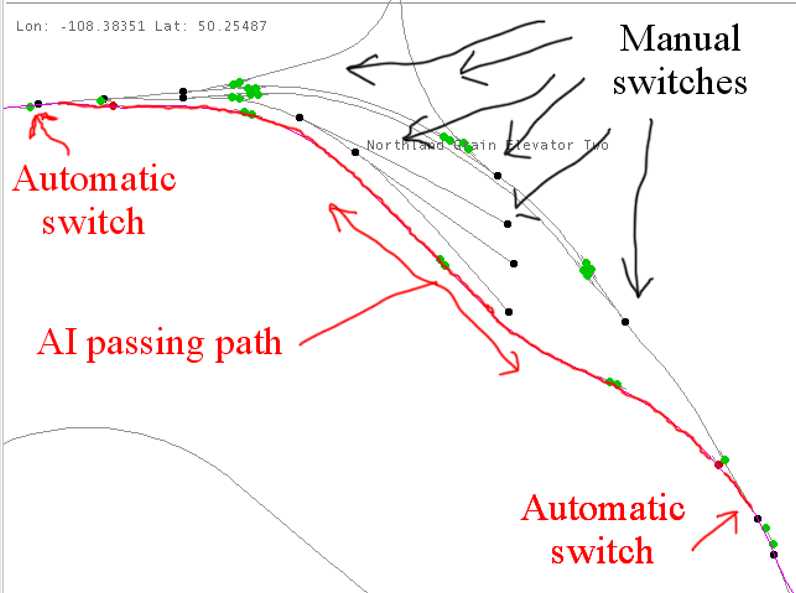 When I'm done with all this, the route will be divided into switching districts, with the player and AI trains sharing the mainline, but the AI traffic routed around the switching districts. Remove | Alert Edit | Reply | Reply With Quote | Top
keithmj (34 posts)
Dec-26-01, 08:29 AM (EST) 2. "RE: Switches not Working" Thank You for the reply: I have all automatic switches on the route, when I first started I had manuals but changed to autos when I retracked. I am still learning how to use this program and how everything works. I was wondering why some switches still worked on some routes and some didn't, now I know..It was something so simple, just didn't know the difference between the two switches..Thanks Again, Have a nice day and CHUG-ON.. KMJ () Remove | Alert Edit | Reply | Reply With Quote | Top
Lock | Archive | Remove
Lobby | Topics | Previous Topic | Next Topic
Restored from the Train-Sim.Com archive, captured March 9, 2002. About this archive.