Message Areas - "Activity Editor - The Idiot's Guide"
Train-Sim.Com Message Areas
"Activity Editor - The Idiot's Guide"
Email this topic to a friend
Printer-friendly version of this topic
Bookmark this topic (Registered users only)
Previous Topic | Next Topic Conferences MSTS Activity Design (Protected) Original message
sniper297 (134 posts)
Aug-03-01, 11:20 PM (EST) "Activity Editor - The Idiot's Guide" LAST EDITED ON Aug-03-01 AT 11:35 PM (EST)I'm trying to upload the html, but the pictures dissapear. I must be an IDIOT. Alert Edit | Reply | Reply With Quote | Top
Table of Contents
Subject Author Message Date ID RE: Activity Editor - The Idiot's G... sniper297 Aug-04-01 1 RE: Activity Editor - The Idiot's G... sniper297 Aug-04-01 2 RE: Activity Editor - The Idiot's G... snoopi9 Aug-04-01 6 RE: Activity Editor - The Idiot's G... Familton Aug-06-01 13 RE: Activity Editor - The Idiot's G... jmw Aug-04-01 3 RE: Activity Editor - The Idiot's G... sniper297 Aug-04-01 4 RE: Activity Editor - The Idiot's G... Familton Aug-05-01 9 RE: Activity Editor - The Idiot's G... KingJPW Aug-04-01 5 RE: Activity Editor - The Idiot's G... sniper297 Aug-04-01 7 RE: Activity Editor - The Idiot's G... sniper297 Aug-04-01 8 RE: Activity Editor - The Idiot's G... sniper297 Aug-05-01 10 RE: Activity Editor - The Idiot's G... KingJPW Aug-06-01 11 RE: Activity Editor - The Idiot's G... sniper297 Aug-06-01 12
Lobby | Topics | Previous Topic | Next Topic
Messages in this topic
sniper297 (134 posts)
Aug-04-01, 00:09 AM (EST) 1. "RE: Activity Editor - The Idiot's Guide" LAST EDITED ON Aug-04-01 AT 00:11 AM (EST)Well, THAT was a bust. I posted a route creator's idiots guide as a thread, and some guy emailed me and asked if he could use it on his web site. I told him to go for it (anything I post here is public domain) and then sat back and wondered how he was gonna copy all that stuff that I spent ten minutes pasting into the thread. So I started fooling around with the menu bar at the top of the browser, and found out you could save the whole thread as a web page, even if all of it wasn't visible on the screen without scrolling. Hey, maybe everyone else already knew that, but it was news to me. Which I guess qualifies me to publish an Idiot's Guide, cuz I'm the ultimate Idiot. Anyway, I also finally figured out how to start a blank HTML document on my computer offline, so I spent the last couple days typing and inserting screenshots into my netscape navigator thingie, then about half an hour ago I uploaded the HTML, which had shrunk to an amazing 11kb even with all those images in it. Being an Idiot, it never occured to me that there might be something wrong with that until I uploaded it, then when I checked it out my pictures were all gone and were replaced by them button icon thingamys that are supposed to show a picture when you click on them, but never do. So now I'm gonna try it the manual way, and I'm pretty sure you can save the page and read or print it offline - that is, unless you're too much of an idiot to figure out how, in which case you're gonna be switching back and forth between the activity editor and the website a lot. Better get two computers. Remove | Alert Edit | Reply | Reply With Quote | Top
sniper297 (134 posts)
Aug-04-01, 00:43 AM (EST) 2. "RE: Activity Editor - The Idiot's Guide" LAST EDITED ON Aug-04-01 AT 00:52 AM (EST)Activity Editor - The Idiot's Guide
Foreword.
This guide is primarily meant for us idiots who are not computer geeks, but would like to create, download, and run trains on fairly simple routes that are within our abilities. The worst trouble I have with trying to get help for something I don't understand is the "no foundation" catch. Techies all too frequently assume that everyone knows the basics, and they leave out a whole bunch of steps. "It's really very simple, just reset the hex values in REGEDIT". So we're left saying "Huh? What the #$%^&*! is a REGEDIT?" So I'm going to keep this as simple as possible, although I AM going to assume you know enough about how to use a Windows computer, otherwise you wouldn't be reading this. There are a few posts I see occasionally that nobody can help - us idiots can always study to become morons, but the hopeless are always going to remain that way.
"hello, i am me, how are you? i want to make big new route based on all the railroads in sniper's neighborhood with all tracks and buildings and scenery and everything, it will be really big!!!!!!! sniper's neighborhood looks like this:
i want to make big trakplan so somebody tell me please, what they mean when the say "double click"? thank you."
A true idiot knows he is an idiot, and recognizes, accepts, and works within his limitations, only stretching the envelope a little bit at a time. Start small, work your way up. To Begin
Launch the Editor, Select Activity Editor, and like most Windows applications you get a window. Select "file, new", and select the route you just created or downloaded. Type a name for the activity in the box, and before you save drag the cursor to highlight the name, so it looks like this: 
Now hold down the CTRL key and hit C. This copies the word into the windows clipboard - no, idiot, you can't see it unless you're using the clipboard viewer.
Now click the OK button. Your screen should look something like this: 
Everything you need is on the top half, you can ignore the lower half for now. The first thing you need to do is in the upper right, "Edit Activity Description" and "Edit Activity Brief". You can type anything you want in here, as long as there is something for the game to display on the screens, even one letter. When I get the "activity is not complete" error when I try to save, it's usually because I forgot to put something in these. If I'm just testing the route it don't matter what it says, so I just hit CTRL V to paste in the name of the activity. 
There is no "save" or "close" on these, so just click the X button, it will save automatically.
Now get familiar with the route map. Most people who work with graphics programs are familiar with this, but for those who aren't, imagine you dropped your brand new copy of Model Railroader down a sewer drain with a small square opening in the lid. You look down through the hole, and you can see that the magazine fell open to the page with the article you most wanted to read, but you can't see the whole page. So you get a stick, and by poking it down through the hole you can drag the magazine around so you can read the whole page a small square at a time. That's how the left mouse button works on the map - left click and drag to move the map around inside the "hole". 
If you right click on the map and move the mouse up and down it will zoom the map in and out. Try it now. Zoom out (right click mouse down), then left click and drag the part of the map you want to see magnified to the center of the screen, then zoom back in on it.
Just below the description and brief buttons is the player service editor. If this is a new route there won't be any existing paths, so you have to make one. Click on the "NEW" button. This gives you the following: 
At this point I just paste (CTRL V, remember?) the same name as I've been using for everything else into the two boxes on top, again, it doesn't matter as long as something is in here. It's a bureaucratic editor, it won't let you leave any blanks. Now you need to select a consist. You don't need to make a new consist, just click on the down arrow to the right of the blank underneath the word consist, and pick one of the existing ones. 
If you're not actually going to play an activity, and just want to explore the route, don't agonize too much over choosing a consist, because you'll be able to pick a different one in the explore route. Just don't try to use an electric engine on a route with no power lines.
Once you have picked a consist - and it's important to note that this is the player driveable consist, not to be confused with engineless cars left laying around on the spurs - you need to make a path. Again, if it's a new route, there won't be any existing ones. So click on the path "NEW" button.
is 
You need something in all three boxes here, the second box, starting location, is the whole point of this exercise - this is the box that tells the game that this is a route, and it has a starting point. If you want more than one starting point in explore route mode, you need to create one of these simple activities for each alternate starting point. Now you need to place that starting point. Zoom in on the area you want to start in so that you can see individual tracks, put the cursor over the track you want to start on, and RIGHT click. 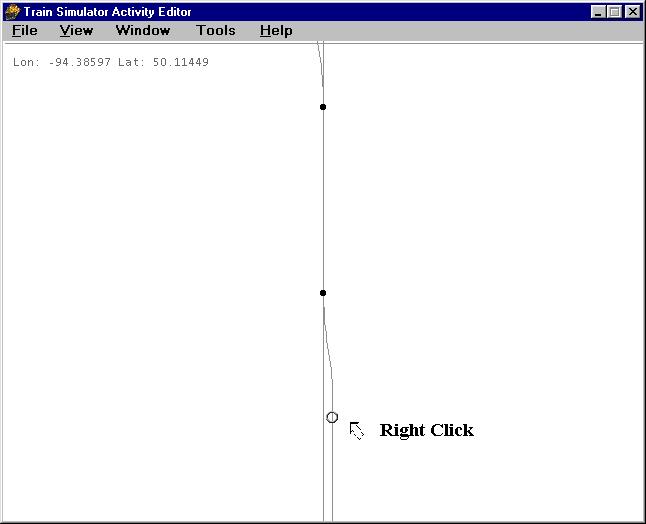 If the "place start point" is grayed out, you missed - you're not on the track, or on a switch or something, Move the mouse and try again.
If you get this, LEFT click on the words "place start point". Everything else is grayed out because you can't change the parameters of something that doesn't exist yet. Duh. 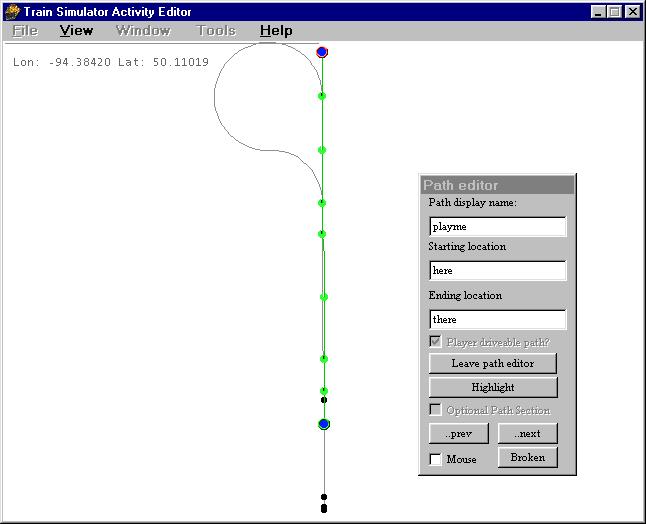
You can place an end point if you want, it's not really necessary, or toggle start direction if you want to go the other way.
The "highlight" is just for viewing your own path, not really necessary unless you are putting in AI traffic, which is beyond the scope of this discussion. When you're comfortable with this part you can go on to learn that. As far as anyone knows, the "mouse" check box is just for decoration. Now click on "leave path editor, click yes I want to save changes (Sometimes I wonder who's dumber, us or the game. I KNOW the path has been changed, it didn't exist two minutes ago!).
Now save, exit, and go drive the route.  By the way, the reason I give all my test stuff the same name is so I can use the "find" thing in the windows explorer in case the game starts locking up, I can find "playme*.* in the route directory and delete all the files associated with the faulty activity.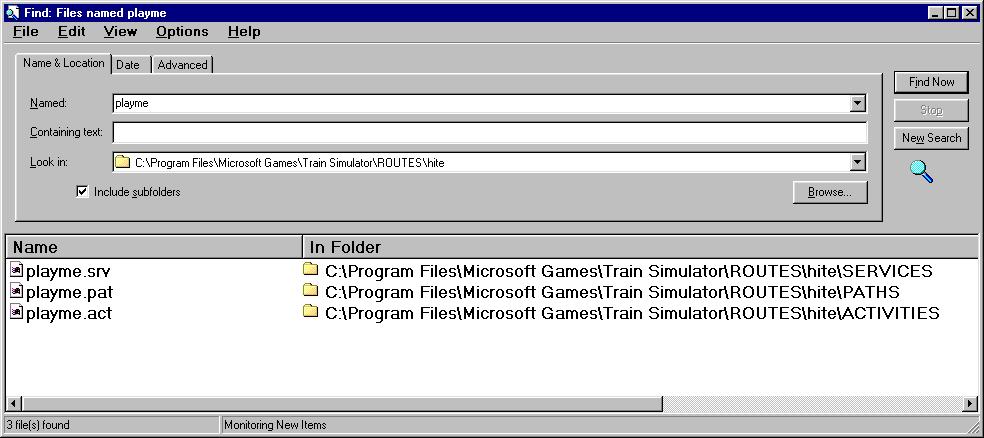
This is sometimes necessary if you create an activity to test a new route, then change the track. Those "broken path" errors can be fixed just by deleting the files in these three directories, then creating a new activity on the altered route. "Hey, wait a minute Jim, I'm not ready to quit yet. I wanna switch a bunch of cars around!"
Ok, that's a lot simpler than anything we've done so far. You did remember to use all manual switches in your route, right?
go back to the map, zoom in on the siding you want to place your cars on. No paths, no services, no complications, except don't place a freight car where your player engine is gonna start, or it will be a short game. Right click, place consist.

Choose what you want to put on here. 
And there it is. The car with the round circle is not an engine unless there is an engine in the consist - and you can PLACE consists with engines, but without a service they're not going to go anywhere by themselves, but the round circle always designates the lead car. if you left click on the lead car you can drag the train around to relocate it, if you right click on it you can edit the consist (if you have read this far you obviously ain't ready for THAT yet) or delete it. Be advised, if you start an activity and get a "failed to load ushoppercar2.sd" or whatever, it usually means you have placed the consist too close to the end of a spur, and the game tried to generate that car off the end of the track and failed. If that happens, look for a "compressed" consist in the editor and drag it away from the end until all the cars are showing and there is some space at the end. This entire document, including all the images, is public domain. Copy and distribute at will.
Jim "Sniper" Ward
Remove | Alert Edit | Reply | Reply With Quote | Top
snoopi9 (8 posts)
Aug-04-01, 07:39 PM (EST) 6. "RE: Activity Editor - The Idiot's Guide" Thank you, thank you, thank you. Finally, someone that addresses the needs of us "dummies". Only after your explanation of how to make a simple activity was I able to make one!. Minor problem was I didn't know it was MANDATORY for you to put something in the activity description and activity brief!! They have such poor documentation/help.
So, now I am ready for kindergarten. How about a second stage explanation of anything more. Signals? Or anything at all.
Jack
Remove | Alert Edit | Reply | Reply With Quote | Top
Familton (127 posts)
Aug-06-01, 08:57 PM (EST) 13. "RE: Activity Editor - The Idiot's Guide" Hi. Is there a way you can bundle up this post into a word.doc or some sort of file that I can save to my hard drive? I would really appreciate it. I use Netscape and tried to save it but the pictures didn't save. If not, can you e-mail it to me so I can save it. Thanks. Ther guide is great. I can print it out but would really like to save it. Thanks, regards, Bob. Remove | Alert Edit | Reply | Reply With Quote | Top
jmw (15 posts)
Aug-04-01, 08:31 AM (EST) 3. "RE: Activity Editor - The Idiot's Guide"
If you are using Internet Explorer, when you save the web page there are basically two options:If you select Web Page, complete...the page will be saved and a sub-directory with the same name will be created. The sub-directory will contain the various .jpgs, etc. needed to render the page.If you select Web Archive, Single File (.mht) then everything is saved in a single file and the sub-directory is not created. Keeps the disk from becoming cluttered. This is my standard save format. Unfortunately, I have yet to find a way to make it the default in Intenet Explorer. Remove | Alert Edit | Reply | Reply With Quote | Top
sniper297 (134 posts)
Aug-04-01, 10:29 AM (EST) 4. "RE: Activity Editor - The Idiot's Guide" Thanks, JMW, I'll try that next time. I come from the days of DOS and dinosaurs, and was getting so good at DOS after 10 years of playing around with it that I was reluctant to upgrade to windows95. So reluctant, in fact, that I never did - I waited until '99, and bought win98. Win98 seems to be so automated I can never figure out how to get it to do what I WANT it to do. Remove | Alert Edit | Reply | Reply With Quote | Top
Familton (127 posts)
Aug-05-01, 02:21 PM (EST) 9. "RE: Activity Editor - The Idiot's Guide" How can I save a complete web page with Netscape 4.75? When I do a save it only saves the text, not the pictures. Thanks, regards, Bob. Remove | Alert Edit | Reply | Reply With Quote | Top
KingJPW (235 posts)
Aug-04-01, 03:22 PM (EST) 5. "RE: Activity Editor - The Idiot's Guide" Good job! I know lots of idiots who will appreciate this.
Looks like you even used one of my world-famous reversing loops (which don't always work properly) in your tutorial.KingJPW Remove | Alert Edit | Reply | Reply With Quote | Top
sniper297 (134 posts)
Aug-04-01, 07:47 PM (EST) 7. "RE: Activity Editor - The Idiot's Guide" Better believe it they don't always work properly. I've done more hair tearin' out the last couple weeks over those lousy reverse loops than anything else. The first one usually works OK, but I have found you can't have them facing each other (NOT apparent when you first start testing it, you have to drive around MORE THAN ONCE if you want to see the effect) and usually have to isolate them from the mainline to keep the switches from locking in position. That was the worst trouble, trying to incorperate them into the mainline to disguise them - works great, but if you try to take an alternative path next time around you can't - having taken the loop once, the switches are set for the loop and locked. USUALLY doesn't happen when you isolate them. Remove | Alert Edit | Reply | Reply With Quote | Top
sniper297 (134 posts)
Aug-04-01, 08:17 PM (EST) 8. "RE: Activity Editor - The Idiot's Guide" LAST EDITED ON Aug-04-01 AT 08:24 PM (EST)Back again already? I just read a gy's question over in the general section about how to change a consist, and it occured to me that somebody might want to know about editing an EXISTING activity, which theoretically ought to be simplicity itself.
If you want, you could open an existing activity, write down all the names of the paths and services, and the name of the activity, then make backups of all those files before trying to edit, but that's only necessary if you're one of those guys who's still plugging along on one of those old 2 gigabyte hard disks. Even on marias pass the whole mess in all three folders takes up only 1.5 megs, so create a directory (folder) in explorer called backup, and copy the entire folders for activity, path, and service in the route you want to change the activity for. It helps if you know what you're looking for, so go to C:\program files\microsoft games\train simulator\routes\ before you start hunting. USA1 is the East coast, usa2 is marias, europe1 is england, 2 is the austrian thing, and i forget the japanese ones.
After making your backup copy you can go in and follow the guide starting with player service edit instead of new, then change the consist (or even the starting point if you want) save and play it.
If you screw it up hopelessly, and start getting crashes, lockups and error messages, just replace all three folders (MAKE SURE YOU ARE PASTING IN TO THE CORRECT ROUTE, IDIOT!) with the backup copies.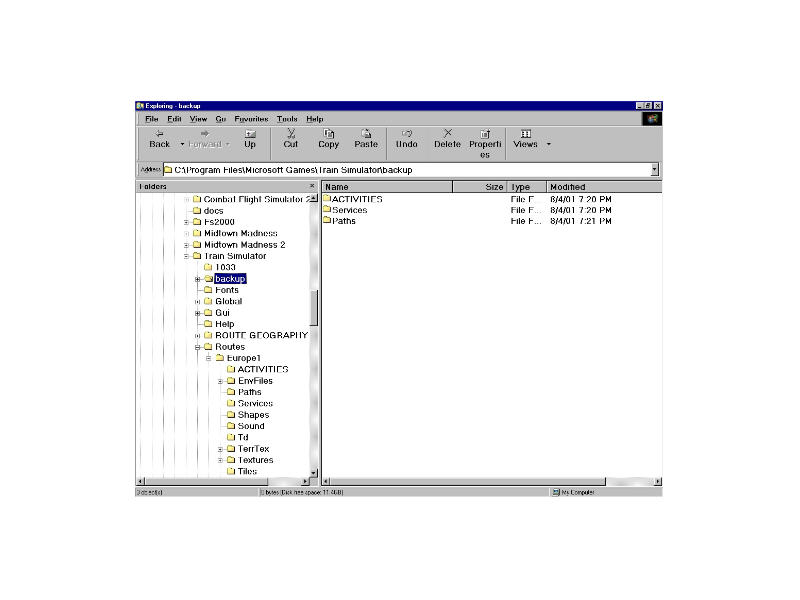 Remove | Alert Edit | Reply | Reply With Quote | Top
sniper297 (134 posts)
Aug-05-01, 04:15 PM (EST) 10. "RE: Activity Editor - The Idiot's Guide" I dunno, Bob. I did it once with the other one eventually, after about 20 tries and poking around with all the settings, but it was kind of like 2000 monkeys banging on 2000 typewriters for 2000 years, law of averages says that eventually one of them is gonna accidentally hit the right key combination to publish something that makes sense. Having done it once, I can't remember how I did it. If one of the web savvy guys (KingJPW, you know how to do this?) can't help you, take a couple polaroids of the screen and get a magnifying glass. Remove | Alert Edit | Reply | Reply With Quote | Top
KingJPW (235 posts)
Aug-06-01, 01:43 AM (EST) 11. "RE: Activity Editor - The Idiot's Guide" My studies indicate that manually editing an activity won't really get you anywhere. It seems that the only usefull thing you could do is change the cars in loose consists and change the driving player service, which is why I only included these features in MSTS Buddy. That's really all that can be done!Sorry,
KingJPW Remove | Alert Edit | Reply | Reply With Quote | Top
sniper297 (134 posts)
Aug-06-01, 09:47 AM (EST) 12. "RE: Activity Editor - The Idiot's Guide" What we have here is failure to COMMUNICATE! No, KingJPW, I should have made the previous question more clear, and I notice ther's something screwy about this thread, cuz the message numbers ore out of order. I was asking about a different guy's question - and I've gotten a couple emails asking the same thing - about how to get all the dope out of the guide, pictures and all, and save it on your own computer so you can print it out. A web savvy guy like you could clean it up and make the kind of HTML file out of it that would keep the illustrations intact - I tried saving the page, and I get a couple of starwars graphics and that obnoxious broad who wants to know who the short guy with no money is (that would be ME, actually, toots, what I wanna know is, who's the ugly goldigger with no class?).Here's the question:
Familton (123 posts)
Aug-05-01, 02:21 PM (EST)
9. "RE: Activity Editor - The Idiot's Guide"
How can I save a complete web page with Netscape 4.75? When I do a save it only saves the text, not the pictures. Thanks, regards, Bob.
Remove | Alert Edit | Reply | Reply With Quote | Top
Lock | Archive | Remove
Lobby | Topics | Previous Topic | Next Topic
Restored from the Train-Sim.Com archive, captured May 20, 2002. About this archive.