Message Areas - "Here's how to change track texture files (see images too)"
Train-Sim.Com Message Areas
"Here's how to change track texture files (see images too)"
Email this topic to a friend
Printer-friendly version of this topic
Bookmark this topic (Registered users only)
Previous Topic | Next Topic Conferences MSTS Route Design (Protected) Original message
JMSteven_W98 (203 posts)
Aug-06-01, 00:04 AM (EST) "Here's how to change track texture files (see images too)" This may be old news to many people, but for those who don't know, there are four train track textures available in the game.When you design a route or when you run a route in the game, the system locates five files in your "Textures" folder: ACleanTrack1.Ace
ACleanTrack2.Ace
ACleanTrackBase.Ace
ATrackTunFloor.Ace
ATrackTunWall.AceFour styles ship with the game. They can be found here:
\Train Simulator\Template\Textures
\Train Simulator\Routes\USA1\Textures
\Train Simulator\Routes\USA2\Textures
\Train Simulator\Routes\Europe1\TexturesIf you create four folders within the Templates\Textures folder and copy sets of files to them, you can quickly switch the images used with a design.I stored mine in "Templates\Textures\Tracks" and used the names "Default", "Marias", "NE Corridor" and "Settle" to identify them.Here's what that does for you. I'm working on a new design now, and did screen captures of the same route with each track type. All I do is copy the file sets from one of the textures\track folders over my existing Textures and reload the route.DEFAULT TRACK: MARIAS TRACK:
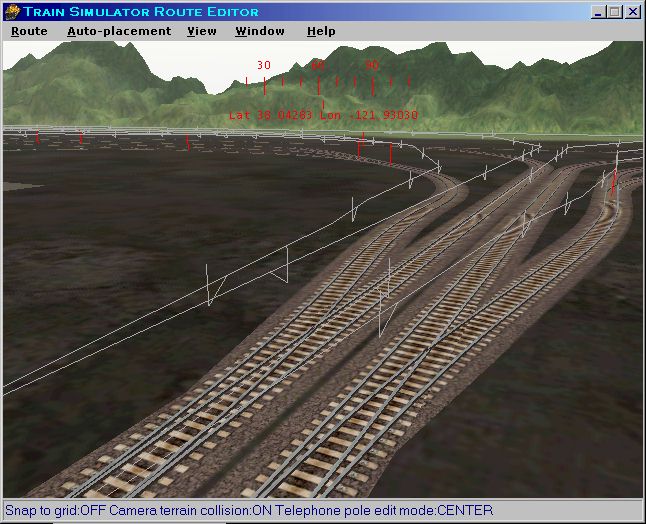 NORTH EAST CORRIDOR TRACK:
 SETTLE / CARLISLE TRACK:
You can mix sets of regular track / tunnel track, but since the files have the same name, there's no way to tell the binary shape file which track texture to select for a specific section.
Jim Steven, MCSE
Sr Microsoft Windows Application Developer Alert Edit | Reply | Reply With Quote | Top
Table of Contents
Subject Author Message Date ID Interesting... Omellette Aug-06-01 1 RE: Interesting... JMSteven_W98 Aug-06-01 2 RE: Interesting... sniper297 Aug-06-01 3 See, here's where my total lack of ... Omellette Aug-06-01 4
Lobby | Topics | Previous Topic | Next Topic
Messages in this topic
Omellette (30 posts)
Aug-06-01, 12:02 PM (EST) 1. "Interesting..." ...could you, in theory, create new track shapes that would be entered in the .ref file and the track datafile that accessed each of the textures individually?yes, I realize this would increase the size of the track section 4 times, but at least it would offer a bit of flexibility if you creating a route that mixes both urban and rural areas, or mainlines with abandoned sidings... Remove | Alert Edit | Reply | Reply With Quote | Top
JMSteven_W98 (203 posts)
Aug-06-01, 12:18 PM (EST) 2. "RE: Interesting..." That's probably the only way to get them all into a single textures folder.Since the shape file includes texture file names needed, that's where any change must happen.I'm looking for solutions that allow people to use files that already ship with the game, since many people don't have a 3D drawing program.But - it wouldn't hurt to submit this idea to Microsoft Product Marketing.Jim Steven, MCSE
Sr Microsoft Windows Application Developer Remove | Alert Edit | Reply | Reply With Quote | Top
sniper297 (132 posts)
Aug-06-01, 12:30 PM (EST) 3. "RE: Interesting..." LAST EDITED ON Aug-06-01 AT 12:33 PM (EST)Is there a tutorial somewhere on how to create your own track textures? The techdoc says:
"How to Create Track Textures.The track textures in Microsoft Train Simulator <http://www.microsoft.com/games/trainsim/>; were created by Kuju Entertainment Ltd <http://www.kuju.com/>; to represent the actual ballast and structure used in each specific route.
The key point to remember when creating track textures is that they must tile (discussed in How to Create Terrain Textures). The reason for this is so that one texture can be used for multiple width tracks instead of adding more polygons in to create wider track, a single lane piece of track then amounts to the same amount of polygons as a two, three or four lane piece of track.
The texture below is used in the Settle Carlisle route:This texture not only repeats vertically but horizontally too so that any width or length track can be created easily. This piece of track also has an alpha channel so that there are no harsh edges between the track and the terrain, below is that alpha layer:The red border is used for your reference so that the texture can be seen. To test and make sure that the newly created track texture tiles, it might be an idea to replace one on an existing level but remember to back that texture up first.
The new texture needs to be created as a .tga file because it has alpha but if it does not have this layer then it needs to be saved as a .bmp and then converted into an ACE file."And that's all, which is about as helpful as these things usually are, not a word about where to find the template files or anything else. On the same subject, if I want to create my own cab, how do I know which of the sample images relates to what cab? Remove | Alert Edit | Reply | Reply With Quote | Top
Omellette (30 posts)
Aug-06-01, 12:31 PM (EST) 4. "See, here's where my total lack of ability..." ...in 3D modelling kills me. Is it possible to edit the shape files outside a 3D modeller? If not, what about using 3DCanvas with the special plugin that has been bally-hooed alot previously? Can you "copy" the shape file, rename it, and just apply a different texture (the same texture in a different folder, actually)?If that could work, then it's just a matter of copy-and-pasting the entries in the ref file and track file, and renaming the copies. Or, am I over-simplifying it? Remove | Alert Edit | Reply | Reply With Quote | Top
Lock | Archive | Remove
Lobby | Topics | Previous Topic | Next Topic
Restored from the Train-Sim.Com archive, captured August 31, 2001. About this archive.