Train-Sim.Com
MSTS Route Design

TDB Rebuild

Notice to all visitors and members of the Train-Sim.Com message forums:
If you plan on using a signature banner in your posts, we would like to remind you that there is a maximum size for banners. That maximum is 450 pixels wide by 120 pixels high, and not to exceed 25k. Your compliance is appreciated. FORUM RULES Problems? There are two common reasons for problems with logging in and posting messages. The first is that you are running a firewall that prevents your messages from being sent to the server. The other is that you have cookies disabled; the DCForum software requires cookies to work properly.

Previous Topic | Next Topic

Printer-friendly copy Email this topic to a friend

Reading Topic #9358

Charter Member · 2535 posts

TDB Rebuild – image 1

LAST EDITED ON May-01-03 AT 12:11 PM (EDT)

As many of you know, I have been unable to successfully complete a tdb rebuild for quite some time now. I decided to investigate this problem a little more thoroughly. First, I did a full backup of my route. I deleted the .rdb, .tdb,.rit, .tit, and all associated bk files. I did a tdb rebuild. It failed with the infamous "vector end, no end" error. I made note of the lat/long coordinates. I went into RE and moved to the coordinates and looked for anything abnormal. I went into wireframe mode, toggled water off and found nothing abnormal. I made note of the tile coordinates. I then went into the world folder and found the file for that tile. I opened it in Wordpad and found one section of dynamic track and about ten regular track sections. I went back into RE and located and selected the dynamic track section. I recorded the parameters for the dynamic track and then deleted it. I saved and then replaced the dynamic track and reentered the parameters I recorded and saved again.I tried a another tdb rebuild and got the same error but at a completely different location. I went to that area and deleted and replaced two dynamic sections as above. I then tried another tdb rebuild. Same error, but again, totally different location.There seemed to be a pattern here. It looked like dynamic track is the problem. I am using Xtracks and have been through several revisions. I don't remember what the first version was but thought that maybe I should run Horace again. I tried and it said no update required.At this point I don't have a clue what the problem is. There are no rogue blue poles, no rogue track or road sections. The route seems to be fine. All the tracks work. The problem seems to be related to dynamic track but I am not sure.Another problem that started at about the same time is a water display problem. I use Pat Malicki's water texture in my route. As I drive a train along the river or "fly" over with the RE camera, there are sections of the river that are sharp and clear and other areas that appear very grainy. These areas alternate as you move down the river. It also makes a difference in the sim whether you use the cab view or outside view. This may not have anything to do with the tdb problem but it started at about the same time.I hope someone can suggest something to try. I hate to release the route knowing that a tdb rebuild will fail even though the route runs fine.Cal Rasmussen
Beaverton, OR
cal.rasmussen@verizon.netColumbia Gorge Route (Phase 1 track completed, 60% scenery, learning 3D Canvas)

Alert | IP

Printer-friendly page | Edit | Reply | Reply With Quote | Top

RE: TDB Rebuild, pennsyfan2, May-01-03, 12:35 PM, (1) RE: TDB Rebuild, OkrasaGhia, May-01-03, 12:36 PM, (2) RE: TDB Rebuild, shawnbecher, May-01-03, 01:10 PM, (3) RE: TDB Rebuild, griffinmt, May-01-03, 01:29 PM, (4) RE: TDB Rebuild, lfriddle, May-01-03, 02:34 PM, (5) RE: TDB Rebuild, lfriddle, May-01-03, 02:43 PM, (6) RE: TDB Rebuild, sniper297, May-01-03, 03:34 PM, (7) RE: TDB Rebuild, Coonskin, May-01-03, 06:10 PM, (9) RE: TDB Rebuild, calr, May-01-03, 03:34 PM, (8) RE: TDB Rebuild, mauried, May-01-03, 07:53 PM, (10) RE: TDB Rebuild, sniper297, May-01-03, 10:50 PM, (11) RE: TDB Rebuild, lfriddle, May-01-03, 11:49 PM, (12) RE: TDB Rebuild, Coonskin, May-02-03, 02:00 AM, (14) RE: TDB Rebuild, lfriddle, May-02-03, 01:51 PM, (16) RE: TDB Rebuild, Coonskin, May-02-03, 01:56 AM, (13) RE: TDB Rebuild, calr, May-02-03, 02:02 PM, (17) RE: TDB Rebuild, calr, May-02-03, 11:09 AM, (15) RE: TDB Rebuild, mauried, May-02-03, 06:56 PM, (18) RE: TDB Rebuild, robertreedy, May-02-03, 08:21 PM, (19) RE: TDB Rebuild, mauried, May-02-03, 09:28 PM, (21) RE: TDB Rebuild, rowie_nq, May-02-03, 08:42 PM, (20) RE: TDB Rebuild, calr, May-03-03, 01:28 AM, (22) RE: TDB Rebuild, landnrailroader, May-03-03, 08:08 AM, (23) RE: TDB Rebuild, Hawk, May-03-03, 08:45 AM, (24) RE: TDB Rebuild, Idahojeff, May-04-03, 11:38 PM, (31) Some New Information, lfriddle, May-03-03, 01:54 PM, (25) RE: Some New Information, robertreedy, May-03-03, 02:57 PM, (26) RE: Some New Information, jdtrainman, May-03-03, 05:01 PM, (27) RE: Some New Information, griffinmt, May-03-03, 06:45 PM, (28) RE: Some New Information, mauried, May-03-03, 08:57 PM, (29) RE: TDB Rebuild, OTTODAD, May-04-03, 10:31 PM, (30) RE: TDB Rebuild, mauried, May-05-03, 01:58 AM, (32) SUCCESS, OTTODAD, May-05-03, 11:00 PM, (33)

Conferences | Topics | Previous Topic | Next Topic

Charter Member · 258 posts

RE: TDB Rebuild

CalJust went through the same process myself this past weekend. The exact same thing was happening as you describe. I suspect it is a dynamic track issue somewhere in your route. I spent some three hours going through the same routine you describe and eventually found a two meter piece of dynamic track well below the terrain surface beneath a section of dynamic track. It wasn't even close to the tile where the tdb function was stalling. And like you I would tweak the track work where it had stalled and the problem would move to the next dynamic track section in the line. I began thinking I was actually moving toward the problem area, but later found I was moving away from it. Evidently I had inadvertently hit the place button for a piece of dynamic track but that particular piece of track had nothing to connect to and so just dropped in wherever it felt like it. Once I removed it then I was able to finally run a full rebuild of the tdb.Another issue. Do you have any track or roads running off onto empty unpopulated tiles? If when the tdb is running you see it slide into white space then you need to remove track in that tile.A third issue. ROADS! the same problems that crop up with track can occur with roads. (End vector, etc) and stall a tdb rebuild. Thankfully no dynamic roads.Hope this info helps you. Been there, done that.Bill A.

pennsyfan2

Alert | IP

Printer-friendly page | Edit | Reply | Reply With Quote | Top

Charter Member · 877 posts

RE: TDB Rebuild

Cal, running Horace is something you do once on a route and then never need do it again. The main purpouse is to re-index all dynamic track as not to interfere with all the new track sections.
When this is done there is no need to do it again even if new track sections are released cause we made ample of space with the standardized tsection.dat. I think we can add something like 30.000 more new track sections before running into problems for that reason.
Starting a completely new route with XTracks already installed you never need run Horace. The problem is only when changing from one tsection.dat to another with different maximums for sections and shapes as stated inside the file.I have no difficulty with your theory about dynamic tracks being the cause for your problems in the tdb rebuild. They are special and them causing problems of various kinds is nothing new. This though is only one of various reasons a tdb rebuild could fail and I don't think it possible to make a step-by-step guide on resolving tdb rebuild problems but who knows?I'd suggest continuing along the path you've begun. Each time you crash out in a new location you have actually resolved one tdb rebuild problem.The water problem is probably not related to the tdb rebuild problem. It is likely related to dynamic tracks though and your different experiences if you're in cab view or not makes sence. I'd believe this is the same kind of problem as the flashing water problem. The graphics engine is overloaded and can't render everything as it should and you experience visual degrading. Dynamic tracks is hard on the graphics engine as they have many polygons and they tend to make this happen. When inside the cab your view is more limited then when outside and thus there is less of a problem as less objects are drawn.


//Okrasa
Chief Engineer
okrasaghia @ yahoo.com
http://www.geocities.com/okrasaghia
http://www.geocities.com/okrasaghia/XTracks

TDB Rebuild – image 2

Alert | IP

Printer-friendly page | Edit | Reply | Reply With Quote | Top

Charter Member · 166 posts

RE: TDB Rebuild

If anyone ever does know how to solve this mystery, I would also like to know. I had this problem on my route in progress in an area that didn't have any dynamic track. I had to re-organize a small passing siding on a spur in order to get the TDB to rebuild. I had the siding on one of the spurs, but that wouldn't work, so I had to move the passing siding to be in front of the switch for the spurs, and then the TDB worked fine. No roads yet though. I'm a little worried about putting roads in yet....Shawn

Alert | IP

Printer-friendly page | Edit | Reply | Reply With Quote | Top

Charter Member · 878 posts

RE: TDB Rebuild

Cal,As you go through this exercise, also keep track of the changes being made to the tsection.dat in your route. This is where it creates the pseudo track pieces for dynamic track. Of the five possible chunks of each DT (straight,curve,straight,curve,straight), each is defined in that tsection with either the length of staight (type is 0) or the angle and radius for the curve (type is 1). Below that is the composite shape indicating which and how many sections are used. (btw: you can play some ammusing games with mods to this file!!)I suspect that the geometry of the DT is not 'optimal' to match with the adjacent sections of track, so during the rebuild, the various ends don't align within desired tolerances. Coupled with the rounding off errors etc, this may be part of the problem you see.When you find one of these, before deleting and re-adding, take a VERY close look at both ends to see how it mates up, and possibly tinker a bit more with it.Martyn T. Griffin
griffinmt@mindspring.com
http://www.geocities.com/tcmrrc/

Alert | IP

Printer-friendly page | Edit | Reply | Reply With Quote | Top

Charter Member · 318 posts

RE: TDB Rebuild

LAST EDITED ON May-01-03 AT 02:36 PM (EDT)

I have had the following experience a couple of times. One of the reasions I wanted to check someone elses route with problems was to check on this.
My route had the same problem you describe. I did a complete backup, deleted the road and track databases and did a rebuild. It bombed with the "vector end, no end" error. I noted the coords and couldn't find anything wrong. I ran rebuild again, and this time the coords were different. So I just kept running rebuild, and after the 6th time, it finished. It apparently fixed the problems itself. I checked the route with a fine tooth comb and could find nothing missing and everything looked fine. Since then I run a rebuild about once every week. So far I have had no problems with the rebuild finishing again.I also had the same result on another route I was checking for someone. I wasn't going to post this until I had tested more routes to make sure. But since the subject is already up, I'll throw this in.
The point may be that replacing the dynamic track might not have been the issue. Just keep on running rebuild may have had the same results.Larry

Alert | IP

Printer-friendly page | Edit | Reply | Reply With Quote | Top

Charter Member · 318 posts

RE: TDB Rebuild

Cal,
Since you still have the backup made before you began, it should be easy for you to give this theory a test.
I was so happy I got a rebuild I recorded over the backup before I thought of checking farther.Larry

Alert | IP

Printer-friendly page | Edit | Reply | Reply With Quote | Top

Charter Member · 4195 posts

RE: TDB Rebuild

LAST EDITED ON May-01-03 AT 03:41 PM (EDT)

I don't remember who it was, but someone once mentioned that wyes, loops, and assorted other optional paths confuse the rebuild.
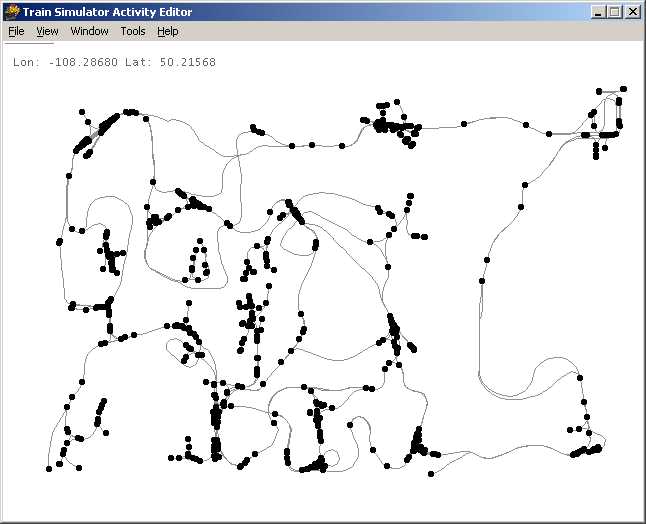
The last time I did a successful TDB rebuild on the PO&N was version 4, and I always got errors/crashes/incomplete rebuilds when I tried to rebuild version 5. I always assumed it was the signals, since V5 was the first with signals, but V5 was also the first with the "2 routes in 1" dedicated AI route.TDB Rebuild – image 3That's the backup working copy of version 7, which is nothing more than V6 with all the track objects (signals, siding and platform markers) removed. The rebuild screws up in a different wierd way every time.So following that old suggestion, I removed one section of track ("snap" track sections, a1t10mstrt or a1endpnt10d right or left usually, I did not remove ANY dynamic track) from assorted different wyes, and took a single section out of some of the return loops. Then I deleted the .tdb, and ran the advanced rebuild, worked perfectly no errors.
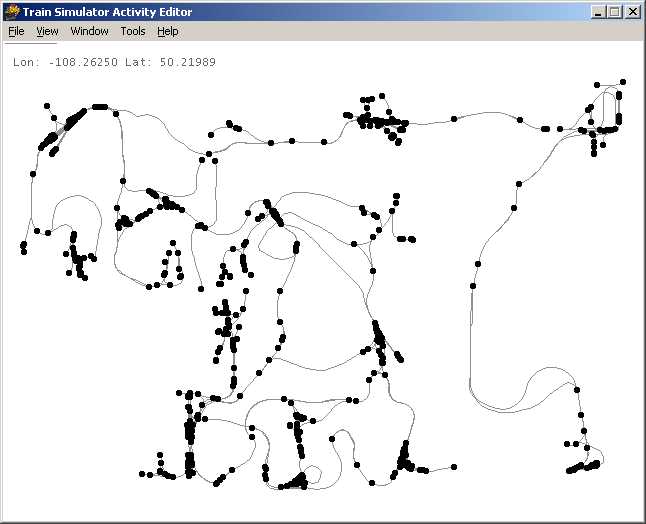
TDB Rebuild – image 4After that, obviously you have some manual work to do going back in to replace the track sections you took out, but at least it DOES rebuild, which V5 and V6 would never do before. (There's more than a single section missing there in some places, but that was intentional, I saved that as an experimental copy, thinking about redoing all the trackwork to spread things out more for better framerates.)Mind you, I'm not saying that dynamic track is absolutely not a problem, cuz I can remember two years ago when I first started doing this having blue poles at the ends of each and every dynamic track section on the route, with no idea how they got that way.One really serious tip for all route developers, whether you're rebuilding the tdb or just making minor changes to an existing route, is RAM, the more the better. I bought MSTS in June of 2001 and extracted the PO&N with 128mb RAM, today I'm up to 1024mb, and the RE don't crash or corrupt files anywhere near as often. RAM is cheap these days, and more is better.

Alert | IP

Printer-friendly page | Edit | Reply | Reply With Quote | Top

Member since Aug-1-02 · 2205 posts

RE: TDB Rebuild

(snip: PO&N spaghetti bowl)LOL!!!! Sniper, you 'da MAN!Gad what a tangle of tracks!No wonder your motto is "Abandon All Hope Who Enter Here"!!You gotta' love it."One of these days"... I've GOT to download and run your route. Just have to.Andre

Alert | IP

Printer-friendly page | Edit | Reply | Reply With Quote | Top

Charter Member · 2535 posts

RE: TDB Rebuild

TDB Rebuild – image 5

LAST EDITED ON May-01-03 AT 03:37 PM (EDT)

Larry, that sounds like a whole lot easier than trying to find all the dynamic track on my route and replacing all of it. I'll give it a try--after doing another backup!Jim, you and I posted at the same time. If Larry's idea doesn't work I'll try yours. There are only two wyes in the route and no reverse loops.Cal Rasmussen
Beaverton, OR
cal.rasmussen@verizon.netColumbia Gorge Route (Phase 1 track completed, 60% scenery, learning 3D Canvas)

Alert | IP

Printer-friendly page | Edit | Reply | Reply With Quote | Top

Member since Aug-25-02 · 107 posts

RE: TDB Rebuild

Cal , Ive had exactly the same probs as you with a TDB rebuild failing.
I had to do a TDB rebuild in order to install Xtracks on an existing route.
I spent weeks trying to get the TDB rebuild to succeed and I finally have done it , albeit in a fairly dramatic manner.Initially the rebuild failed on a particular tile with the dreaded
vector / non vector error,and I searched the tile with a fine toothcomb trying to find anything.
Could find nothing wrong.I initially deleted all the interactive track objects (there wernt many anyway just a few signals and speed boards.)
Still no luk.
I then deleted the track items file (tit) file.
Still no luk.I then deleted the tile where the vector / non vector message occurred from the world files and tried again.
This time the error moved to an adjacent tile .
I deleted the adjacent tile and tried again.
The error moved again to another adjacent tile .
I ended up removing 4 tiles in total, the original tile plus 3 adjacent tiles and then success .
I then put the tracks back onto the removed tiles and still success.
Some of the suspect tiles had dynamic tracks , others didnt so I can only surmise that the problem is somehow related to tracks crossing tile boundaries.My route is full of wyes, reversing loops and circular loops (thats one of the main reasons for building it ) and the Sim is quite happy so I dont think these track configurations are the problem.This is where I am at currently.For what its worth some of the default routes wont survive a TDB rebuild. (Innsbruck - St Anton is one ) ,but like you I didnt want to upload a route that was a bit dodgy.cheers
MD

MD

Attachments
TDB Rebuild – image 6
http://www.train-sim.com/dcforum/User_files/3eb1b24d1a2e68f8.jpg

Alert | IP

Printer-friendly page | Edit | Reply | Reply With Quote | Top

Charter Member · 4195 posts

RE: TDB Rebuild

"One of these days"... I've GOT to download and run your route."
Andre, ya lazy bum, even if you got a 56k dialup it's one of the smallest route downloads in the file library, and takes 2 minutes to install, don't need any special trainsets, the activities all use default rolling stock. Learn how it's DONE, son, forget Mike Vone's pricey guide book, study the PO&N and learn how to be really wierd. With the autoinstall taking two minutes it's the favorite hacker's route, sine you can totally destroy it in the route editor and have a clean working copy again 2 minutes later.Speaking of Mike Vone and wierdness, Maurie, it looks to me like you got Mike's cliffhanger route beaten for strangeness. Stable or not you oughtta upload it, but buy stock in Dramamine before you do since the demand is sure to go up!

Alert | IP

Printer-friendly page | Edit | Reply | Reply With Quote | Top

Charter Member · 318 posts

RE: TDB Rebuild

LAST EDITED ON May-01-03 AT 11:57 PM (EDT)

Andre doesn't have dial up as an excuse! I have employees driving past his house at least once a week. If he wants a copy on CD, all he has to do is ask and it would be delivered to his door step.
Truth be known, I drove past yesterday and his garage door was open and it looked like those dirt bikes were out of storage.Edit
Back on subject, I think all my problems were where dynamic track crossed tile boundries also. You may have something there MD.
edit edit
What a layout. I get dizy just looking at it!Larry

Alert | IP

Printer-friendly page | Edit | Reply | Reply With Quote | Top

Member since Aug-1-02 · 2205 posts

RE: TDB Rebuild

You should'a stopped for a chat Friddle-diddle. Had it been lunch, I would have even offered you a stale sandwich. How's that for friendship?Andre

Alert | IP

Printer-friendly page | Edit | Reply | Reply With Quote | Top

Charter Member · 318 posts

RE: TDB Rebuild

Sounds like the Braums burger I had was a better deal. I had a crew with me and a lot to get done in not enough time. We now have the Cavanal Hill Tower Cam available to the Weather Center. The weather idiots (er, I mean Certified Meteorologists ) were using it on storm track last night.
I should put it on the web. We could all zoom in on your house at the foot of the hill and keep an eye on you Larry

Alert | IP

Printer-friendly page | Edit | Reply | Reply With Quote | Top

Member since Aug-1-02 · 2205 posts

RE: TDB Rebuild

Sniperboy:Ha. Beat you to it. Already downloaded it. (Twice in fact. First time it self destructed on extraction... thought the weirdness had already begun... but turned out to be a corrupted download due to lightening interuption... we had tornadoes tonight as I was downloading the the PO&N... what an omen... why am I rambling... please help me I can't stop...)SOOOOO.... yup... second time's the charm. I will have to run the 'Lite' version, 'cause it was bringing my box to its knees. Fortunately I was able to hit the reset button right after the smoke started oozing out of the cooling fan area. Shame about the melted plastic smell, but I think it will go away eventually. Not so sure about the smoke stains on the wall, though.Anyrate... fired up again and resumed exploring, ran it for several miles enjoying the spectacles before me wonderin' eyes... until the first "fun" place, that is. I have no clue what you've done or how you did it (yet)... but I stalled out of Van der Hoven with a pair of light engines!!! Now how did you pull THAT off???Your PO&N is like a sureal image of railroading... sort of like what a route would be that was created by the offspring of Steve Martin and Madame Tusade. I'm going to have lots of fun with it. Andre

Alert | IP

Printer-friendly page | Edit | Reply | Reply With Quote | Top

Charter Member · 2535 posts

RE: TDB Rebuild

TDB Rebuild – image 7

That's called a sharp curve!Cal Rasmussen
Beaverton, OR
cal.rasmussen@verizon.netColumbia Gorge Route (Phase 1 track completed, 60% scenery, learning 3D Canvas)

Alert | IP

Printer-friendly page | Edit | Reply | Reply With Quote | Top

Charter Member · 2535 posts

RE: TDB Rebuild

TDB Rebuild – image 8

Maurie, just looking at that track plan makes me dizzy!To everyone else, I have tried breaking the wyes but that didn't help. I tried removing a VERY suspect piece of dynamic track in a "special" area of the route and that didn't help. The idea of a section of dynamic track crossing a tile boundary makes more sense than anything else at this point. I am going to start looking for any of those and see if I can use an alternate track configuration.In the meantime I am pressing onward in the building of my route. I am currently working on the industrial area on the Northwest side of The Dalles. There is a lot of industry in this area including the Northwest Aluminum Smelter.Cal Rasmussen
Beaverton, OR
cal.rasmussen@verizon.netColumbia Gorge Route (Phase 1 track completed, 60% scenery, learning 3D Canvas)

Alert | IP

Printer-friendly page | Edit | Reply | Reply With Quote | Top

Member since Aug-25-02 · 107 posts

RE: TDB Rebuild

Cal look carefully for dynamics that cross 2 tile boundaries.
This can happen near the corner of a tile where the start of the dynamic is on 1 tile ,the end is on another and the middle goes thru a 3rd.
This combination seems to be the worst.The problem doesnt seem to be the dynamic itself ,but occurs if the the dynamic is laid down,track is connected to both ends, and then later the dynamic is deleted or changed.Im still digging around this issue ,but I think the problem is caused by one piece of track being referenced more than once in multiple world tiles and this causes an incorrect object count , ie the sim thinks there are more track pieces in existance than there really are as 1 track piece is counted twice,and then the TDB rebuild fails when it cant find the missing track piece.As for my circular route,it only looks bizzarre when you see the whole lot at once, when driving around the route it seems pretty normal, you only know you are going in circles if you have the compass turned on.cheers
MD

MD

Alert | IP

Printer-friendly page | Edit | Reply | Reply With Quote | Top

Charter Member · 804 posts

RE: TDB Rebuild

Click to send message via ICQ

Cal, sorry to steal your thread for a moment, but MD how is the fps in a case like this? I did this to Fifty miles of the Western end of my route and have had trouble keeping decent fps and trying to keep down the constant disk loading/unloading. Did you find a secret to it, or is your computer simply able to handle it. I won't average much more than 1/2 the fps on this section than on the remainder which is fairly straight line. Just curious

RobertR .. ADF-M&RM at http://www.adfrr.com

Alert | IP

Printer-friendly page | Edit | Reply | Reply With Quote | Top

Member since Aug-25-02 · 107 posts

RE: TDB Rebuild

I dont have any probs with fps (varies from 20 up to 50 ( but I suspect thats because I have a lot of RAM (1 GB DDR) in my machine .
I needed this much RAM to be able to build the route without the RE crashing frequently.
What tends to slow down the frame rates is running lots of AI trains around the route, even when you cant see them .
Ive had up to 55 AI trains on the route all at once and it worked.
Bit hard to keep track of them all, but with a circular route you can simply get all the AI trains running around the outer circle in both directions and have the player train interacting with them.
Adds a bit of randomness to the whole sim as quite often you get stopped at a passing siding to cross something and you cant predict what it will be.
I dont as yet have a real lot of scenery or buildings on the route or any roads so that will no doubt slow things down a bit.PC is AMD XP2000, 1 GB DDR, Geforce 4 vid card. Maxtor 40Gb hard drive. Gigabyte MB.
Seems to work OK on most routes.MD

MD

Alert | IP

Printer-friendly page | Edit | Reply | Reply With Quote | Top

Member since Apr-10-03 · 117 posts

RE: TDB Rebuild

TDB Rebuild – image 9

Cal, Maurie,I had the same problem and when the suspect tile was checked, there was a switch over one tile boundary and a 2t250mStr over the other. So I moved the switch back and replaced the 250m straight with 2 x 100m and a 50m, and the problem went away. There are a couple of spots with dynamic track crossing a tile boundary on my route and there have been no problems yet. Cheers,
David.

Alert | IP

Printer-friendly page | Edit | Reply | Reply With Quote | Top

Charter Member · 2535 posts

RE: TDB Rebuild

TDB Rebuild – image 10

Is it possible that a straight or curved track section that crosses the corner of a tile could cause the same problem? So far, I have found three dynamic sections crossing a tile boundary and I have corrected the problem. I have spotted another in The Dalles yard but haven't fixed it yet. I just placed that section two days ago!I've got a lot more searching to do. Wishram yard is about 50% dynamic track.Cal Rasmussen
Beaverton, OR
cal.rasmussen@verizon.netColumbia Gorge Route (Phase 1 track completed, 60% scenery, learning 3D Canvas)

Alert | IP

Printer-friendly page | Edit | Reply | Reply With Quote | Top

Charter Member · 792 posts

RE: TDB Rebuild

I have never had a successful tdb rebuild yet, but I believe those of you who have mentioned dynamic tracks crossing tile boundaries may have some thing.Near the end of the tracklaying process on the KP sub., I came to a point where, when I created an activity, I would get a broken path error problem near the south end of Hannum Siding. At this point, I had a dynamic piece on both the main and the siding, and they crossed tile boundaries. Finally, I deleted the dynamics and cobbled up a fix using double track pieces of fixed radius (so the purists will note a minor discrepancy in the actual aligment at this point). After doing this, the problem went away. That is the good news. About 1/2 way between Gate City and SPeers Ferry on the NS line, I had a directional problem. This was at a juncture between two tangent double track pieces in the siding. I was never able to resolve it, and so I put a message in the README about "known problem".I'm now doing advance preparation for the Milwaukee Road, and as I prefer to do generic routes, I am probably going to use fixed radius pieces whereever I can. There are a lot of 10 degree curves, and although the switch end curves are not exact, I may use some of those to reduce the amount of DT pieces used.J. H. Sullivan

Alert | IP

Printer-friendly page | Edit | Reply | Reply With Quote | Top

Charter Member · 1095 posts

RE: TDB Rebuild

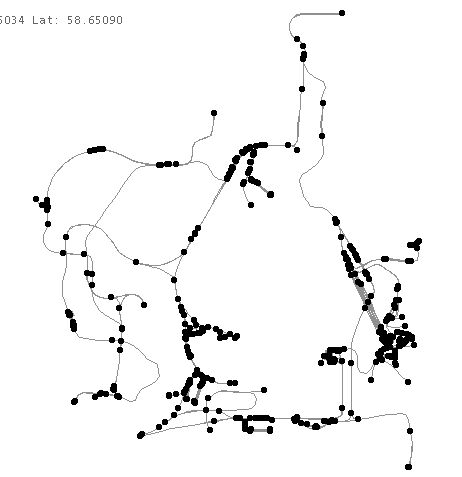
You wanna' talk about catastrophic results doing a TDB rebuild.TDB Rebuild – image 11There used to be a huge freight yard at the southern end of the above shot, as well as a bunch more track, but a TDB rebuild took care of that. I ended up completely deleting 3 tiles before I got rid of all the blue poles, and the "End-vector-no-end-end-vector" (or what ever the heck that message says. You'd think I'd no it by heart, I've seen it so many times.)
I haven't done a TDB rebuild since, even after installing X-Tracks.
So far (knock on wood), I haven't had any new problems with blue poles and such, but problems with tile elevations is a whole nuther story.
HawkThe television's going, and the wash still on the line.
I hear the whistle blowin'-the train is right on time.
I know I ought'a catch her-she's taken my last dime.

Alert | IP

Printer-friendly page | Edit | Reply | Reply With Quote | Top

Charter Member · 236 posts

RE: TDB Rebuild

In my recent travails with the TDB rebuild, the problem seems to exist largely with long tangents crossing tile boundaries. I'm working with 300+ route miles of track, TDB rebuild choked on not a single piece of dynamic track (knock wood). Most problems (90%+) were with 250m or 500m straight track (or road) sections crossing tiles. The others were corrected by breaking 20 degree curves into 5 and 10 degree sections. I'm using X-Tracks and ridiculous amounts of dynamic track. I now do a weekly TDB rebuild to insure the overall health of the route (solid TDB being essential IMHO to the route "health"). Some lessons learned, the BNSF Pend O'Rielle sub. is alive and well (build #3). Having said that, this bit almost killed my route
3eb5dbff284d8c0f.jpg
This is a siding adjacent to a wye, the switches are well beyond the closing track section. Resolved by crossing the tile boundary with 2 5m straights.Jeff

Attachments
TDB Rebuild – image 12
http://www.train-sim.com/dcforum/User_files/3eb5dbff284d8c0f.jpg

Alert | IP

Printer-friendly page | Edit | Reply | Reply With Quote | Top

Charter Member · 318 posts

Some New Information

LAST EDITED ON May-03-03 AT 02:02 PM (EDT)

Last night I did my weekly database rebuild. I was really surprised when it came up with the vector end end error because I had done no track or road work since last week when it ran fine. I have spent this week on creating some new scenery items and placing them to see how they would look. Anyway it went like this:Started route editor and checked rebuild the first thing home from work. It came up with the vector end end (VEE) error message. I clicked OK. It did this six times before I got the debug message and crash. The tile where the errors happened was x = -11793 z = 14071.I immediately restarted RE and selected rebuild again. Again I got VEE error messages. This time there were only two before I got the debug message and crash. The tile was x = -11794 z = 14071.I restarted RE and selected database rebuild again. This time the rebuild completed. I clicked to close the editor, and it asked if I wanted to save placement changes. I hadn’t made any but I clicked yes. It then asked if I wanted to save terrain changes. I hadn’t made any but I clicked yes.I checked all the files of the route to see which ones had changed. No .w files had changed. I was surprised to find that the .t , .y, .n, and .e files for tile file –07095254 had changed. This corresponds to tile x = 11793 z = 14071. This must have had something to do with it asking if I wanted to keep terrain changes. I could find nothing changed just by looking at the tile but with terrain over that wide an area it would be easy to miss. The .rit, .rdb, .tit, and .tbd files and their backups had new dates. I am now in the process of comparing them with the ones from the last backup to see what has changed in them. I’ll keep you posted on what I find.It does look as if repeated runs of rebuild will indeed finally succeed, at least for what ever kind of error I had this time.
One corner of one of the buildings I placed crossed the corner of the two tiles, but no track or road had been laid or changed.
EDIT: Both tiles contain dynamic track, but none of them crossed the boundary.Questions I am trying to answer:
1. Where is the editor storing the corrections between runs of rebuild? The database files didn’t change, the .w files didn’t change, no terrain files changed, something had to, where did it keep track of them?
2. Many scenery items cross boundaries without problems. Why a problem this time?
3. Is there a significance to the number of VEE error messages you get before the crash? Do they correspond to the number of errors found within that tile?Larry

Alert | IP

Printer-friendly page | Edit | Reply | Reply With Quote | Top

Charter Member · 804 posts

RE: Some New Information

Click to send message via ICQ

Larry, this might be a silly proposition for #1, but I'm wondering if the results of the last rebuild are still in memory and RE utilizes them the next times around. I found this second and third time success also a couple of times, but it has only been when I went directly back in and tried it again. That's what makes me wonder.

RobertR .. ADF-M&RM at http://www.adfrr.com

Alert | IP

Printer-friendly page | Edit | Reply | Reply With Quote | Top

Member since Apr-8-03 · 158 posts

RE: Some New Information

So if I understand everything I read correctly a WYE will also create a circular track error?I've also noticed that if you get to pieces of track without bumpers too close together that this will ALSO create a CTE!I'm having all sorts of problems trying to do a TDB rebuild on the GM&O right now!JBD

Jim Duncan
Team GM&O

Alert | IP

Printer-friendly page | Edit | Reply | Reply With Quote | Top

Charter Member · 878 posts

RE: Some New Information

On the small route that I have with this rebuild problem, the error always comes up at the same exact spot every time. From a Lat/Lon point of view, there is NO track or road in the vicinity. So that is just the camera placement while it spins around working on track/roads in all adjacent tiles I assume.But the x,y,z coordinates is shows are a bit of a giveaway. While the x coord is normal, and the y coord is whatever the highest point the camera hit while moving around (3182 M in my case), it is my Z coord that is interesting, at -1038.46 which is outside the normal bounds of -1024. Assume this is equiv to 1009.54 of the adjacent tile, but is MAY have something to do with a confused calculation. This would go in hand with the theory of sections that cross two or more tiles. Except that I have NO track or any other objects anywhere near that spot.Martyn T. Griffin
griffinmt@mindspring.com
http://www.geocities.com/tcmrrc/

Alert | IP

Printer-friendly page | Edit | Reply | Reply With Quote | Top

Member since Aug-25-02 · 107 posts

RE: Some New Information

Martyn.
Can you remember whether on this problem tile or on any of the immediately adjacent tiles that in the past you have encountered a
"Adjacent Track Sections not loaded , Unable to select this track piece " error ,and if so how did you fix it.One cause I have now found of the Remove vector / non vector problem in the TDB rebuild is the occurrance in the world files of the same track piece that is referanced twice , ie in more than one tile .
This causes a condition of two identical track pieces trying occupy the same space ,which the world files will allow but the tdb file wont,and this prob seems to be created when the adjacent Track Sections not loaded occurs.MD

MD

Alert | IP

Printer-friendly page | Edit | Reply | Reply With Quote | Top

Charter Member · 2301 posts

RE: TDB Rebuild

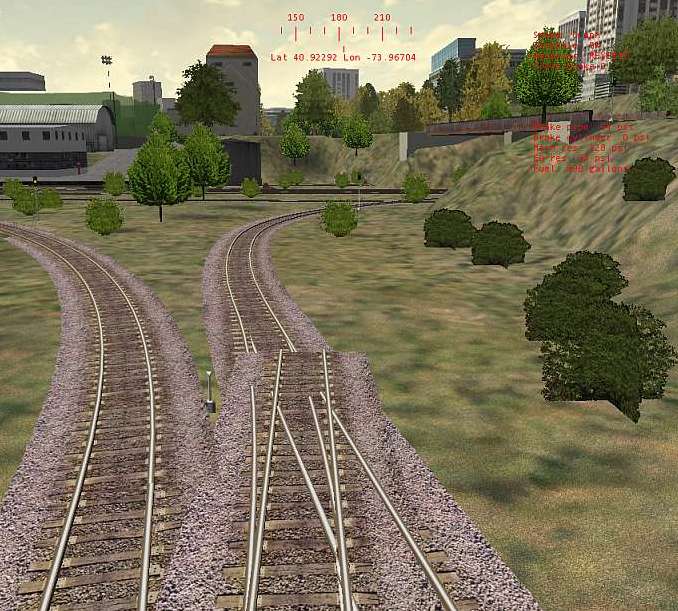
Working on ENOCELL's N.&.J.C. making improvements I ran into serious problems, similar to some reported in this thread.Frequent "Updates", changing things all over the place, are fraught with danger unless absolute care is being taken and step-by-step back-ups are being made. Looks like he did neither !The N.&.J.C. Tracks Database is now hopelessly corrupted, seemingly split into parts. This particular section can no longer be accessed with the RE without causing "Send, do not Send" ! Trying to remove some pieces accessing this "NO GO" part from across a good sector causes "Adjacent Track Pieces Not Loaded" messages. TDB Rebuild – image 13This is one of the Track pieces causing problems, the train going over it taking the left branch O.K.!TDB Rebuild – image 14Various "Rebuilds" result in "Sector....." and consequent "Send, do not Send".The funny thing is that all this does not stop me editing other parts of the Route and all of it can be accessed by the AE, no broken Path and ALL works as it should !Can these "Rougue" pieces be edited out of the Track Database ?I don't think that a complete re-build of the N.&.J.C. is an option !O t t o
Alert | IP

Printer-friendly page | Edit | Reply | Reply With Quote | Top

Member since Aug-25-02 · 107 posts

RE: TDB Rebuild

Hi Otto.
If the route will load into the AE OK and you can make edits in the RE
without probs then the Track database (tdb file is itself OK.)
What isnt OK is one or more of track segments in one of more of the world files.
It seems that the world files (insofar as the tracks and the roads go) arnt relevant to the connectivity of the pieces, but are only used to display the track and roads as static objects.
You can delete a track segment from the world files and the route will still function perfectly,although bits of it may look quite odd.If the world files are corrupted somehow, then they stay corrupted and this only is detected when the TDB is done .
Sometimes, the corrupted world files can be fixed from within the RE,but not in the case of the vector prob.Im currently looking at writing a small program which will scan all the world files for duplicate track entries,and this will help a bit to get rid of one cause of the vector / non vector problem.
There are still problems which I dont understand the mechanism of , but I am now paying a lot more attention to what types of track I place near tile boundaries,and I try and avoid doing a lot editing near the tile boundaries,and so far its working.
Im avoiding having dynamics and switches crossing the tile boundaries.My route is continuing to stay healthy (ie will withstand a TDB rebuild.)
MD

MD

Alert | IP

Printer-friendly page | Edit | Reply | Reply With Quote | Top

Charter Member · 2301 posts

SUCCESS

Hi Mauried !I did a search for this Rogue Track Piece with my ULTRA-Editor and found the 20m Straight in that picture.
But removing it from the World File did not really solve the problem of a whole bunch of track being untouchable,
"Adjacent Track Section not Loaded" and me not being able to directly work in these areas due to the RE refusing
the Co-Ords with "Send, do not Send ! Had to sneak into it from the neighbouring section but could not see much
to work on until I started to remove all I could around the problem tracks !Had this before in one of my Test Routes, I worked around by deleting all the pieces I could which were attached to
the "Adjacent...." one, by-passing the area, laying new track. After working some more on that Route, it suddenly
let me delete the offending track piece !Did the same in this major Disaster Area and it worked again. The Track Database Rebuild is still bombing out with
"Send, do not Send", probably loads more problems to find yet and repair.I can now edit all areas the RE did not let me access before and all is well !Made a lot of alterations to the N.&.J.C.-1.5, new Loops all of which work, including ENOCELL's, causing no
Frozen Switches or "Circles" Problems, filling in wherever Scenery Objects are a bit scarce. Anybody would
like me to Air Mail an EASY INSTALL CD ? E-Mail me your address. I think my E-Mail Icon is still working ?
TDB Rebuild – image 15
North and South now visible again at the same time, to be worked on as and when.TDB Rebuild – image 16The start of the re-laid section, the useless track "Buried" and out of sight. Seen others do that too !TDB Rebuild – image 17On the subject of BACK-UPS, having been a Programmer for 20 years now, I too made mistakes in the early days,
some serious, on one occasion losing an Accounts Program I had been working one for some months and had to
completely re-write ! Could not do that at my age now.I always Back-Up to new a Folder after every short successful Editing Session and never overwrite what I did
previously. The RE SAVING your work alright does not mean that it will load it again the next time. Had
a few "Send, do not Send" that way. If all you got is just the one Back-Up then you got problems ! Earlier
Back-Ups can be deleted if no longer required.TDB Rebuild – image 18Thanks for the tip anyway, got me thinking and reminded me of that old trick I completely forgot about,
only having had to use it once.O t t o

Alert | IP


[ Home | MSTS Forum | MSTS FAQ | File Library ] Copyright © 2002 by Nels Anderson. All Rights Reserved.

Restored from the Train-Sim.Com archive, captured May 27, 2003. About this archive.