
Train-Sim.Com
MSTS Route Design

Phantom Curve added to the CTSRR!

Phantom Curve added to the CTSRR! – image 1

Notice to all visitors and members of the Train-Sim.Com message forums:
If you plan on using a signature banner in your posts, we would like to remind you that there is a maximum size for banners. That maximum is 450 pixels wide by 120 pixels high, and not to exceed 25k. Your compliance is appreciated. FORUM RULES Problems? There are two common reasons for problems with logging in and posting messages. The first is that you are running a firewall that prevents your messages from being sent to the server. The other is that you have cookies disabled; the DCForum software requires cookies to work properly.

Previous Topic | Next Topic

Printer-friendly copy Email this topic to a friend

Reading Topic #7729

Member since Oct-27-02 · 172 posts

Phantom Curve added to the CTSRR! – image 2

LAST EDITED ON Dec-16-02 AT 08:26 PM (EST)

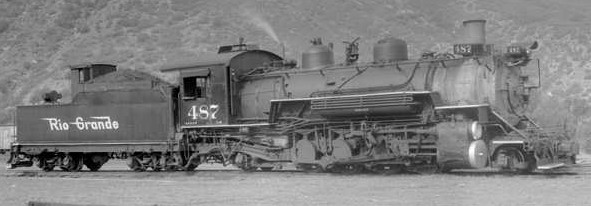
Here it is, the spooky Phantom Curve near milepost 312. The only problem is that it is pointed, where the real one is more rounded at the top. Any suggestions on how to make it less like a triange?I'm moving right along, just have a few more things to do to the route. Mainly the "hideous" (who likes that word! ) dynamic track problem, which will enable me to fix the track in the Chama yard.Tell me what you think,The pictures are Phantom Curve, except for the last two, which is 487 steaming away from the east portal of Toltec Tunnel, (A much larger and clearer one is on my desktop!) and 487 entering the tunnel from the west.JohnFuture Cumbres & Toltec or Durango & Silverton engineer!(I'm only 13)
Phantom Curve added to the CTSRR! – image 3
Long Live D&RGW K-36 487!PS: Does anyone know if there are any telltales for download?
How about something similar to the Gramps Oil loading platform in Chama?PS#2: Jonathanmlewisrgs, have you figured out the watertankk problem yet?

Attachments
Phantom Curve added to the CTSRR! – image 4
http://www.train-sim.com/dcforum/User_files/3dfe7c2a2a07da2e.jpg
Phantom Curve added to the CTSRR! – image 5
http://www.train-sim.com/dcforum/User_files/3dfe7c392a4be6c3.jpg
Phantom Curve added to the CTSRR! – image 6
http://www.train-sim.com/dcforum/User_files/3dfe7c452a8608f8.jpg
Phantom Curve added to the CTSRR! – image 7
http://www.train-sim.com/dcforum/User_files/3dfe7cd12d0ec098.jpg

Alert | IP

Printer-friendly page | Edit | Reply | Reply With Quote | Top

RE: Phantom Curve added to the CTSRR!, JMorris, Dec-16-02, 09:31 PM, (1) RE: Phantom Curve added to the CTSRR!, brucek, Dec-16-02, 09:32 PM, (2) RE: Phantom Curve added to the CTSRR!, Coonskin, Dec-17-02, 05:21 AM, (5) RE: Phantom Curve added to the CTSRR!, DRGWK36, Dec-17-02, 07:59 AM, (6) RE: Phantom Curve added to the CTSRR!, riograndedude, Dec-17-02, 09:15 AM, (8) RE: Phantom Curve added to the CTSRR!, brucek, Dec-17-02, 09:39 PM, (11) RE: Phantom Curve added to the CTSRR!, Coonskin, Dec-17-02, 09:58 PM, (12) RE: Phantom Curve added to the CTSRR!, brucek, Dec-18-02, 11:29 PM, (17) RE: Phantom Curve added to the CTSRR!, K36487, Dec-18-02, 04:14 PM, (15) RE: Phantom Curve added to the CTSRR!, Coonskin, Dec-16-02, 09:35 PM, (3) RE: Phantom Curve added to the CTSRR!, jonathanmlewisrgs, Dec-17-02, 02:37 AM, (4) RE: Phantom Curve added to the CTSRR!, K36487, Dec-17-02, 05:40 PM, (10) RE: Phantom Curve added to the CTSRR!, DRGWK36, Dec-17-02, 08:01 AM, (7) RE: Phantom Curve added to the CTSRR!, K36487, Dec-17-02, 02:03 PM, (9) RE: Phantom Curve added to the CTSRR!, brucek, Dec-18-02, 01:39 AM, (13) RE: Phantom Curve added to the CTSRR!, K36487, Dec-18-02, 03:58 PM, (14) RE: Phantom Curve added to the CTSRR!, brucek, Dec-18-02, 10:54 PM, (16) RE: Phantom Curve added to the CTSRR!, K36487, Dec-19-02, 03:27 PM, (18)

Conferences | Topics | Previous Topic | Next Topic

Charter Member · 5 posts

RE: Phantom Curve added to the CTSRR!

Nice work! Could you make it into a scenery object with a properly rounded top instead of using the MSTS terrain?Jim

Alert | IP

Printer-friendly page | Edit | Reply | Reply With Quote | Top

Charter Member · 196 posts

RE: Phantom Curve added to the CTSRR!

I'm confused - which is very easy at my age! Why are there two Cumbres & Toltec routes? Or is the work that you are carrying out something to do with the currently-available route?
Or is it a new, fresh-from-the-ground-up route?As I said - I'm confused!Bruce.

Alert | IP

Printer-friendly page | Edit | Reply | Reply With Quote | Top

Member since Aug-1-02 · 1224 posts

RE: Phantom Curve added to the CTSRR!

Hi Bruce, I'm not John, but I'll try to help your confusion:1. There's the old CTSRR that we're all familiar with. I don't know if it's still in the files library. It was created by Andy Miller. It had the track problems at Chama, etc.2. There's an UPDATED CTSRR recently uploaded to the files library. This is an update to the ORIGINAL CTSRR, and the work was performed by Andy Miller. Track problems are hopefully fixed.3. John is MODIFYING a copy of the "old" CTSRR. This is the version you see pics of in this thread. Track problems hopefully fixed, as well as additional trackage added along with additional objects.Now... I THINK I've got them all. Oh yes, except I've been using an install of an old CTSRR to experiment with too... the pics I've posted in my "Colorado in the 1880's" threads are MY version of the CTSRR!! Gets kinda' wild, don't it?Andre

Alert | IP

Printer-friendly page | Edit | Reply | Reply With Quote | Top

Charter Member · 309 posts

RE: Phantom Curve added to the CTSRR!

Andre ALMOST covered it all. There's actually another version of the CTSRR. Riograndedude was working on a "modern" CTSRR, which follows the current track layout of the tourist railroad. I tried to stay with the route as it was during DRGW revenue operations through the 60s. I think, although I'm not certain, that the modern CTSRR was uploaded, so it may be in the File Library. The version John (K36487) is working on has not been uploaded.My recent update did not change any of the track plans, and John's version has made some changes to add a couple of sidings and turnouts. I know my version (which I have been calling D&RGW Cumbres Pass Route to distinguish it from the modern CTSRR) has a couple of sidings missing, in particular at Coxo and Cresco on the way up the hill from Chama. There was also a wye at Bighorn which I did not put into the route.And, just to add to the confusion, I'm starting to gather the appropriate info/data to create the Cumbres Pass line using XTracks NG. So "someday" there will be ANOTHER version of the route floating around out there.Andy

Alert | IP

Printer-friendly page | Edit | Reply | Reply With Quote | Top

Charter Member · 560 posts

RE: Phantom Curve added to the CTSRR!

Well my version of the Cumbres and Toltec Scenic Railroad is floating around. It sits on a CD on my desk with the words "DO NOT DESTROY" We are thinking of upgrading to DSL and that will give me time to do it instead of leaving the internet on all day. I might have time with my internet, but I just gota job at the golf course across the street from me, so it might be a while.

Behold the POWER of BLACK AND GOLD: THE DENVER&RIO GRANDE WESTERN
http://groups.msn.com/RioGrandeDudesNarrowGaugeCommunity Phantom Curve added to the CTSRR! – image 8

Alert | IP

Printer-friendly page | Edit | Reply | Reply With Quote | Top

Charter Member · 196 posts

RE: Phantom Curve added to the CTSRR!

Thanks, André and Andy.
I don't feel so confused now! I had Andy's original route and have also d'loaded the new update, which is run exclusively with the K36's - stunning!I'm detailing the route in my own small way - a tree here, a telephone pole there type of thing - and Andy's referred me to a good reference site.Does anyone know if there is a video of this route, just out of curiosity?Regards,
Bruce.

Alert | IP

Printer-friendly page | Edit | Reply | Reply With Quote | Top

Member since Aug-1-02 · 1224 posts

RE: Phantom Curve added to the CTSRR!

Yes Bruce, there are several video tapes available that cover the C&TS operations. Next time you're near a model railroad hobby shop, stop in a browse, they may have one there. If not, while there pic up one of the railfan oriented magazines and you should find listings for several video tape producers, most have a tape or two about the CTSRR. There's even a few tapes transferred from film cams that cover historical action when it was a sure'nuf freight hauler. I've got "Rio Grande Narrow Gauge in the 50's" as well as "Excursion To The Thirties". Both have a lot of footage on that line.Enjoy!Andre Ming

Alert | IP

Printer-friendly page | Edit | Reply | Reply With Quote | Top

Charter Member · 196 posts

RE: Phantom Curve added to the CTSRR!

Quote:-Yes Bruce, there are several video tapes available that cover the C&TS operations.Thank you very much.Yes, I had a bit of a search and have identified several tapes, including three Pentrex items.Regards,
Bruce.

Alert | IP

Printer-friendly page | Edit | Reply | Reply With Quote | Top

Member since Oct-27-02 · 172 posts

RE: Phantom Curve added to the CTSRR!

Phantom Curve added to the CTSRR! – image 9

OK, there's lots of videos on the CTSRR. I have a few my self. Also, what site are you referring to?
JohnFuture Cumbres & Toltec or Durango & Silverton engineer!(I'm only 14)
Phantom Curve added to the CTSRR! – image 10
Long Live D&RGW K-36 487!

Alert | IP

Printer-friendly page | Edit | Reply | Reply With Quote | Top

Member since Aug-1-02 · 1224 posts

RE: Phantom Curve added to the CTSRR!

"Any suggestions on how to make it less like a triange?"With it being such a small (in size) landmark feature, you may not get what you want using terrain. The way I've created much of the jagged, craggy terrain in the Colorado pics I've posted was by mainly using a piece of 10m 2-lane dirt road tiltled and rotated as needed, and adjusting the Cutting/Embankment/Width for variety. I would also use the same piece of dirt road and same technique in various places on the sides of the landforms to break up the continuity and give the landform a more "random" look. However, I don't think the technique will prodcuce a small enough land form to represent Phantom Curve.Suggestion:Download one of the rock collections in the Files Library, and use a shrunk copy of the toltec_rock.ace to reskin them. That will help them match the toltec_rock.ace texture you're using. Then build a stack of appropriate sized re-textured rocks at that location until you get the look you like.Good luck!Andre Ming

Alert | IP

Printer-friendly page | Edit | Reply | Reply With Quote | Top

Member since Oct-27-02 · 172 posts

RE: Phantom Curve added to the CTSRR!

Phantom Curve added to the CTSRR! – image 14

I got it to work! See the other post for pics. JohnFuture Cumbres & Toltec or Durango & Silverton engineer!(I'm only 13)
Phantom Curve added to the CTSRR! – image 15
Long Live D&RGW K-36 487!

Alert | IP

Printer-friendly page | Edit | Reply | Reply With Quote | Top

Charter Member · 309 posts

RE: Phantom Curve added to the CTSRR!

John - I thought about how to create that little bit of rock formation, and I think the best way to do that specific one is to make it as a scenery object and place it in the appropriate place. That way you can get the shape, size, and color right.Andy

Alert | IP

Printer-friendly page | Edit | Reply | Reply With Quote | Top

Member since Oct-27-02 · 172 posts

RE: Phantom Curve added to the CTSRR!

Phantom Curve added to the CTSRR! – image 16

How exactly would you do that? (make it a scenery object)
JohnFuture Cumbres & Toltec or Durango & Silverton engineer!(I'm only 13)
Phantom Curve added to the CTSRR! – image 17
Long Live D&RGW K-36 487!

Alert | IP

Printer-friendly page | Edit | Reply | Reply With Quote | Top

Charter Member · 196 posts

RE: Phantom Curve added to the CTSRR!

LAST EDITED ON Dec-18-02 AT 01:43 AM (EST)

Place the .ACE file in the route's Textures folder and the .S and .SD files in the route's Shapes folder.Then create a new entry for the item in the route's .REF file in a similar fashion to another scenery object - such as a rock or boulder - and save the .REF.See example here..............
===================
Static (
Class ( "Desert Scenery" )
Filename ( PhantRock.s )
Align ( None )
Description ( Phantom_Curve_Rock )
)
======================I have created scenery objects from all the RGS rolling stock in order to populate the yards at Antonito and Chama.
Believe me - it saves a whole heap of work in the Activity editor and also saves on frame-rate.Hope this helps you.Bruce.

Alert | IP

Printer-friendly page | Edit | Reply | Reply With Quote | Top

Member since Oct-27-02 · 172 posts

RE: Phantom Curve added to the CTSRR!

Phantom Curve added to the CTSRR! – image 18

Thanks. Could you tell me how to make the train cars static objects?I like the idea of populating the Chama yard that way!
JohnFuture Cumbres & Toltec or Durango & Silverton engineer!(I'm only 14)
Phantom Curve added to the CTSRR! – image 19
Long Live D&RGW K-36 487!IT IS MY BIRTHDAY TODAY!!!

Alert | IP

Printer-friendly page | Edit | Reply | Reply With Quote | Top

Charter Member · 196 posts

RE: Phantom Curve added to the CTSRR!

LAST EDITED ON Dec-18-02 AT 11:30 PM (EST)

Quote:-Thanks. Could you tell me how to make the train cars static objects?.No worries, John. And happy birthday too! The following is straight from my .REF file for Andy's new C&T.......
=========================================================
Static (
Class ( "Rolling Stock" )
Filename ( rgsbox.s )
Align ( None )
Description ( Boxcar )
)Static (
Class ( "Rolling Stock" )
Filename ( rgscattle.s )
Align ( None )
Description ( Cattlecar )
)Static (
Class ( "Rolling Stock" )
Filename ( rgsflat1.s )
Align ( None )
Description ( Flatcar_1 )
)Static (
Class ( "Rolling Stock" )
Filename ( rgsflat2.s )
Align ( None )
Description ( Flatcar_2 )
)Static (
Class ( "Rolling Stock" )
Filename ( rgsflat3.s )
Align ( None )
Description ( Flatcar_3 )
)Static (
Class ( "Rolling Stock" )
Filename ( rgscab1.s )
Align ( None )
Description ( Caboose )
)Static (
Class ( "Rolling Stock" )
Filename ( rgcoach1.s )
Align ( None )
Description ( Passenger_Carriage )
)
====================================================All you have to do is exactly what I mentioned previously: copy the .ACE file to the Textures folder and the .S and .SD files to the Shapes directory for the route.The files shown are from a Rio Grande Southern pack which I downloaded but the methodology is exactly the same for any item.
Notice that the entry references the .S file, and as long as you know which file refers to which item then you won't have a problem.Class name can be whatever you wish; I created a new one so that it was easy to identify when in RE.
Description is also up to you but if more than one word then separate by an underscore, otherwise only the first word will appear in the list of objects when in RE.Oh...and the site that Andy referred me to is.........http://ghostdepot.com/rgCheers!
Bruce.

Alert | IP

Printer-friendly page | Edit | Reply | Reply With Quote | Top

Member since Oct-27-02 · 172 posts

RE: Phantom Curve added to the CTSRR!

Phantom Curve added to the CTSRR! – image 20

LAST EDITED ON Dec-19-02 AT 03:43 PM (EST)

Thanks, I'll try that. PS. Ghostdepot is a great site!
JohnFuture Cumbres & Toltec or Durango & Silverton engineer!(I'm only 14)
Phantom Curve added to the CTSRR! – image 21
Long Live D&RGW K-36 487!Here are some pics of my watertank repaint.
(See other post for more info.)

Attachments
Phantom Curve added to the CTSRR! – image 22
http://www.train-sim.com/dcforum/User_files/3e022f44712e4758.jpg
Phantom Curve added to the CTSRR! – image 23
http://www.train-sim.com/dcforum/User_files/3e022f517176d9c7.jpg
Phantom Curve added to the CTSRR! – image 24
http://www.train-sim.com/dcforum/User_files/3e022f6071b7a4f5.jpg
Phantom Curve added to the CTSRR! – image 25
http://www.train-sim.com/dcforum/User_files/3e022f6d71f8b875.jpg

Alert | IP


[ Home | MSTS Forum | MSTS FAQ | File Library ] Copyright © 2002 by Nels Anderson. All Rights Reserved.

Restored from the Train-Sim.Com archive, captured January 19, 2003. About this archive.