Notice to all visitors and members of the Train-Sim.Com message forums: If you plan on using a signature banner in your posts, we would like to remind you that there is a maximum size for banners. That maximum is 450 pixels wide by 120 pixels high, and not to exceed 25k. Your compliance is appreciated. FORUM RULES Problems? There are two common reasons for problems with logging in and posting messages. The first is that you are running a firewall that prevents your messages from being sent to the server. The other is that you have cookies disabled; the DCForum software requires cookies to work properly.
Anybody know where these come from?Somebody else was asking about these, and it got me to wondering what causes them. I have a total of 4 on my AI traffic path, and altho you can't select "take other exit" since it's not a switch, "mark point as broken" does show up as an option.
I have seen those in my Columbia Gorge route. They are not points. If you look in RE in that vicinity, you may see one of those "rogue" blue poles. You can try to do a TDB rebuild but it probably won't work and is not recommended. What I did was to remove the track sections on both sides of the trouble spot, save, and replace them. You might have to try a couple of times.Cal Rasmussen Beaverton, ORColumbia Gorge Route (Phase 1 track completed. Building roads and scenery)
Nope, no rogue blue poles. That one in the pic above is common to PO&N 5 and 6, since I didn't change any of the track in that area, but there are signals on the track about that location. The signal configuration is different between V5 and V6, but they're in about the same place. It's not causing me any problems, but the guy who was asking thought it might have something to do with problems after trying to fix broken path errors. I did have one where I slipped or something and marked a point as broken, then discovered there's no way to unmark it, you have to delete the whole path and start over. I forget whether that was one of these or a regular switch point tho. Guess I oughtta try setting up a path on V7, I'm stripping all the signals out to prep it for Hank's new creations, that would either confirm or eliminate signals. Might have something to do with the passing siding configuration too, the other guy thought it was dynamic track on his route, but that whole section is double track curves with no dynamic track.
I have noticed them when doing activities and I think that it is one of two things: the sim adds a midpoint point on long sidings/passing tracks or a point when the distance between two point is over a certain distance. Kevin Arceneaux It is time for Amtrak to become a fallen flag!
Sniper, I think kevarc has the right idea. They are on every one of my 'passing sidings' or sidings where both ends are back to the main. I still don't know if there is a function that uses them or not .. have experimented with, but found nothing so far.
I don't think it has anything to do with long sidings and as Jim said there may not be any blue poles but it did indicate, in my case, a corruption in the TDB. If I tried to drive a train through the spot where the black dot appeared in AE, the train would crash. This occurred in two different locations. It is not signal related. I have never had signals on my route. As I indicated in my previous post, the only way I was able to fix the problem was to remove the track on both sides of the "anomaly" and re-lay them and that wasn't easy.I don't think it is activity related. In my case, I have not created any activities, only paths for explore route. As I recall, the anomaly did result in a broken path.Jim, can you successfully drive trains through those spots? If so and everything appears to be working, I say don't worry about it. If you are having problems, try pinpointing the location by lat/long and re-laying the track in that vicinity.Cal Rasmussen Beaverton, ORColumbia Gorge Route (Phase 1 track completed. Building roads and scenery)
No, they're not causing me problems, been there since V5 and the AI traffic trains run across a total of four of them in both directions with no trouble on both V5 and V6. The reason I asked was because someone else asked me about them, apparently he's having trouble. They do appear only in the middle of passing sidings for some reason, but not all passing sidings have them. Not related to signals tho: Here's a section of V7 (originally created for V5, no alterations to the track since last February) with all the signals stripped out, I dunno if you would call this a long siding, but it is double track all the way. Creating a path thru either track, even without signals, generates that funny little point. It don't do it on all passing sidings, possibly the point is generated by the double track connection or something. If that's the case, the derailment problem some people are having may be unrelated to the phantom point, it may be caused by double track curves on the grades. If you look at a curved section from the top, the ends aren't parallel to each other, since the outside track is longer than the inside track. When the double track curve section is rotated in elevation, the outside track is higher at the end than the inside track. Most places I use single track 10 meter sections in between the double track pieces, with each 10 meter piece at a slightly different angle, but in some places I just left the "bump" since it wasn't causing problems. This bump combined with a restricted speed zone would cause a derailment here. For those who still haven't gotten the word on this, if there's no blue pole but a rough track section, the train won't derail unless it's exceeding the speed limit. Raise the speed limit to 400 mph, you can take that curve/bump at 390, lower the speed limit to 10mph and you'll derail in the same spot at 15. The bumps can be annoying tho if you don't want bumpy track (look at Lake & Wells on the Chicago EL 1 route, Chris put in some deliberate "trippers"), so the way to deal with those is to either use single track on graded curves, or space out the double track sections so they're not connected directly to each other.
I needed to change the elevation on about a three mile section of double track. I needed to raise it a couple meters. I did it by removing two sections, noting what type and size. I then elevated the preceding section so a slight grade was created with the unconnected end at the desired elevation. I then replaced the first removed section and removed the next section after the gap. I repeated this as far as was needed. I then replaced the last removed track section and adjusted the grade to make the connection. It came up slightly short, as expected, but, of more interest, there was a lateral misalignment of about 2-3 inches. What really surprised me was that RE made the connection and removed the blue poles. When I ran a train through the spot it appeared that there was now way the train would negotiate the misalignment but it did. The sudden jump and jar nearly shook me out of my engineer's seat! On the other hand, I have had very tiny misalignments that derailed the train. Go figure.Cal Rasmussen Beaverton, ORColumbia Gorge Route (Phase 1 track completed. Building roads and scenery)

 Somebody else was asking about these, and it got me to wondering what causes them. I have a total of 4 on my AI traffic path, and altho you can't select "take other exit" since it's not a switch, "mark point as broken" does show up as an option.

 Here's a section of V7 (originally created for V5, no alterations to the track since last February) with all the signals stripped out, I dunno if you would call this a long siding, but it is double track all the way.
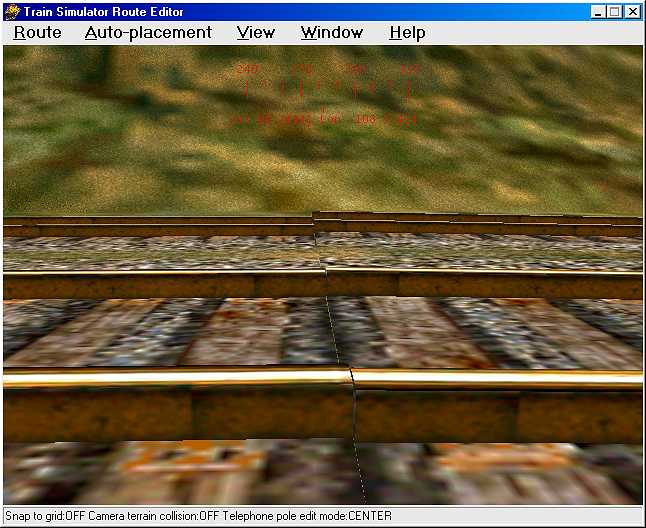 If you look at a curved section from the top, the ends aren't parallel to each other, since the outside track is longer than the inside track. When the double track curve section is rotated in elevation, the outside track is higher at the end than the inside track. Most places I use single track 10 meter sections in between the double track pieces, with each 10 meter piece at a slightly different angle, but in some places I just left the "bump" since it wasn't causing problems. This bump combined with a restricted speed zone would cause a derailment here.