Train-Sim.Com
MSTS Route Design

Unmoveable Lamp Post

Unmoveable Lamp Post – image 1

Notice to all visitors and members of the Train-Sim.Com message forums:
If you plan on using a signature banner in your posts, we would like to remind you that there is a maximum size for banners. That maximum is 450 pixels wide by 120 pixels high, and not to exceed 25k. Your compliance is appreciated. FORUM RULES Problems? There are two common reasons for problems with logging in and posting messages. The first is that you are running a firewall that prevents your messages from being sent to the server. The other is that you have cookies disabled; the DCForum software requires cookies to work properly.

Previous Topic | Next Topic

Printer-friendly copy Email this topic to a friend

Reading Topic #6619

Charter Member · 193 posts

Has anyone tried using the US2Lamp1 static object (part of Clutter)?I just placed one along a road, and after noting it wasn't quite aligned right, I went to select it to rotate it.There is NO spot on the lamp post I can click to select it!! It does not turn red as you pass over it. It was the last thing I added, so I can easily get rid of it in the .W file, but am afraid to use a bunch in case they need moving later.Martyn T. Griffin
griffinmt@mindspring.com

Alert | IP

Printer-friendly page | Edit | Reply | Reply With Quote | Top

RE: Unmoveable Lamp Post, davidbeach, Sep-24-02, 09:57 PM, (1) RE: Unmoveable Lamp Post, griffinmt, Sep-24-02, 09:59 PM, (3) RE: Unmoveable Lamp Post, griffinmt, Sep-24-02, 09:57 PM, (2) RE: Unmoveable Lamp Post, Hobart, Sep-24-02, 10:03 PM, (4) RE: Unmoveable Lamp Post, wp713, Sep-24-02, 10:09 PM, (5) RE: Unmoveable Lamp Post, Motley24Crue2, Sep-24-02, 10:22 PM, (6) RE: Unmoveable Lamp Post, griffinmt, Sep-25-02, 00:46 AM, (9) RE: Unmoveable Lamp Post, goonybird, Sep-26-02, 12:42 PM, (11) RE: Unmoveable Lamp Post, goonybird, Sep-26-02, 12:44 PM, (12) RE: Unmoveable Lamp Post, Transcon, Sep-24-02, 11:06 PM, (7) RE: Unmoveable Lamp Post, Vince, Sep-25-02, 00:17 AM, (8) RE: Unmoveable Lamp Post, gxm149, Sep-25-02, 07:54 PM, (10) RE: Unmoveable Lamp Post, griffinmt, Sep-26-02, 11:37 PM, (16) RE: Unmoveable Lamp Post, tvrail, Sep-26-02, 01:34 PM, (13) RE: Unmoveable Lamp Post, griffinmt, Sep-26-02, 04:48 PM, (14) RE: Unmoveable Lamp Post, tvrail, Sep-27-02, 10:42 AM, (18) RE: Unmoveable Lamp Post, griffinmt, Sep-27-02, 02:23 PM, (19) RE: Unmoveable Lamp Post, Hobart, Sep-26-02, 10:21 PM, (15) RE: Unmoveable Lamp Post, stationmaster, Sep-27-02, 00:07 AM, (17)

Conferences | Topics | Previous Topic | Next Topic

Charter Member · 375 posts

RE: Unmoveable Lamp Post

Go into wire frame mode, and see if there is something below the surface that will select.David Beach.Palouse & LewistonUnmoveable Lamp Post – image 2

1% Completed

Alert | IP

Printer-friendly page | Edit | Reply | Reply With Quote | Top

Charter Member · 193 posts

RE: Unmoveable Lamp Post

Nope, been there, done that.Even did a "/" and dove underground and tried it like that and no hits.Martyn T. Griffin
griffinmt@mindspring.com

Alert | IP

Printer-friendly page | Edit | Reply | Reply With Quote | Top

Charter Member · 193 posts

RE: Unmoveable Lamp Post

Now I am really confused.Just looked in the .w file (all that I modified today actually) and do NOT find any reference to the ugly lamp post ANYWHERE.Go back into RE and it is still where I left it.No references are in the rit, tit, rdb, tdb, kit or kaboodle!!!Martyn T. Griffin
griffinmt@mindspring.com

Alert | IP

Printer-friendly page | Edit | Reply | Reply With Quote | Top

Charter Member · 405 posts

RE: Unmoveable Lamp Post

My route has one too. Checked in, but can't check out. Got a string of 3 telephone poles too. I'm glad they weren't airport hangars

Alert | IP

Printer-friendly page | Edit | Reply | Reply With Quote | Top

Charter Member · 890 posts

RE: Unmoveable Lamp Post

Pretty stuborn those lamp posts be. Just position yourself underneath looking up at the actual light piece, then you should be able to select it. I fought with one for 10 whole minutes once. Thanx
(Wp713)

Alert | IP

Printer-friendly page | Edit | Reply | Reply With Quote | Top

Charter Member · 802 posts

RE: Unmoveable Lamp Post

the Actual light it self seems to be the only part you can select so try that and see if it worksUnmoveable Lamp Post – image 3
Bob
Philadelphia, Pa

Alert | IP

Printer-friendly page | Edit | Reply | Reply With Quote | Top

Charter Member · 193 posts

RE: Unmoveable Lamp Post

Well, I've been under, over, around and through and there is not a square millimeter of that object I haven't poked at and been intimate with. It WILL NOT SELECT.I came at it directly from under the terrain, from above and no dice. As I approach it head on, at about 8 or 9 meters, it will disappear from view, just depends on the angle of approach and camera angle.Martyn T. Griffin
griffinmt@mindspring.com

Alert | IP

Printer-friendly page | Edit | Reply | Reply With Quote | Top

Charter Member · 38 posts

RE: Unmoveable Lamp Post

If you end up not being able to select the lampost, how about opening its "*.sd" file (in the Shapes folder) and changing its detail level (I think that's the field ) to 10? The lampost would then seldom be displayed in the game.Just make copies of the shape ("*.s") and its 'SD' file and rename each, and also ensure you change the "*.s" reference in the 'SD' file so that its properly targeted.

Alert | IP

Printer-friendly page | Edit | Reply | Reply With Quote | Top

Charter Member · 1082 posts

RE: Unmoveable Lamp Post

Unmoveable Lamp Post – image 4

I don't even bother with mine...it disappears before I can get close enough even to highlight it! lolIs there some sort of fix to this annoying disappearing act?------------------------------------------------------------I'll never let go of the railroad that inspired me to be involved with trains, the Union Pacific!Unmoveable Lamp Post – image 5

John Ekhoff
14 yr. old Train Sim Reskinner from Abilene, Texas.

Alert | IP

Printer-friendly page | Edit | Reply | Reply With Quote | Top

Charter Member · 221 posts

RE: Unmoveable Lamp Post

Gee, I've placed hundreds of these lamps in the NECv4 and I've never had a problem. . .yet. But I did notice your problem when I was in Route Editor training class on the Marias Pass v1 route. Flying around and playing I finally got it to select, trial and error. . .mostly error. Not showing up in the world file though, never looked there. At that early date I didn't even know what a world file was.

Regards,
Vince Cockeram
NEC Track Team
http://hometown.aol.com/nectrackteam/main.html
E-Mail me at vcockeram@lvcm.com

Alert | IP

Printer-friendly page | Edit | Reply | Reply With Quote | Top

Charter Member · 394 posts

RE: Unmoveable Lamp Post

LAST EDITED ON Sep-25-02 AT 07:57 PM (EDT)

Funny, I never had any problems with the US Lamp Posts. I originally had them all over the streets in my NEC Extension route. I had to remove them though because I ran out of objects that I could have on the individual tiles and all of the lamp posts were really filling up my object count. I really hate that limitation in MSTS, that and the inability to create a route with a loop. Unfortunately it came down to a choice between buildings and tracks or lightposts, and the buildings and tracks won out. I had to remove quite a few of them and I never ran into a problem with selecting them in order to get rid of them. The only thing I can think of is maybe you aren't close enough to the lamp post to select it. Make sure you are as close to it as you can possibly get when you try to select it and see if that helps. I personally haven't had any problems using the lamposts however. Anyway, I hope that this helps and good luck with your project. George.

Alert | IP

Printer-friendly page | Edit | Reply | Reply With Quote | Top

Charter Member · 193 posts

RE: Unmoveable Lamp Post

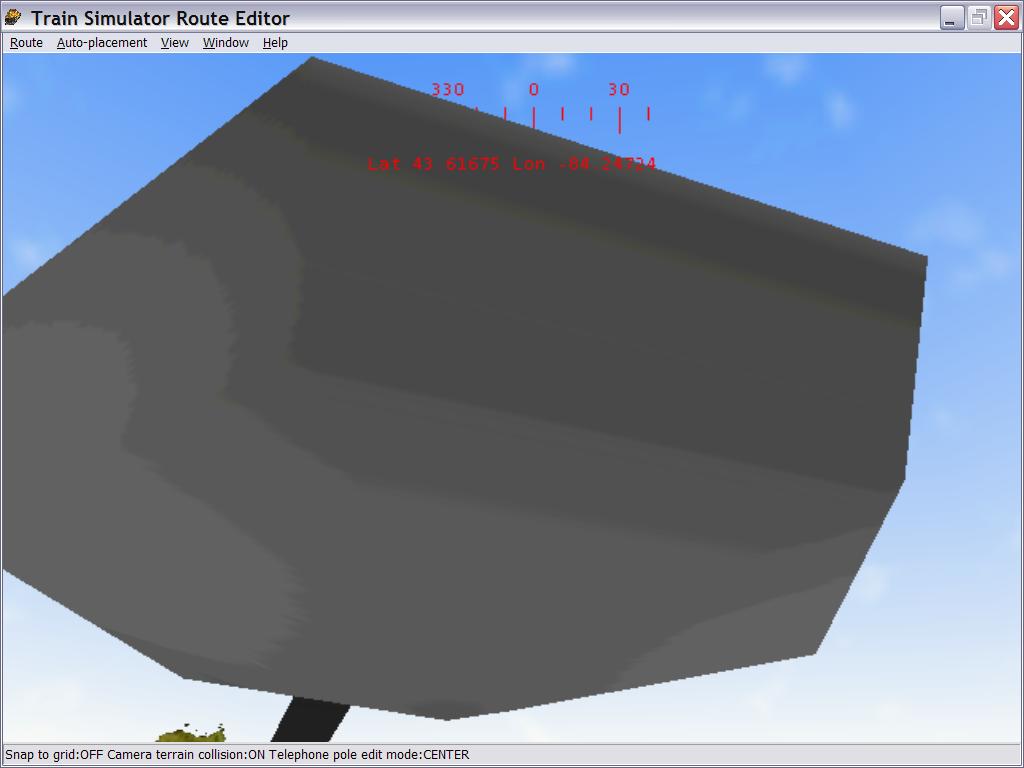
"... The only thing I can think of is maybe you aren't close enough to the lamp post to select it. Make sure you are as close to it as you can possibly get when you try to select it and see if that helps. ..."Ya think this is close enough??Still can't find the sweet spot, nor any reference to it in the .W file.Martyn T. Griffin
griffinmt@mindspring.com

Attachments
Unmoveable Lamp Post – image 6
http://www.train-sim.com/dcforum/User_files/3d93d28103002e0f.jpg

Alert | IP

Printer-friendly page | Edit | Reply | Reply With Quote | Top

Charter Member · 25 posts

RE: Unmoveable Lamp Post

Actually what you need to do is this:1. Open the Shape File Manager (get it from file library?)
2. Uncompress the file (US2Lamp1.s)
3. After uncompressing, open the file with WordPad
4. At the very top of the file there is a part saying something like this:shape (
shape_header ( 00000000 00000000 )
volumes ( 1
vol_sphere (
vector ( -5.96046e-008 2.30845 0 ) 7.73988
)
)Note that the above code is from another file I had at hand.5. Change the "Vector" line to read something like:"vector ( 0 5 0 ) 7"6. Save and open the RE
7. You should now be able to select the file without problems, and it should no longer disappear in certain viewpoints.This fix is suitable for most of these files that keep disappearing or are hard to select. Especially shape files produced by TrainSim Modeler usually have a too small Volume Sphere, resulting difficulties in selecting and disappearance at certain viewpoints. One example is SRV Bridges (but that's not the author's fault!! The bridges are great!)There may be multiple Volume Spheres in a single file. However, you'll most likely need only one. The value in brackets defines the center point of the volume sphere (X Y & Z, Y being the height), and the last value defines the radius of the sphere. All values are Metric. Note that this edition does not affect the main axis of the object at all.Hope this helps. I always check my TSM files for bugs like this before compressing them into binary. Someone ought to let the Abacus know about this problem. I recently created a simple 1x1x404 metre box in TSM, and the program defaulted a 0.7 radius volume sphere in the middle of the object. When the volume sphere was moved out from the screen area, the object vanished.TVRail

Alert | IP

Printer-friendly page | Edit | Reply | Reply With Quote | Top

Charter Member · 193 posts

RE: Unmoveable Lamp Post

The US2Lamp1 .s entries appear as follows: vol_sphere (
vector ( -5.80455 3.94235 -18.3806 ) 6.48095
)
vol_sphere (
vector ( -1.69854 3.94235 0.0152825 ) 4.38384
)
vol_sphere (
vector ( -3.23639 3.86657 0.369051 ) 6.12583
)
vol_sphere (
vector ( -1.69854 3.94235 0.0255115 ) 4.41117
)
vol_sphere (
vector ( -3.23639 3.86657 0.369051 ) 6.12583
)
vol_sphere (
vector ( -1.81885 3.94235 0.0255115 ) 4.36076
)
Can you confirm what the values should be to make it selectable?Thanks,
Martyn T. Griffin
griffinmt@mindspring.com

Alert | IP

Printer-friendly page | Edit | Reply | Reply With Quote | Top

Charter Member · 25 posts

RE: Unmoveable Lamp Post

Martyn,I just omitted all 'vol_sphere' marks and replaced it withshape (
shape_header ( 00000000 00000000 )
volumes ( 1
vol_sphere (
vector ( 0 5 0 ) 7
)
)Just remember to check that there is a ')' for every '('. Also pay attention that you have as many vlo_sphere lines as is defined in 'volumes (' line. In this case there must be not more than 1 vol_sphere.The above example is more than adequate to do the trick. The problem with the original lamp post is that the vol_spere is more than 5 metres off the center of the lamp post object, thus making it hard to select.The above correction will also fix the disappearance problem.I may upload an update of the problematic shapes found in USA1 and USA2 folders. I also have an update for the Bruce Bridges' Railroad Crossings. Those objects also tend to disappear.TVRail

Alert | IP

Printer-friendly page | Edit | Reply | Reply With Quote | Top

Charter Member · 193 posts

RE: Unmoveable Lamp Post

I made the changes that you suggested (thats how I was able to get close enough for the pic posted previously (say that fast 5 times!).But I still couldn't selected. But I did get rid of it.I said before I couldn't find it in the .W file. Thats because I did a file search, looking for the text US2Lamp1. But that doesn't work on Unicode files, so It didn't find a match. But I went into the file and found it about halfway up. So I just replaced the name with my mailbox, saved it and restarted RE. I was able to easily select/delete it then.Thanks for your help.BTW: just wrote a text search routine to solve that previous mixup. It will handle ansi or unicode files, optionally search inside ZIP files and MSTS compressed files.
If I pretty up the interface, I may upload it.Martyn T. Griffin
griffinmt@mindspring.com

Alert | IP

Printer-friendly page | Edit | Reply | Reply With Quote | Top

Charter Member · 592 posts

RE: Unmoveable Lamp Post

Selecting lamps is tricky, but last time I moved one, I think clicking on the "head" of the lamp did the trick.Ron

Alert | IP


[ Home | MSTS Forum | MSTS FAQ | File Library ] Copyright © 2002 by Nels Anderson. All Rights Reserved.

Restored from the Train-Sim.Com archive, captured October 2, 2002. About this archive.