Train-Sim.Com
MSTS Route Design

GM&O ROUTE UPDATE 7 screenshots

GM&O ROUTE UPDATE 7 screenshots – image 1

Notice to all visitors and members of the Train-Sim.Com message forums:
If you plan on using a signature banner in your posts, we would like to remind you that there is a maximum size for banners. That maximum is 450 pixels wide by 120 pixels high, and not to exceed 25k. Your compliance is appreciated. FORUM RULES Problems? There are two common reasons for problems with logging in and posting messages. The first is that you are running a firewall that prevents your messages from being sent to the server. The other is that you have cookies disabled; the DCForum software requires cookies to work properly.

Previous Topic | Next Topic

Printer-friendly copy Email this topic to a friend

Reading Topic #6602

Charter Member · 296 posts

LAST EDITED ON Sep-24-02 AT 10:45 AM (EDT)

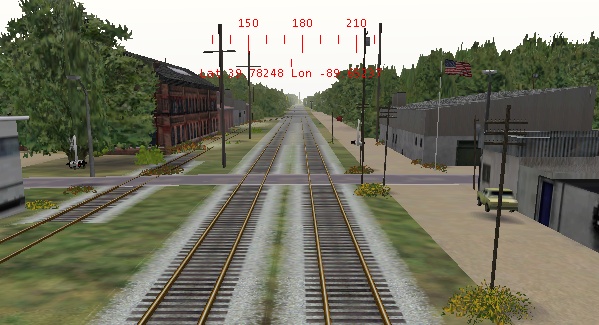
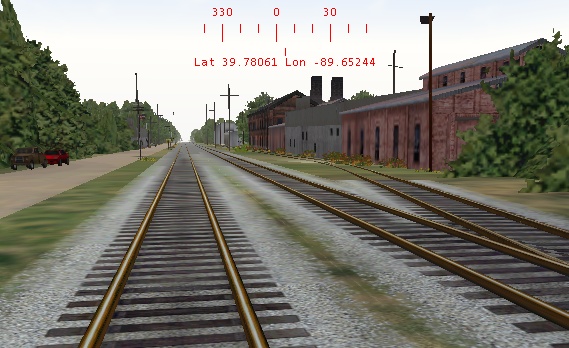
Hi again folks..the route continues...(got to keep ahead of the IC guys) Of course..they're cheating...2 against one ain't fair! Actually..I've had alot of very kind folks who have contributed to this route project! (including those IC guys) LOL. I am thankful for each one of them...I will compile a list of names one day soon and post them after the route is farther along.There is going to be a limitation to this route..I want all who are looking forward to it's release to know this...running locos and cars larger than 512x512 will be extremely risky to frame rates. I'm trying to make a route that looks real...(because it was real..at one time in history)..so it's rob Peter to pay Paul...when I get done with it...the only thing that may actually make it down the route is a Fairmont Motorcar. LOL I've run several 1024 textured locos..and the frame rates are around 10fps, and with 512 textures..it's around 15-20 ...unless anyone here has any other ideas...that's about the best I can do....but for now..take a look at south-central Springfield, Ill. along the GM&O main.....

Paul...
www.mstsgmo.com

Attachments
GM&O ROUTE UPDATE 7 screenshots – image 2
http://www.train-sim.com/dcforum/User_files/3d90794c338911ee.jpg
GM&O ROUTE UPDATE 7 screenshots – image 3
http://www.train-sim.com/dcforum/User_files/3d90795933c445ec.jpg
GM&O ROUTE UPDATE 7 screenshots – image 4
http://www.train-sim.com/dcforum/User_files/3d907966340dcc53.jpg
GM&O ROUTE UPDATE 7 screenshots – image 5
http://www.train-sim.com/dcforum/User_files/3d907975343f15f1.jpg
GM&O ROUTE UPDATE 7 screenshots – image 6
http://www.train-sim.com/dcforum/User_files/3d9079823458c875.jpg
GM&O ROUTE UPDATE 7 screenshots – image 7
http://www.train-sim.com/dcforum/User_files/3d90798e34725310.jpg
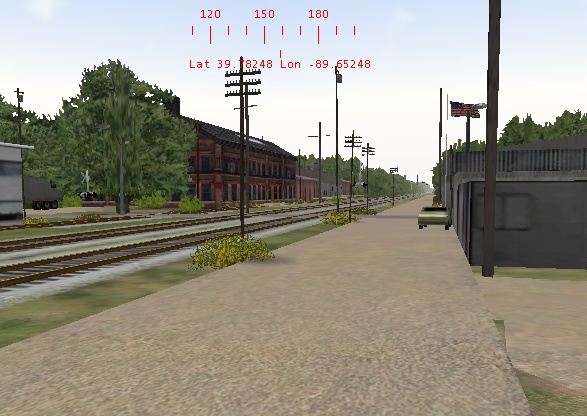
GM&O ROUTE UPDATE 7 screenshots – image 8
http://www.train-sim.com/dcforum/User_files/3d9079a834c18401.jpg

Alert | IP

Printer-friendly page | Edit | Reply | Reply With Quote | Top

RE: GM&O ROUTE UPDATE 7 screenshots, troub, Sep-24-02, 10:54 AM, (1) RE: GM&O ROUTE UPDATE 7 screenshots, Hack, Sep-27-02, 10:57 AM, (20) RE: GM&O ROUTE UPDATE 7 screenshots, GMOF3A, Sep-27-02, 07:14 PM, (24) RE: GM&O ROUTE UPDATE 7 screenshots, Hack, Sep-27-02, 11:27 PM, (25) RE: GM&O ROUTE UPDATE 7 screenshots, Coonskin, Sep-28-02, 01:56 AM, (26) RE: GM&O ROUTE UPDATE 7 screenshots, griffinmt, Sep-28-02, 06:49 PM, (27) RE: GM&O ROUTE UPDATE 7 screenshots, GMOF3A, Sep-29-02, 02:33 PM, (28) RE: GM&O ROUTE UPDATE 7 screenshots, CStevens, Sep-24-02, 11:14 AM, (2) RE: GM&O ROUTE UPDATE 7 screenshots, smmille1, Sep-24-02, 11:17 AM, (3) RE: GM&O ROUTE UPDATE 7 screenshots, DKlemm, Sep-24-02, 12:21 PM, (4) RE: GM&O ROUTE UPDATE 7 screenshots, GMOF3A, Sep-24-02, 05:22 PM, (16) RE: GM&O ROUTE UPDATE 7 screenshots, Coonskin, Sep-24-02, 12:27 PM, (5) RE: GM&O ROUTE UPDATE 7 screenshots, stephenburr, Sep-24-02, 12:47 PM, (6) RE: GM&O ROUTE UPDATE 7 screenshots, GMOF3A, Sep-24-02, 01:21 PM, (8) RE: GM&O ROUTE UPDATE 7 screenshots, stephenburr, Sep-24-02, 04:38 PM, (15) RE: GM&O ROUTE UPDATE 7 screenshots, stephenburr, Sep-27-02, 04:14 PM, (22) RE: GM&O ROUTE UPDATE 7 screenshots, CStevens, Sep-25-02, 10:51 AM, (18) RE: GM&O ROUTE UPDATE 7 screenshots, smmille1, Sep-25-02, 12:18 PM, (19) RE: GM&O ROUTE UPDATE 7 screenshots, griffinmt, Sep-24-02, 01:08 PM, (7) RE: GM&O ROUTE UPDATE 7 screenshots, Coonskin, Sep-24-02, 01:34 PM, (9) RE: GM&O ROUTE UPDATE 7 screenshots, griffinmt, Sep-24-02, 01:43 PM, (10) RE: GM&O ROUTE UPDATE 7 screenshots, Coonskin, Sep-24-02, 02:11 PM, (11) RE: GM&O ROUTE UPDATE 7 screenshots, griffinmt, Sep-24-02, 03:19 PM, (12) RE: GM&O ROUTE UPDATE 7 screenshots, Mark_Blum, Sep-24-02, 04:12 PM, (13) RE: GM&O ROUTE UPDATE 7 screenshots, WabashJae, Sep-24-02, 04:28 PM, (14) RE: GM&O ROUTE UPDATE 7 screenshots, wkuijk, Sep-24-02, 05:53 PM, (17) RE: GM&O ROUTE UPDATE 7 screenshots, nw_fan, Sep-27-02, 01:14 PM, (21) RE: GM&O ROUTE UPDATE 7 screenshots, SD80MAC, Sep-27-02, 05:23 PM, (23) RE: GM&O ROUTE UPDATE 7 screenshots, WabashJae, Sep-29-02, 09:15 PM, (29) RE: GM&O ROUTE UPDATE 7 screenshots, GMOF3A, Sep-29-02, 10:17 PM, (30)

Conferences | Topics | Previous Topic | Next Topic

Charter Member · 1296 posts

RE: GM&O ROUTE UPDATE 7 screenshots

Thanks Paul. When done, it'll be a Phase-I. This is for your road, as well as to fill Andre's needs for a Frisco F3. A few alpha tricks, and you've got an early (GM&O) Phase-II. A bit more work, and a few alpha-tricks or two, and I think you can make the whole line of F3's through the interum F5/F7. Dynamics for any other road will be limited to F3-style slots in the roof, however.GM&O ROUTE UPDATE 7 screenshots – image 12Cheers!
Marc - 3DTrains
http://www.3dtrains.comGM&O ROUTE UPDATE 7 screenshots – image 13Pro Series F-Units

Alert | IP

Printer-friendly page | Edit | Reply | Reply With Quote | Top

Member since Aug-1-02 · 566 posts

RE: GM&O ROUTE UPDATE 7 screenshots

Oh man, that thing is beautiful! Almost makes me want to have a GM&O route stashed on my hard drive.... ALMOST, that is. (No doubt about it, the GM&O had a wonderful mix of 1st generation stuff.)Marc, you have become the F unit KING. Plus, I appreciate your efforts to replicate very ACCURATE F-types for us F-unit Loonies. The state of the art of this hobby just keeps getting more and more fantastic.A Phase 3 F3 is going to look SOOOO good in The Route Of The Coonskin's paint schemes!Andre "Coonskin" Ming

Alert | IP

Printer-friendly page | Edit | Reply | Reply With Quote | Top

Charter Member · 58 posts

RE: GM&O ROUTE UPDATE 7 screenshots

This is excellent work. You have trully created a scene that looks real. Is that track texture in the library? If so, please let me know the name.Carey Stevens
Tulsa, OK

Alert | IP

Printer-friendly page | Edit | Reply | Reply With Quote | Top

Charter Member · 1843 posts

RE: GM&O ROUTE UPDATE 7 screenshots

Awesome Paul. Look forward to adding this to the IC as a branch line!

David Klemm
Illinos & St Louis Divisions
IC Version .9 uploaded

Alert | IP

Printer-friendly page | Edit | Reply | Reply With Quote | Top

Member since Aug-1-02 · 566 posts

RE: GM&O ROUTE UPDATE 7 screenshots

Like I've said in a recent post: Some of you guys are rewriting the book on building believable, realistic looking routes. I hope to SOMEDAY be able to attain even a portion of this level of superb route work. I read with MUCH interest your comment on the 512 x 512 textures.I've been debating that issue myself... even tried a poll question to see what the other fella's are using... but the poll sunk like a rock on the main forum. At this point, the Ft. Smith Sub alpha has the FPS headroom (50-60 FPS at many places) so that it's not an issue on my machine. BUT, I hope to SOMEDAY add details and such so that it appears closer to my remembrances of the actual line. Once that begins, the FPS will start down the tubes. In addition, I would like to be able to share my skins with any/all that are interested, so would like to accomodate the typical end user's needs.Your comments have just tilted the scales in favor of me doing my texture work in 512 x 512.1024 x 1024 x 24 bit looks superb in screen pics and statics... but you actually live with the model moving through the sim enviornment. Seems it's best at this point to live with it in 512 x 512. In my very limited understanding of the MSTS sim world, it appears that 1024's engine textures are somewhat ahead of their time at this juncture in regards to most end user's machines. So, I'll settle for less intensity on the engine's texture and trade it off for increased FPS.Thanks for the wonderful route progress pics. I love viewing your work. Can't get enough. When the time comes for me to start detailing the FS Sub, expect many, many questions from yours truly asking "now, how did you do ..... "Andre "Coonskin" Ming

Alert | IP

Printer-friendly page | Edit | Reply | Reply With Quote | Top

Charter Member · 64 posts

RE: GM&O ROUTE UPDATE 7 screenshots

Paul, this is excellent work. What I'm wondering is, what effect the type of video card is having on those frame rates, i.e. between the 1024 and 512 textures, what are you running it on, so as to get a feel for what a higher end video card will do?I hope I've made myself clear with this question, as I do have a 128 meg video card, and, if I could (as most of the rest of us would), like to run with the more detailed textures. I also am aware that the microprocessor in the computer has an effect on this too!

Alert | IP

Printer-friendly page | Edit | Reply | Reply With Quote | Top

Charter Member · 296 posts

RE: GM&O ROUTE UPDATE 7 screenshots

Well..the system I use with the frame rates i posted are as follows:Spacewalker MB KT 2661.6 gig processor
512 MB SD ram
40gig, (1/4 full) 72 spin HD.
Geforce 3 TI 500 64MB videoWithout a train in the RE..I can get 20 to 25 FPS.
With a short train with all 512 textures, then about 15 FPS.
With 4 GP38's with 1024 textures and a 25 car train in the overhead air view...7 FPS...and jerking the video very bad atr the FPS rate.Now...My textures on most of the objects I've placed are Low in size..and not that many of them placed at that. I'm really at a loss here..never the less..I may just employ the Fairmont Speeder just to buzz up and down on to look at the scenery instead of running trains..LOLSeriously...I think that sharper, less sized loco and car textures need to be investigated. 1024 textures are great for detail!..but they will slow a machine down greatly.I'd be interested to see what a 128 MB vid card does with this route.As for the rusty track..it is in the file lybrary...they are really cool..don't you think?..wish I had came up with the idea...P.

Paul...
www.mstsgmo.com

Alert | IP

Printer-friendly page | Edit | Reply | Reply With Quote | Top

Charter Member · 64 posts

RE: GM&O ROUTE UPDATE 7 screenshots

Thanks for the info Paul. It gives me something to gage by. Right now I'm running a PIII-750 Mhz with 256 MB Ram w/that 128 meg card. The motherboard is crippled as it won't take any more than 256 (supposed to go up beyond 512 SDRAM). I'm getting ready to change boards to a P4 with a PIV-2.53 Ghz and 512 DDR Ram, but getting time to switch it all over is a problem. I can't wait to see how it handles MSTS and some of the other sims when I get it all put together! Like you, I like the more realistic routes if they will work and not overload the computer.

Alert | IP

Printer-friendly page | Edit | Reply | Reply With Quote | Top

Charter Member · 64 posts

RE: GM&O ROUTE UPDATE 7 screenshots

Looks like I'm getting the new computer board installed tomorrow. The I'll load enocell's latest offering of the Newark & Jersy City and see what I get on the frame rates.

Alert | IP

Printer-friendly page | Edit | Reply | Reply With Quote | Top

Charter Member · 58 posts

RE: GM&O ROUTE UPDATE 7 screenshots

Quick question on the Rusty Track texture. Did you start your route with this texture or did you convert to the new texture after the default track texture was laided? Will the install just replace all the default textures that are already there?Carey

Alert | IP

Printer-friendly page | Edit | Reply | Reply With Quote | Top

Charter Member · 322 posts

RE: GM&O ROUTE UPDATE 7 screenshots

Click to send message via ICQ

They're merely texture files, so you can change them at any point - it only changes the appearance of the track, not the functionality. Yes, all track will change. They are route-specific (they go in the route's \textures folder). A clarification: the rails themselves (acleantrack2.ace) are from rusty tracks, but the ties and ballast (acleantrack1.ace) are from smmtrk04.zip

Alert | IP

Printer-friendly page | Edit | Reply | Reply With Quote | Top

Charter Member · 205 posts

RE: GM&O ROUTE UPDATE 7 screenshots

Is this a scene from 'Back to the Future"?
Looks like that car in the first pic is about to 'fly' away.Also, did I detect a fire hydrant in one of those pics? Would love to have one.Martyn T. Griffin
griffinmt@mindspring.com

Alert | IP

Printer-friendly page | Edit | Reply | Reply With Quote | Top

Member since Aug-1-02 · 566 posts

RE: GM&O ROUTE UPDATE 7 screenshots

Re: Floating Cars...I've seen that on other routes! Got one that has some autos and trucks levitating along an Interstate... looks funny. Would like to know a fix though, doesn't do much for the mental "Realism Scale". Andre

Alert | IP

Printer-friendly page | Edit | Reply | Reply With Quote | Top

Charter Member · 205 posts

RE: GM&O ROUTE UPDATE 7 screenshots

For static objects, you can just use F3 and keypad 2/8 to move them down or up.For cars used by the spawner, changing the height in the points section of the .s file should do it. Just change the middle value smaller by the same amount for all points.You may have to alter the bounding box values in the .SD file too.Martyn T. Griffin
griffinmt@mindspring.com

Alert | IP

Printer-friendly page | Edit | Reply | Reply With Quote | Top

Member since Aug-1-02 · 566 posts

RE: GM&O ROUTE UPDATE 7 screenshots

Martyn:Not all the roads on that route have floating cars... is the above a local fix PER road, or does it adjust ALL the settings for ALL the roads on a route?(I'm very RE illiterate, so I'm actually getting way ahead of myself here.)Andre

Alert | IP

Printer-friendly page | Edit | Reply | Reply With Quote | Top

Charter Member · 205 posts

RE: GM&O ROUTE UPDATE 7 screenshots

Adjusting the .S file makes it relative to the terrain level at that point. Given that most default roads are either 0.1 or 0.2 meters above terrain, it would not be unreasonable to expect the same of the cars. However, you will get buried tires if it was made to sit on a 0.1 road but the road is 0.2, and it will 'float' if the other way around.If you have them on a 'concrete' pad that sits even higher, they would have to get raised, and also if you adjust the terrain after placing the car.Martyn T. Griffin
griffinmt@mindspring.com

Alert | IP

Printer-friendly page | Edit | Reply | Reply With Quote | Top

Charter Member · 206 posts

RE: GM&O ROUTE UPDATE 7 screenshots

Hi Paul:Just want to add my congratulations for the artistic scene work. The devil is in the details. I frequently look to your screenshots for ideas about how to "paint" the picture - hopefully I'll have results approaching the quality of your work when I'm done!Mark
A Southern Railway Fan
Building the North Georgia Route
One "Send/Don't Sent" at a time!

Alert | IP

Printer-friendly page | Edit | Reply | Reply With Quote | Top

Charter Member · 632 posts

RE: GM&O ROUTE UPDATE 7 screenshots

GM&O ROUTE UPDATE 7 screenshots – image 16

Holy smokes!!!!I love it. And don't worry about frame rates. Make your equipment as good as it can be. We'll upgrade our systems. By the time you get it released, computer technology will have advanced, prices will have dropped, etc... A small exageration? Possibly. But, probably not too much of one.
GM&O ROUTE UPDATE 7 screenshots – image 17
NORFOLK & WESTERN
Precision TransportationMike Rector
mrector@columbus.rr.com

Alert | IP

Printer-friendly page | Edit | Reply | Reply With Quote | Top

Charter Member · 1207 posts

RE: GM&O ROUTE UPDATE 7 screenshots

Lookin good Paul!I'm quite impressed with the "Realism"of the scenery.I for one am not that concerned about frame rates,detail is it for me.You've done a excellent job so far,can't wait for the finished product!I like what you've done with the arrangment of the houses...cool.

Alert | IP

Printer-friendly page | Edit | Reply | Reply With Quote | Top

Charter Member · 214 posts

RE: GM&O ROUTE UPDATE 7 screenshots

Paul, don't mean to "steal your thunder" or anything but...I thought you might like to see a few progress pics of the A&S
GM&O ROUTE UPDATE 7 screenshots – image 18
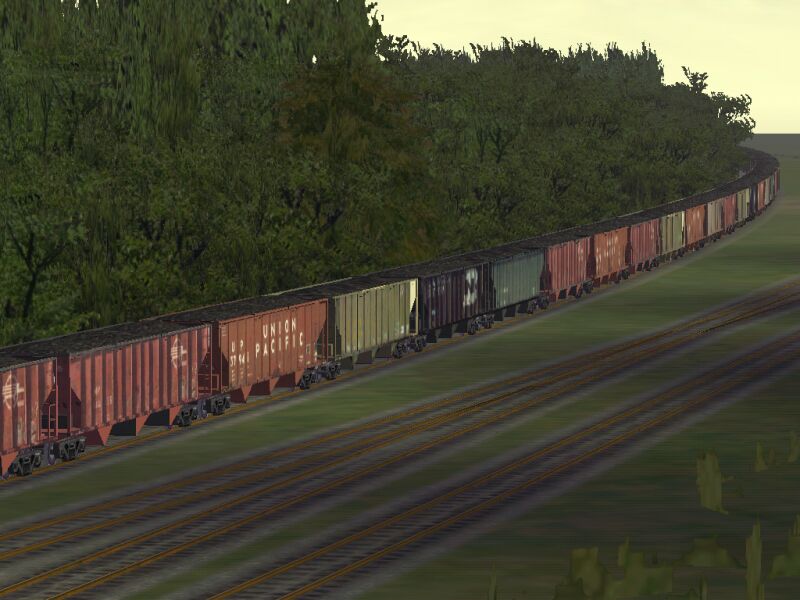
UP coal on the "old" GM&O
GM&O ROUTE UPDATE 7 screenshots – image 19
A&S Mitchell Yard
GM&O ROUTE UPDATE 7 screenshots – image 20
NS action near Lenox Tower
GM&O ROUTE UPDATE 7 screenshots – image 21
Not as much progress as your route but its getting there-
Jae

Alert | IP

Printer-friendly page | Edit | Reply | Reply With Quote | Top

Charter Member · 296 posts

RE: GM&O ROUTE UPDATE 7 screenshots

OH My Gosh Jae...you stole the thunder!...Man -oh- man..that looks JUST LIKE Lennox!..You are planning on us linking up are you not???

Paul...
www.mstsgmo.com

Alert | IP


[ Home | MSTS Forum | MSTS FAQ | File Library ] Copyright © 2002 by Nels Anderson. All Rights Reserved.

Restored from the Train-Sim.Com archive, captured October 2, 2002. About this archive.