Train-Sim.Com
MSTS Route Design

Add-on objects with night textures

Notice to all visitors and members of the Train-Sim.Com message forums:
If you plan on using a signature banner in your posts, we would like to remind you that there is a maximum size for banners. That maximum is 450 pixels wide by 120 pixels high, and not to exceed 25k. Your compliance is appreciated. FORUM RULES Problems? There are two common reasons for problems with logging in and posting messages. The first is that you are running a firewall that prevents your messages from being sent to the server. The other is that you have cookies disabled; the DCForum software requires cookies to work properly.

Previous Topic | Next Topic

Printer-friendly copy Email this topic to a friend

Reading Topic #5862

Charter Member · 2850 posts

Somebody discovered a bug in the way trainsim processes the ESD_Alternative_Texture ( 256 ) when you make an object that has a night texture but no snow texture. These errors are starting to show up in routes now, and the silly game is looking for snow textures in \Global, obviously not finding them there, and returning error messages or crashing.
Best way for all you 3D object designers is to never use ESD 256, if you want a night texture for your object, make a snow texture too and use ESD_Alternative_Texture ( 257 ) instead.
For route developers using the existing add-on objects, there are two ways to fix the ones with the bug. Either edit the SD file to change the ESD_Alternative_Texture ( 256 ) to ESD_Alternative_Texture ( 0 ) and eliminate the night texture, or if you like and want to use the night texture, change it to ESD_Alternative_Texture ( 257 ). That will make it look for a snow texture in the proper place instead of looking for it in the \Global folder, but of course then you need a snow texture. Some objects might look kind of odd walking in a winter wonderland with no snow on them, but the simplest way is to copy the base texture to the \Textures\Snow folder. If you're ambitious and want to use TGAtool2 to make an actual snow texture knock yourself out, but since this bug is pervasive, you pretty much have to think night texture = include snow texture or suffer the errors. Here's a sample batch, copy the text into notepad, or add it to your install batch file at the end, replacing "replaceme.ace" with the actual name of the ace file.
call copy .\textures\replaceme.ace .\textures\snow\replaceme.aceAnother thing that pops up a lot is vegetation, that usually defaults to ESD_Alternative_Texture ( 252 ), and any forest region automatically uses ESD 252. That will look for the ace filename in all the \Textures subfolders except night. If you want to fix one that has 252 and don't include all the seasonal textures, or use one as a forest region object, copying the base texture to \textures\spring\ and \textures\autumn\, then looking for a similar shaped bush or tree and stealing the winter and snow textures from that works OK. Here's an example from the aspen tree, I looked at the winter and snow textures for some of the defaults, and tree7.ace was pretty close to the same shape: call copy .\textures\Aspen-1.ace .\textures\spring\Aspen-1.ace
call copy .\textures\Aspen-1.ace .\textures\autumn\Aspen-1.ace
call copy .\textures\winter\tree7.ace .\textures\winter\Aspen-1.ace
call copy .\textures\wintersnow\tree7.ace .\textures\wintersnow\Aspen-1.ace
call copy .\textures\snow\tree7.ace .\textures\snow\Aspen-1.ace
call copy .\textures\autumnsnow\tree7.ace .\textures\autumnsnow\Aspen-1.ace
call copy .\textures\springsnow\tree7.ace .\textures\springsnow\Aspen-1.aceBasically what that does is makes a new copy of tree7.ace in the seasonal subfolders, giving it a new name of Aspen-1.ace, so I don't have to include it in the zipfile.Terrain textures sometimes get this problem too, there's a default one in \USA2\Terrtex, US2mount1.ace, which has no snow texture and will cause errors if used. US2forest.ace is a pretty close match, so I steal the US2forest.ace texture for US2mount1.ace:call copy .\terrtex\snow\us2forest.ace .\terrtex\snow\us2mount1.aceDiscussions, suggestions, flamewars?

Alert | IP

Printer-friendly page | Edit | Reply | Reply With Quote | Top

RE: Add-on objects with night textures., Tree Frog, Aug-01-02, 11:33 AM, (1) RE: Add-on objects with night textures., dvdhoven, Aug-01-02, 12:42 PM, (2) RE: Add-on objects with night textures., sniper297, Aug-01-02, 01:36 PM, (3) RE: Add-on objects with night textures., atsfdude, Aug-01-02, 02:52 PM, (4) RE: Add-on objects with night textures., robertreedy, Aug-01-02, 03:48 PM, (5) RE: Add-on objects with night textures., atsfdude, Aug-01-02, 06:02 PM, (7) RE: Add-on objects with night textures., sniper297, Aug-01-02, 07:17 PM, (9) RE: Add-on objects with night textures., sniper297, Aug-01-02, 04:05 PM, (6) RE: Add-on objects with night textures., robertreedy, Aug-01-02, 06:17 PM, (8) RE: Add-on objects with night textures., sniper297, Aug-01-02, 08:09 PM, (10) RE: Add-on objects with night textures., robertreedy, Aug-01-02, 09:52 PM, (11) RE: Add-on objects with night textures., sniper297, Aug-02-02, 00:57 AM, (12) RE: Add-on objects with night textures., robertreedy, Aug-02-02, 01:28 AM, (13) RE: Add-on objects with night textures., Hobart, Aug-05-02, 00:40 AM, (14)

Conferences | Topics | Previous Topic | Next Topic

Member since Jun-26-02 · 145 posts

RE: Add-on objects with night textures.

What is your suggestion for those of us with tropical routes that do not have any snow folders? Can we still use 257 to avoid the bug?Bill Burnett

Alert | IP

Printer-friendly page | Edit | Reply | Reply With Quote | Top

Charter Member · 1158 posts

RE: Add-on objects with night textures.

Hi,Yes Bill, just in case some idiot likes it to drive your great route in winter. And then MSTS gives nasty messages and that idiot send nasty messages to you.Jim, another good tutorial of you. Well explained. I hope that Australian guy will put this one in his tutorial pages.Dick van den HovenAdd-on objects with night textures – image 1

Alert | IP

Printer-friendly page | Edit | Reply | Reply With Quote | Top

Charter Member · 2850 posts

RE: Add-on objects with night textures.

LAST EDITED ON Aug-01-02 AT 01:59 PM (EDT)

Yeah, it's kind of crazy, you go thru all that creative agony to make something beautiful, and some of these guys wanna cover it with snow!
Hee-hee, I dunno about Seaview, I still think you got the best idea for that, toss a warning in the readme that it's a tropical route, so only drive it in the summer or Mother Nature will be pissed off, and the coconut god will put a curse on you!
If you really want to go thru the tedium just to keep a few idiots from crashing their computers, you could do all that. Open up the SD files for the add-on objects, anything with an ESD 256 that has a good looking night texture, change it to 257, then add the lines at the end of the installme.bat to copy the base texture into the \Snow folder. (If you don't like the night texture, just change the ESD to 0, then it only looks for the base texture no matter what time or weather they choose.) You'd have to include an empty \textures\snow folder, Xcopy32 with the /s switch will create the destination folder if it don't already exist, but the plain vanilla DOS copy command for single files will just return a "file or folder not found, 0 files copied" message.Forest regions are a different can of worms, since they default to 252 there needs to be one copy of the ace file in all the seasonal subfolders except night. So if you didn't want them getting error messages on the veggies if they took it into their heads to explore route in the springtime with snow, you'd need to copy the base texture into all the subfolders for every different type of forest region on the route. Again you'd have to include all the empty subfolders, since the copy command won't create them.call copy .\textures\TreeTropical.ace .\textures\spring\TreeTropical.ace
call copy .\textures\TreeTropical.ace .\textures\autumn\TreeTropical.ace
call copy .\textures\TreeTropical.ace .\textures\winter\TreeTropical.ace
call copy .\textures\TreeTropical.ace .\textures\wintersnow\TreeTropical.ace
call copy .\textures\TreeTropical.ace .\textures\snow\TreeTropical.ace
call copy .\textures\TreeTropical.ace .\textures\autumnsnow\TreeTropical.ace
call copy .\textures\TreeTropical.ace .\textures\springsnow\TreeTropical.aceThat particular format would copy the base texture to all the seasonal subfolders, so no matter when they chose to explore route they would get the summertime look. Makes it seem kind of pointless, if the route looks exactly the same in all seasons, why drive it in different seasons, but it would keep the error messages and crashes from popping up.
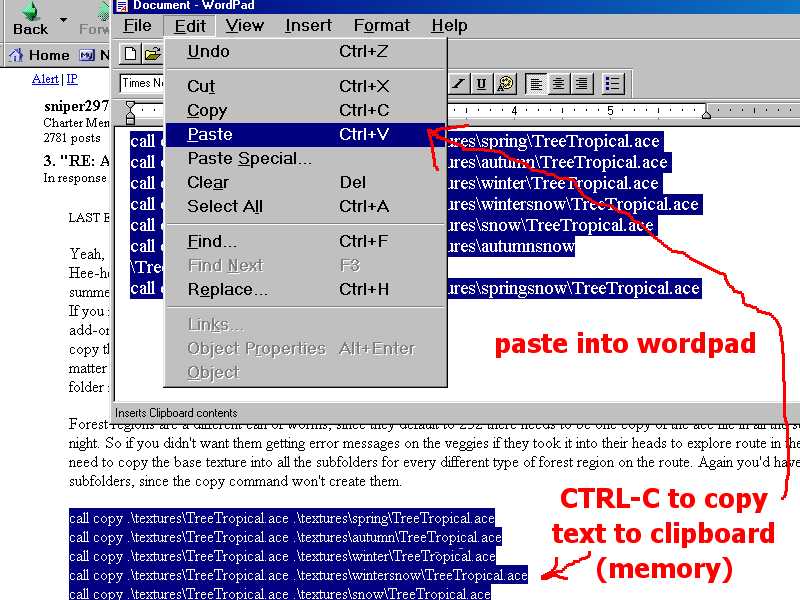
Quick tip for editing these, you have forest regions with TreeTropical.ace, Palm1.ace, and Palmetto.ace or something, just copy all that text into a new wordpad doc, do a edit, replace, and replace the one ace file name with the new one. Then copy the whole block of text, switch to the batch file you have open in notepad, and paste the entire block in. Switch back to the wordpad, change the ace file names to the next ones, copy all the text, switch back to notepad and paste, curse at the idiots who insist on running routes in anything but summer sunshine, repeat until done or repeat until psychotic.
Oh, almost forgot, the snowy terrtex. To have the same terrain texture regardless of season, include an empty \Terrtex\Snow folder, add lines like this:call copy .\terrtex\poppies.ace .\terrtex\snow\poppies.ace
call copy .\terrtex\gladiolas.ace .\terrtex\snow\gladiolas.ace
call copy .\terrtex\Daisies.ace .\terrtex\snow\Daisies.ace
call copy .\terrtex\tulips.ace .\terrtex\snow\tulips.aceand so on.

Attachments
Add-on objects with night textures – image 2
http://www.train-sim.com/dcforum/User_files/3d49717d03e8c64a.jpg

Alert | IP

Printer-friendly page | Edit | Reply | Reply With Quote | Top

Charter Member · 360 posts

RE: Add-on objects with night textures.

Sniper, Thanks for the information. I will do this for the building that are in the planning stages and will also attempt to redo all the existing buildings I have done to correct this issue. (Oh Nels.. I may have a bunch of files to replace.)
Thats why you are the Coconut God. (as I bow done i to you and your knowledge.)Add-on objects with night textures – image 3
-- John Tackett --

Alert | IP

Printer-friendly page | Edit | Reply | Reply With Quote | Top

Charter Member · 209 posts

RE: Add-on objects with night textures.

Click to send message via ICQ

Sniper, it's a funny thing, unless I don't understand the editing of the shape file .. I had put all of Johns textures in all of the winter type folders originally, and kept getting a message about the global\textures folder until I finally put his, some ic's and dkb's and the aspen's and a couple of others in there. Only then did the errors cease to come. Does the editing then take care of this problem.And Mr. John ATSFDUDE Tackett, do NOT take the above as a criticsm. I love your work .. every trip across KS & CO we're looking for the 'Southern Heritage' places to visit. It gives an extremely homey-type atmosphere to the entire project.RobertR

Alert | IP

Printer-friendly page | Edit | Reply | Reply With Quote | Top

Charter Member · 360 posts

RE: Add-on objects with night textures.

None taken, we had this problem earlier and thought it was fixed. We are all learning the little quirks of MSTS.Add-on objects with night textures – image 4
-- John Tackett --

Alert | IP

Printer-friendly page | Edit | Reply | Reply With Quote | Top

Charter Member · 2850 posts

RE: Add-on objects with night textures.

That's exactly what I tried Robert, and had the same result. Then later somebody (I think it was Dick) pointed out that the ESD 256 code was buggy and would cause that. I don't like the idea of copying anything into the \Global folder unless it's absolutely necessary, and in this case it shouldn't be necessary, it's just one more bug in the program. My own personal opinion, altho you can "fix" (actually work around the bug) it by copying the tex file into the global folder, changing to ESD 257 and copying it into the \Textures\Snow folder is simpler to do, and probably less likely to cause other problems down the road.

Alert | IP

Printer-friendly page | Edit | Reply | Reply With Quote | Top

Charter Member · 2850 posts

RE: Add-on objects with night textures.

Yeah, spray paint the little beggars white. The whole idea of it was that ESD 1 is base plus snow only, ESD 257 is base + snow + night, ESD 256 is SUPPOSED to give you base + night without having to do snow. My thinking is that if the blasted thing is gonna look for a snow texture anyway, and look for it in the wrong directory to boot, there's no point in even using ESD 256, might as well use 257. When I was initially screwing around with the restaurants trying to do a snow texture (my talents apparently don't go that way!) I started with the night texture as a base (thinking that in snowy gloomy weather most places have the lights turned on), but the building exteriors were too dark. Take the daytime texture, turn the gamma down one notch, copy and paste the windows and lights from the night texture into that, then spray some snow on it? How do people get textured snow, anyway, mine comes out looking like white spray paint!Well, anyway, same route found some more errors, apparently it uses the original unfinished Jim Steven SD files instead of the ones Dick fixed, so it's looking for non-existant snow textures for the two burnt Japanese buildings. US2bush1fire.ace is also missing the seasonal textures, as I recall that was "fixed" in the SD file, but if it's used as a forest object it defaults to 252 and looks for the texture in the seasonal subfolders. Naturally I can't resist fixing that, which gives me an itch to do another tutorial! (Chorus of groans)
Since a burnt shrub is gonna look the same in all seasons, I click and drag over the text I posted for BillyFrog's tropics example, hit CTRL-C, and open a new wordpad document and paste in the text.
Add-on objects with night textures – image 5
Next I click on edit, replace, type the name of the old file in the top box, and the new file in the bottom box.
Add-on objects with night textures – image 6
Click on the replace all button, no need to wave the magic wand, hocus pocus all the entries are changed.
Add-on objects with night textures – image 7

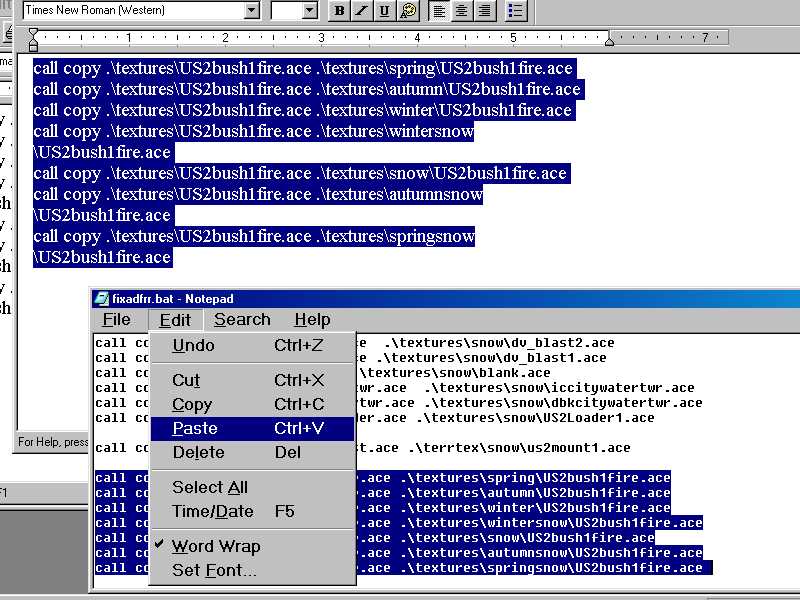
If the oriiginal worked correctly, the replacement will too, the god of syntax errors is cheated once again.Selecting and copying the new text, I open my previous patch batch and paste it in at the bottom, then save the .bat file.
Add-on objects with night textures – image 8
Now all I gotta do is see what other errors are in this thing, do the same type of process as above, and zip the batty little thing and upload it.

Alert | IP

Printer-friendly page | Edit | Reply | Reply With Quote | Top

Charter Member · 209 posts

RE: Add-on objects with night textures.

Click to send message via ICQ

Sniper, I have a GREAT IDEA. Use my route for your tutorial and we'll kill two birds with one stone Sorry, I couldn't resist that, it was just too much!I think those bushes were the first error I had when running winter and winter/snow, so maybe that should be it.As I said in the readme (whoever reads them anyway?), I had not even run spring or autumn yet, so that's another can of worms.I'm going to have to leave for awhile to digest this one though. You all went over my head awfully quick RobertR

Alert | IP

Printer-friendly page | Edit | Reply | Reply With Quote | Top

Charter Member · 2850 posts

RE: Add-on objects with night textures.

LAST EDITED ON Aug-01-02 AT 08:12 PM (EDT)

Hey, I just saw this second post by you, we're gonna turn this into one of those nutty threads that go on forever! Where's Rich Garber hiding? Need to get him in here talking about fresh pineapples! Hear the joke about the ceiling? Forget it, IT"S OVER YOUR HEAD!
Hee-hee, spring and autumn ain't tough, those are both 252 only ESD codes. Here's a list of the alternative texture numbers you'll see in the SD files:ESD_Alternative_Texture ( 0 ) = No alternative texture, base texture only, ace file in \Textures only. Always uses summer daytime texture.ESD_Alternative_Texture ( 1 ) = Base plus snow, ace file in \Textures and \Textures\Snow. Any time snow is turned on, regardless of season, the sim looks for the alternative snow covered texture. ESD_Alternative_Texture ( 252 ) = Base plus all seasons, ace file in:
\Textures
\Textures\Snow
\Textures\Spring
\Textures\Autumn
\Textures\Springsnow
\Textures\Autumnsnow
\Textures\Winter
\Textures\Wintersnow.This one it looks at the season that's chosen plus the weather, if you're running in spring, clear or spring, rain it goes to \Textures\Spring, if you choose spring, weather snow, it goes to \Textures\Springsnow for the spring colored snow covered texture.ESD_Alternative_Texture ( 256 ) = base plus night, ace file in \Textures and \Textures night. This is the one with the bug, running the route on a snowy day causes it to look for a snow texture in global when it should be ignoring the weather and going with either the day or the night texture depending on the time. (moonrise and moonset in the .env file, I think)ESD_Alternative_Texture ( 257 ) = base plus night OR snow, ace file in:
\Textures
\Textures\Snow
Textures\Night.
There's no \Nightsnow category, so it has to make a choice of one or the other, and as near as I can tell it prioritizes the night texture; if it's snowing at night it has to choose either night or snow and it chooses night. That's not always apparent, since snow reduces the visibility the lighted buildings don't appear to be lit up until you get real close.

Alert | IP

Printer-friendly page | Edit | Reply | Reply With Quote | Top

Charter Member · 209 posts

RE: Add-on objects with night textures.

Click to send message via ICQ

He has some pineapples in another thread I think btw, did you get the milk?Seriously, I think I'm through for the night. I just wish I had known all of this earlier - I know, why didn't I ask -, because I think some of the seasonal folders could have been smaller, since I copied a lot of files into them until the error messages quit coming. However, as you pointed out, some of them were neeeded anyway.Thanks again for everything. This route is going to make it yet: RobertR

Alert | IP

Printer-friendly page | Edit | Reply | Reply With Quote | Top

Charter Member · 2850 posts

RE: Add-on objects with night textures.

Yeah, no problem, once all the beta testers get all the errors hunted down, it's a simple matter of uploading a final patch for it. From what I've seen it's a real good looking route, so it'll be worth the effort.
I suspect the crash the one guy is talking about is the DVblastfurnace, if Rich don't still have the patch I made for it on the first bodiddly I'll see if I can find it on my disk. I'm waiting to hear back from him on his system specs.

Alert | IP

Printer-friendly page | Edit | Reply | Reply With Quote | Top

Charter Member · 209 posts

RE: Add-on objects with night textures.

Click to send message via ICQ

Coming from the top coconut and someone of your stature that second sentence makes all the hassle worth it.Thank you, sir!RobertR

Alert | IP

Printer-friendly page | Edit | Reply | Reply With Quote | Top

Charter Member · 325 posts

RE: Add-on objects with night textures.

Thanks Sniper. My route only has snow falling in the mountains, so my plan was to eliminate it altogether but thanks to this bug I'm going to include snow textures. Took me four hours to eliminate the crashes discovered when I created a snowy activity. If you use PSP 7 to tweak textures, you can make a reasonable snow texture real quick by using the "color replacer" tool(see pic). Set the foreground color to white and the background color is set to any pixel in the image you choose(the eye dropper thingy, left click sets fore, right click sets background). Select the color replacer, and go to the tool options window, the find the tolerance and set to about 12 or so. Then just double click and you have snow. If you want more snow increase the tolerance. Best Regards
Hobart

Attachments
Add-on objects with night textures – image 9
http://www.train-sim.com/dcforum/User_files/3d4e017f27f42d34.jpg

Alert | IP


[ Home | MSTS Forum | MSTS FAQ | File Library ] Copyright © 2002 by Nels Anderson. All Rights Reserved.

Restored from the Train-Sim.Com archive, captured August 21, 2002. About this archive.