Notice to all visitors and members of the Train-Sim.Com message forums: If you plan on using a signature banner in your posts, we would like to remind you that there is a maximum size for banners. That maximum is 450 pixels wide by 120 pixels high, and not to exceed 25k. Your compliance is appreciated. FORUM RULES Problems? There are two common reasons for problems with logging in and posting messages. The first is that you are running a firewall that prevents your messages from being sent to the server. The other is that you have cookies disabled; the DCForum software requires cookies to work properly.
Help! I have the CI flashing light level crossings and I have found that once set down, and deselected, that there I am not able to reselect them. Is anyone else having this problem? I am not sure if this is a bounding box thing, or what can I potentially adjust that would allow me to use these cool level crossings. Any help would be appreciated.ThanksMark
The reselection process is quite tricky...If you're talking about the flasher base w/ gate, you have to select it on the pole on the gate-side of the base. Move your mouse slowly until you get it.If you need more help, I'll be glad to show some screenshots to help.------------------------------------------------------------I'll never let go of the railroad that inspired me to involved with trains, the Union Pacific!
Another way that sometimes does the trick, is to go underground! Hit the / key, and the camera can go below the surface, sometimes, the only way I've been able to select things, especially around crossings, is from below.
Hi there Mark,Which items are you having difficulty in selecting? For me, the bases w/ gates appear to be the most difficult to select. As Bruce Bridges mentioned in the given readme file, you may have to try different angles in order for the mouse to highlight a particular crossing object.. Steve T. has a good suggestion here as well.. Here's what works well for me:Move the camera to the opposite side of the barrier itself.. This is the camera view:For me, the object is most easily highlighted from this angle.. This angle also works well when trying to highlight the cantilevers..Hope that helps.. cdntrains"must be trains in the blood" gifs by Chris Denbow
I will give it a try and see if this works, I have not had much luck so far. I may fiddle around with the bounding box to see if the size of the "sweet spot" can be increased. I'm backed up. =) I appreciate all the help that I have gotten here. As soon as I adjust them for size, I will upload some captures from the route that I am building. I hope to be able to upload it in the next couple of months. Still have about 100 miles of track to put down...Mark



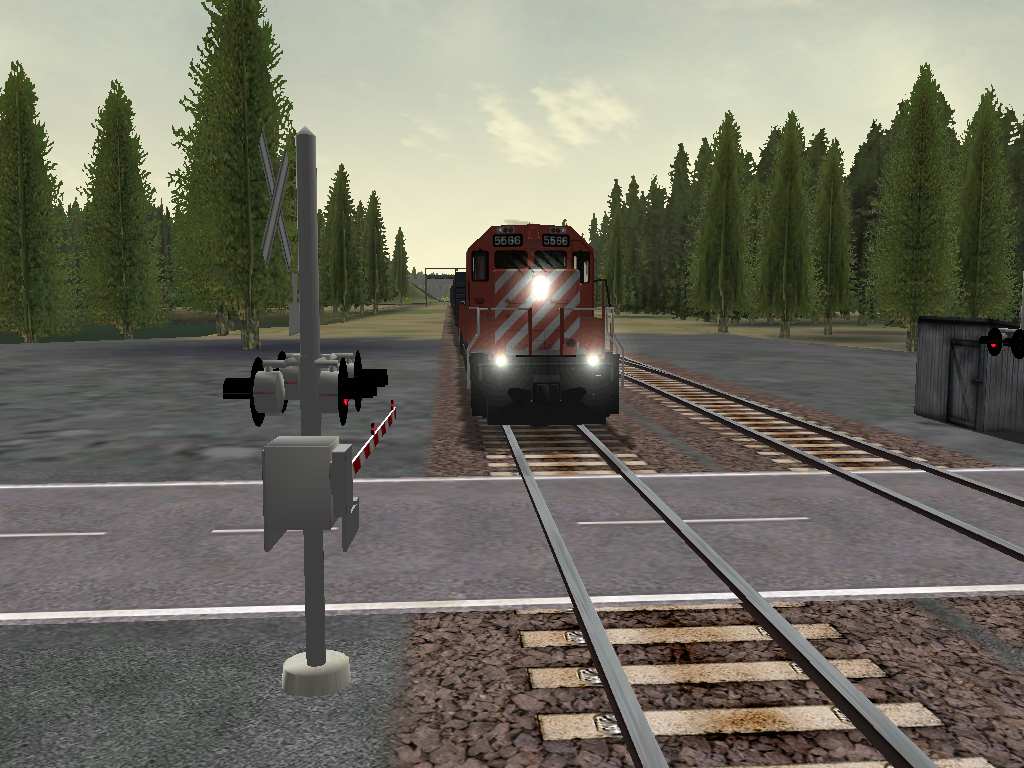 For me, the object is most easily highlighted from this angle.. This angle also works well when trying to highlight the cantilevers..Hope that helps.. cdntrains