Message Areas - "L2 getting worst"
Train-Sim.Com Message Areas
"L2 getting worst"
Email this topic to a friend
Printer-friendly version of this topic
Bookmark this topic (Registered users only)
Previous Topic | Next Topic Conferences MSTS Route Design (Protected) Original message
bvecrazy (135 posts)
May-11-02, 02:47 PM (EDT) "L2 getting worst" after re-installing my system, downloasind L2 again. I done all the instructions, put data into envfiles, re-placed tsection (backed up original one) ran 'runL2.bat', start MSTS and i get 'send report to microsoft' error message!Whats wrong with this cool route,
Couldn't it hae been made esier??James. Alert Edit | Reply | Reply With Quote | Top
Table of Contents
Subject Author Message Date ID RE: L2 getting worst OwainGlyndwr May-11-02 1 RE: L2 getting worst bvecrazy May-12-02 2 RE: L2 getting worst OwainGlyndwr May-12-02 3 RE: L2 getting worst sniper297 May-12-02 4 RE: L2 getting worst OwainGlyndwr May-12-02 5 RE: L2 getting worst bvecrazy May-13-02 6 RE: L2 getting worst sniper297 May-13-02 7 RE: L2 getting worst davidbeach May-13-02 8 RE: L2 getting worst OwainGlyndwr May-14-02 9 RE: L2 getting worst stnelson9 May-15-02 10 RE: L2 getting worst ccyko May-15-02 11 RE: L2 getting worst ccyko May-15-02 12 RE: L2 getting worst sniper297 May-15-02 13 RE: L2 getting worst stnelson9 May-16-02 14 RE: L2 getting worst stnelson9 May-16-02 15 RE: L2 getting worst stnelson9 May-16-02 16 RE: L2 getting worst sniper297 May-17-02 17 RE: L2 getting worst stnelson9 May-17-02 18 RE: L2 getting worst stnelson9 May-17-02 19 RE: L2 getting worst ccyko May-17-02 20
Lobby | Topics | Previous Topic | Next Topic
Messages in this topic
OwainGlyndwr (108 posts)
May-11-02, 06:53 PM (EDT) 1. "RE: L2 getting worst" Same here ,ive tried installing it 5 or 6 times.Msts starts and crashes,microsoft message of death,end of story. cheers,
O.G Remove | Alert Edit | Reply | Reply With Quote | Top
bvecrazy (135 posts)
May-12-02, 05:43 AM (EDT) 2. "RE: L2 getting worst" It was the tsection, i replaced it and it caused an error, looks like its been done wrong.James. Remove | Alert Edit | Reply | Reply With Quote | Top
OwainGlyndwr (108 posts)
May-12-02, 05:56 AM (EDT) 3. "RE: L2 getting worst" I have tried both the latest universal tsection.dat files with the route,it crashes with both.
regards,
O.G Remove | Alert Edit | Reply | Reply With Quote | Top
sniper297 (2238 posts)
May-12-02, 01:27 PM (EDT) 4. "RE: L2 getting worst" Guys, guys, I know it's confusing, but it's not that complicated.
"I done all the instructions, put data into envfiles, re-placed tsection (backed up original one) ran 'runL2.bat', start MSTS and i get 'send report to microsoft' error message!"If you followed the instructions you shouldn't have to "put data into envfiles" or replace the tsection.dat file, the install.bat does that automatically. Where you may be confused, you have to get everything into the \Routes folder and run install.bat from the \routes folder, and all the files and folders from the zip have to go into \routes.
I know it goes fast, but watch the DOS box for error messages like "file not found, zero files copied", if you see that something is wrong.
"I have tried both the latest universal tsection.dat files with the route,it crashes with both."
Yes. Chris has been working on custom track sections with the outside third rail for a long time, most of his work predates Xtracks so it's not compatible. If you have another route based on Xtracks in the \routes folder, the sim won't load while the L2 tsection.dat is active, which is what RunL2.bat does. That includes enocell's Hoboken Shore routes, and a beta I just got from somebody else did the same thing. What I did was make a backup folder outside the train simulator folder, and moved the \USA_HBS folder to the backup folder so I could run L2. I just got a beta copy of another Xtracks route in the mail yesterday, and I had to move the \L2 folder to the backup before the new route would run, since there's some kind of conflict in the other direction with the new route.Chris is working with Okrasa on these issues, so if you still can't get it to run I would advise downloading the original L1 route (search for l1_0_6d.zip in the file library), and play with that while you're waiting for the problems to be fixed in the next version.
Remove | Alert Edit | Reply | Reply With Quote | Top
OwainGlyndwr (108 posts)
May-12-02, 02:52 PM (EDT) 5. "RE: L2 getting worst" I installed it as per intructions,dood.The install batch file was
in the \Routes folder ,not in the L2 folder.But i will leave it now till the problems are resolved as you recommend.regards,
O.G. Remove | Alert Edit | Reply | Reply With Quote | Top
bvecrazy (135 posts)
May-13-02, 11:26 AM (EDT) 6. "RE: L2 getting worst" so basicly everything in the L2 folder goes to:
C:\WINDOWS\Program files\microsoft games\Train simulator\Routesyes?thanks alot,
James. Remove | Alert Edit | Reply | Reply With Quote | Top
sniper297 (2238 posts)
May-13-02, 12:32 PM (EDT) 7. "RE: L2 getting worst" You got it.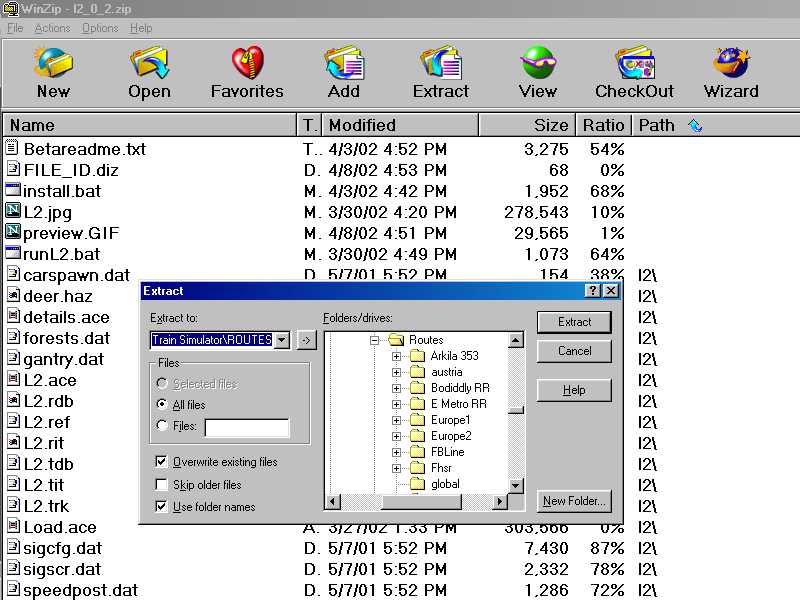
That's where a lot of this stuff gets confusing, everyone has different extraction utilities, and even people who have winzip all have it set up different ways, sometimes with the wizard, sometimes defaults to extracting to another folder, "\Unzipped" or "\Temp" or "\Windows\Temp" or even right to the desktop, and then you gotta move it to the right place. If your unzipper has the option, extracting right to \Train Simulator\Routes works best for the L2 route. Notice in the above picture that the first six files, including the two batch files, do not have a stored path folder. So doing it that way gets it right to \routes. This don't work for all routes, the bodiddly (Ohio & West Virginia) for example, has the stored path "\Routes\Bodiddly", so it has to be extracted or moved to the root of \Train Simulator or you end up with \Train Simulator\Routes\Routes\Bodiddly, which don't work. Sometimes the developer stores the whole path, so if you extract it to \Train Simulator\Routes you get "C:\Program Files\Train Simulator\Routes\Program Files\Train Simulator\Routes\RouteName", and you have to cut the \RouteName folder (whatever it's called) out of there and paste it into \Routes before it will work.
Sometimes it's necessary to check for that, you get a folder buried in a folder, and it has to be moved. Easiest way is to look at the RouteName folder and see if it has all the usual folders like \Activities in it, or another subfolder that has them instead.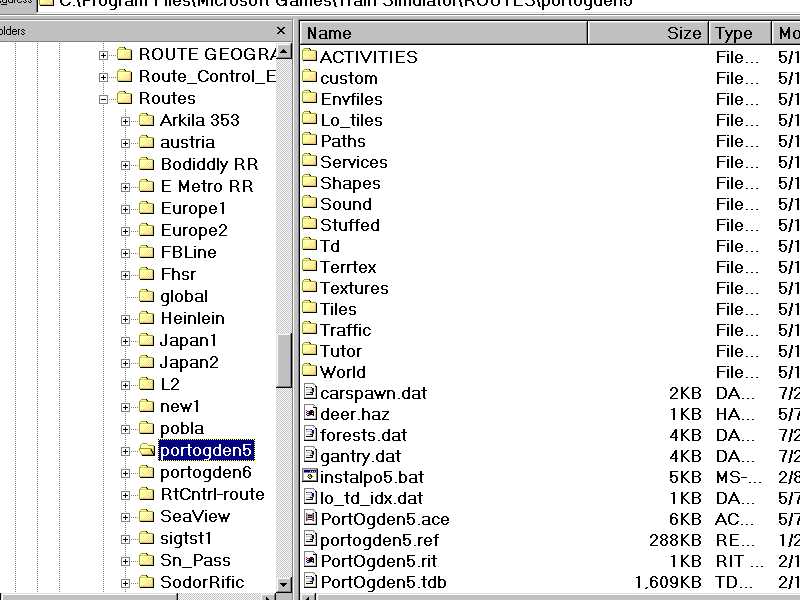 BTW, don't forget the l2_02_p1.zip, that patches some missing textures. And remember it's incompatible with Hoboken at present.
Again, if all else fails, get the 0.1 version ( l1_0_6d.zip). The L2 is difficult because Chris is using custom track, tunnel, and structure sections that actually look like the Chicago El & subway in this version, but I live next to the Lake St El and I think he did a masterful job of faking it in the first version, even tho none of the objects he had to work with resembled anything in Chicago.
Remove | Alert Edit | Reply | Reply With Quote | Top
davidbeach (141 posts)
May-13-02, 09:26 PM (EDT) 8. "RE: L2 getting worst" If you want to use L2 with the standardized \global\tsection.dat file you have to use the build 00001G version, file name tsection00001g.dat, instructions in the readme.The fork of the road that Chris took with the L2 beta turns out to be a dead end. His next version will work with the standardized \global\tsection.dat file. - but a build that doesn't exist yet.David Beach. Remove | Alert Edit | Reply | Reply With Quote | Top
OwainGlyndwr (108 posts)
May-14-02, 07:54 AM (EDT) 9. "RE: L2 getting worst" Did that,David.Still no luck. regards,
O.G. Remove | Alert Edit | Reply | Reply With Quote | Top
stnelson9 (6 posts)
May-15-02, 09:40 PM (EDT) 10. "RE: L2 getting worst" I just tried installing myself... The L2 directory does end up in the routes directory, the runL2.bat file at the same level, correct??? I ran runL2.bat, minimized the screen, ran TS, saw the route at the top. Clicked ok (on all three choices, explore, north, south).... The screen clears, the first set of yellow bars appear in the lower left... The screen goes back to windows with the error box:Train World Initialization Failed...Click ok, alt-tab back to TS and it is back to the main screen... AAny ideas on how to fix??? Remove | Alert Edit | Reply | Reply With Quote | Top
ccyko (480 posts)
May-15-02, 10:10 PM (EDT) 11. "RE: L2 getting worst" You did not run the install.bat file first before running the L2.bat file. If it would have gotten past the train world init failed, you would have gotten a great deal of other error messages. All the things that come with L2 are either packaged in different folders in the L2 route or are in the default routes, the install.bat arranges the files to where they need to be.-Chris
Chicago-L Remove | Alert Edit | Reply | Reply With Quote | Top
ccyko (480 posts)
May-15-02, 10:12 PM (EDT) 12. "RE: L2 getting worst" Also, small note: I hate the title of this thread, I'm afraid it may be scaring people away from the route, and it's not grammatically correct. Could we at least keep negative feedback inside the thread?-Chris
Chicago-L Remove | Alert Edit | Reply | Reply With Quote | Top
sniper297 (2238 posts)
May-15-02, 10:21 PM (EDT) 13. "RE: L2 getting worst" Train World Initialization Failed = missing/corrupted \Textures\Acleantrack1.ace (ballast & crossties) or Acleantrack2.ace (rails). This one is tough, since Chris had problems getting it to load without putting the textures in \global, which is not the way tracks normally work. Usually the .s file for the track section is in \global\shapes, and it calls for Acleantrack 1 & 2 from the \textures folder in the route, but as David said, Chris went back to the drawing board due to the difficulties involved with these 3rd rail tracks. The install.bat for L2 is supposed to copy a 1,413 kb Acleantrack1.ace and a 6 kb Acleantrack2.ace, along with some tunnel sections, to \Global\Textures. If those files are there, I dunno what to tell you other than wait for the next version. Did I mention backing up your default \Global folder before attempting to install L2, Hoboken Shore, or any other future routes based on Xtracks or custom track sections?
Remove | Alert Edit | Reply | Reply With Quote | Top
stnelson9 (6 posts)
May-16-02, 09:52 PM (EDT) 14. "RE: L2 getting worst" >Train World Initialization Failed = missing/corrupted
>\Textures\Acleantrack1.ace (ballast & crossties) or
>Acleantrack2.ace (rails). This one is
>tough, since Chris had problems
>getting it to load without
>putting the textures in \global,
>which is not the way
>tracks normally work. Usually the
>.s file for the track
>section is in \global\shapes, and
>it calls for Acleantrack 1
>& 2 from the \textures
>folder in the route, but
>as David said, Chris went
>back to the drawing board
>due to the difficulties involved
>with these 3rd rail tracks.
>The install.bat for L2 is
>supposed to copy a 1,413
>kb Acleantrack1.ace and a 6
>kb Acleantrack2.ace, along with some
>tunnel sections, to \Global\Textures. If
>those files are there, I
>dunno what to tell you
>other than wait for the
>next version. Did I mention
>backing up your default \Global
>folder before attempting to install
>L2, Hoboken Shore, or any
>other future routes based on
>Xtracks or custom track sections?
>
>Just checked, those files you mentioned:Acleantrak1.ace
Acleantrak2.ace are not in the global\textures directory...I am going to run install.bat one more time (really, I have already done this) If it really messes things up, I will just reinstall TS, have not really started messing with custom stuff yet. The Chicago L was my first ever download...I agree with Chris, if anyone knows how to change a thread title, I would do it. I am really excited about getting this to work!!! Thanks for your help so far! Remove | Alert Edit | Reply | Reply With Quote | Top
stnelson9 (6 posts)
May-16-02, 09:57 PM (EDT) 15. "RE: L2 getting worst" I just checked my zip file of the: l2_0_2.zip... Under the L2 directory, there is a global directory, BUT there is only a shapes directory under that, with a file caled L2.l2... I will redownload but that seems to be the problem to me... Remove | Alert Edit | Reply | Reply With Quote | Top
stnelson9 (6 posts)
May-16-02, 10:10 PM (EDT) 16. "RE: L2 getting worst" Ok, redownloaded the zip file... Now I have both a shapes and textures directory under global, but the textures directory is empty... Help! Remove | Alert Edit | Reply | Reply With Quote | Top
sniper297 (2238 posts)
May-17-02, 00:41 AM (EDT) 17. "RE: L2 getting worst" You running WinXP by any chance? That's the only reason I've seen for batch files failing lately.
If the install.bat does it's thing properly, the files from \Routes\L2\Global should be moved into \Train Simulator\Global, so being empty at that point is OK. Check the \Train Simulator\Global\Textures\ folder, it should have a bunch of default KUJU textures (date 5/7/01) as well as 25 L2 textures (dated for the day of installation). If for some reason you're getting error messages like "file not found, 0 files copied" from the install batch file (you can hit the PAUSE/BREAK key to stop it so you can read it), you may have to either copy and paste manually, or download the L1 route and play with that until Chris gets the next version done.And Chris, don't worry about people being scared off of downloading, it's a beta, once all the rough edges are knocked off the timid ones will come back. Very popular route, and you KNOW how much I like it! And I thought the guy's description was pretty good, my L2 is "getting worst" too, I got a beta of another Xtracks-based route and had to move L2 out of the \routes folder to make the new beta work. Which is strange, since L2 didn't interfere with Hoboken 5, it was Hoboken 5 conflicting with L2 that gave me all the problems until I moved \USA_HBS out of the \Routes folder. This is the opposite, with L2 in the \Routes folder and the L2's \Global\tsection.dat inactive (or even deleted!), the sim would send/don't send on loading, so there's something in the \L2 folder conflicting with something in the beta route's folder.
That's why I don't think it's really a bad idea to scare off people who aren't comfortable with backing up and restoring and moving files around, routes with custom track sections can turn into a real beast for the computer inept. Once all this Xtracks stuff is made completely idiot-proof that will be a different story. Meantime, altho it don't look as good, I'm still having a lot of fun driving the L1 route, which is still available in the file library, l1_0_6d.zip . I just looked, 5,345 downloads for that one. Remove | Alert Edit | Reply | Reply With Quote | Top
stnelson9 (6 posts)
May-17-02, 01:20 AM (EDT) 18. "RE: L2 getting worst" Well, I just re-installed, install.bat and the patch.bat file. Worked like a charm the second time around, not sure what happend... I am now driving a Chicago subway train, cool! Look forward to the next version! Remove | Alert Edit | Reply | Reply With Quote | Top
stnelson9 (6 posts)
May-17-02, 01:21 AM (EDT) 19. "RE: L2 getting worst" >You running WinXP by any chance? Nope, good old 98SE... Thanks for all the explanations, seems to be working just fine now! Remove | Alert Edit | Reply | Reply With Quote | Top
ccyko (480 posts)
May-17-02, 05:34 AM (EDT) 20. "RE: L2 getting worst" Well, to put some of your minds to ease, I have attempted to resolve the HBS and other route's conflicts in what I'm currently working on. Other than a revamp in scenery, that'll be the main difference in the next release most likely. Though I will of course have to run all of this by the L2 beta team first, and we'll work at the bugs.-Chris
Chicago-L Remove | Alert Edit | Reply | Reply With Quote | Top
Lock | Archive | Remove
Lobby | Topics | Previous Topic | Next Topic
Restored from the Train-Sim.Com archive, captured June 14, 2002. About this archive.