Message Areas - "New signal set… "
Train-Sim.Com Message Areas
"New signal set ... "
Email this topic to a friend
Printer-friendly version of this topic
Bookmark this topic (Registered users only)
Previous Topic | Next Topic Conferences MSTS Route Design (Protected) Original message
oboe (158 posts)
Apr-01-02, 02:20 PM (EST) "New signal set ... " OK ... Here goes:Are you interested in Beta Testing the signals described below ??Note ... If these signals work as intended, the method could be adapted to other signal types ...I have created a new group of signals based on the BNSF 3 head Absolute ( interlocking -- US2Bsignal3.s ) and the BNSF 2 Head Permissive ( Interval -- US2Bsignal2.s ). These were created as an experiment for my Superior South Shore route, but they have worked so well, that I thought that maybe other simmers might like to try them out. If someone wants to try these, should I email them, or should they be uploaded as a beta ?? .. These files are also available for study, in case you just want to see how they work.There are 129 new signals, 101 Absolute signals, and 28 Permissives. All of these signals are designed to get around the "SignalNumberClearAhead" (SNCA) problem, and The 22 signals in the set that I have tested have done that very well. ( I have only tested one permissive signal )Background ... Several tests were run over the last two months, and the results showed that if the current signal was looking at multiple head signals in the blocks ahead, the results for the current signal would be skewed, but predictable. A signal that would work fine when facing 4 single head signals ahead, would never clear if it was facing multiple head signals because the extra heads would decrement the SNCA counter, and it could not see far enough ahead to clear the signal. If you increased the SNCA of the signal, then the Sigs would clear too many blocks ahead in single and double track areas where there were few, or no, multiple head signals in front of the current signal. This would result in opposing AI trains stopping too far ahead, or worse, an AI train creating a red signal for the player service train fifteen minutes before it cleared the switch in front of the player service train.These new signals do NOT follow the current railroading rule sets ( although that could be done ). They were designed to allow a five block look ahead to allow maximum flexibility in train control, and this is the method that I use on the Superior South Shore.The Absolute Aspects are as follows:1. Green ....................... Clear 2 .......Clear for next five signals .... Speed limit 95
2. Flashing Green............... Clear 1....... Clear for next four signals .... Speed Limit 75
3. Yellow over Flashing Green .. Approach 3 ... Clear for next three Signals ... Speed Limit 60
4. Flashing Yellow ............. Approach 2 ... Clear for next two Signals ..... Speed Limit 45
5. Yellow ...................... Approach 1 ... Prepare to stop at next signal ..Speed Limit 30
6. Stop ( With tab permission ) .Stop ..........Stop at current signal ..........Speed Limit 0Speed Limits can be easily changed or removed in the Sigconfig dat file.The Permissive aspects are the same except for Red.... Stop & Proceed, or restricting, are the rules for red permissives.Pics of the ( Optional ) Placement Windows
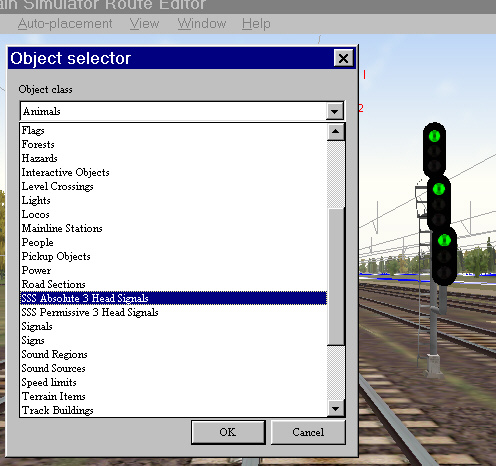
 How They work:Absolutes:
_________________________________________________________________________________________________
The Absolute Signals work the same as the BNSF Interlocking Signals on which they are based. All shape and SD files for the absolutes are directly copied from the US2BSignal3.s and .SD files. These are three head signals with the 2nd and 3rd heads being optional. The first head is mandatory, and if you use the optional 2nd and/or 3rd heads, then the links for all heads must be set. The Sigscr.dat, and the Sigcfg.dat are heavily modified to allow control over the next five blocks.Absolute signals have the following naming convention: "SSS #1_#2_#3 Absolute" --- The "SSS" is a preamble that is used throughout the signal set for naming files, signals, directories, etc. The "Absolute" describes the signals use. the numbers describe the SNCA set for each head of the signal". ... Examples are below:"SSS 5_5_5 Absolute" .... This signal has a SNCA value of five for every head. This signal would be used where all three links were looking at single heads in the path ahead for five blocks. If you only need the top head, then you would be looking at five single head signals in the single path ahead."SSS 6_5_5 Absolute" .... This signal has a SNCA value of 6 for the top head, and 5 for the two optional heads. It would be used where the main path is facing one double head, and four single head signals in the path ahead. The double head signal ahead decrements the SNCA by one, so the current signal is still looking only five blocks ahead. The optional heads ( if used), can only be facing single heads in the blocks ahead."SSS 7_7_5 Absolute" ... This Signal allows both the top and second head to compensate for a triple head signal, or two double head signals in the paths ahead for each head. The second and third head are still optional, but if the third head is used, it can only be looking at five single head signals."SSS 9_9_9 Absolute" ... This signal is compensating for four extra heads in each of the 3 possible paths for the signals ahead. This means that the paths ahead for each link have 2 triple head, or 1 triple and 2 double, or or 4 double head signals in each path for the next five blocks.A "SSS_15_15_15_Absolute" would be used if you were facing 5 triple head signals in all three paths. ( or one path, if only using one head. )The formula is simple ... Start with five, and add one for each extra head in the five signals in the path ahead. ( Multiple paths ahead are a minor problem, just select your signal based on the most likely scenario ) There are over 2700 combinations from SNCA 2 to SNCA 15, and I have only created 101 of these combos to cover most situations. The important combinations are available in the Absolute set:
___________________________________________________________________________________________________Permissives:NOTE: I do not use many permissives on the Superior South Shore, and have little experience with them. Any comments from those with permissive experience ( signals ) would be appreciated.
___________________________________________________________________________________________________
The Permissive Signals work the same as the BNSF Interval Signals on which they are based. All shape and SD files for the Permissives are directly copied from the US2BSignal2.s and .SD files. These are two head signals with the 2nd heads being an optional rear facing head. The Sigscr.dat, and the Sigcfg.dat are heavily modified.Permissive signals have the following naming convention: "SSS #1_#2 Permissive" --- The "SSS" is a preamble that is used throughout the signal set for naming files, signals, directories, etc. The "Permissive" describes the signals use. the numbers describe the SNCA set for each head of the signal" where the first # is for the front head. ... Examples are below:
"SSS 5_1 Permissive" ... This signals front head is looking at five heads ahead, the optional rear head (if used) would be looking at 1 head in the other direction.All combinations from 2 to 6 are included in the permissive set ... Should there be more ????__________________________________________________________________________________________________These are "Mast" type signals only... Sorry, but no SNCA compensating gantry sigs are available at this timeThe Scripts also include all the sigs from both USA sets Using the combined USA set by Ken Huntley, and should therefore be totally compatible with both the original Marias Pass, the original NEC routes, and any route that uses these USA sigs. The files that are included are:A reference file to be inserted into "yourroute".ref ( Optional )
all required *.s and *.SD files to be inserted into the routes shapes directory ( Required )
Sigscr.dat, and Sigcfg.dat. ( Required )The Zipped file size is 2.2 MBIf you decide that you would like to beta test these sigs, "BACKUP YOUR ENTIRE ROUTE FIRST" ... This is not a "Self installing" file set ... Experience is required to install the Reference files, but these files are optional.oboe Alert Edit | Reply | Reply With Quote | Top
Table of Contents
Subject Author Message Date ID RE: New signal set ... flarrfan Apr-01-02 1
Lobby | Topics | Previous Topic | Next Topic
Messages in this topic
flarrfan (545 posts)
Apr-01-02, 07:04 PM (EST) 1. "RE: New signal set ... " Hi! This looks great! I'm not at the point where I'm ready for signals on my route, but I'm certainly interested in signal files that will work better than the default, and particularly 3 head signals with the multiplicity of functions described. I will be following beta testing with great interest and hope that you may have an upload to the file library soon! Keep us posted! Remove | Alert Edit | Reply | Reply With Quote | Top
Lock | Archive | Remove
Lobby | Topics | Previous Topic | Next Topic
Restored from the Train-Sim.Com archive, captured May 2, 2002. About this archive.