Message Areas - "Two more SNCA signal tests"
Train-Sim.Com Message Areas
"Two more SNCA signal tests"
Email this topic to a friend
Printer-friendly version of this topic
Bookmark this topic (Registered users only)
Previous Topic | Next Topic Conferences MSTS Route Design (Protected) Original message
oboe (97 posts)
Mar-06-02, 01:21 AM (EST) "Two more SNCA signal tests" LAST EDITED ON Mar-06-02 AT 01:37 AM (EST)Take an aspirin before reading this post.The two "SNCA" (SignalNumClearAhead) tests below are both using the same signal arrangement.Daylighter ... The first test is for your first request and the results are very interesting. The second one I need to ask a bunch of questions about. ( later )The Signals are from the Marias Pass 3.0 Route by Bob Siederer with signals created by Bob and based on the signals created by Hank Sundermeyer and graphics by Conn McCarthy. Please note that the tests being done on these signals, are being done to further our understanding of the SNCA ( SignalNumberClearAhead ) value in the sigcfg.dat file, and is NOT a test of the signal itself. These tests are not to be construed as a test for the validity of how these signals will work in the sim.In both of the tests below, all of the sigs are Marais Pass single head searchlights. Signals 1,6,11,16,21,26, & 31 are absolutes, and the rest are permissives. The first test looks at the sigs using the sigscr.dat as supplied with MP3. The second test replaces a small portion of the "MPPS3Color" script in the sigscr.dat file as shown below.
_______________________________________________________________________________
This: ( from test twenty )....}if (block_state() !=# BLOCK_CLEAR){Is replaced with this: ( In test twenty one )....}if (!enabled ||block_state() !=# BLOCK_CLEAR ||!route_set()){
_______________________________________________________________________________Putting the "!enabled" ( not enabled ) statement in the script allows the permissive signals to react to the SNCA number in the sigcfg.dat. Without the "!enabled" or the "!route_set", the permissive signals can only react to to an occupied block, or to another signal that has the "!enabled" statement, which is within script range of the permissive being tested. In test one, the absolutes contain the "!enabled" statement, and the permissives react to those absolutes that are beyond the SNCA range.This was done to show that even though the SNCA is counting both the permissives and the absolutes, the permissives aren't "turned off" by being beyond the SNCA count because the lack of the "!enabled" statement ( and no occupied blocks ahead ) allows the script to fall to the "else" statement that checks the state of the next signal.The sigs are charted with a train on a single track mainline, approaching, but never getting to signal 1. The train is traveling toward signal 31. Each SNCA line is a separate test, with each chart covering 21 tests.
_______________________________________________________________________________
________test20_____________________Stock MP3 Scripts ... Signals 1,6,11,16,21,26, & 31 are absolutes, and the rest are permissives. 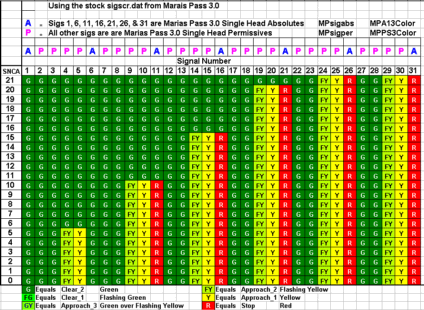 OOOOPS ... The blocks for signal 6 from SNCA 5 to 0 should be red ( the ones behind the yellows ) ( oboe hangs head in shame )At an SNCA of 21, Signal 22 should be red, but in this case, the permissive at location 22 does not care about the SNCA because the script for the permissive does not have a "not enabled" (!enabled) statement in the sigscr.dat. The next signal that will show a red (Stop), will be the next absolute which is signal 26. Signal 25 will show Approach, and signal 24 will show Advanced approach, with sigs 23, and 22 clear. The permissive signals beyond 26 will only indicate the state of the next absolute which repeats the pattern above.At SNCA 20, signal 21 should show red and it does because it contains the "!enabled" statement and doesn't fall through to the "else" statement that looks at the state of the next signal. Beyond signal 21 the pattern above for the permissives will be replayed. (G-G-FY-Y-R etc.), again because these permissives always fall past the stop statements. This pattern will hold to SNCA 15 because the permissives in 17, 18, 19, and 20, can only react to the "not enabled" absolute in position 21. This pattern will be repeated all the way to SNCA "4". The SNCA numbers from 0 to 3 appear to be following the pattern, but in actuality are not. The pattern from 0 to 3 will always follow the G-G-FY-Y-R for these searchlights as seen in the test below. I still have not had time to see why the Searchlights react differently than the BNSF3 sigs in the SNCA 0 to 3 range.
_______________________________________________________________________________
________test21_____________________Same setup as the above test except that The "!enabled" statement is added to the MPPS3Color script. 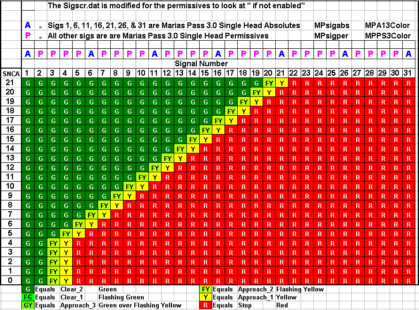 The test result for this arrangement is exactly the same as the result obtained for the test where 31 searchlight single head absolutes were placed in a single line.
______________________________________________________________________________If none of this makes sense to you, welcome to the club. If you would like to learn more about how these signals work, I strongly recommend that you download Bob Siederers' excellent signal tutorial from the Files area, and take the time to download the Marias Pass 3.0 route so that you may study the remarks in the sigscr.dat, and the sigcfg.dat files that Bob has written about the operation of these signals.oboe
Alert Edit | Reply | Reply With Quote | Top
Table of Contents
Subject Author Message Date ID RE: Two more SNCA signal tests Daylighter Mar-06-02 1 RE: Two more SNCA signal tests GaryG Mar-06-02 2 RE: Two more SNCA signal tests oboe Mar-06-02 3 RE: Two more SNCA signal tests Signalmaster Mar-06-02 4 RE: Two more SNCA signal tests Daylighter Mar-06-02 5 RE: Two more SNCA signal tests Daylighter Mar-06-02 6 RE: Two more SNCA signal tests GaryG Mar-06-02 7 RE: Two more SNCA signal tests Daylighter Mar-06-02 8 RE: Two more SNCA signal tests roeter Mar-06-02 9 RE: Two more SNCA signal tests GaryG Mar-06-02 10 RE: Two more SNCA signal tests GaryG Mar-07-02 12 RE: Two more SNCA signal tests oboe Mar-06-02 11
Lobby | Topics | Previous Topic | Next Topic
Messages in this topic
Daylighter (169 posts)
Mar-06-02, 02:04 AM (EST) 1. "RE: Two more SNCA signal tests" Just found this Oboe.I will have to look at it more closely in the morning.Looks intersting though, eh? Remove | Alert Edit | Reply | Reply With Quote | Top
GaryG (60 posts)
Mar-06-02, 05:24 AM (EST) 2. "RE: Two more SNCA signal tests" Hi OboeAs you have a test setup already, here's a scenario I hit the
other day and perhaps you could devise a (relatively) quick
test.I've been tinkering with the running with hotbox on the Marias
Pass 3 route and ran into the following.There are two Westbound AI trains. I changed the first AI to a
long CP coal train, 3 SD40's, 55 coal cars, 2 SD40's and another
58 (or so) coal cars plus a caboose. At first things appeared ok
but when I set the time of the second AI train a bit earlier,
it was actually running through the first train! When the first
AI started to move, major derailment.Now here's my analysis and your challenge (should you accept it).
The length of the CP coal train was longer than one block. The
signal/track layout was as follows:
Please excuse the wonderful artwork Top is East| |
| |
| |
|/..A3
|
|
|
|...P1
|
|...Rear of first AI train
|
|...Bridge
|
|...A2
|\
| |
| |
| |
| |
| |
| |.Glacier Park
| |.Front of first AI train
|/..A1
|
|Only WB signals shown
A1,A2,A3 - Absolute signals
P1 - Permissive signalWhat should have happened? The WB coal stops on the main at A1
and waits for my train to enter the siding and clear the block
then proceed on the Green. In the meantime, the second AI train
should arrive but stop at what should be a Red at A3 as the rear
of the first train is still in the A2 to P1 block.What was happening? I was seeing the second train arriving and
running through the rear of the train, stopping when it got to
the A2 signal! When the first AI train started to move, all
hell broke out as the rear of the train fell off the track, (it
was on the bridge East of Glacier Park).I was able to see this by ignoring speed limits and scooting to
the East end of the A1-A2 passing siding.I'm thinking our wonderful signaling system only looks at the
front of a train when he/she/it decides when a block is occupied
thus a train that exceeds one block in length will show no
occupancy of any but the first block.OR (the big or)When the A3 signal is setup, it sees the P1 signal as an
absolute and thinks it will display an absolute stop so the A3
signal can safely display an approach. It did look like the
second AI train was running at very slow speed when it was
running up to the A2 signal.I'm thinking the second part may actually be the problem 'cuz
I was able to fix it by changing the P1 Permissive signal to an
absolute.GaryG
Remove | Alert Edit | Reply | Reply With Quote | Top
oboe (97 posts)
Mar-06-02, 09:35 AM (EST) 3. "RE: Two more SNCA signal tests" Hi guys:Daylighter .. .. Yes ... Very Interesting. I didn't expect the results that we ended up with in test 20, but when I compared the signal script to the chart, It all made perfect sense. I am really curious about how this sig arrangement might affect opposing traffic. I really need to find the time to figure out what's happening at the SNCA 0 to 3 range. Gary .. You bring up some interesting questions. The tests that I have been doing have not looked at opposing signals or block occupancy ahead. We have been trying to come up with a set of rules that will allow us to predict how a given group of signals "should" behave based on the SNCA used in a particular situation. These tests have helped a lot, but we aren't "there" yet. There may be a "Lurker" who can help. ( speak out you lurkers ).When we "think" we have a formula, I ( or someone ) will start testing it against opposing traffic and other scenarios. I have done a couple of tests where I had an AI loco in a block ahead, but have never tested with just a freight car. I have slowly learned not to "assume" anything where these sigs are concerned. If I have time, I will put a few cars in the blocks ahead and see what happens, but I am hoping someone else will jump in an do some of these occupancy tests.I will go out on a limb and say that for the most part these sigs do what the script says they should do. The major hurdle right now is to try and understand why multiple head sigs are interefering with the ability of the SNCA to properly clear blocks ahead in a predictable fashion. For the time being, I want to concentrate on this issue, and I already have several ideas that need to be tested. These tests are very time consuming and I believe that some of the other signal guys out in sim-land have a better knowledge base to analyse the data then I do. ( I'm learning though. )Join the fray .... Do some testing ( My Superior South Shore route is awaiting my return ... someday )oboe Remove | Alert Edit | Reply | Reply With Quote | Top
Signalmaster (182 posts)
Mar-06-02, 10:20 AM (EST) 4. "RE: Two more SNCA signal tests" Are taking into account that whatever the number of heads any particular signal has consumes that number of SNCA slots? Even the doulbe head permissives.
Hank Remove | Alert Edit | Reply | Reply With Quote | Top
Daylighter (169 posts)
Mar-06-02, 12:46 PM (EST) 5. "RE: Two more SNCA signal tests" LAST EDITED ON Mar-06-02 AT 01:36 PM (EST)Hey Oboe,I'm not so sure I see any surprises, except maybe that signal number 6 in test 20 should be red. This begs the question, are you sure it is an absolute signal - Though I'm sure you checked this first.Regarding test 20, I would like to see you leave the set up as is but move the train forward through signal number one and recheck the cascade of subsequent signals. It might also be interesting to add a permissive in front of signal number 1, or remove signal number 1 all together as I think this would more closely simulate proper function - normally, you would not have an absolute sitting like this by itself without some permissives in front of it, unless it was at an interlocking in a terminal or yard area.Interesting that the (!enabled) changes the reaction to SNCA this way.
Remove | Alert Edit | Reply | Reply With Quote | Top
Daylighter (169 posts)
Mar-06-02, 12:59 PM (EST) 6. "RE: Two more SNCA signal tests" Ragrding GaryG's scenario,I don't understand this one at all. If the previous block signal is an absolute, it should not permit the second train to rear end the first, regardless that the fist is longer than the passing siding, as the passing siding is the only place train number 2 can go and it is definately occupied. The only way I can see this happening is if the path for the second train is to the other passing siding, and the rolling stock of the overhanging train is not being recognized for block occupancy for some reason.I've been able to cause a rear end collision situation like this as well, but only when the proper or sufficient signals were not existent in advance of the occupied block. I've never been cleared to take a single track mainline until the tail end of a passing oncoming train had cleared the passing siding switch. In all of my observations, a signal goes red as soon as the locomotive passes the sensor, so a following train should never be able to collide as long as there is an absolute signal in the chain sufficiently far back to stop a following train from occupying the same block. Permissives of course will not stop an AI train, though a red "stop and proceed" indication from a permissive does slow them down. Remove | Alert Edit | Reply | Reply With Quote | Top
GaryG (60 posts)
Mar-06-02, 01:19 PM (EST) 7. "RE: Two more SNCA signal tests" HiThanks for reading the scenario.To make sure you're understanding it, the two Westbound trains
(top to bottom of diagram) are both AI trains - the second one
runs over the rear of the first AI train between the P1 and A2
signals right up to the A2 signal.Of course, why they don't "crash" at this time is another one
of our little TrainSim "features". The first AI train is waiting for my Eastbound (Bottom to Top)
train to heading into the A1-A2 siding and clear his path. It's
when I clear and the first one starts moving that I see the cars
falling off the bridge.I have left my train behind so the first can't move then zipped
to the A2 end of the siding. This is when I was able to confirm
the second AI train was definitely running right to the A2
signal.It is possible this is a Marias Pass 3 signalling problem 'cuz
the original MP used some different logic as well as fewer
signals (especially the permissives).GaryG
Remove | Alert Edit | Reply | Reply With Quote | Top
Daylighter (169 posts)
Mar-06-02, 01:30 PM (EST) 8. "RE: Two more SNCA signal tests" Hey Gary,Come to think of it I was able to follow an AI train within a couple of car lengths, by spawning it just a minute or so in front of my departure time. I could do this by running through red permissive signals right up until the AI train in front passed an absolute signal, causing it to return "Stop", and forcing me to slam on the brakes or get the "activity ended" message by running through the red absolute.I guess the signals do not recognize overhanging rolling stock as occupying a block in a following situation when permissive signals are present, as you can "ride the yellows", and even the reds from permissive signals.I bet if you removed the signal located just behind the first overhanging train all together, the second train would not move forward. Of course, replacing it with an absolute would prevent the collision, but did it prevent train number two from moving onto the mainline behind train number one? Remove | Alert Edit | Reply | Reply With Quote | Top
roeter (20 posts)
Mar-06-02, 05:02 PM (EST) 9. "RE: Two more SNCA signal tests" Hi all,both the test and GaryG problem sound familiar to me.
As for the test by oboe : how did you chart the signals?In one of my tests (see my post from the previous discussion), I found the signal display in the activity editor differs from the real simulator if SNCA < 4. This may explain the 'greens' for the signals at the lower SNCA's. For the rest, it is all quit logical : SNCA just counts the signals it wants to 'enable', and if a signal is enabled it will show green unless it has some other restriction.One important point to note, also regarding opposing traffic : the SNCA has nothing to do with claiming absolute blocks. When signals are cleared as a results of SNCA, any points or cross-overs within the cleared area are 'locked'. Furthermore - and this is were confusion really sets in - are all points etc. upto the first DIVERGING point in the train's path - even well beyond the SNCA! This - and not the 'block occupancy' - is what protects your train from opposing traffic on single-line sections (as well as in junction areas). Further signal-aspects are all related to the next block or next signal - independent of the type of next signal.
This can be best observed if you put a permissive immediately behind the point where a siding ends and reverts back to a single line : even if the exit signal from the siding shows 'red' because of on oncoming train, the permissive will show green - yellow etc. (depending on the total no. of signals in the next section) as the train approaches.
I conducted a test in which I enabled ALL signals by default - the result was disatrous as opposing junction signals did not change to red as I entered a single line section!So, in a nutshell, signal aspects are ruled by four (separate!) conditions :
1. SNCA - determines how many signals ahead are enabled;
2. route set - block occupancy - junction blocked : conditions which indicate if a signal (when enabled!) may be cleared;
3. Aspect of next signal;
4. Paths 'claimed' as a result of traffic movement. The scope of these paths is determined by the track-layout.As for Gary's problem : your second guess is right. Signal A1 is cleared as the next block (A1 - P1) is clear. P1 is at red, but AI traffic does not stop at permissives. In one of my activities for Marias Pass I had no less then 3 trains 'mingled' at Columbia Falls after a trip to Kalispell! Among all the problems and bugs regarding AI traffic, this one is really trying to claim poll position!I know another one, even better : start an activity on a siding, with an AI train timed to approach it immediately as opposing train. As the AI train never ENTERED the single line section (it started right in the middle, remember), MSTS does not know it is there! So you get a green light, set of full speed and plunge straight into the oncoming train! It happened to me at Glacier Park and the collision was right ontop the trestle - talking about worthwhile crashes ...Sorry for the long post, hope it helps.Thanks, Rob Roeterdink Remove | Alert Edit | Reply | Reply With Quote | Top
GaryG (60 posts)
Mar-06-02, 08:14 PM (EST) 10. "RE: Two more SNCA signal tests" Responding to Daylighter firstThe original Marias Pass had no signal between the start and end
of the single track between the sidings. MP3 added the Permissive
and I guess this is the problem. I bet our dispatcher is looking
at it as an absolute and sees it's showing Red so it's safe to
allow the second train to see an approach at the A3 signal. Of
course when we get to the Red Permissive at P1, the AI continues
on to the Absolute Red at A2 and stops. By now the damage is
done, we've overrun the stopped train.As far as replacing the Permissive with an Absolute, it did seem
to fix the problem but I placed the signal out of visual range.
The second train didn't appear even though I gave it lots of
time.Rob (Roeter), your turnI think you have numbers (or directions) mixed up. The AI flow is
from top to bottom of my wonderful piece of art (A3 to A1) though
your description is correct if you substitute A3 for A1 in your
description.I thank you both for your time and I do suspect we will need to
wait until MS/Kuju decide there are signalling problems. For now
I guess using Permissives sparingly is one work-around for this
particular problem.Remember the famous quote, "AS REAL AS IT GETS" GaryG Remove | Alert Edit | Reply | Reply With Quote | Top
GaryG (60 posts)
Mar-07-02, 01:26 AM (EST) 12. "RE: Two more SNCA signal tests" LAST EDITED ON Mar-07-02 AT 01:27 AM (EST)HiA final thought about the trains running into trains after
passing Permissive signal.I even think this explanation does explain what I've seen.
It's not a signalling problem, it's an AI train problem. The
stupid engineer in all the AI trains ONLY drives from signal to
signal and will never stop for anything except a Red Absolute.He will respect speed restrictions but will, at all costs, keep
the train moving until he arrives at a Red Absolute.What this means is if we want to use AI trains, we'd better
design the activity so there can't be any chance of multiple
trains running in the same direction where there are any
Permissive signals. This restriction would also include our
own train. We would have to be sure our train only stops at
locations protected by Absolute signals.Of course, we do have the option of never using Permissive
signals (probably the easiest cure for this "feature").If only the AI Engineer could look at the track with his eyes!Isn't this just so much fun; remember it is "AS REAL AS IT GETS".GaryG
Remove | Alert Edit | Reply | Reply With Quote | Top
oboe (97 posts)
Mar-06-02, 09:32 PM (EST) 11. "RE: Two more SNCA signal tests" Hi allSignalmaster Asks: >Are taking into account that whatever the number of heads any particular signal has consumes that number of SNCA slots?Hi Hank .. Yes, (but) when I carry the tests up to SNCA 21, the multiple head sigs get ignored at some point beyond the count limit required to see them ... See the charts in this post: http://www.train-sim.com/dcforum/DCForumID6/3813.htmlThe problem with the SNCA counting multiple heads is that it screws up the real intention of the SNCA. The sim needs to look at all the heads to figure out "Next_State_lr", ( Or mr ), but it should not count the extra heads as part of the SNCA. I believe this was an oversight on the part of the sim designers.The other issue is why do the Searchlights and the BNSF3 scripts react differently at SNCA 0 to 3 ?
The BNSF sigs decrement the signals all the way down to "0", but the Searchlights quit decrementing the sigs at SNCA 4. ( See the two posts with charts in the thread above.)
__________________________________________________________________________GaryG ... Hopefully, the other posts have answered your question. I haven't been testing with opposing traffic and could not have given you a rational answer. ( I am real good with irrational answers however, but they cost 20 cents each )____________________________________________________________________________Roeter asks: >how did you chart the signals?Hi Rob ... I built a test route called testbed4 and created 8 differently configured test tracks. Each test track has a "spy" track running along the side of the test track. ( Lauries idea from a previous post. ). I then head an AI controlled GP9 with 150 cars toward signal 1 on the test track using an "expected player performance" setting of "2", and the start speed set at "1MPH". This assures that the AI train will never get to signal 1 before I have a chance to run down the "spy" track with my player service loco and chart the conditions of the signals in front of the AI train. I set the sigcfg.dat for all signals used in the test to the SNCA value being tested. Each chart contains 21 separate tests, one for each SNCA value. The two test tracks that I have used so far are: 1. A straight single track with 31 signals placed 200 meters apart. ( for the single head tests at the top of this post )2. A track (Which has a drawing in the thread below), which allows me to place any combination of dual or triple head sigs in the first ten blocks (which have two switches each), followed by up to 21 single head sigs on a single track main.One thing to be careful of ... The SNCA does enable Sigs ahead by counting sigs that have the Sig function "normal" call, and this works great until you have multiple head sigs in front of the train. (See the charts in the thread listed below.) Also be aware that even though the Searchlight Permissives are counted by the SNCA, they ignore the enabling call of the SNCA because they are enabled by default. The script for the permissive sigs does not use the "not enabled" modifier, and therefore falls through to the "else" call that tells them to start looking at the "Next state least restrictive". This means that all permissives are "enabled" for the entire length of the route, whether they are on the activity path or not. P.S. ... After reading one of my posts Rob, you will never again have to apologize for the length of yours. Charts for above tests ... http://www.train-sim.com/dcforum/DCForumID6/3813.html__________________________________________________________________________________Daylighter said: >except maybe that signal number 6 in test 20 should be red.Yeah ... Look at the post again ( under the chart ) ... I already hung my head in total shame ... I will try your idea early next week ... I think I might take a stab at my tax return this weekend . ( Arrrggghhh )_______________________________________________________________________________oboe Remove | Alert Edit | Reply | Reply With Quote | Top
Lock | Archive | Remove
Lobby | Topics | Previous Topic | Next Topic
Restored from the Train-Sim.Com archive, captured May 2, 2002. About this archive.