Message Areas - "What does the "tiling Factor" do?"
Train-Sim.Com Message Areas
"What does the "tiling Factor" do?"
Email this topic to a friend
Printer-friendly version of this topic
Bookmark this topic (Registered users only)
Previous Topic | Next Topic Conferences MSTS Route Design (Protected) Original message
smolds (53 posts)
Jan-18-02, 01:44 AM (EST) "What does the "tiling Factor" do?" Just wondering what the settings for this item does. Can't find any reference to it by searching the route archives, and it doesn't seem to be mentioned in the Step by Step guide. In the search, I did find some references to "tile resolution", is this the same thing. In the Guide, I do see mention of the "error bias" setting in tile properties. What does these settings do, what is the range, and can they be used to modify existing tiles with terrain mods?Thanks,Stephen
Alert Edit | Reply | Reply With Quote | Top
Table of Contents
Subject Author Message Date ID RE: What does the "tiling Factor" d... JohnCS Jan-18-02 1 RE: What does the "tiling Factor" d... smolds Jan-18-02 2 RE: What does the "tiling Factor" d... sniper297 Jan-18-02 3 RE: What does the "tiling Factor" d... rgarber Jan-18-02 4 RE: What does the "tiling Factor" d... NickF Jan-18-02 5 RE: What does the "tiling Factor" d... sniper297 Jan-18-02 6 RE: What does the "tiling Factor" d... smolds Jan-18-02 7 RE: What does the "tiling Factor" d... JohnCS Jan-18-02 8 RE: What does the "tiling Factor" d... smolds Jan-18-02 9
Lobby | Topics | Previous Topic | Next Topic
Messages in this topic
JohnCS (240 posts)
Jan-18-02, 02:06 AM (EST) 1. "RE: What does the "tiling Factor" do?" Did you ever think of trying it to see?The result should be fairly obvious as to its purpose. Remove | Alert Edit | Reply | Reply With Quote | Top
smolds (53 posts)
Jan-18-02, 02:51 AM (EST) 2. "RE: What does the "tiling Factor" do?" "Did you ever think of trying it to see?The result should be fairly obvious as to its purpose."I tried with a 0, 1, 8, and 10 - no change was noted. Even made the change, saved the tile, got out of RE, then returned - still no change.So, what is this supposed to do, and will it work on an existing, DEMed route?
Remove | Alert Edit | Reply | Reply With Quote | Top
sniper297 (1373 posts)
Jan-18-02, 08:28 AM (EST) 3. "RE: What does the "tiling Factor" do?" It's probably more obvious if you use a terrain texture that has some contrasting detail on it. The little tiles (black lines) at a tiling factor of 1 will "tile" a terrain texture once, so it covers the square. A tiling factor of 2 will double the "tiling", so the image tiles twice in the square, both horizontally and vertically, putting 4 images in it instead of 1. On something with an even overall texture like "terrain.ace" this would merely increase the resolution, but textures with other detail on them are affected like this;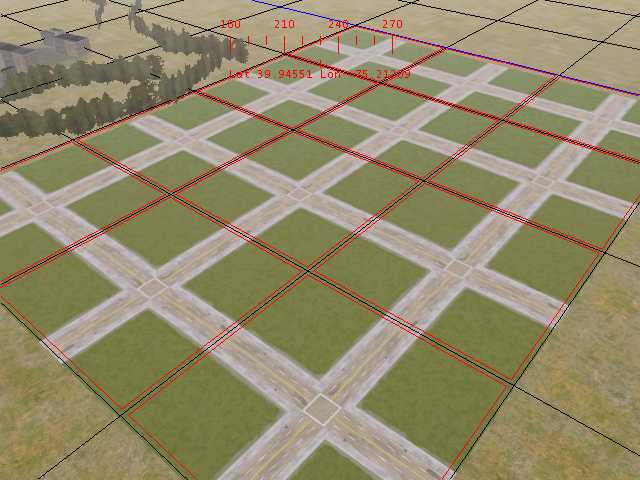
Normal tiling.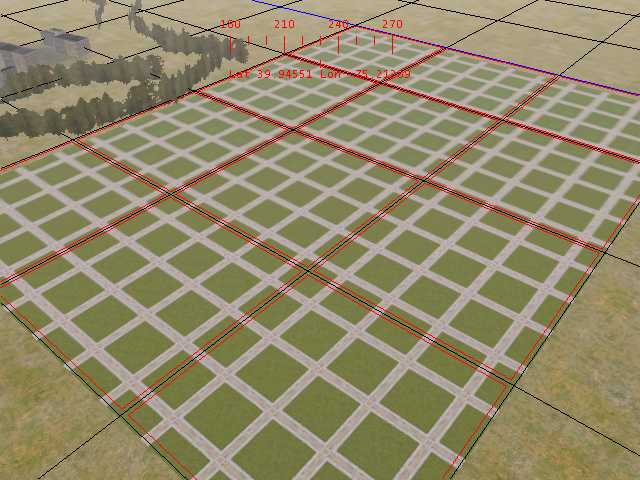
4 x tiling. Remove | Alert Edit | Reply | Reply With Quote | Top
rgarber (1038 posts)
Jan-18-02, 09:08 AM (EST) 4. "RE: What does the "tiling Factor" do?" Well now that's interesting... have you found a use for it though? I would think the terrain has a sharper look to it. Close up anyway. Might be worth a try. I'm using that forest look and I would think even with doubling the factor you wouldn't see a pattern. Hmmm....Rich Garber Remove | Alert Edit | Reply | Reply With Quote | Top
NickF (629 posts)
Jan-18-02, 09:49 AM (EST) 5. "RE: What does the "tiling Factor" do?" I tried using it and the texture in the demo above to create some neighborhood street. worked OK, but the images are half sized, and I ended up with very NARROW lanes on a 4-lane street.Nick Remove | Alert Edit | Reply | Reply With Quote | Top
sniper297 (1373 posts)
Jan-18-02, 10:55 AM (EST) 6. "RE: What does the "tiling Factor" do?" Yeah, that's why I haven't bothered with it, plus the fact that I don't know what it would do to the frame rate. Just another one of those things that I assumed everybody else already knew about. You might try experimenting with values like 1.33 or 1.5 to see what that does. I tried 0.5 to make the streets bigger, but the "residential block" buildings 1, 2, and 3 are just about the right size to fit in the square tiled once anyway. An "official" city block is 1/8th of a mile, so including sidewalks and half the street on both ends to the centerline it would be 5,280 divided by 8 = 660 feet =220 yards = about (can't find my conversion table at the moment) 200 meters. Each blue tile is 2000 or 2200 meters, I forget which, and they are 16 x 16 black squares long and wide. Either way, it don't convert exactly to a city block, and all this is further complicated by whichever map conversion they used in the geo extractor. There has been a little discussion on distorted quad tiles, rectangular rather than perfectly square, but that's a universal cartography distortion caused by trying to flatten out the surface of a globe. Mercator or conical projection, the lines of latitude and longitude aren't perfectly symmetrical even at the equator. The world is not flat.
As if all that ain't bad enough, when you make objects like buildings they have to look "right" both at a distance and close up and when combined with each other, so some sacrifices have to be made to perfect scale. The buildings DO look out of scale sometimes, but in perfect scale they would look worse most of the time. So I guess the trick is TLAR engineering, TLAR being, "That Looks About Right". If it don't look right, fiddle with it until it does. Remove | Alert Edit | Reply | Reply With Quote | Top
smolds (53 posts)
Jan-18-02, 12:28 PM (EST) 7. "RE: What does the "tiling Factor" do?" From what I am reading, it looks like it depends on where you are working that might be the best guide to the advisability of using this or not. I was, after running the tiling factor up to 50, able to see some effect on the displayed surface. It seemed to be "smoother", with less texture (apparently due to the texture being "shrunk"), but water lines took on more detail. I am working on the Tacoma, WA, port area (called the Tacoma Belt Line), so there is a lot of waterline. Most seems to be long strips of land jutting into Puget Sound (this would be the areas where the piers are) but there is also the east and west sides of the bay that are naturally steep and well defined. What I have noticed is that the "shoreline" is a very steep edge, judge it at about 12 feet, that drops down into the water. I'm using 10 meter DEMs, so I guess that's not expected - it would be nice to find some way to smooth these areas out a bit, add a "sandy beach" along the water's edge. No doubt there is and I just haven't found it yet. What prompted me to ask the original question is the confusion on my part as to what the word "tile" means in TS. When I first looked at the RE, I saw the big blue lines, containing 16 black squares. I at first thought these black squares were the "tiles"
addressed in Rich's guide, and that I had to hit EVERY one of these to effect a change when DEMing the area. Since then I have realized that the BLUE lines are the tile edges, and that I need only change one black square in each tile to do the modification. What it comes down to is perception - relating the grid of the RGE with the grid of the RE, and then with the grid of the DEM quads and the smaller grids shown in MicroDEM. The vantage point, and the scale, within each display has no "link", visually, to any of the others. It would be nice if, while in the RE, one could click on a point and get a reading of the coordinates of that point - and perhaps even get the distance from the last point clicked.Sorry if this rambles a bit, just voicing some of the frustrations encountered in understanding this endeavor.Stephen
Remove | Alert Edit | Reply | Reply With Quote | Top
JohnCS (240 posts)
Jan-18-02, 01:02 PM (EST) 8. "RE: What does the "tiling Factor" do?" The big blue lines demarkate the 'tiles', each represented in a separate file in your tiles folder.Each of the 256 blocks in the tiles are either 'sub-tiles' or probably more properly 'texture patches'. At least that's the terminology I've been using here for several months and no-ones contradicted me.'Tiling' is a graphics technique of repeating a texture end for end multiple times, and has nothing to do with the fact that you're placing textures on 'tiles'. Remove | Alert Edit | Reply | Reply With Quote | Top
smolds (53 posts)
Jan-18-02, 04:21 PM (EST) 9. "RE: What does the "tiling Factor" do?" "The big blue lines demarkate the 'tiles', each represented in a separate file in your tiles folder.Each of the 256 blocks in the tiles are either 'sub-tiles' or probably more properly 'texture patches'. At least that's the terminology I've been using here for several months and no-ones contradicted me."I discovered this when using Rich's method - clicked on 16 "tiles" (black squares) then only found 4 files changed! It was reinforced when I put a 100 m. track section on a black "tile", and it almost crossed the space - which I had assumed was 2KM! Sometimes it take a bit to fully understand the evidence of one's eyes <hehehe>..."'Tiling' is a graphics technique of repeating a texture end for end multiple times, and has nothing to do with the fact that you're placing textures on 'tiles'." Which I understand better now. Thanks,Stephen Remove | Alert Edit | Reply | Reply With Quote | Top
Lock | Archive | Remove
Lobby | Topics | Previous Topic | Next Topic
Restored from the Train-Sim.Com archive, captured March 9, 2002. About this archive.