Message Areas - "Changing track textures the EZ way"
Train-Sim.Com Message Areas
"Changing track textures the EZ way"
Email this topic to a friend
Printer-friendly version of this topic
Bookmark this topic (Registered users only)
Previous Topic | Next Topic Conferences MSTS Route Design (Protected) Original message
sniper297 (1328 posts)
Jan-09-02, 02:33 PM (EST) "Changing track textures the EZ way" Just for fun, another BAT from my belfry.http://www.train-sim.com/dcforum/User_files/3c3c95db5c93b6e9.zipSafe even for dummies, bulletproof error checking routine to make sure you don't copy over textures in one of the default routes, which are after all the source of the four default track textures. To use it correctly, paste the tracktex.bat into the root of any ADD-ON route, double click on it, choose from one of the four track textures.Dave's IC route, as installed, Japanese track;
 Changed to NEC track;
 Marias track;
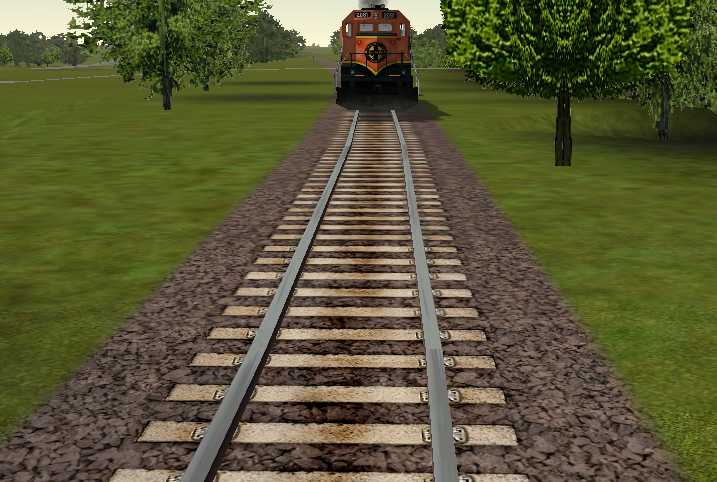 Europe track;
 HAC is doing heavy snow track textures, so if anything goes wrong blame him. Ain't I a stinker?!
Alert Edit | Reply | Reply With Quote | Top
Table of Contents
Subject Author Message Date ID RE: Changing track textures the EZ ... TOPDOG5184 Jan-09-02 1 RE: Changing track textures the EZ ... blehmann Jan-10-02 2 RE: Changing track textures the EZ ... blue comet Jan-11-02 3 RE: Changing track textures the EZ ... rgarber Jan-11-02 4 RE: Changing track textures the EZ ... sniper297 Jan-12-02 5 RE: Changing track textures the EZ ... blehmann Jan-12-02 6 RE: Changing track textures the EZ ... sniper297 Jan-12-02 7 RE: Changing track textures the EZ ... Motley24Crue2 Jan-12-02 8 RE: Changing track textures the EZ ... blehmann Jan-12-02 9 RE: Changing track textures the EZ ... blehmann Jan-13-02 12 RE: Changing track textures the EZ ... rgarber Jan-12-02 10 RE: Changing track textures the EZ ... sniper297 Jan-12-02 11
Lobby | Topics | Previous Topic | Next Topic
Messages in this topic
TOPDOG5184 (497 posts)
Jan-09-02, 03:12 PM (EST) 1. "RE: Changing track textures the EZ way" LAST EDITED ON Jan-09-02 AT 03:14 PM (EST)Heya Jim. I just painted mine balck. Didn't know I could change the textures with a batch though. I just copy the acleantrack1.ace from a route and overwrite the one in there. though yours is dummyproof. Take a look:
 Craig ShortinoP.S. The WP SW1500 has been changed. see my post in the skinning forum for updated pics as these are the only ones on that route with the black textures. Remove | Alert Edit | Reply | Reply With Quote | Top
blehmann (26 posts)
Jan-10-02, 04:42 PM (EST) 2. "RE: Changing track textures the EZ way" Love your track textures, Sniper! Where can I get them from? Thanks,
Henry. Remove | Alert Edit | Reply | Reply With Quote | Top
blue comet (42 posts)
Jan-11-02, 10:47 PM (EST) 3. "RE: Changing track textures the EZ way" sniperI assume this will work with anything other than the default routes? I would love to change my track to wood ties, ala NEC, but I would REALLY hate to screw up my own route after all these hours of work. Also, it will work with all track sections, including dynamic pieces?? Please let me know if this is OK.ThanksBob S Remove | Alert Edit | Reply | Reply With Quote | Top
rgarber (1020 posts)
Jan-11-02, 11:18 PM (EST) 4. "RE: Changing track textures the EZ way" Won't screw up your route. I used Snippets little diddy to change my track over from the Marias Pass textures to the Japanese textures. Nadda problem at all.Rich Garber Remove | Alert Edit | Reply | Reply With Quote | Top
sniper297 (1328 posts)
Jan-12-02, 00:16 AM (EST) 5. "RE: Changing track textures the EZ way" LAST EDITED ON Jan-12-02 AT 00:46 AM (EST) Henry, they're not my track textures, those are from the original routes. If you're asking where to get the zip file that changes them, have you looked at the top of the page?Bob, this is a simple 1kb batch file that merely copies Acleantrack*.* from the \textures folder of one of the original routes into \textures in whichever route it's run in. The geo extractor defaults to copying the track texture files from the \template folder, which has the same textures as japan1 and 2. Even if a batch file like this was unreversable, the route could be restored just by copying the texture files from \template again. This one is reversable tho, if you select #2 from the menu, you'll have the concrete tie Japanese track again.
That said, I've been working on PO&N5 for several months, and I sure don't want to lose hours of work either. So after downloading Hank's new switch signal package, I renamed the folder \portogden5b15 to portogden5b16, copied and pasted it with all the others into C:\PONBACKUP. Then I deleted the \envfiles, \shapes, \sound, \terrtex, and \textures folders from the backup copy to save space. Everything in those folders is in the first backup, and doesn't change when the route is edited, so they can be restored from a single master. I leave one master with all the folders in it, and periodically delete every second backup copy between the first and the last to save space.
Then and only then I tried the new signals in the working copy. If I screw it up completely, I don't lose any of the previous work, I can just delete it and restore the backup copy. Good thing to remember before trying anything new.
Almost forgot, Laurie Whelan did find a flaw in the traktex batch, WindowsXP apparently no longer uses the "choice" command. No slouch, that girl, she sent me an XP version of the same thing;
http://www.train-sim.com/dcforum/User_files/3c3fcd506ee24bfe.zip
So anybody can't get it working on XP download Laurie's version instead.
Remove | Alert Edit | Reply | Reply With Quote | Top
blehmann (26 posts)
Jan-12-02, 02:00 PM (EST) 6. "RE: Changing track textures the EZ way" Thanks Jim, for answering my question. After shaking my brains several times quite violently, I've got it now and it works!This brings me to another question concerning track textures: In the USA2 (Marias Pass) track texture I get about half way into the screen a graphical distortion which looks like the rings of a cut down tree.Have you any idea what does this and if one can do anything about it? (Some time ago I downloaded the blurry track textures fix utility from Joseph Realmuto, but this gives two or three instead of one of these distortions...) (I bet this has been discussed before and people will tell me, why don't I search the forum. But the forum search faciltiy seems to be knackered. Whenever I search for something these days I get a long time nothing and then I get the time out message...)Thanks,
Henry. Remove | Alert Edit | Reply | Reply With Quote | Top
sniper297 (1328 posts)
Jan-12-02, 02:30 PM (EST) 7. "RE: Changing track textures the EZ way" Yeah, me too. I got a DSL, and sometimes it takes 10 minutes even if I limit to one forum, and the subject and author fields don't seem to work the way they're supposed to. Lately it sometimes locks up when I'm searching the archives, maybe the archives are getting too big.
Marias seems to have it the worst, but I don't like it anyway, looks like cork HO ballast to me even close up. Some people seem to have it worse than others too, I think it's a video card issue. Unlike a human head banging on it doesn't help, so the only thing I can think of is to play with the directX settings and mippmapping for your video card and see if you can clean it up without tanking the frame rate. After setting, testing, changing, testing, and on and on for several days you'll finally get disgusted and decide that it don't look so bad after all. Remove | Alert Edit | Reply | Reply With Quote | Top
Motley24Crue2 (296 posts)
Jan-12-02, 03:09 PM (EST) 8. "RE: Changing track textures the EZ way" LAST EDITED ON Jan-12-02 AT 03:20 PM (EST)lol, very true ... my Video seems to be pretty good atleast i think so anyway no Complaints here, my card is an ATI Radian 64DDR, seems to work fine with the game
Hey blehmann what is your Connection speed, my guess is the Archive is pretty full so either way it'll take a while, im DSL and it takes me a while at times but i have never gotten a Time out Message. it eventually loaded with results but just took a while longer then usualBob... Philly, Pa Remove | Alert Edit | Reply | Reply With Quote | Top
blehmann (26 posts)
Jan-12-02, 04:17 PM (EST) 9. "RE: Changing track textures the EZ way" My connection speed is 46.6 Kbps. When I search for somthing I can see the progress bar at the bottom of the IE browser inching ever so slowly forward which with other pages in most cases tells me that it has problems to get the page and eventually I will get the "The Page cannot be displayed" message. With the search on Train-Sim.com I get instead the time-out message.My guess too is that the archive has just become too big. Couple of months ago I had no problems doing searches.(Just had a thought: Maybe there is somewhere a setting where one can make it wait longer for something to come through. Must investigate this!)Henry. Remove | Alert Edit | Reply | Reply With Quote | Top
blehmann (26 posts)
Jan-13-02, 06:18 PM (EST) 12. "RE: Changing track textures the EZ way" LAST EDITED ON Jan-13-02 AT 06:44 PM (EST)I've done a couple of searches on the forum this morning and they worked!!!!So, maybe somebody listened and fiddled with the knob of the server and it did some good... ;)Henry. Remove | Alert Edit | Reply | Reply With Quote | Top
rgarber (1020 posts)
Jan-12-02, 04:48 PM (EST) 10. "RE: Changing track textures the EZ way" Laurie's a girl?? Remove | Alert Edit | Reply | Reply With Quote | Top
sniper297 (1328 posts)
Jan-12-02, 09:06 PM (EST) 11. "RE: Changing track textures the EZ way" Far as I know. You'd have to ask him/her, there's a whole bunch of names that could be either, but my baby sister (40 something now, guess she's not much of a baby now) is Laurie, and the only male I ever met was spelled Laury.
What about it, cobber, you a shiela or one of us hairy types? Remove | Alert Edit | Reply | Reply With Quote | Top
Lock | Archive | Remove
Lobby | Topics | Previous Topic | Next Topic
Restored from the Train-Sim.Com archive, captured March 9, 2002. About this archive.