Message Areas - "Working Water Tower"
Train-Sim.Com Message Areas
"Working Water Tower"
Email this topic to a friend
Printer-friendly version of this topic
Bookmark this topic (Registered users only)
Previous Topic | Next Topic Conferences MSTS Route Design (Protected) Original message
Gandalf (113 posts)
Jan-04-02, 02:19 AM (EST) "Working Water Tower" LAST EDITED ON Jan-04-02 AT 02:24 AM (EST)Eureka!!! After days (weeks?) of frustraion, I've finally figured out how to get the water pick-up to work with animations and everything! Don't pay attention to the textures (or lack thereof), I will have to rework the model to texture it properly. The impartant thing is that the spout comes down, and actually fills the tender!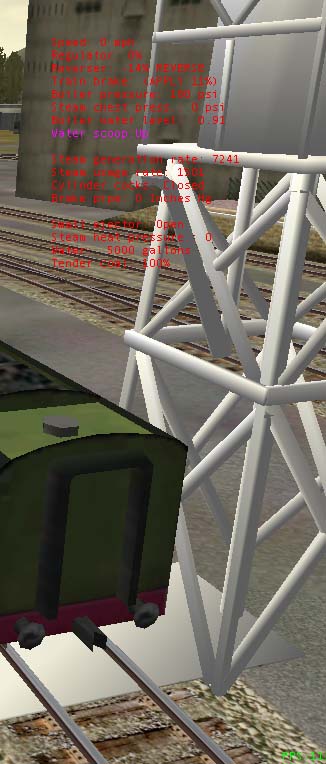
 Still needs some fine tuning in the spout animation, too. Alert Edit | Reply | Reply With Quote | Top
Table of Contents
Subject Author Message Date ID RE: Working Water Tower nw_fan Jan-04-02 1 RE: Working Water Tower timken Jan-04-02 2 RE: Working Water Tower nw_fan Jan-04-02 3 RE: Working Water Tower Gandalf Jan-04-02 4 US Water Tower, non working but gre... timken Jan-05-02 6 RE: Working Water Tower Gandalf Jan-05-02 5 RE: Working Water Tower Captain Bazza Jan-05-02 7 RE: Working Water Tower Captain Bazza Jan-05-02 8
Lobby | Topics | Previous Topic | Next Topic
Messages in this topic
nw_fan (162 posts)
Jan-04-02, 03:18 AM (EST) 1. "RE: Working Water Tower" Awesome... keep up the good work and post some info once you have it all set. I have an American type tank that could use the animation.Mike
Norfolk & Western
Precision Transportation Remove | Alert Edit | Reply | Reply With Quote | Top
timken (208 posts)
Jan-04-02, 12:36 PM (EST) 2. "RE: Working Water Tower" An American type water tank?!! We need it, at least I sure do. Animated or not, it is an empty space on my RR! Both of you, keep up the good work!Steve Remove | Alert Edit | Reply | Reply With Quote | Top
nw_fan (162 posts)
Jan-04-02, 01:36 PM (EST) 3. "RE: Working Water Tower" I had a problem with the texture. I moved the file and my model program (3dCanvas) didn't find it where it usually does, so it untextured everything. Give me a couple days to fix it.Mike
Norfolk & Western
Precision Transportation Remove | Alert Edit | Reply | Reply With Quote | Top
Gandalf (113 posts)
Jan-04-02, 09:01 PM (EST) 4. "RE: Working Water Tower" I used TSM for the model. I had it textured, and somehow I joined all the parts of the tank and sructure when I was experimenting with different part names. I will have to reassemble the parts and figure out the hierarchy again. As near as I can tell, you need to have a part called "base" and a part called "arm". At first, it seemed that it would only work with two parts, but I have added 1 more and it still works. I now have "tank", "base" and "arm". The next trick seems to be centering the axis of the "base" with the axis of the "arm" so that your pickup point lines up reasonably well. TS automatically places the axis of the "base" in the middle of the track on pickup objects, so with this style of tower, you have to find a way to get the axis out from under the center of the water tank. I did this by adding a "slab" from the center of the tank structure under the tracks and centering the axis on this.As far as the animation goes, I couldn't get it to work with more than 3 frames (0,1,2 or Up,Down,Up) but it still animates smoothely in the sim. You can animate as many frames as you want, but the sim will only recognise the first, second and last frame you program.WHen you export to TS, you have to manually go into the .ref file and cahnge the object entry from this:Static (
Class ( TSModeler )
Filename ( Watertower2.s )
Align ( None )
Description ( Watertower2 )
)to this:Pickup (
Class ( "<Pickup Objects>" )
Filename ( watertower2.s )
PickupType ( _FUEL_WATER_ )
Align ( None )
Description ( Watertower2 )
)If you are using TSM you can enter "<Pickup Objects>" in your class selection when you convert the file, but the Tech Docs say to include quotation marks where you see them in similar files, so I just edited it manually and added the quotes. It seems logical that these principles would apply to any of the pickup objects....but we've all learned that just because something is logical doesn't mean it will work in TS!Well, I just got home from work, and tried the water pickup in the sim and it still works tonight. I'm going to have a beer and some dinner...then I'll tackle the textures. Any comments, questions or suggestions would be appreciated, either here or at jjc123@msn.com.
Remove | Alert Edit | Reply | Reply With Quote | Top
timken (208 posts)
Jan-05-02, 03:25 PM (EST) 6. "US Water Tower, non working but great eye candy!" Mike sent me the tower he is working on, and I figured I should share it with you. This is something that has really been missing for the sim, up till now! Steve Remove | Alert Edit | Reply | Reply With Quote | Top
Gandalf (113 posts)
Jan-05-02, 01:48 AM (EST) 5. "RE: Working Water Tower" LAST EDITED ON Jan-05-02 AT 01:51 AM (EST)Here's an update: watertower now has 8 parts for texturing. everything still works. It's just a matter of fine tuning and texturing now. Here are a few new pics. The tank, roof, pipes, spout, upper framework (around the tank) and lower framework are all seperate parts, as well as the "slab"(under the tracks) and a small"base" buried in the "slab" . I made the upper and lower framework as individual parts for ease of texturing. I did save a file with the lower framework made up of individual "planks", but I figured that the railroad would have painted all this one color anyway. Textures are still crude at this point, but I'm working on them. 
Remove | Alert Edit | Reply | Reply With Quote | Top
Captain Bazza (226 posts)
Jan-05-02, 08:20 PM (EST) 7. "RE: Working Water Tower" The secret to animating scenery objects is it appears you can only use three frames.
Frame 1: Key frame, animation in neutral.
Frame 2: Animation at start position.
Frame 3: Animation at end position.This gives you no control over how fast the animation cycles through the frames. For certain animated scenery types of objects, such as water or coaling facilities, the rate of animation is set in the object's properties box in the route editor. If you want to reflect the amount of time it would take to rewater a tender, you can set the animation rate very slow, which means the water spigot arm might take 20 - 30 seconds to lower while you hold down the key. When you release the key the spigot arm returns to its resting (neutral) position.I made a similar water tower last year, the animation sequence includes the spigot arm, a water level indicator/float, plus a shark in the tank I also made a coaling crane, with coal bucket, and a set coal bins where the coal level drops as you recoal the loco tender. Making animated scenery objects is fun, frustrating at times, but a lot of fun when they work.Don't let the computer WIN! Remove | Alert Edit | Reply | Reply With Quote | Top
Captain Bazza (226 posts)
Jan-05-02, 08:27 PM (EST) 8. "RE: Working Water Tower" That reminds me of the lovely old TV series from the sixties, 'Petticoat Junction,' where the opening sequence showed Uncle Joe's three nieces pop up from the water tower, where they'd been bathing. Now that would be a great animation project - adding bathing beauties too.
Don't let the computer WIN! Remove | Alert Edit | Reply | Reply With Quote | Top
Lock | Archive | Remove
Lobby | Topics | Previous Topic | Next Topic
Restored from the Train-Sim.Com archive, captured March 9, 2002. About this archive.