Message Areas - "The All New All_Stuff.ref Package - 253 Kilobytes!"
Train-Sim.Com Message Areas
"THE ALL NEW ALL_STUFF.REF PACKAGE - 253 KILOBYTES!!!!!!"
Email this topic to a friend
Printer-friendly version of this topic
Bookmark this topic (Registered users only)
Previous Topic | Next Topic Conferences MSTS Route Design (Protected) Original message
sniper297 (1233 posts)
Jan-01-02, 06:52 PM (EST) "THE ALL NEW ALL_STUFF.REF PACKAGE - 253 KILOBYTES!!!!!!" The internationally famous Dutch genius, our own Dick van den Hoven, just created a magic chainsaw in visual basic that chopped six months worth of tedious work off of Operation Zero Defects!
I couldn't believe it, absolutely stunning. His VB script ran thru a ref file in milliseconds, and created two new files, one with all the duplicates and one without. So with this awesome tool at hand, I charged into battle by copying the entire contents of combined.ref, pasted them on the end of ALL_OBJECTS, and I now had a file that was over 650 kb with a hopeless number of duplicate (and probably triplicate!) entries in it, which I never would have dared to try before. I fired Dick's magic bullet at it, bang, one ref file, every object from ALL_OBJECTS and Combined.ref in a single file with no duplicates at all, no fuss no muss no months of tedious comparing. WOW!
Thank you, Dick!http://www.train-sim.com/dcforum/User_files/3c3243ea7062208e.zip And here it is, 253 kilobytes of more objects than you ever had before with a single ref file. There are still some odd double selections that have to do with dat files I think, like dynamic track is in a category of it's own and also appears at the end of the track section menu. The siding and platform markers also appear in "Mainline Stations" as "siding" and "platform", and in "interactive objects" as "named siding" and "named platform", darned if I can see any difference between the two.
It now comes down primarily to a matter of taste and esthetics, Rich pointed out to me the other day the problem with JS's naming convention - US2shelbyware.s is a good example, the original listed it as "US2ShelbyWarehouse", and Jim Steven was trying to arrange them in a more sensible fashion, so altho the shape filename remains the same, the description was changed to "Warehouse Shelby". This format is helpful if you are looking for a warehouse for a particular location, it arranges all the warehouses in a single group, and that makes it easier to browse thru the different warehouses until you find the one you want. It's a double edged sword tho, right clicking on an object you find in another route gives you the shape file name, and this naming convention makes it more difficult to hunt for it in the menu.
So we're looking for opinions here, arguements and disagreements as to what the "best" format would be are allowed as long as the rules of the Geneva Convention are followed. As an example, I found this under "track objects" lumped in with "signal boxes" (Signal or interlocking towers)and forest regions and signals and younameit.
In the menu it's listed as OEInnsbruckdepot, the shape file is oetraindepot.s, it looks like a combination freight/passenger depot, does it belong in buildings, track buildings, or mainline stations?
OK, easy boys, light sabers and flamethrowers are allowed, but no tactical nukes, who brought that harpoon in here? Before the naming battle starts, check out some of the stuff you haven't seen before, and also look for any error messages. Alert Edit | Reply | Reply With Quote | Top
Table of Contents
Subject Author Message Date ID RE: THE ALL NEW ALL_STUFF.REF PACKA... rgarber Jan-01-02 1 RE: THE ALL NEW ALL_STUFF.REF PACKA... Nalle13 Jan-01-02 2 RE: THE ALL NEW ALL_STUFF.REF PACKA... LawrenceKellie Jan-01-02 3 RE: THE ALL NEW ALL_STUFF.REF PACKA... sniper297 Jan-01-02 4 RE: THE ALL NEW ALL_STUFF.REF PACKA... DKlemm Jan-01-02 5 RE: THE ALL NEW ALL_STUFF.REF PACKA... sniper297 Jan-01-02 6 RE: THE ALL NEW ALL_STUFF.REF PACKA... patm41 Jan-01-02 7 RE: THE ALL NEW ALL_STUFF.REF PACKA... rgarber Jan-01-02 8 RE: THE ALL NEW ALL_STUFF.REF PACKA... SilverFox Jan-03-02 21 RE: THE ALL NEW ALL_STUFF.REF PACKA... SilverFox Jan-02-02 9 RE: THE ALL NEW ALL_STUFF.REF PACKA... dvdhoven Jan-02-02 10 RE: THE ALL NEW ALL_STUFF.REF PACKA... sniper297 Jan-02-02 11 RE: THE ALL NEW ALL_STUFF.REF PACKA... Nalle13 Jan-02-02 12 RE: THE ALL NEW ALL_STUFF.REF PACKA... dvdhoven Jan-02-02 13 RE: THE ALL NEW ALL_STUFF.REF PACKA... sniper297 Jan-02-02 14 RE: THE ALL NEW ALL_STUFF.REF PACKA... SilverFox Jan-02-02 15 RE: THE ALL NEW ALL_STUFF.REF PACKA... sniper297 Jan-02-02 16 RE: THE ALL NEW ALL_STUFF.REF PACKA... TOPDOG5184 Jan-02-02 17 RE: THE ALL NEW ALL_STUFF.REF PACKA... sniper297 Jan-03-02 18 RE: THE ALL NEW ALL_STUFF.REF PACKA... rgarber Jan-03-02 19 RE: THE ALL NEW ALL_STUFF.REF PACKA... sniper297 Jan-03-02 20
Lobby | Topics | Previous Topic | Next Topic
Messages in this topic
rgarber (970 posts)
Jan-01-02, 07:37 PM (EST) 1. "RE: THE ALL NEW ALL_STUFF.REF PACKAGE - 253 KILOBYTES!!!!!!" Very very cool!! Love those old cars! Thanks Jim. And thank you Dick! Rich Garber Remove | Alert Edit | Reply | Reply With Quote | Top
Nalle13 (103 posts)
Jan-01-02, 07:45 PM (EST) 2. "RE: THE ALL NEW ALL_STUFF.REF PACKAGE - 253 KILOBYTES!!!!!!" I just ran the updated All_stuff today....Gotta do it again now.
Couldn't make it with All_stuff's sigcfg-files though, I had to use my old one. With the new one RE said it couldn't read the track database and Rebuild option did not help. Anything you've encountered?  Nalle Remove | Alert Edit | Reply | Reply With Quote | Top
LawrenceKellie (994 posts)
Jan-01-02, 08:09 PM (EST) 3. "RE: THE ALL NEW ALL_STUFF.REF PACKAGE - 253 KILOBYTES!!!!!!" Wonderful work, Sniper - And Dick.Lawrence Remove | Alert Edit | Reply | Reply With Quote | Top
sniper297 (1233 posts)
Jan-01-02, 09:10 PM (EST) 4. "RE: THE ALL NEW ALL_STUFF.REF PACKAGE - 253 KILOBYTES!!!!!!" No, I haven't run across that yet, it's exactly the kind of thing I'm looking for tho.
Which signals are you using? Default or add-on?
Does replacing the sigcfg and sigscr files with the ones you had before fix it?
Does replacing the ref file with the previous ref fix it?I haven't tried this with any add-ons (yet another thing I gotta add to the readme, I guess I can cut out the history of combined ref files, anyone who don't already know the saga is probably not interested anyway), but I have tried all the default signals. the only one that I didn't get to work is the Japanese pentagon signal, I suspect it's tied into some kind of grade crossing. I think you have to have roads placed to get these to work, and there's an order you have to do that in which I haven't played with yet. Track, road, grade crossing, signal maybe? I dunno. Anyway, that's one that don't work out of the box, I'm sure there will be others. And if you're talking about custom signals that's a whole new can of worms, hopefully the readme files on one of those gives a foolproof way to add the data to existing sigcfg.dat and sigscr.dat files. Hank would possibly know.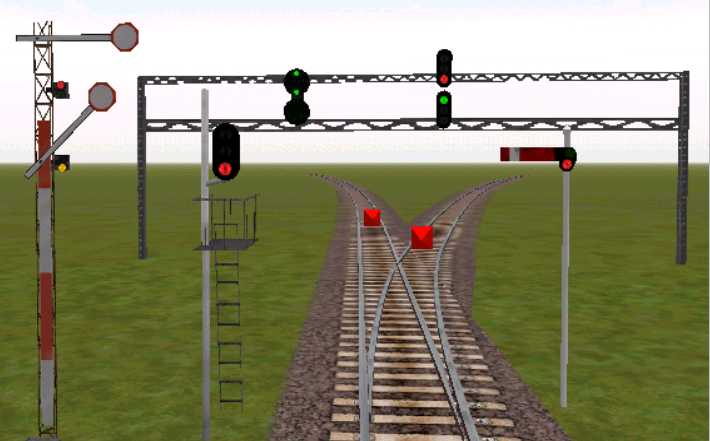
Try changing the signal dat files first, I'm pretty sure those aren't even addressed by the ref file. Get back to us either way. Remove | Alert Edit | Reply | Reply With Quote | Top
DKlemm (890 posts)
Jan-01-02, 09:35 PM (EST) 5. "RE: THE ALL NEW ALL_STUFF.REF PACKAGE - 253 KILOBYTES!!!!!!" Thanks sniper and Dick! And sniper, are you a reincarnated Jim Stevens???????? I often wonder what happened to him. My theory is that MS saw what great things he was doing for MSTS and snatched him on the next update for the program. Or, beat the crap out of him and told him to stop helping us and making the product better. Guess it depends if you an optimist or pesimist as to which is right.Later guysDavid Klemm
Illinois Central Route
Illinois and St Louis Divisions
Ver 0.6 uploaded
Working on Decatur IL
Remove | Alert Edit | Reply | Reply With Quote | Top
sniper297 (1233 posts)
Jan-01-02, 09:54 PM (EST) 6. "RE: THE ALL NEW ALL_STUFF.REF PACKAGE - 253 KILOBYTES!!!!!!" If I was a reincarnation of Jim Steven I'd already know all this stuff instead of having to figure it out the hard way. Plus I'd be younger than he was. (I wish, January is an "old" month for me, oldest daughter 28 today, youngest daughter 25 on the 12th, oldest grand daughter 11 on the 22nd. Feeling ancient.) You also forgot the third category. Optimist = glass is half full, pessimist = glass is half empty, paranoiac = glass is about to be knocked over. My theory is they carried the guy off in a black helicopter cuz he was trying to fix the game without shaking more money out of our pockets. Just because you're paranoid doesn't mean they ain't really out to get you, so I got the bunker prepared just in case.
I screwed around with the Japanese signals a little more, can't get any pentagon or the 7 light heads to place, possibly I could be doing something wrong tho cuz I don't even know what all these Japanese signals are for.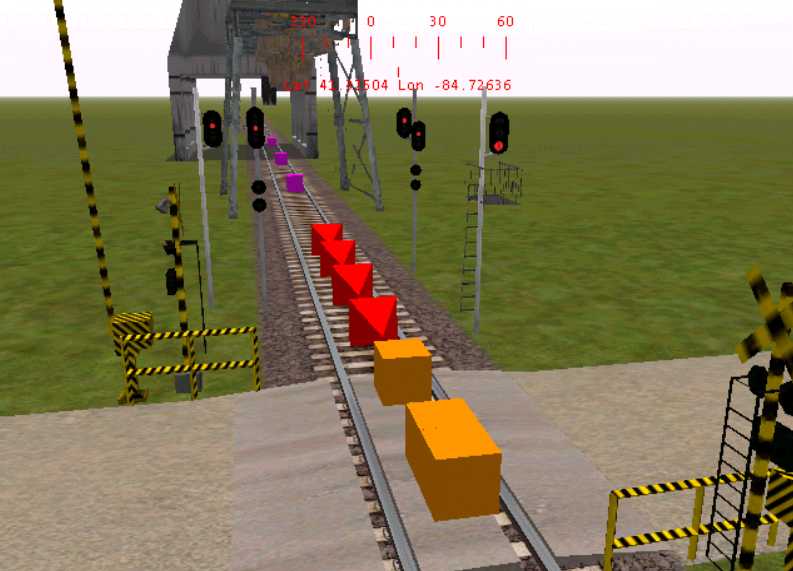
Invasion of the Asian signal objects. Remove | Alert Edit | Reply | Reply With Quote | Top
patm41 (485 posts)
Jan-01-02, 10:02 PM (EST) 7. "RE: THE ALL NEW ALL_STUFF.REF PACKAGE - 253 KILOBYTES!!!!!!" LAST EDITED ON Jan-01-02 AT 10:16 PM (EST)thats whats in the boat Sniper.. Shipping containers full of themThats why ya built that dock in NewCastle !!! 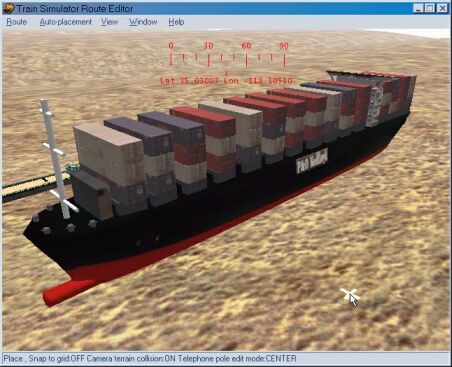


Thanks for the file Patm41 Remove | Alert Edit | Reply | Reply With Quote | Top
rgarber (970 posts)
Jan-01-02, 11:19 PM (EST) 8. "RE: THE ALL NEW ALL_STUFF.REF PACKAGE - 253 KILOBYTES!!!!!!" Gosh these pictures are getting better and better all the time! Beautiful ship pics! And the little switcher engine... cool!Rich Garber Remove | Alert Edit | Reply | Reply With Quote | Top
SilverFox (72 posts)
Jan-03-02, 03:01 PM (EST) 21. "RE: THE ALL NEW ALL_STUFF.REF PACKAGE - 253 KILOBYTES!!!!!!" Great pics.
What is the switcher loco?
-john Remove | Alert Edit | Reply | Reply With Quote | Top
SilverFox (72 posts)
Jan-02-02, 09:05 AM (EST) 9. "RE: THE ALL NEW ALL_STUFF.REF PACKAGE - 253 KILOBYTES!!!!!!" >So we're looking for opinions here, arguements and disagreements as to what the "best" format would be are allowed as long as the rules of the Geneva Convention are followed.<Hi Jim,
You and Dick are doing a great job on this Zero Defects project.
I'd like to throw in a few comments on classification and naming before the Geneva Convention gets ratified.First, if you look at the .ref file in James Hunt's Modern England Route he has obviously put some thought into classifying the objects. As far as I can see he has not renamed any of the objects but has reclassified them into groups which are more user friendly. The classes used, and number of objects in each category, are shown in a comment heading the .ref file, as follows:-SIMISA@@@@@@@@@@JINX0r1t______
skip( 1,191 objects in this list
352 Textures in TerrTex
333 Textures in TerrTex\Snow
========================================
1,876 Objects Animals 3
Bridge, Footpaths 5
Bridge Pieces 15
Bridge, Rail 46
Bridge, Vehicle 5
Bridges and Viaducts 11
Buildings 170
Clutter 24
Dynamic Track 1
Farm 6
Fence 18
Flag 4
Forests 30 (See FORESTS.DAT/TrackObjects)
Hazards 2
Interactive Objects 3
Level Crossings 15
Lights 7
Mainline Station Items 8
Mainline Stations 49
People 2
Pickup Items 9
Power 15
Preview Only 3
Road Sections 80
Signs 10
Sound Regions 30
Sound Sources 216
Speed Limits 16
Terrain Items 6
Track Buildings 24
Track Objects 55
Track Sections 157
Transfers 18
Transfers_2 12
Tunnel 10
Vegetation 57
Vehicle-Related 7
Vehicles 37
Vehicles- Train Related 7
Vehicles - Water 2
Walls 17)This type of header/comment for the ref file is useful, it shows the classes used, as they appear in the Route editor object selection menu and the number of objects in each class.
As you can see he has created a few new object classes eg " Vehicle related" for gas stations etc and subdivided others such as "buildings". When you add custom objects you can decide whether you want to use one of these classes or a new one such as <Flat people> or <3D Canvas objects>. On balance I think it would be worth renaming individual objects, a la Jim Stevens. It would be nice to have all the Warehouses or Office buildings appearing together in the selection menu. Whether an object first appeared in the original US2 route or not is becoming less & less relevant as they are being widely used in more routes. You will find Marias Pass Stations used in the Gotthard Pass route for example. Some objects will remain unique to one route ( Japanese Temple?, OE Landeck Bridge?)but I can't really see the need to distinguish between a Japanese steel bridge and a US one. On the other hand wholesale renaming of the standard objects would be time consuming and be confusing for a while. ( Was it Pres. Truman who said he wanted to be advised by one handed scientists , because he never met a scientist who didn't say "but on the other hand...."?)
Happy New Year,
John Remove | Alert Edit | Reply | Reply With Quote | Top
dvdhoven (358 posts)
Jan-02-02, 11:48 AM (EST) 10. "RE: THE ALL NEW ALL_STUFF.REF PACKAGE - 253 KILOBYTES!!!!!!" <blushing>
Thanks for the flowers guys.
It was some hours work, but I think it was worth doing it.
Now you have seen what a script can do and don't do such a things by hand forever! Is that a promise for 2002? Well I have created a script that lists all the files that have the same name in more then one route. When you like to have that list, give a reply.I also have a script ready that can create a .ref file from the shape folder of a route. I created that when I was looking in the Pro-train route Along the Rhine. You remember mr Rolf that was so p....d on me?When I read the replies well, you want to have a skip section (comment) with the numbers of each class, just like Jim Stevens had. That is possible.Another point is that I understand is that Jim Stevens have more descriptive descriptions, but that it is also nice to have the filename in the description. Why not doing both, I put Jim Stevens's descriptive description into Jim Wards ref file combined with the filename. May I have your votes please! Dick van den Hoven Remove | Alert Edit | Reply | Reply With Quote | Top
sniper297 (1233 posts)
Jan-02-02, 12:38 PM (EST) 11. "RE: THE ALL NEW ALL_STUFF.REF PACKAGE - 253 KILOBYTES!!!!!!" LAST EDITED ON Jan-02-02 AT 12:43 PM (EST)That particular header was from the original Jim Steven ALL_OBJECTS.REF, I cut it out of All_Stuff to avoid confusion, since All_Stuff is going to get rid of all non-working objects and add a bunch of ones that do work. That was a big portion of the modern england route's install problems, was the fact that it was based on the original unfinished ALL_OBJECTS instead of combined.ref. No slam on James Hunt, anybody with the first name James is automatically a helluva guy, because I had to learn some of the same lessons the hard way too. Nowadays I have one computer with an unmodified default installation of MSTS that I use for testing installs, and the install has to work perfectly first time every time without changing, adding, or modifying anything on the test computer (AMD K6-2 450, 64mb PC-100 SDRAM, 16mb Voodoo3-2000 PCI vid card, WIN98SE). As written, the original ALL_OBJECTS fails that test, which is why I'm hacking it to pieces.
Adding a new header will have to be somebody else's contribution to the project, that kind of tedious counting and cataloging would put me to sleep in 15 seconds, which is why I'm forever indebted to Dick for that VBscript which did all the duplicate checking so I wouldn't have to.
Before I go on to classes, I should probably clear up one possible bit of confusion. The objects are all listed in the menu not according to their order in the ref file or the name of the shape file itself, but alphabetically according to the description. So an "OEsnowshed.s" would have a description OE_Snow Shed, which would place it between OEoldhut and OEStAntonHotel. Without changing the filename (since that's the .s file it's gonna look for) you change the description to Snow Shed, OE. Then it appears in the RE objects menu with Snow Shed, US1, Snow Shed, US10, and so on. Changing the filename would be a bad idea, since the name of the shape file would have to be changed also, and then changed on every system the route is installed on, which would make it incompatible with any other ref file, and totally fail the Jim Ward "Idiot-Proof" test.
One thing that probably should be changed is the classification of buildings into two or three groups, commercial industrial residential or something, along with the track buildings and mainline stations. Again, that's something we need opinions on, do snowsheds belong in track objects, track buildings, or tunnels?
I'm inclined to agree that the object types should be renamed to catagories, it does make them easier to sort thru when you're looking for a particular type. Unfortunately it makes it more difficult to find it by the shape file name, and anything referenced by a dat file instead of the ref file can't be changed from the ref file. I'm also inclined to agree that we can lose the country of origin, UKsignalbox 3, for example, looks mere like a US signal tower from the 40s than any of the US signal towers do. And there are an awful lot of Japanese buildings that look just fine on an American railroad too, and as nutty as I am about bridges I'd be lost without the Japanese and European bridges.
Now we get to custom objects like the ship above. Whole new ballgame, if you are adding custom objects you have to add the lines to the ref file, copy the shape and texture files to the proper places, and make sure they are distributed correctly with the route. I haven't used any custom stuff for distribution yet because of the size of some objects, that one coal mine head shaft was really cool looking, had animated wheels that rotated, but it would have added 2 1/2 megs to the zip to include that one custom object. Compressing ace textures is something that sooner or later is going to have to be solved, and potentially someone will someday put together a package of add-on objects.
Meantime, I think I should write an additional batch file for this, one to be used with existing routes that have custom signals and so forth already installed, until then just delete this line;
call xcopy .\stuffed\root\*.* .\*.* /y
and then the existing dat files won't be overwritten.
I tried the aforementioned Japanese pentagon and 7 head signals with the original ALL_OBJECTS, same result, they just won't place. I looked for them in Hiatsu and Tokyo-Hakone, but they're not there, so I don't know where JS dug them up from. I should probably eliminate those too.
As far as I know this doesn't affect Xtracks unless there are custom signals already installed, the DAT files included that get copied over are;carspawn.dat
forests.dat
gantry.dat
sigcfg.dat
sigscr.dat
speedpost.dat
ssource.dat
ttype.datThe last entry, ttype.dat, actually has nothing to do with the type of track sections, it's the additional track sounds, like under bridge, in tunnel, steel girder, concrete bridge, all that stuff.
Remove | Alert Edit | Reply | Reply With Quote | Top
Nalle13 (103 posts)
Jan-02-02, 01:10 PM (EST) 12. "RE: THE ALL NEW ALL_STUFF.REF PACKAGE - 253 KILOBYTES!!!!!!" Hey Jim...
I mailed you but it just bounces back....User unknown!!!
Wierd, considering I just used "Reply" to the one you sent. Nalle Remove | Alert Edit | Reply | Reply With Quote | Top
dvdhoven (358 posts)
Jan-02-02, 02:31 PM (EST) 13. "RE: THE ALL NEW ALL_STUFF.REF PACKAGE - 253 KILOBYTES!!!!!!" Hi,What I simply can do is the following:- Use the classes of Jim Stevens
Simply go through the new ref file, look up if the .s file exists in Jim Stevens' ref file and alter the class accordingly JS, not find no altering of the class name- Use the descriptions of JS, but then in this way:
filename - description
Many time JS has only the filename as description
(uses the same lookup as the first point)- Count the object per class and put that as header, just like JS had.And to clarify, I will not add any object to the newest ref file, only altering classnames and descriptions.And as I said before, no handwork, this can be easily accomplished by a piece of scripting.Dick van den Hoven
Remove | Alert Edit | Reply | Reply With Quote | Top
sniper297 (1233 posts)
Jan-02-02, 02:52 PM (EST) 14. "RE: THE ALL NEW ALL_STUFF.REF PACKAGE - 253 KILOBYTES!!!!!!" LAST EDITED ON Jan-02-02 AT 02:59 PM (EST)Way to go, Dick. Go ahead and hack away, you could zip it and upload it here or email it to me, this is probably gonna be edited by a few different people before we hammer out something that's a close to perfect all-in-one swiss army knife type of utility.Nalle, I get two names here, Nalle and Bjorn, are you both?
I got an email from you at 10:16 this morning (my time, CST, 11:16 train-sim.com time, 16:16 ZULU) and the copy of the error message I got from you was;
(reason: 550 you are not allowed to send mail to <jwarde@ameritech.net>)Kinda makes you wonder what the preceding 549 reasons are. I love this garbage computer geeks write, "access denied", "you are not authorized to", "operation prohibited", all that nerdy crapola. Hey, dipstick, it's my computer, I'm allowed to do anything I want on it, go pound sand.
ATM machines are annoying too, enter pin number, choose your transaction, how much cash do you want, press here to accept this transaction fee, sorry, this machine is unable to dispense cash at this time. Simple program, you would think the pencil necks could set it up to tell you it was out of cash before you jump through all the hoops, but geeky programmers get a kinky kick out of proclaiming their authority and making people do useless things . Remember when people thought that computers were so smart they would take over the whole world?
Sorry, who put that soapbox in here, didn't mean to go off on a rant, that's Dennis Miller's job.I'm really not sure the combined signal dat files are actually necessary, the only use I can see for them is if you want to see what all the different default signals look like, or if you are making a route that would require two types of signals. I haven't been down near Western and Lake St. recently, but if I was ever gonna do the C&NW galena line I would have to do that interchange, and in addition to standard American signals (BNSF type) I would also need the Pennsy style for some of the tracks.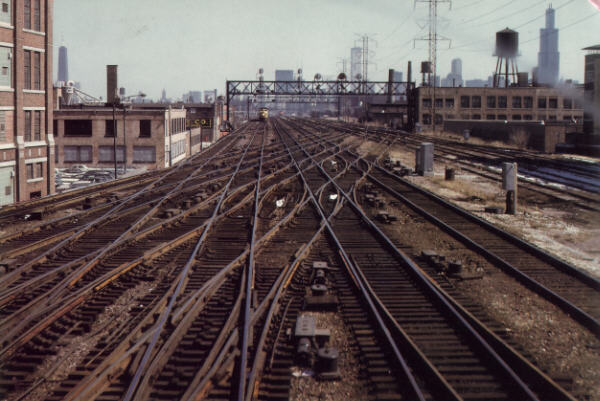
On the gantry closest to the camera, note the PRR style signals on the far right.Obviously I'd need working slip switches for that too, but other than this type of interchange I don't know why you'd want more than one type of signal on a route anyway. Remove | Alert Edit | Reply | Reply With Quote | Top
SilverFox (72 posts)
Jan-02-02, 03:59 PM (EST) 15. "RE: THE ALL NEW ALL_STUFF.REF PACKAGE - 253 KILOBYTES!!!!!!" Sniper,
As usual you are a (coal)mine of information.
So I have been using All_objects.ref without realising it for the last few months!
By renaming objects I only meant the description in the .ref file not changing the actual file names.
Dick seems to have come up with a solution to suit everyone.
He's certainly got my vote.
-John
Remove | Alert Edit | Reply | Reply With Quote | Top
sniper297 (1233 posts)
Jan-02-02, 05:30 PM (EST) 16. "RE: THE ALL NEW ALL_STUFF.REF PACKAGE - 253 KILOBYTES!!!!!!" Actually I don't know what you're using, I can't see your computer because there are some trees and buildings in the way.
If you downloaded one of the early ref files from here, it's probably either ALL_OBJECTS.REF (why did JS use ALL_CAPS?) or combined.ref. If you haven't altered it, a ref based on ALL_OBJECTS would be 175k, combined.ref would be 214k. Easiest way to tell is to look for the class "missing track sections" in the object menu, if it's there it's ALL_OBJECTS.REF (gonna wear out the shift key typing that), if not, it's combined.ref. Except now, of course, All_Stuff.ref don't have the MIA track sections either.
So far we have one problem that's with the batch file rather than the ref file, a route using custom signals that had a problem when the custom signal dat files were overwritten by the batch file, anybody run across any other problems or error messages yet? I should probably remind all you guys with the custom objects, once an object is placed it won't cause any error messages in either the sim or the editor, because a placed object is no longer an available object. Once the object is placed on the route the information is stored in the \world files, and you can change the ref file to that old template ref file and it won't cause the object to disappear or give error messages, you just won't be able to place the same kind of object again. So if you are using custom static objects and you replace your ref file with All_Stuff.ref, you won't get any error messages from that, but you will have to add the lines for the custom object before you can place any more of them. And Pat, get a bucket to catch all the water that slops over when you fill Newcastle Harbor with ships. Remove | Alert Edit | Reply | Reply With Quote | Top
TOPDOG5184 (436 posts)
Jan-02-02, 07:43 PM (EST) 17. "RE: THE ALL NEW ALL_STUFF.REF PACKAGE - 253 KILOBYTES!!!!!!" LAST EDITED ON Jan-02-02 AT 07:44 PM (EST)Heya Jim. got another for ya. A friend of mine used it on his route he's building. problem is he already placed alot of track before this .ref file. now everytime he places track it locks up. so he used a backup he had from before he placed any track. no word on wether or not static objects do the same only the tracks. any ideas? also I have 2 probs but they are to the version you made before this one. I had only one track section that was mia. i.e. it was in the track sections list but there was no pic and it said no .s file for it found when I clicked on it. the other is the new pickup objects ( i.e. the gravel tower, coal tower, eyc. ) don't work. is this normal? a route I'm building has a few mines and thought it would be cool to have them. I read a post the Jim Steven made months ago that he had them workin. other than that. that's it. no others. I also wanna say thanks and good job with it to you and Dick van den hoven. ( sp? ) anyways keep up the great work. hopefully next we'll have the turntable runnin. I'm gonna work on that after I get this coupler fixed. Craig Shortino Just a guy tryin to get non workin items in MSTS to actually work. Remove | Alert Edit | Reply | Reply With Quote | Top
sniper297 (1233 posts)
Jan-03-02, 00:42 AM (EST) 18. "RE: THE ALL NEW ALL_STUFF.REF PACKAGE - 253 KILOBYTES!!!!!!" Unwittingly, you just pointed out one of the major problems in beta testing anything. I installed something new, it crashed, was it the something new I installed or something else? troubleshooting problems is a tedious process because you have to have identical conditions and be able to duplicate the problem, and if you change more thamn one parameter at a time you frequently assume the wrong thing is causing the problem.
"every time he places track it locks up". Did he install the Xtracks at the same time? Was he using custom signals? Did deleting the Jim Steven compiled DAT files and restoring the originals fix the problem? Restoring from a backup "before he placed any track" sounds rather wierd, you mean he had a backup copy of a blank route with no track on it? Have him try the fix above, deleting the line that copies the DAT files, assuming he has custom signals, sounds, or mileposts or something, and try the route again.
As far as your MIA track section, which one was it? A lot of them don't have thumbnail sketches, that's a KUJU hurry-up-and-get-it-out-the-door thing, nothing can be done about that, and most people turn off thumbnails anyway because they are a big crash contributor. But there shouldn't be any screwed up track sections in this, I took out all the ones JS put in that weren't finished, and all the track sections you find in the object menu are referenced not by the ref file, but by the tsection.dat file in the global folder, which this package doesn't affect. Did you yourself add Xtracks or something before trying this? Clarify, son, clarify. Get your thumb out of your mouth and stop mumbling. And don't be so ambitious, with a working front coupler the turntable could wait.
Oh yeah, almost forgot, the pickup objects. I actually haven't tried any of those yet, I'll have to hunt for the post where he explains how to activate them. (I have a list of his threads somewhere, it was while hunting for all this I discovered his name was Jim Steven, not Jim Stevens. No "s" on the end, no wonder a lot of my searches turned up empty, DUH!) This is further complicated by the interactive nature of the interaction, like for the fuel pumps, water columns, coal loaders, and sand towers to work the engine can't have unlimited fuel and sand. I think it's possible to change that in an activity, but the eng file possibly needs to be hacked for some of that too, I don't really know. And I think the fuel pump needs two different objects to make it work, one of them is a region type of thing that the engine has to be stopped on, the other is the fuel pump visible object. Man, I ain't even figured out the yard limit region thingie yet, you're making my head hurt. i suspect that none of this stuff works in explore route mode, only in activities that are set up for action events. Maybe Rich would know.
Anyway, get back to me on the other stuff, you and your friend have problems let's see if we can Sherlock the actual cause in case somebody runs into something similar.
Hey Rich, that's an idea, when you're done playing DEMocrat you could put together a troubleshooting guide, with flow charts and stuff, sell it for 50 bucks a copy and make Rich richer! Remove | Alert Edit | Reply | Reply With Quote | Top
rgarber (970 posts)
Jan-03-02, 10:20 AM (EST) 19. "RE: THE ALL NEW ALL_STUFF.REF PACKAGE - 253 KILOBYTES!!!!!!" Jim,I think the first thing I would put in a troubleshooting guide is to upgrade the computer to the max. MSTS seems to settle down alot once you boost the ram, and video card.Then the next thing I would put is don't look at anything when you save.Third, start out small.Fouth, become a programer.Fifth, back up incessantly, just in case.Sixth, get a faster hard drive.Seventh, and so forth...Right now the worst problem I have is after awhile I get the black flickering and I have to start over.My MSTS does not like me messing with Outlook Express. Frankly, I don't think anything gets along with that program.The next tutorial I would like to do is how to do traffic trains. I think that's most people's frustrations. Right now though I'm trying to devote my time to the Bodiddly. I think the route is about 120 miles. I think when its done, I'm done. Last night I did a flight in FS2002 from Pittsburgh to Philadelphia. I learned a couple of things. First, there's alot more buttons and dials in an airplane. Second, you have to land. Go figure. Actually it went pretty good. I thought the ATC was gonna talk me down but rather I flew right over Philadelphia and said.. well.. I could put this thing into a nose dive...Well.. I'm rambling now... Rich Garber Remove | Alert Edit | Reply | Reply With Quote | Top
sniper297 (1233 posts)
Jan-03-02, 01:12 PM (EST) 20. "RE: THE ALL NEW ALL_STUFF.REF PACKAGE - 253 KILOBYTES!!!!!!" LAST EDITED ON Jan-03-02 AT 01:16 PM (EST)I would think the first thing would be to make sure you have a good mental health insurance plan before you start.
Boy, you brought back some memories. I had a buddy in my squadron that lived in Pittsburgh when we were based at NAS Willow Grove, about 30 miles North of Philly. Winter of 79-80 I rented a T-34B from the flying club (only 14 bucks an hour wet, as I recall!) and we flew to his hometown for a weekend. Great flight going to Pittsburgh on Friday afternoon, but by Sunday night a front had moved thru, and it was freezing cold. Common to that model, the nosegear doors always caused problems, so they had been removed for easier maintenance, and the nosegear just tucked up into the well and was left exposed. Normally not a problem, but the solid cloud deck over the Alleghenny Mountains that night topped out at 13,000 feet, and it was 50 below up there. The heater couldn't compete with that 140 knot wind coming up the nosegear well, thru the hole in the floor for the left rudder pedal, and right up my left leg to my poor frozen test-cicles. By the time we landed 2 1/2 hours later we were a pair of blue ice cubes. Pop-sicle the sailor. Brrrr.
This was shot on a much balmier day in the Fall, NAS Lakehurst, NJ. Note the absence of nosegear doors. Remove | Alert Edit | Reply | Reply With Quote | Top
Lock | Archive | Remove
Lobby | Topics | Previous Topic | Next Topic
Restored from the Train-Sim.Com archive, captured January 5, 2002. About this archive.