Message Areas - "Transfers – !@#$%^&*()_+"
Train-Sim.Com Message Areas
"Transfers---!@#$%^&*()_+"
Email this topic to a friend
Printer-friendly version of this topic
Bookmark this topic (Registered users only)
Previous Topic | Next Topic Conferences MSTS Route Design (Protected) Original message
landnrailroader (125 posts)
Dec-30-01, 09:29 PM (EST) "Transfers---!@#$%^&*()_+" Those of you who have looked at my pictures the last few days of progress on the Kingsport Sub. of CSX, probably realize that I haven't done a real good job with transfers around tunnels.I would hope that some future release of this program would improve on this method. The idea of filling in gaps with transfers that have the general appearance of the background is nice, but there are a number of problems with them.1. The white edges. Isn't there someway to eliminate these. If they could be eliminated, it would be much easier to blend these things into the scenery.2. At present, they just follow the grid of terrain, and bisect anything that is placed thereon, such as track, portals, etc. It would be really nice if you could turn this on or off, so that if turned off, they would just lay on the surface of the man-made item.3. It is not always desirable for them to strictly follow the land contours. Sometimes it would be better, if they could be stretched and fitted to cover a hole. How about it Kuju??For those of you, like me, struggling with these widgets, I have had the best results, when I sized them fairly large,and oblong, rather than square. For example, I might select 20 for width, and 6 for height, and then rotate it until it lays over a hole, sort of like a band-aid. I then zoom around and try to look at all reasonable angles of the area and fill in white spots. It is only necessary to fill in the areas that will be seen by the engineer, passengers, or in an aerial view (keys 2, 3, or 4). As I operate a test train, I make notes of imperfections.Since there is often a cut, leading to the mouth of a tunnel, I am not afraid to adjust the "cut edges" after I penetrate scenery with the "V" key. This must be done with care to produce something that looks reasonable, and also something that does not protrude down into the tunnel. More than 2/3 of my tunnels have been produced with a succession of portals, blended into each other, and this method works well. It can be improved on by positioning a tunnel roof piece UNDER THE TRACK to block out white light from entering through the lower edges. I have not done this, however, in an effort to reduce the database size where I can.Lastly, I find that using the Japanese Bush #3 to disguise irregularities in the patching process works nicely, and then I use the US2 decidous tree No. 2 and randomly spot a few of these around. This is to draw attention away from the tunnel portal.In the OE bridges, there is a 3 arch small bridge, that works nicely as a culvert, although no American railroad would be likely to have such intricate stonework.J. H. Sullivan, P.E. (retired) Alert Edit | Reply | Reply With Quote | Top
Table of Contents
Subject Author Message Date ID RE: Transfers---!@#$%^&*()_+ Hobart Dec-30-01 1 RE: Transfers---!@#$%^&*()_ sniper297 Dec-30-01 2 RE: Transfers---!@#$%^&*()_+ JohnCS Dec-31-01 3 RE: Transfers---!@#$%^&*()_+ landnrailroader Jan-14-02 4 Eastern Railroads need all the corr... sniper297 Jan-14-02 5 RE: Eastern Railroads need all the ... romerails Jan-14-02 6 RE: Eastern Railroads need all the ... yellowdog Jan-15-02 7 ROMERAILS: yellowdog Jan-18-02 9 RE: Transfers---!@#$%^&*()_ Nalle13 Jan-15-02 8 RE: Transfers---!@#$%^&*()_ landnrailroader Jan-18-02 10 RE: Transfers---!@#$%^&*()_ Nalle13 Jan-18-02 11
Lobby | Topics | Previous Topic | Next Topic
Messages in this topic
Hobart (133 posts)
Dec-30-01, 10:17 PM (EST) 1. "RE: Transfers---!@#$%^&*()_+" Hey LRR,
One suggestion I would make is to pick the square or squares containing the portal and set the error bias to 0. When you come up on the portal at some distance the holes are huge, when you get closer the holes shrink. Setting the error bias minimizes this substantially. You've got some great DEMed terrain there boss! Best Regards
Hobart Remove | Alert Edit | Reply | Reply With Quote | Top
sniper297 (1373 posts)
Dec-30-01, 10:35 PM (EST) 2. "RE: Transfers---!@#$%^&*()_ " I screwed around with those transfer things just long enough to decide that they were useless. Even when you finally get the hole covered, they ripple and crawl and shimmer like a bad acid trip. These days I delete the tunnel piece, connect a temporary 10 meter straight section to the track outside the tunnel, set width to 12 and cutting to 65, hit the Y key, then delete the 10 meter straight piece and reattach the tunnels section. This gives a steep wall inside the tunnel, which I use the V key on to make it transparent. After adjusting the hole for a fairly close fit, I use a UKsingle tunnel. Which doesn't work, because altho it covers the hole, the inside is too big for the tunnel section. So JP1 single tunnel goes next, merged with the UK tunnel.
One is too big, the other is too small;
But together they're just right. Goldilocks would be delighted. And a couple of them turned sideways make a reasonable brick retaining wall.
Fills in the cuts pretty good too, and you can always stack two or three if needed, easier on the framerates than a single transfer. Remove | Alert Edit | Reply | Reply With Quote | Top
JohnCS (240 posts)
Dec-31-01, 03:43 AM (EST) 3. "RE: Transfers---!@#$%^&*()_+" LAST EDITED ON Dec-31-01 AT 03:45 AM (EST)JH:I don't quite understand some of you comments. I've never had any problems per-se with transfers, other than the frame-rate hit they cause. It shouldn't take more than 4 transfers to cover any portal.You say you wish they just covered the terrain. Well, thats all that they do. I can't make them overlap a portal or anything no matter what I try.You do understand that there's on sharp edge and three soft ones to each transfer, and that you can rotate them to align that edge. Also, use the H key when moving the transfer to keep its center on the landscape for later selection, and don't rotate arbitrarilly with the mouse as this will distort the transfer (just rotate it in the ground plane using the keyboard)If you need to change the draw order of transfers, it is determined by their order of appearance in the world file. You can cut and paste each entry to get them in the order desired.BTW you are toggling the drawing on just the individual triangles, and not the whole terrain patch, arent you? Remove | Alert Edit | Reply | Reply With Quote | Top
landnrailroader (125 posts)
Jan-14-02, 08:34 PM (EST) 4. "RE: Transfers---!@#$%^&*()_+" Several persons responded, but when I start the next piece of the clinchfield, I am going to try the method of merging the english and Japanese tunnel pieces. That produced a very superior solution, even if it isn't quite correct for an eastern railroad. Thanks to all who responded.J. H. Sullivan, P.E. (retired) Remove | Alert Edit | Reply | Reply With Quote | Top
sniper297 (1373 posts)
Jan-14-02, 09:31 PM (EST) 5. "Eastern Railroads need all the correction they can get!" If the bricks ain't exactly what you like, try other combinations. I assume you've at least dabbled in model railroading, what we're doing here is kitbashing! Rotating some of the tunnels around works sometimes, most of them have two different faces. You can also lower them into the ground slightly as long as you use the cupola caboose to check clearance afterwards. Here's a more Eastern looking tunnel face;
The gray concrete one is called "stacked tunnel", altho it don't look like any pin-up girl I ever saw. Since it's one of the "missing objects", you'll need this to get it;
http://www.train-sim.com/dcforum/User_files/3c3d22853fb41330.zip
Keep hackin', it's looking good!
Remove | Alert Edit | Reply | Reply With Quote | Top
romerails (37 posts)
Jan-14-02, 11:56 PM (EST) 6. "RE: Eastern Railroads need all the correction they can get!" OK, from reading these posts I can see that there is a real need for some new tunnel portals and retaining walls. Since I am sitting here totally addicted to this new Train Designer software, I may as well work on creating some of these. Anyone have any photos of a particular prototype? What do you need? Wider walls, longer portals? I don't have any tunnels on the current route I am working on but have done some on other routes so I have a good idea of what we need. Post any other suggestions to this message and I will check back. Remove | Alert Edit | Reply | Reply With Quote | Top
yellowdog (25 posts)
Jan-15-02, 09:32 AM (EST) 7. "RE: Eastern Railroads need all the correction they can get!" Give me some time (maybe the weekend- -jeez I can't wait til we have longer day-times!) and I will get you some photos of CRR tunnel portals! Even though I'm not working on the railroad, I appreciate the offer!Clayton Remove | Alert Edit | Reply | Reply With Quote | Top
yellowdog (25 posts)
Jan-18-02, 12:36 PM (EST) 9. "ROMERAILS: " Please see my post entitled "CRR tunnel portals." Not the best pics, but may give you some ideas as to what is needed.CN Remove | Alert Edit | Reply | Reply With Quote | Top
Nalle13 (144 posts)
Jan-15-02, 12:18 PM (EST) 8. "RE: Transfers---!@#$%^&*()_ " I tried building some "ground" as objects.
This first shot is Williams Loop where I attached some ground to the tunnel. I lowered the ground where the tunnel is so there were no need to make a "hole" here. This is the latest version where I'm getting the hang of how to map it correctly. You have to look twice to see where the real ground ends and the "homemade" one starts. Some vegetation on top of this and you'll never notice att all.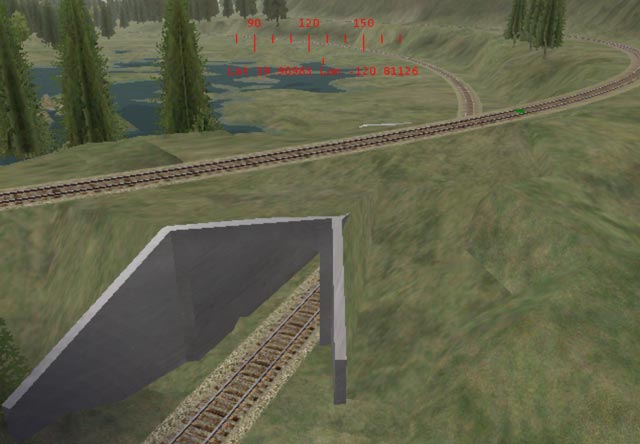 Here I used separate "ground objects" to cover the hole, one convex shape above the tunnel and one flat under the tracks.
The mapping isn't perfect.(yet...)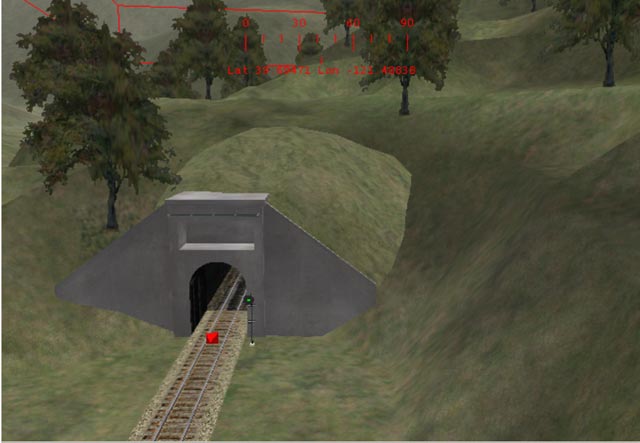 Same thing here, but here it's a part of the tunnel portal. The mapping needs some work here too.
 The flat objects are only 2 polys, and the others around 40. Not too bad on framrates.
 Nalle Remove | Alert Edit | Reply | Reply With Quote | Top
landnrailroader (125 posts)
Jan-18-02, 04:44 PM (EST) 10. "RE: Transfers---!@#$%^&*()_ " I never rode the WP, wish I had, but I am familiar with Williams Loop from the written material.However, that 3rd pix. looks hauntingly like Tunnel #5 on the D&RGW Front Range. It goes through a spine that sticks out of the face of the canyon, and it is not over 100' in length. As the train exits from tunnel 3 or 4, (I rode the CZ on Amtrak in 1984 as far as Salt Lake City) you can clearly see the entrance to this tunnel ahead.J. H. Sullivan, P.E. Remove | Alert Edit | Reply | Reply With Quote | Top
Nalle13 (144 posts)
Jan-18-02, 07:27 PM (EST) 11. "RE: Transfers---!@#$%^&*()_ " The third pic is the east end of tunnel No.9 in the lower part of the FRC. The texture need some more work but I think it is better than transfers (or a huge hole).
The picture above is the west end of tunnel No.8 (longest one on the 3rd Sub at 8856').
Here is one of the east portal of tunnel No.7 They're actually just a couple hundred feet apart! Nalle Remove | Alert Edit | Reply | Reply With Quote | Top
Lock | Archive | Remove
Lobby | Topics | Previous Topic | Next Topic
Restored from the Train-Sim.Com archive, captured March 9, 2002. About this archive.