Message Areas - "When dynamic tracks don't quite match"
Train-Sim.Com Message Areas
"When dynamic tracks don't quite match"
Email this topic to a friend
Printer-friendly version of this topic
Bookmark this topic (Registered users only)
Previous Topic | Next Topic Conferences MSTS Route Design (Protected) Original message
Simerjoe (59 posts)
Oct-01-01, 11:56 PM (EST) "When dynamic tracks don't quite match" This is what happens. OOPS!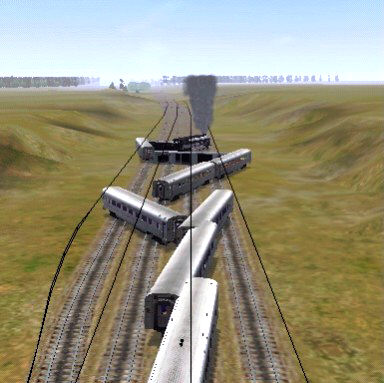 Alert Edit | Reply | Reply With Quote | Top
Table of Contents
Subject Author Message Date ID RE: When dynamic tracks don't quite... Motley24Crue2 Oct-02-01 1 RE: When dynamic tracks don't quite... ronik24 Oct-02-01 2 RE: When dynamic tracks don't quite... Signalmaster Oct-02-01 3 RE: When dynamic tracks don't quite... LawrenceKellie Oct-02-01 4 RE: When dynamic tracks don't quite... ronik24 Oct-02-01 5 RE: When dynamic tracks don't quite... LawrenceKellie Oct-02-01 6
Lobby | Topics | Previous Topic | Next Topic
Messages in this topic
Motley24Crue2 (27 posts)
Oct-02-01, 01:32 AM (EST) 1. "RE: When dynamic tracks don't quite match" Watch out for those "Blue lines" in the editor. Also i find it easy just to get up close and Personal. and play around with the numbers "using the "w" so you can see through the terrain, and once you have a Perfect match your good to go! Remove | Alert Edit | Reply | Reply With Quote | Top
ronik24 (40 posts)
Oct-02-01, 10:41 AM (EST) 2. "RE: When dynamic tracks don't quite match" Yes, always deselect the track and watch if the blue lines disappear! Always check the route in the Activity Editor, too.Roní Remove | Alert Edit | Reply | Reply With Quote | Top
Signalmaster (91 posts)
Oct-02-01, 11:15 AM (EST) 3. "RE: When dynamic tracks don't quite match" Even on closeup inspection, make it is close as possible. The sim will accept some 'sloppyness' in that joint. Won't derail the train, but it will take an nasty jog at the joint.
What I can't stand is when you make an adjustment to some dynamic track on a grade, it slams to level again.
Am I correct in assuming the track curves only in one direction?
Hank Remove | Alert Edit | Reply | Reply With Quote | Top
LawrenceKellie (405 posts)
Oct-02-01, 12:31 PM (EST) 4. "RE: When dynamic tracks don't quite match" Curve one direction? Yes. All track, even the curves, curve in only one direction. However, by switching the track (press the "t" key), it will "curve" in the other direction. Actually, it doesn't actually curve in the other direction, it flip flops the ends. Lawrence Remove | Alert Edit | Reply | Reply With Quote | Top
ronik24 (40 posts)
Oct-02-01, 01:07 PM (EST) 5. "RE: When dynamic tracks don't quite match" No, but with dynamic track this seems to be a bug. You can only create a -gradiant curve, no +. If you use both curves, they can't be in different directions.Roní Remove | Alert Edit | Reply | Reply With Quote | Top
LawrenceKellie (405 posts)
Oct-02-01, 01:51 PM (EST) 6. "RE: When dynamic tracks don't quite match" LAST EDITED ON Oct-02-01 AT 01:53 PM (EST)All curves are with a - gradient. None are with a + gradient. The all curve to the left. To get them to curve to the right, you must press the "t" key.If you press the "t" key, a dynamic track will flip flop. I have done it numerous of times in the route(s) I am creating. Can you make an "S" with *one* dynamic track? No. But you can with two. Again, I have done this often.Lawrence Remove | Alert Edit | Reply | Reply With Quote | Top
Lock | Archive | Remove
Lobby | Topics | Previous Topic | Next Topic
Restored from the Train-Sim.Com archive, captured November 2, 2001. About this archive.