Message Areas - "The Signals that time forgot… Part 2"
Train-Sim.Com Message Areas
"The Signals that time forgot.....Part 2"
Email this topic to a friend
Printer-friendly version of this topic
Bookmark this topic (Registered users only)
Previous Topic | Next Topic Conferences MSTS Route Design (Protected) Original message
Boweavel (711 posts)
Sep-21-01, 03:24 AM (EST) "The Signals that time forgot.....Part 2" LAST EDITED ON Sep-21-01 AT 03:47 AM (EST)Ok, that other thread was getting a bit long....
i went for an Exploreer trips on My PO&N and everything seemed fine, Lights all worked, could even sit back and watch the lights change as I threw the switches, But there is still this traffic problem....Is says error creating traffic file *etc* with one of those big ugly red crosses ...... But after this post im going to create this new folder you mentioned sniper and see what happens..... ToodloooUPDATEWell i placed the new folder in ( traffic ) and it just amazed me how stupid computers are...It Worked !!!!! Thanks again Sniper....Rgarber..im now with you in banging my head... I cant believe I didnt even see that folder missing myself, considering the amount of time ive spent in those folders !!!Anyway off to creating traffic for PO&N vBOW....!! Alert Edit | Reply | Reply With Quote | Top
Table of Contents
Subject Author Message Date ID Traffic on PO&N .... Boweavel Sep-21-01 1 RE: Traffic on PO&N .... TheEagle Sep-21-01 2 RE: Traffic on PO&N .... Boweavel Sep-21-01 3 RE: Traffic on PO&N .... rgarber Sep-21-01 4 RE: Traffic on PO&N .... Boweavel Sep-21-01 5 RE: Traffic on PO&N .... sniper297 Sep-21-01 6 RE: Traffic on PO&N .... rgarber Sep-21-01 7 RE: Traffic on PO&N .... rgarber Sep-21-01 8 RE: Traffic on PO&N .... rgarber Sep-21-01 9 RE: Traffic on PO&N .... sniper297 Sep-21-01 10 RE: Traffic on PO&N .... rgarber Sep-22-01 11 RE: Traffic on PO&N .... Boweavel Sep-23-01 12 RE: Traffic on PO&N .... sniper297 Sep-23-01 13 RE: Traffic on PO&N .... rgarber Sep-23-01 14 Blah Blah Blah Boweavel Sep-23-01 15 RE: Blah Blah Blah rgarber Sep-23-01 16 RE: Blah Blah Blah Boweavel Sep-24-01 17 RE: Blah Blah Blah rgarber Sep-24-01 18 RE: Blah Blah Blah sniper297 Sep-24-01 19 RE: Blah Blah Blah rgarber Sep-24-01 21 RE: Blah Blah Blah Boweavel Sep-25-01 22 RE: Traffic on PO&N .... LawrenceKellie Sep-25-01 25 RE: Traffic on PO&N .... LawrenceKellie Sep-25-01 24 RE: The Signals that time forgot...... Boweavel Sep-24-01 20 RE: The Signals that time forgot...... Boweavel Sep-25-01 23 RE: The Signals that time forgot...... rgarber Sep-25-01 26 RE: The Signals that time forgot...... Boweavel Sep-25-01 27 RE: The Signals that time forgot...... Boweavel Sep-25-01 28 RE: The Signals that time forgot...... rgarber Sep-25-01 29 RE: The Signals that time forgot...... Boweavel Sep-25-01 30 RE: The Signals that time forgot...... rgarber Sep-25-01 31
Lobby | Topics | Previous Topic | Next Topic
Messages in this topic
Boweavel (711 posts)
Sep-21-01, 08:17 AM (EST) 1. "Traffic on PO&N ...." Heys ..well its works... to a point, traffic runs but it seems some lights its set to go threw , they (the train) just stops, I had screen pics but my Conversion to jpeg turned out shocking , much like these pictures of a little traffic run i made to chase down this great steamer......

 Im still getting the errors from the above post, except now there more frequent, And when i went into the activity creator , the new lights I had placed were not shown on the map.....
I think i may just reload the origanal..start from scratch....Im getting a sore head and I think i need a new table....
"Keep the wheels to the steels" Remove | Alert Edit | Reply | Reply With Quote | Top
TheEagle (23 posts)
Sep-21-01, 09:27 AM (EST) 2. "RE: Traffic on PO&N ...." LAST EDITED ON Sep-21-01 AT 09:33 AM (EST)It's a bit offtopic but, nice pics Is that landscape made with dem data? Remove | Alert Edit | Reply | Reply With Quote | Top
Boweavel (711 posts)
Sep-21-01, 09:44 AM (EST) 3. "RE: Traffic on PO&N ...." LAST EDITED ON Sep-21-01 AT 10:03 AM (EST)The Origanal landscape was Snipers brain child, So it'll be him that can answer that question, But... As for all the mountain peaks and extra hills, Its just a good o'l 2 lane road, usually a 50mtr, can be more, depends how long you want the hills, I set width to 14, and both angles to 79, Then i angle the road piece up as far as it will go, swivel it whilst pressing the j key, Then go over the track pieces that are affected by instant hills, and press the J key again for them... and your done...
Track pieces only go to a certain angle height, But are good for creating long rolling hill terrain..Heres some extra examples....All dug out and built up with roads...One end of the Bridge...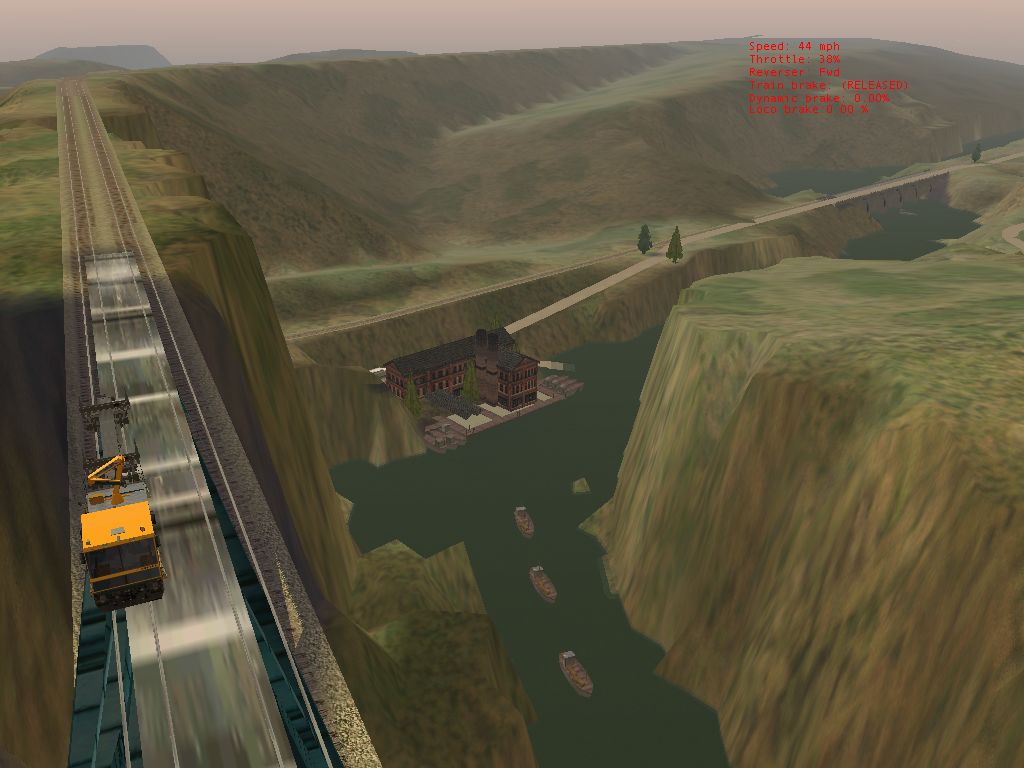 This city has been built North (well on the map ) of Combs landing, On all that beutiful clear open country.. I call it Zooburbia..The other end of the bridge....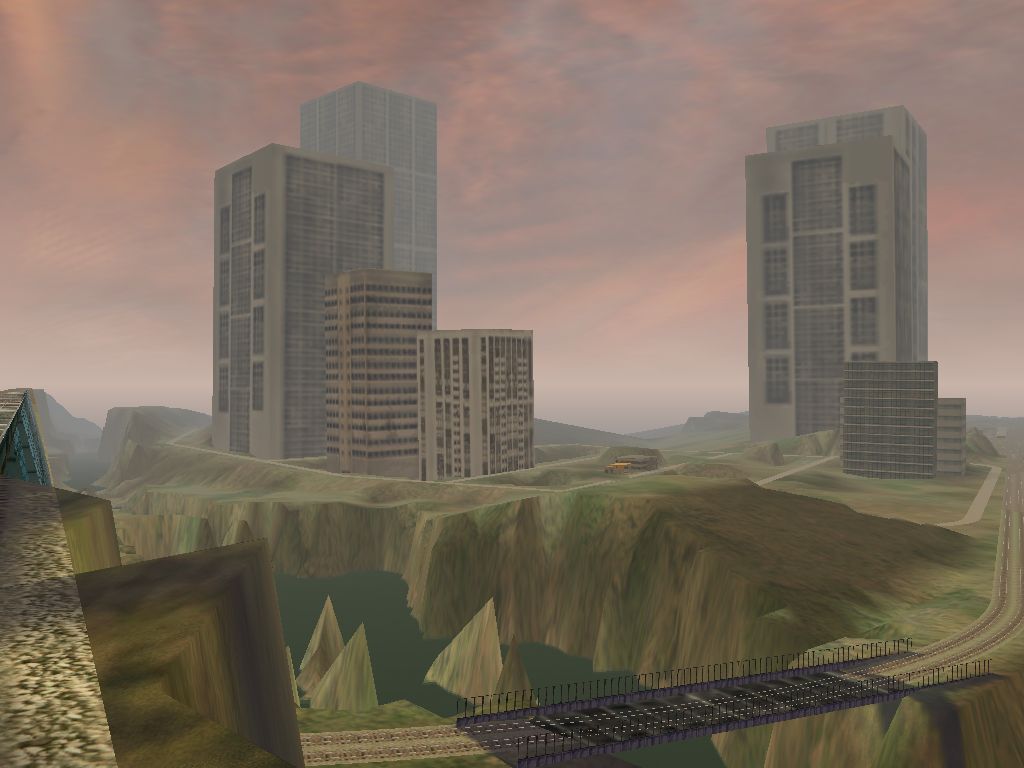
Enjoy Remove | Alert Edit | Reply | Reply With Quote | Top
rgarber (159 posts)
Sep-21-01, 12:28 PM (EST) 4. "RE: Traffic on PO&N ...." Gee Bo, you sure make answering your posts hard. Either it's tacked onto a thread a mile long, or you stuff so many pictures in it the screen keeps jumping and I can't hit the reply do-hicky! I do like the pics though, and it's good you posted the pics, cause I've seen that problem you are having. Drove me nuts. But you see how you are getting the little arrow in with the yellow signal? When my signals work right, I never get that. Now this is all theory my man, but I believe Kuju decided the AI trains always go to the passing siding. Now I'm guessing here, cause I can't see the siding you are going to, but it looks like the AI is trying to route you to the passing siding. This is probably bad. Because the way signals work on this route is one reason why in a thread, in a galaxy not too long ago (star wars theme), I was thinking to avoid model railroad type layouts in this sim. It doesn't appear the AI logic knows what to do when you're the one that needs directing to the passing siding, and what to do if you have an unopposed interlocking signal. I mean if you don't provide an AI train, an 'out' clause, deadlocks will occur. So, what am I saying. You almost have to be wary of how you put your route together that you don't give an AI train the chance to go through an interlocking signal where it might meet an oncoming train without a siding for it to run into. So here's what you do in the mean time since the ole dispatcher really isn't up to par.First, keep your AI train runs short. Think choreography, not realism.
Second, you do need to never insert an AI train onto the track with no less than two maybe three signals between it and you. Notice how you go from, green, to flashing yellow, to yellow, and then red? I think if you insert a train where it never sees a green, it messes up the dispatcher.
Third, your paths are critical. Never run an AI path through a static anything, or a manual switch where the points are changed by another AI train. The same applies for the player path too. The AI will just stop. You will just stop (see below)
Fourth, stay with automatic switches for your AI trains. You can run them through a manual switch as long as nothing switches the points before you or the AI train get there. Yep, a manual switch down the road can cause you problems too. I think it's because the dispatcher sees the path as not being clear and you get a red you can't go through.
Fifth, check your vcr playback in the activity editor frequently. And then, don't always believe the results.
Sixth, use the Begin passing path option for the AI train, but don't use it for your player train when planning the path.The problem I see you having there, looks just like the one I had. In the Activity editor plaback it worked perfectly though. It's just a guess by I'm inclined to think what is happening is the dispatcher is detecting the AI train before he detects you, giving him the right of way, and you are getting directed to the passing siding. By any chance, did your train go through the turnout portion of a switch before you got into this mess?Anyway, hope this helps. I have an activity creation tutorial I did. I had it up as a beta but a couple of guys wanted to make some changes to it. Okay, alot of changes. It should be ready soon. I cover some of this in this manual of sorts with the presumption I have no idea what I'm talking about. Rich Garber Remove | Alert Edit | Reply | Reply With Quote | Top
Boweavel (711 posts)
Sep-21-01, 12:57 PM (EST) 5. "RE: Traffic on PO&N ...." LAST EDITED ON Sep-21-01 AT 01:27 PM (EST)That tunnel in the First picture is not in the the PO&N original route,
That tunnel in the second picture is in the PO&N original route,tho I dont think the high banking to the left is...
The tunnel in the third picture is just after the entrance in the second pic, at the end of this tunnel is what is know as 77 on the PO&N route, the double tracks merge into one, Im on the mainline and the steamer was set to wait for two minutes at the yellow light...I was to go straight threw and try and meet it at another point in the track..But..
When i got to the switch I was bout 100m infront of the steamer..It was slowing down..I just got to switch and game froze... Typical..
But alas all those switches have now gone..as I have reloaded the Old backup.. (I got to many error's)...But whilst doing that I decided i'd buy my own patch of land from the route geometry extractor..All went well...got my patch, first thing i went to do was whip out a 200m 2pce road and proceed to make a hill..well no hill came, and I couldnt delete the pice..So I exited without saving..as it was the only thing I had done..
Whats my new problem here ?
I also noticed I have almost No objects or tranfers to place of any kind.. I know ive done it Before with the cheeseman co route..But i cant for the life of me remember what to do.. Anyone know where I can get the 2000 tools pack ive heard about ?
Agh so many questions........
So much time..................All your advice has been notepaded and saved rgarber.... very usefull...Catchya's...PS. Oh thanks about the model railway warning, I used to work for a recycling company..Its amazing the things people throw out..One of them being a whole stack of model railroad magazines
and a map book called "Nine N scale railroads", book #7 Level 2, printed by atlas..all that info is for all you real train buffs that know your stuff... .
I was going to create one long straight stretch and off of this stretch , run sidings that turn into a different model layout...
, But till i get some gear and build some hills then im stuck ;{
Remove | Alert Edit | Reply | Reply With Quote | Top
sniper297 (567 posts)
Sep-21-01, 07:34 PM (EST) 6. "RE: Traffic on PO&N ...."
No Dem, guys, all that terrain was made by the method Boweavel described. Lay the track first, then sculpt the terrain around it when you get tired of looking at track on bare embankments.
Bo, you need to open the geo extractor help file and print out the three step by step pages. But reading thru all that upside down might give you a headache, so here's the short version.
1. Open the extractor. File, new route. Name it "Maniac Railways". You can change most of the info later.
2. File, select route. You'd think the dumb thing would know to select the route you just created, but no such luck.
3.File, new quad tree.
4. Here's what the help file left out. If you want to change the height offset, this is your one and only chance. You don't do it here you'll have default zero height offset. Til death do us part.
5. Do all the zooming in, drag rectangle, right click inside rectangle. Add all selection tiles. Drag rectangle and right click again. Toggle populated state.
6. Click Edit, minimize quad tree.
7. File, save quad tree.
8. Edit, generate flagged tiles.
9. Pick the blue square you want, right click, route editor start tile.
Exit ALL THE WAY BACK TO DESKTOP. Important, these idiot editing tools don't use memory the way a normal program does.
Now, open the route in the route editor, just to make sure you didn't goof on the previous and wind up looking at blank white ground. Exit to desktop. Now you need to get some objects.1.Download Comboref.zip (misc. section) and Gitstufd.zip (utilities section) if you don't already have them. Don't use my install, it was customized from the files in gitstufd, and doesn't copy all of the shapes and textures like ezstuf2 does.
(I don't recommend using jim Stevens' All_Objects until it's finished, I never heard of anyone that got it working right yet.)
2. In your new route folder, paste in ezstuf2 and combined.ref. Delete the 4k .ref file created by the extractor, eg "maniac.ref". rename combined.ref to maniac.ref.
3. Doubleclick on Ezstuf2.bat, go get a cuppa while it stuffs your directory with shapes and textures.
4. Go hog wild, make a route no one would want to drive on without a good mental health plan.Ok, now it's my turn to ask the questions, here's where I am on the signals;
I'm pretty sure the trackplan is important to the setup of signals, probably why half the people who are still working on their routes haven't uploaded even a demo yet. Some of them are stuck on the Dem extractors, (anybody seen a route actually created with DEM yet?) but I'm sure most are doing the kind of meticulous planning that would drive me nuttier than I already am, but will end up saving them a lot of time and work in the long run. Due to that kind of lack of planning, I got a trainload of work to do to try to relay a bunch of this track so I can place signals for AI trains and still have access to all the spurs for switching. Here's what I'm playing with now: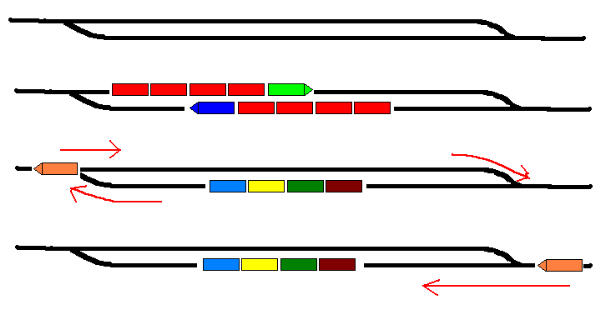 This is an offset passing siding, the auto switches default to straight ahead, and the trains automatically take the proper side without having to change the exit. Hopefully. As you can see by the two bottom drawings, a way freight can use this as a runaround without having to change either switch, so it don't matter if they're not manual. Only thing I gotta check now (and I hate extensive beta testing when I ain't getting paid for it), is whether this will always work, or will certain AI paths make it so you're stuck using one side only, or set a red signal against you so you can't back up and complete the switching exercise. This is, after all, supposed to be a switching route. If you look at the actual town of Port Ogden, the through path from Johnsburg to West Ogden goes through a crossover, and there's no way to make a full blown mainline out of that without making some of the spurs inaccessable. One option would be to add a switch on the curved spur under the trestle, make it a manual switch, and run a tunnel under the ridge to spawn AI trains in. Otherwise there ain't a whole lot of room to make a hidden spawn section, and it's no good to me when I see a train suddenly teleport in, drive to it's destination, and vanish into the twilight zone. Gotta hide all that. Well, I'll be back, ain't getting any work done yakking with you guys, and I've already talked a lot, even for me. My home town ain't called "The Windy City" for nothing. Remove | Alert Edit | Reply | Reply With Quote | Top
rgarber (159 posts)
Sep-21-01, 09:44 PM (EST) 7. "RE: Traffic on PO&N ...." Won't work Jim. The reason is you will violate the signals by running the red. Here's what you could do.first version... place reversing points to allow the signals to allow you to do what you want to do.second version... place manual switches inside the siding so you can do the end around without violating the signals. Remember to reset these switches before you continue on or you could mess up an AI train trying to come through if you have one setup to do so.Rich G. Remove | Alert Edit | Reply | Reply With Quote | Top
rgarber (159 posts)
Sep-21-01, 09:46 PM (EST) 8. "RE: Traffic on PO&N ...." Oh, forgot one thing... depending on if you have AI traffic running, you might get around the red signals by using the tab key. But in trying to come back on the backside of the train, the dispatcher will deny you going through the red, because the dispatcher may see your consist as blocking your path. I'm not positive on that though. Remove | Alert Edit | Reply | Reply With Quote | Top
rgarber (159 posts)
Sep-21-01, 09:47 PM (EST) 9. "RE: Traffic on PO&N ...." no.. come to think of it.. I am pretty sure, the dispatcher will see the cars as blocking your path and reject you outright like a tiberium bat.. never mind... need more sleep... Remove | Alert Edit | Reply | Reply With Quote | Top
sniper297 (567 posts)
Sep-21-01, 11:14 PM (EST) 10. "RE: Traffic on PO&N ...." LAST EDITED ON Sep-21-01 AT 11:16 PM (EST)Never mind sleep, Rich, wake up. What we need to do is sneak onto a Canadian route and steal a few tank car loads of Crown Royal so we can think more clearly about this. I couldn't get the above to work, so I made an isolated section of double track above the Combs Landing cutoff on the North Pass, ran the other end up to 77, and put one lousy automatic switch in that gave two alternate routes for the AI traffic. Not being as bold as our crazy cobber from Down Under, I applied the KISS principle, set up me coming up from switchback bridge on the right track, and one (count 'em, 1 and only one) PFE AI train generated in a new tunnel at 77 coming down on the other track, diverging into another new tunnel. Could have done that without any signals at all, since the two trains never go on the same track. But somehow putting in that one interlocking on a track that never connects to the player service track screwed up the TDB, and I derailed on a piece of dynamic track clear over in the old mountain division section South of the yellow bridge, and got the dreaded out of sync error when I tried to fix it. So, delete the TDB file, advanced rebuild didn't fix it but let me delete the dynamic track and re lay it, then comes all the missing signal links, which somehow had that one lousy interlocking linked to no less than three switches. Almost enough to make a guy go out and buy a decent graphics program and go skin locos instead. I think I'm gonna try using nothing but interval signals til I get a chance to read all the dope in your manual, I'm doing more fiddling around than a blind hooker at a wiener roast and accomplishing even less. Good thing I got lots of backups, I found and eliminated a couple of those invisible signal links but I didn't get them all, and that one little exercise screwed up that working copy beyond repair. Oh well, back to the drawing board. I don't let this crap get to me, I just go try something different for awhile. Remove | Alert Edit | Reply | Reply With Quote | Top
rgarber (159 posts)
Sep-22-01, 00:13 AM (EST) 11. "RE: Traffic on PO&N ...." That's an amazing number of metaphors in one paragraph. I liked the hooker one the best!These signals, are well.. "like a woman. The got all the right curves and squawlk in all the right places." (From Destroyer w/ Edward G. Robinson)Signals unlike anything else in the sim are only part of the symptom. You have to take into consideration the trackwork, your paths, the ai paths, what's ahead and behind and whose been where. Oh yeah, and how much hair you have left to pull out. It could be that the things actually work, but since we have no documentation, it's been alot of trial and error. One of the things that's hard to figure out is just what did Kuju have in mind when they created the things. Were they going for a real working signaling system or just something to give am appearance. I still can't tell.The way I would approach any activity is this way. You are putting on a show. It's choreography. Do not plan AI train paths that serve any other purpose. Now there maybe one exception that the late great MIA J Steven eluded to. Somebody in the activity forum found one of his ancinet bliblical posting where he created an ai train that dropped a consist off. This is worth looking into.Anyway, I'm just rambling... Remove | Alert Edit | Reply | Reply With Quote | Top
Boweavel (711 posts)
Sep-23-01, 02:27 AM (EST) 12. "RE: Traffic on PO&N ...." Nope the AI consist dropping train was a CIA cover up...Other word...Bullshit..Heya guys i see you 2 have been busy.. Me too ;}
As for my own piece of land Jim, well that has gone, And in its place has comeback the Cheeseman Co route, Nice free piece of DEM data..heres the link, http://members.tripod.com/dem-xtractor/
As for Siganals on PO&N..well mine are all gone , one to many errors, much like the ones your recieving Jim.
Im now tryng to start a route on this Cheeseman piece of land, first thing i did was to try and set water height threw out the whole map..Well that was a task and a half, still not finished..I again have a problem, One set of "Blue" sqaures doesnt want to have offset heights, Ie; I want to set water height from east (700) to middle (660) to west (back up to 700 ) across the whole map, so to do this per blue sqaure ive set both SW and NW to be 5 foot lower than NE and SE, all went fine till i came across this one Blue sqaure that doesnt like anything but equal heights on all of its corners, How can i break its will ?On another note, the height defaults for this chunk of land are somehing like, Min 822 - Max 995 (I think) yet if water height is set any higher than 700 the whole map can be flooded, the lowest point ive found is 650, :] Just another glitch..All this great advice from both of you guys has been duly copyied and notepaded.. Ta guys...
Remove | Alert Edit | Reply | Reply With Quote | Top
sniper297 (567 posts)
Sep-23-01, 10:37 AM (EST) 13. "RE: Traffic on PO&N ...." Hmm, I played with that cheesy download you're talking about briefly, but didn't go very far with it. If you're not doing anything wrong, possibly you're finding out why nobody has uploaded a route that was actually created with DEM yet. I've heard there are all kinds of problems with it, and I think I remember some people saying you had to adjust the tile ceilings upwards to get it to actually show the mountains, but that was after I looked at it. So without any editing what I saw was some rolling meadows rather than rugged mountains, with slight clipping around the edges of each tile that would have had to be smoothed out. Seemed like more work than doing it by the track or road method, so I put it aside for now. I may use it for the Sodor Railways project tho, all my attempts to ressurect the previous versions are not working. That's what is so maddening about this whole thing, find a bunch of bugs, swat them and spray them with RAID, and you think you got them all. Then lay some track, place some objects, go over into another corner to do something else, crash bang boom send/don't send error that's all, folks. And for all appearances the new bugs are unrelated to the old ones, but were probably spawned by the ghosts of the ones you eradicated before. I have taken to watching the startup screens carefully for ram speed 100 instead of 133 after one of these severe crashes, cuz the bad ones reset my CMOS to factory defaults, and I have to go in and re enter all the info in the BIOS setup. I also went out and bought Ontrack fix it utilities, cuz the dammed editor corrupts the system registry when it does that too. Remove | Alert Edit | Reply | Reply With Quote | Top
rgarber (159 posts)
Sep-23-01, 12:03 PM (EST) 14. "RE: Traffic on PO&N ...." Jim I am very glad you brought this up. I was gonna send you an email about this. But I couldn't cause my whole system crashed and I have this sneaking suspicion it had something to do with all that Raid you've been using... er.. I mean, the bugs in MSTS. I got this error I've never seen before, or at least this way. What was happening is before Windows would start, I started getting this in what looked like DOS text; WINDOWS PROTECTION ERROR and then something else on the same line I can't remember. I'm not talking about the blue screen of death, it was one line at the top of the screen (black) and all capitalized text. I could load up in safe mode though. But I wasn't sure if it was a virus or boot sector problem or registry or what? Anyway, even while reinstalling Windows the computer was crashing so I reset my 133 ram to 100 and that seemed to help. It is 133mhz memory I have. Anyway, it took a couple of nudgings to get Windows to reinstall (Bill's ears were burning badly I'll guarantee ya) and right now it seems to be okay. I ran a thorough disk scan and nothing came up in the way of bad sectors. So I'm at a loss, any ideas?I was going to try the DEM data deal, but after your last post, I think I'm scared off now. But Kern use that method and I gather they've made pretty good progress. But it is getting a little old reinventing the wheel to do another route. *sigh*Hey! Thanks for sending the new stuffit. It looks like Fortran to me though. You got more slashes and S's and what nots, in that thing... If I had it to do all over again, I'll tell you what I'd do. Rather than create a route, I lay out some flat land (not hard to do with the extractor), throw down a variety of track from simple to more complicated, and put down signals. Nothing else. And maybe then the things would start making sense. That's what you gotta do with something as undocumented like this. Experiment.I doubt those boys and gals at Kuju don't even show their face in any of the forums for all the tomatoes that would come their way. What they are missing though, is many of us really like this blasted sim, for all its faults. But I would clean their chronometer over this EULA crap. If you ask me that's gotta be illegal. For one thing, the EULA comes up after you have purchased the product and started the install. To me, if they are gonna arbitrarily make rules, they should be on the front cover and not a surprise waiting for me months after I purchased the thing. And the full refund disclaimer??? Sheesh! Get real. Like they are really going to reimburse me for the shipping, the time I spent picking it up... whatever *doing a kermit the frog waving his paws(???) in the air thing* Think about this. If I had read the EULA in its entirety, would I have even understood anything about the object restrictions they are talking about BEFORE I have even seen the product? Sorry, just my annoyed take on that subject even though I have no intention of selling anything remotely connected to the sim.Anyway, Bo, thanks for explaining the CIA coverup. Betcha Echelon is reading this and saying to itself, what the heck??? Remove | Alert Edit | Reply | Reply With Quote | Top
Boweavel (711 posts)
Sep-23-01, 12:32 PM (EST) 15. "Blah Blah Blah" I found that the cheeseman route was rather bland as in high peaks, but none of these edges you mention are present....One thing i noticed is in the odd blue sqaure...One little black sqaure will be missing its terrain.....And no amount of right clicking will bring it back, In the end i bung a transfer over it and all was well, Infact it was even better cause i finnaly learnt how to import thses transfers..so that was a bonus,
Anyway now that route has gone too...I had clicked water tiles everywhere and didnt want to have to go threw the whole map to find the buried ones...Im downloading it again but I dont know if I can be stuffed doing a full route...Agh dilemma's
Think i might just toy with unreal PO&N or That awsome East Metro routes... Yes..I wonder what monster i could spawn from East Metro ...Mwuhahahaha.......Is adding extra tiles to say the PO&N route...as easy as going into the Geometery extractor and just clicking a few more tiles ?
Is it that simple ?Have fun guys... Remove | Alert Edit | Reply | Reply With Quote | Top
rgarber (159 posts)
Sep-23-01, 11:04 PM (EST) 16. "RE: Blah Blah Blah" Yep, kinda... but yep. Let's see if I remember how to do this... First you load up the route...
then you load the quad tree...
then.. uh... you want to zoom in on the quad tree...
then you start clicking little boxes to add...
then tell it whatever you do, I think add tiles...and it will only generate the new tiles. You may want to give it a new start tile.then save your quad tree and that should do ya.Rich Garber Remove | Alert Edit | Reply | Reply With Quote | Top
Boweavel (711 posts)
Sep-24-01, 12:16 PM (EST) 17. "RE: Blah Blah Blah" If I was going to add those tiles , would I have to make sure the terrain is set to the same hieght as the edge its connecting to or does it do that bit itself ?Well another note..Ive kinda taken to the landscape of Cheeseman ..Took me a day but Ive finnaly got all rivers, streams and lakes flowing.... So I took some time to create the First bridge and soon to be town.... I had to place each one of them seperatly..Anyone know what key copy's multiple pices ? is it shift key like with the water ?Not important but if there is such a key it sure will save me a hell of a lot of time...Ok thanks, Im off to do some more landscaping... Remove | Alert Edit | Reply | Reply With Quote | Top
rgarber (159 posts)
Sep-24-01, 12:47 PM (EST) 18. "RE: Blah Blah Blah" I don't know about adding the tiles, if that be a problem but that screen shot looks pretty good! I'm wanting to do a new route myself and a good portion of doing a route is getting those mountains to look good. I thought I had done a decent job until I saw Sniper's. But that river looks good, the bridges look great, I'm getting interested in that cheesyman whatever it's called if it looks like that!As far as placing more bridge objects, yep, just select the bridge and do the ctrl+C then ctrl+v and you'll be in business. How much effort does it save ya? Well.. it does some. Your bridge will already be lined up, at least you don't have to rotate it into position.Rich Garber Remove | Alert Edit | Reply | Reply With Quote | Top
sniper297 (567 posts)
Sep-24-01, 07:56 PM (EST) 19. "RE: Blah Blah Blah" LAST EDITED ON Sep-24-01 AT 08:02 PM (EST)Well, I'm back. Not a world class system crash like you had rich, but all of a sudden web pages were locking up, loading slow, and crashing the connection. I actually thought at first somebody had stolen my new DSL and replaced it with the old 56k modem. Nope, still there. After uninstalling and reinstalling a few dozen things, cleaning up the system registry with Ontrack, I finally tried uninstalling IE 5.5. Won't let you uninstall, but there's a "fix" option, and that finally seemed to be the problem, cuz I'm online and typing now. Sent a nasty email to Ameritech anyway, cuz they are gonna send me the kind of modem I asked for and I'll send back the external USB one in my own sweet time. Or else. I haven't been playing with signals too much cuz before the web wreck I was over in the Loco section (think I saw you over there rich) arguing with them geniuses about physics 3.0. I lost, they ganged up on me. That's OK tho, I figured out how to hack the .eng files and I'll include a set with the version 4 release, if and when. But at least I can go ahead and add the Rio Grande Southern onto it without worrying about whether you'll need 18 engines to pull one empty car up the grades, cuz I'll just include my own engines. I never had an SD40 before I got the PO&N one from cadman, and I never really tested it except to see how many cars it could pull up the south pass, but while I was fooling around with being my own physics wizard (strictly TLAR physics mind you, I give a $^@#%$#%! if it's REAL as long as it looks and feels real, which the "REAL" physics don't) I found you couldn't couple on to anything, and a 3 mph attempt derailed it. So I looked at the derail buffer force, sure enough, 200KN. Might be "realistic", but somehow a 368,000 lb locomotive getting knocked clean off the tracks by bumping it at 4 mph don't seem realistic to me, so I'm changing it. I'm also increasing the power by about 150% for some engines, 125% for others, and not at all for the ones that are supposed to be old and underpowered. I changed the maxbrake force too, at first doubling it but that was no good, back to the original "stop on a dime give ya nine cents change" we got from KUJU. If I wanted no challenge at all I'd just turn on simple controls and turn off derailments. So after playing with it a bit I found that increasing max brake force by 10 percent still takes a while to stop and needs full attention to operating, but don't coast halfway to Kansas when you apply the brakes on three cars in New Jersey. Good compromise. Anyway, now that that's settled, I can finally get back to working on the route. Bo, after selecting the route in the geo extractor and loading the quad tree, right click on the tiles you want to add, toggle populated state, save quad tree, generate flagged tiles. Pretty much same steps as making a new one, except it just adds the ones you selected to the existing one. Height offset is zero, the PO&N was one of the first routes I extracted (went on the shelf and collected dust a lot in the early days) and there is no height offset.
Oh yeah, bo, I saw a guy said he was uploading a 250 ton crane, I don't see it in the files yet, where did you get your work train? I want one, gimmee gimmee gimmee! Remove | Alert Edit | Reply | Reply With Quote | Top
rgarber (159 posts)
Sep-24-01, 08:36 PM (EST) 21. "RE: Blah Blah Blah" Hiya Jim.. yeah it's fun to go over there and get neglected. Seems them loco folks are just plain loco. They just think they know it all Great bunch of guys really.. they whip out something real nice in a month maybe and wonder why we can't do the same with a route. Remember me going on about how no one asks them for an installer??!!?? heh heh.. funny stuff them locoheads. Anyway, I did think you had some nerve to go over and stir up trouble. That's why I had to go and help ya out in my Benedict Arnold way. Anyway, my world class crash has me world class baffled. I thought I had it fixed and then it went right back to what it was doing late last night. Today, I took the cover off and it's ran all day without a hitch. Three fans, including a AMD approved power supply and I gotta heat problem? Hmmm. I ordered in a replacement hard disk a bit larger than what I had by 20 gigs. That'll give me 40gig. I'll hate to run a surface scan on that mudder. Can you imagine defragging something that large??Now get this. Brand new install, windows, msts, and msts still don't run right. I get two minutes and then I'm outta there. I'll tell ya tomorrow what happens cause I ordered something else you ain't gonna believe that I think may be the trouble. But I'm not saying anything cause I think I'll sound stupid. But I think msts has a problem with sound cards. I do. But I ain't sayin and you didn't hear that from me.Well, I hope you get some satisfaction out of the engine updates. Cause I haven't a clue if what I'm running is even close to real. But I do know this. Bo knows how to keep a thread going doesn't he? I mean look at any post he gets involved with and before you know it, your scrolling down half an hour to get to the latest post. How does he do that!? Take me, I could put up a post that I cracked the signal code come one and come all. I might get , one.... twoo..... maybe threeeeee at the most. Not Bo, he sneezes and there ya go.. twenty..... thirty..... Forty..... He probably doesn't even have MSTS!!!! Okay.. I'll go back to work.... Remove | Alert Edit | Reply | Reply With Quote | Top
Boweavel (711 posts)
Sep-25-01, 03:07 AM (EST) 22. "RE: Blah Blah Blah" LAST EDITED ON Sep-25-01 AT 03:45 AM (EST)bet you guys think I have nothing better to do than sit on these posts allday and play MSTS....
Well you would be right !!!!!!!
Im currently unemployed and only just got signed onto the welfare system today..After 3 months of barely eating..Let alone trying to go out........So i enjoy floatin in here driving people bonkers... As for that sound card issue..I think you could be onto something there as it seems when ever theres is or going to be a problem in the game...Its always the sound that goes first....Then in my case the game freezes, you know..one of those bastard freezes where the only way out of it is to hit the o'l reset button... Geez i hate doing that......Hope your new gear gets you up and running rich.....CAtchya guy's..just bought a movie called "The Boat" Ive heard its an old classic so im sitting down to watch it....
Toooddles.....Oh and thanks for the ctrl V and C , heres the result of your help.....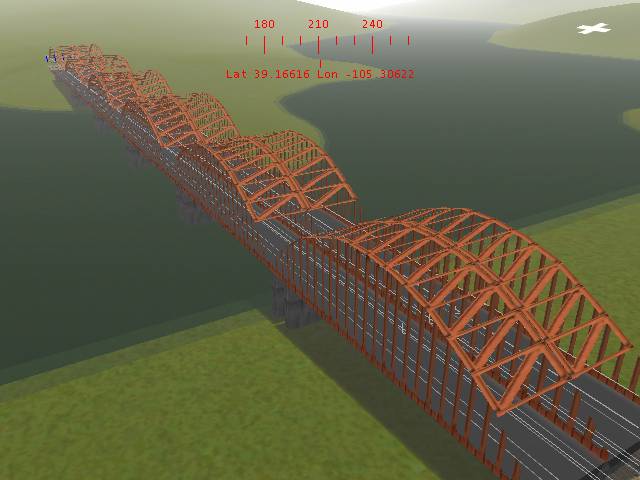 Remove | Alert Edit | Reply | Reply With Quote | Top
LawrenceKellie (392 posts)
Sep-25-01, 08:52 AM (EST) 25. "RE: Traffic on PO&N ...." There is no problems with routes created via the DEM method.Probably why you have not seen any uploads is because the routes are (a) so large that it would be unbearable and (b) they haven't been completed yet. Creating a route as close to prototypical is very time consuming. Currently I am working on a 631 tile route. I believe Wes Downs is working on a 2500 tile. You want to download that?Lawrence Remove | Alert Edit | Reply | Reply With Quote | Top
LawrenceKellie (392 posts)
Sep-25-01, 08:49 AM (EST) 24. "RE: Traffic on PO&N ...." Regarding Jim Steven's All_Object, I got it installed with a very minimal amount of trouble (almost none). Therefore, you can't say you don't know of anyone.... Also, I believe, David Klem (sp?) did too.Lawrence Remove | Alert Edit | Reply | Reply With Quote | Top
Boweavel (711 posts)
Sep-24-01, 08:12 PM (EST) 20. "RE: The Signals that time forgot.....Part 2" Heya Jim..Good to have ya back..
i dont have a crane yet..I just copied the picture from the one that the guy posted a link to , and reposted it onto that post...why ? well because i can i suppose... I gotta sleep..its 8am and Ive been up alll night setting water and testing an activity......
Damn you MSTS......... Remove | Alert Edit | Reply | Reply With Quote | Top
Boweavel (711 posts)
Sep-25-01, 08:40 AM (EST) 23. "RE: The Signals that time forgot.....Part 2" LAST EDITED ON Sep-25-01 AT 08:55 AM (EST)Laying track is a breeze..I must of covered 30 miles at least in just a couple of hours...Had 2 shut downs... (Thank you once again for the Bug's, Bill!!...)Im taking another break and building a switch back up the side of these huge hills in Colorado, Got half way up and my desire for a good yard kicked in ..So ive made a start... Its all Manual..The switch backs too, But Im keeping all of the main line automatic.. Do you think this will help keep those bugs out ? And is a Manual yard allright to be used for AI traffic ?..
Ok Im off to tinker a bit more...A yard that I can love....... Well soon.....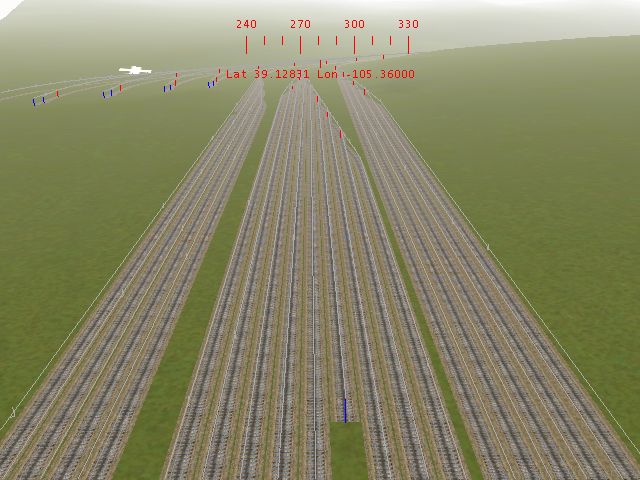 Catchya's Remove | Alert Edit | Reply | Reply With Quote | Top
rgarber (159 posts)
Sep-25-01, 10:39 AM (EST) 26. "RE: The Signals that time forgot.....Part 2" that is alot of track... looking good too. are you finding alot of flat ground to lay track or are you having to slope it alot? Remove | Alert Edit | Reply | Reply With Quote | Top
Boweavel (711 posts)
Sep-25-01, 10:58 AM (EST) 27. "RE: The Signals that time forgot.....Part 2" Nah I was lucky and found some fairly flat terrain up there...Ive trying to follow the lay of the land as best I cann..If the hills to big I tunnel it, If the gaps to wide i'll bung a bridge over it..Thanks to the ctrl c and v things are moving much quicker........Had to have a break..At the rate im laying track , I'll have the whole map covered in another day or 2 ......Heres an Activity view of The yard...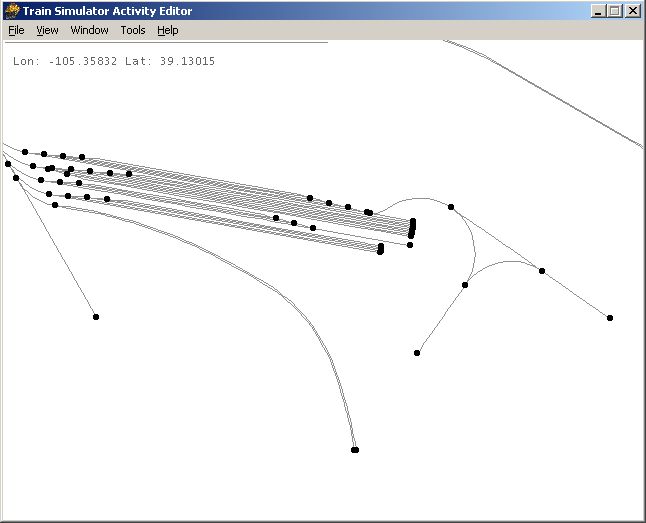 Anyone Know what a descript.ion file is ?
Ive accidently moved it from the train sim folder to my pic folder..I just found it and thought I'd move it back..When i went to do it there was allready one in there and its larger than the one Ive found.... So should I keep the large original..Or place in the smaller one Ive found...?Its hasnt stuffed up the game funny enough......Catchya's folks.. Remove | Alert Edit | Reply | Reply With Quote | Top
Boweavel (711 posts)
Sep-25-01, 12:38 PM (EST) 28. "RE: The Signals that time forgot.....Part 2" "Think of Jim carrey in the " Mask " Somebody stop me................. Remove | Alert Edit | Reply | Reply With Quote | Top
rgarber (159 posts)
Sep-25-01, 02:47 PM (EST) 29. "RE: The Signals that time forgot.....Part 2" I gotta download that sucker... looks too good against what I can do. Plus it give a good creative variety to what I do next (providing I ever get msts working again).Maybe Snipper know.. I mean Sniper (typo) knows this one... I wonder what would happen if I removed tiles from the cheesy route. Know what I mean? I'm figuing on needing about a 100 at the most.From what I saw, that's a big chunk of terrain, maybe over a BILLION tiles big!? So if I could pick my pickings and remove the world tiles not in use, then I could have my own backyard railroad on my computer, eh?whatcha think?BTW do you know the length and width in tiles how big that cheesy thing is?Thanks!Rich Garber Remove | Alert Edit | Reply | Reply With Quote | Top
Boweavel (711 posts)
Sep-25-01, 03:02 PM (EST) 30. "RE: The Signals that time forgot.....Part 2" To tell you the truth Ive never looked at that part..I kinda figured the blue and black sqaures were all the same standard size... If so it roughly 16 1/2 blue sqaure long and 7 1/2 blue sqaures wide...It is a fairly huge piece of land but iI think I will soon run out...Altho there is sill plenty of terrain on the edges that could still be built up..Like that yard for example..Its right on the northen edge of the map..Ive just built hills up to hide the fact..If you look at that track that dead ends behind the yards, into a soon to be Tunnel Entrance,
Well that that tunnel entrance is pretty much is the edge of the map..
I. Think..And dont quote me on this.... Its roughly 40 miles long ? by maybe20 to 30 miles wide...Anyway Im sure enjoying it...Catchya Remove | Alert Edit | Reply | Reply With Quote | Top
rgarber (159 posts)
Sep-25-01, 05:16 PM (EST) 31. "RE: The Signals that time forgot.....Part 2" Well... 16 tiles long x 2km that would be... awww.. I dunno.. never could figure that stuff out. I got europeans telling me in emails that I figured the conversion wrong. Picky picky! Well... still starting with 16 tiles already done is better than nothing I guess. Guess I could always add more.Kinda how I cook.. don't look right.. throw some of this.. and a little bit of that... one boot... wholla, a meal fit a for a dog!Rich G. Remove | Alert Edit | Reply | Reply With Quote | Top
Lock | Archive | Remove
Lobby | Topics | Previous Topic | Next Topic
Restored from the Train-Sim.Com archive, captured December 3, 2001. About this archive.