Message Areas - "I really need some help on this"
Train-Sim.Com Message Areas
"I really need some help on this"
Email this topic to a friend
Printer-friendly version of this topic
Bookmark this topic (Registered users only)
Previous Topic | Next Topic Conferences MSTS Route Design (Protected) Original message
Namerifrats (163 posts)
Aug-30-01, 04:20 AM (EST) "I really need some help on this" Look at this picture and tell me how to fix this s$%t.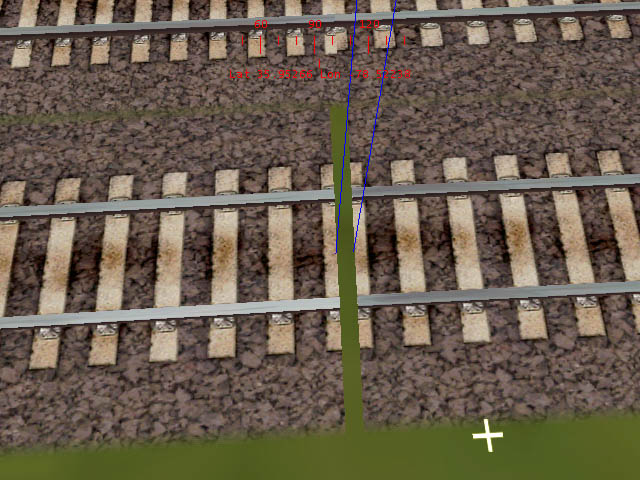
I am just about to pull my hair out. I have worked on this "F"ing switch for over an hour now and can't get the thing to line up. When I finally get it to line up the track comes up to short. Dynamic track sucks, it just derials my train and it doesn't fill this gap. How in the hell do you guys line up your switches when bringing two seperate track together from a distance and not double track. When I try to use small peices of track like skew or dynamic it makes my train jerk all over the place and/or derail. Help is appreciated. Alert Edit | Reply | Reply With Quote | Top
Table of Contents
Subject Author Message Date ID RE: I really need some help on this blvdbill Aug-30-01 1 RE: I really need some help on this 2fastcantstop Aug-30-01 2 RE: I really need some help on this ragmop Aug-30-01 3 RE: I really need some help on this Namerifrats Aug-31-01 4 RE: I really need some help on this sniper297 Aug-31-01 5
Lobby | Topics | Previous Topic | Next Topic
Messages in this topic
blvdbill (17 posts)
Aug-30-01, 05:00 AM (EST) 1. "RE: I really need some help on this" Maybe this will help you out! You can also use the manual switch
as well. 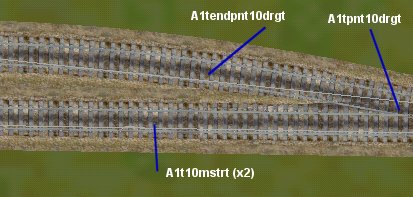 Remove | Alert Edit | Reply | Reply With Quote | Top
2fastcantstop (28 posts)
Aug-30-01, 05:31 AM (EST) 2. "RE: I really need some help on this" Lining up dynamic track is a real pain in the rear, it seems to take forever to line it up just right.
A snap to track would be handy.You should be able to fix your track by using smaller increments.
Add .1 instead of 1 and you can line your tracks up pretty much perfectly.
Joining curved dynamic tracks is even harder but it can be done.It takes some serious patience and a little thought.
Swearing and cursing will help you through.
Remove | Alert Edit | Reply | Reply With Quote | Top
ragmop (113 posts)
Aug-30-01, 10:10 AM (EST) 3. "RE: I really need some help on this" When using the dynamic track... there's two sets of boxes. If you are only using the left side buttons you'll get larger changes. If you use the right side buttons, you'll get really tiny changes. Try using the right side button and you'll get your track to meet. Now when I say, tiny, I really mean tiny. You'll need to get up close to see it changing but it really is. Just keep holding the button down.To clarify, I'm specifically talking about the straight section. I don't use much dynamic track myself, but it is very very useful. Hope this helps. Remove | Alert Edit | Reply | Reply With Quote | Top
Namerifrats (163 posts)
Aug-31-01, 02:16 AM (EST) 4. "RE: I really need some help on this" Well why does dynamic track make my engine jerk around alot??? Or any small track sections? Remove | Alert Edit | Reply | Reply With Quote | Top
sniper297 (311 posts)
Aug-31-01, 03:16 AM (EST) 5. "RE: I really need some help on this" LAST EDITED ON Aug-31-01 AT 03:20 AM (EST)We may be talking about two different things. You get jerky framerates? what kind of system you have? Are we talking about bad track alignment or a jerky display? Do you see the same thing in other routes? If that's you're problem, try turning some of the sliders in the options, advanced display down, especially specular lighting and visibility.
I was trying to make deliberate derailing points by intentionally misaligning dynamic track, but it would go over it at 60 with a sway and a jerk but no derailing. Then Ccyko tipped me off that the speed setting actually enables derailments, if you're going slower than the limit it won't derail as long as the track is close enough for the editor to accept it as a valid join. For the section above, tho, I would take out the one ten meter piece of straight track and use a dynamic track section with the checkboxes unchecked, DON'T enable the curve, and use the left little arrow to make it an 11 meter piece of straight track, then the right arrows (it's the vernier control, small fine tuned movements, on that side) to extend it until the rails just touch. It's a several step process for dynamic track, you lay it at one end, open the dynamic track window, turn your view around until you're looking in the direction it's gonna go, then extend the track until you have the end near the join. Move the camera over close to the join, and get the lineup so it looks close. Now move again, this time holding down the end key (another vernier control) while pushing the arrow keys and moving the mouse around until you are looking down at both rails from just above them, close up view. Now use the right arrows (in the dynamic track window, not the keyboard) to move the track. if you're doing a curve and the left rail joins before the right,the curve needs to be tightened, if the right connects first it needs to be looser. I usually extend the second straight section (again this is if you're doing a curve, which you don't need for the above case) a few meters beyond the join, overlapping the other track, to make it easier to see when the rails are;
first, parallel with each other,
next, lined up fairly close.
then I reduce the length of the last section until the rails are not overlapping, and then fine tune until they close. I'm fussier than I need to be, but my usual standard is if the two rails connect within two strokes of the fine tune key, that's close enough. And don't be too hard on yourself, it takes one hell of a lot of practice. Remove | Alert Edit | Reply | Reply With Quote | Top
Lock | Archive | Remove
Lobby | Topics | Previous Topic | Next Topic
Restored from the Train-Sim.Com archive, captured November 2, 2001. About this archive.