Message Areas - "How to create large mountain ranges?"
Train-Sim.Com Message Areas
"How to create large mountain ranges??"
Email this topic to a friend
Printer-friendly version of this topic
Bookmark this topic (Registered users only)
Previous Topic | Next Topic Conferences MSTS Route Design (Protected) Original message
baz (61 posts)
Aug-28-01, 04:45 PM (EST) "How to create large mountain ranges??" I can make mountains and hills using the Terrain Editor -- but how do you create a mountain range that traverses say 20 miles.
I have been putting the camera up way high so that I can see as much of my Quad tiles as possible and then doing a click and drag routine to get a box which I then apply the elevation tool to.
But it is a bit rough.Thanks Barry Alert Edit | Reply | Reply With Quote | Top
Table of Contents
Subject Author Message Date ID RE: How to create large mountain ra... pointroberts Aug-29-01 1 RE: How to create large mountain ra... sniper297 Aug-29-01 2 RE: How to create large mountain ra... ragmop Aug-29-01 3 RE: How to create large mountain ra... ragmop Aug-29-01 4 RE: How to create large mountain ra... camaro540 Aug-29-01 5 RE: How to create large mountain ra... jkcooney Aug-29-01 6 RE: How to create large mountain ra... sniper297 Aug-29-01 7 RE: How to create large mountain ra... ragmop Aug-29-01 8 RE: How to create large mountain ra... LawrenceKellie Aug-29-01 10 RE: How to create large mountain ra... djaquay Aug-29-01 12 RE: How to create large mountain ra... LawrenceKellie Aug-29-01 11 RE: How to create large mountain ra... robertreedy Aug-29-01 9 RE: How to create large mountain ra... sniper297 Aug-29-01 13 RE: How to create large mountain ra... ragmop Aug-30-01 14 RE: How to create large mountain ra... baz Aug-30-01 15 RE: How to create large mountain ra... sniper297 Aug-30-01 16 RE: How to create large mountain ra... ragmop Aug-30-01 17 RE: How to create large mountain ra... sniper297 Aug-30-01 18 RE: How to create large mountain ra... jkcooney Aug-30-01 19 RE: How to create large mountain ra... sniper297 Aug-30-01 20 RE: How to create large mountain ra... jkcooney Aug-31-01 22 RE: How to create large mountain ra... ragmop Aug-30-01 21
Lobby | Topics | Previous Topic | Next Topic
Messages in this topic
pointroberts (5 posts)
Aug-29-01, 00:27 AM (EST) 1. "RE: How to create large mountain ranges??" Barry, have you tried www.GISDataDepot.com? Best place for real world elevation data.Then you need MicroDEM,available at:
http://www.usna.edu/Users/oceano/pguth/website/microdemdown.htmThen use John CS' excellent extraction tool (available here) to convert the info into something MSTS can use.Bit of a learning curve but the results are worth it. Much more realistic and saves hours and hours of mountain-building... Remove | Alert Edit | Reply | Reply With Quote | Top
sniper297 (311 posts)
Aug-29-01, 01:05 AM (EST) 2. "RE: How to create large mountain ranges??" LAST EDITED ON Aug-29-01 AT 01:24 AM (EST)LAST EDITED ON Aug-29-01 AT 01:19 AM (EST)Place a piece of track, long short sraight curved depending on the effect you want, raise it up in the air:
Adjust width and embankment for steepness, hit the "Y" key:
Move the track around, change embankment angle, hit "Y" until it looks good: 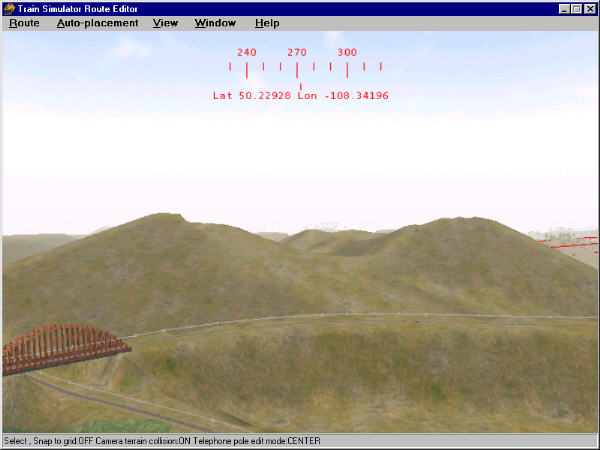
Then delete the track. End result, a one minute mountain. The "~" tilde key undoes the last terrain change if you make a mistake. To make long rugged ridges I lay a whole zigzag connection of 45 degree yard curves and switches, varying the embankment from 15 to 50 degrees (found out over 55 don't look realistic unless you're making a cliff) and hitting the Y key, then go back and delete all the track.
Oh yeah, one more thing, this eats memory like crazy, and due to the crappy editor you got to save and exit after making a bunch of these, how many depending on how much ram you have. Also if you're going above 65 meters don't forget to change the tile floor and scale, or you'll get mesas instead of mountains. Remove | Alert Edit | Reply | Reply With Quote | Top
ragmop (114 posts)
Aug-29-01, 02:04 AM (EST) 3. "RE: How to create large mountain ranges??" Geeze Sniper... my one minute mountains don't even look half that good! Are you doing something else like changing embankment and cutting? Remove | Alert Edit | Reply | Reply With Quote | Top
ragmop (114 posts)
Aug-29-01, 02:06 AM (EST) 4. "RE: How to create large mountain ranges??" Oops! Didn't see the comment on embankment you got there... so do you have a favorite number you like to plug in there? Remove | Alert Edit | Reply | Reply With Quote | Top
camaro540 (32 posts)
Aug-29-01, 04:47 AM (EST) 5. "RE: How to create large mountain ranges??" How do we adjust the width and embankment for steepness?
I don't see that anywhere....ThanksPatrick Remove | Alert Edit | Reply | Reply With Quote | Top
jkcooney (453 posts)
Aug-29-01, 07:07 AM (EST) 6. "RE: How to create large mountain ranges??" Its the box in the editor in the upper right corner of the editor screen. The higher the number the steeper the angle. You can also set the width of you trackbed... that's the middle number. When you have set the numbers you must click outside the box (but not on the editor screen) then go to the editor screen and click the track section(s) you are working with and in wire frame mode hit the Y key. the terrain will now conform to your new settings. Adjust as you go along. Experiment with different settings to see what looks good. Don't be timid but be sure to save frequently so you don't loose a good nights work.
Joe Cooney, Ocala, FL Remove | Alert Edit | Reply | Reply With Quote | Top
sniper297 (311 posts)
Aug-29-01, 11:00 AM (EST) 7. "RE: How to create large mountain ranges??" No particular favorite number, other than I usually set the width to 8 or less so you don't get flat top mountains, the embankment to 35 and the cutting to 25. I adjust all that frequently to avoid having a whole bunch of similar looking mountains. Also, when the new mountains spill over onto the real track do the same thing with each succeeding track section for cutting, varying it from 25 to 55 to make the cut look natural. Remove | Alert Edit | Reply | Reply With Quote | Top
ragmop (114 posts)
Aug-29-01, 11:21 AM (EST) 8. "RE: How to create large mountain ranges??" I've seen it explain before, but what exactly is 'cutting?' And thanks for that info. You hit on why my mountains look so cheesy... I've been using the cultivating tool to throw up alot of mountains real quick. I'm gonna go back and try to make some of my mountains look better. Remove | Alert Edit | Reply | Reply With Quote | Top
LawrenceKellie (261 posts)
Aug-29-01, 02:12 PM (EST) 10. "RE: How to create large mountain ranges??" "Cutting" is when it "cuts" into the terrain. In other words, a road that runs along side a hill, the upper portion is the cutting and the lower portion is the embankment, which is when it embanks--builds up an embankment.With the two values, you can change the cutting from steep (85) to gentle (15), and also the embankment from steep (85) to gentle (15).Lawrence Remove | Alert Edit | Reply | Reply With Quote | Top
djaquay (50 posts)
Aug-29-01, 04:08 PM (EST) 12. "RE: How to create large mountain ranges??" Begging your pardon, but what's the cultivating tool? (I'm just getting started in this, and am still learning the ropes...)Thanks,
Dave
Remove | Alert Edit | Reply | Reply With Quote | Top
LawrenceKellie (261 posts)
Aug-29-01, 02:15 PM (EST) 11. "RE: How to create large mountain ranges??" >Its the box in the editor
>in the upper right corner
>of the editor screen. Unfortunately, that box only exists at that location if the person has not moved it. Lawrence
Remove | Alert Edit | Reply | Reply With Quote | Top
robertreedy (31 posts)
Aug-29-01, 01:16 PM (EST) 9. "RE: How to create large mountain ranges??" Sniper, now I'm totally peeved .. just spent three days making mountains from scratch and now I have to go back, flatten and do it the right way. This little trick should be added to the FAQ for some of us slower ones. Thanks for the tip!! RobertR Remove | Alert Edit | Reply | Reply With Quote | Top
sniper297 (311 posts)
Aug-29-01, 10:35 PM (EST) 13. "RE: How to create large mountain ranges??" LAST EDITED ON Aug-29-01 AT 10:37 PM (EST)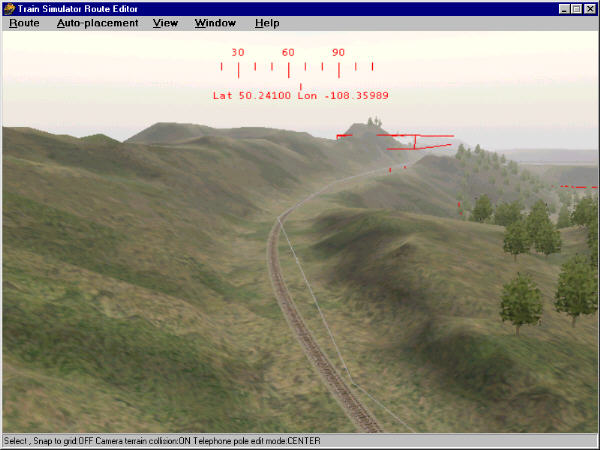
I dunno why you would want to flatten them, you think the glaciers insisted on flatenning all the hills before they would make more? also, to flatten large areas of terrain, use a piece of 2000 radius 20d, I think is the longest, set the width for 48 (I think max width is 50) and use the rotate tool to sweep it in a circle while hitting Y. You can get a 3 degree slope by elevating one end then rotating in just an arc to blend different heights in farm country too. As you can see from this shot, you still get some pointy stuff you gotta smooth out, but it still goes quicker. Remove | Alert Edit | Reply | Reply With Quote | Top
ragmop (114 posts)
Aug-30-01, 01:21 AM (EST) 14. "RE: How to create large mountain ranges??" gee, that looks good... I'm jealous Remove | Alert Edit | Reply | Reply With Quote | Top
baz (61 posts)
Aug-30-01, 02:34 AM (EST) 15. "RE: How to create large mountain ranges??" >You can get
>a 3 degree slope by
>elevating one end then rotating
>in just an arc to
>blend different heights in farm
>country tooHow do you estimate how high to lift the 1 end of the piece of track to get a 3 degree slope??ThanksBarry
Remove | Alert Edit | Reply | Reply With Quote | Top
sniper297 (311 posts)
Aug-30-01, 10:56 AM (EST) 16. "RE: How to create large mountain ranges??" Elementary, Watson, it's the max angle allowed. BTW, there's been quite a bit of discussion on making track grades uphill and down, and I found out only recently that when you rotate a piece of track up or down to make a grade, the plus or minus numbers are degrees above and below horizontal, NOT percent grade as I (and a lot of people just as dumb as me)originally assumed. So all the grades I made that I thought were 2 or 3 percent are actually times 1.75, so a 2 degree grade is a 3.5 precent, and three is really 5.25 percent, suitable only for mountain goats and shays. Being an ancient model railroader has some advantages in this sim, but I've had to stop making assumptions like assuming these guys were using the same terms and values from NMRA standards I usually expect a train game to use. Remove | Alert Edit | Reply | Reply With Quote | Top
ragmop (114 posts)
Aug-30-01, 11:44 AM (EST) 17. "RE: How to create large mountain ranges??" I've used road pieces too to make mountains. With roads you can create a steeper grade. Remove | Alert Edit | Reply | Reply With Quote | Top
sniper297 (311 posts)
Aug-30-01, 02:43 PM (EST) 18. "RE: How to create large mountain ranges??" Gotta try road pieces next. See, ragmop, now you're giving ME tips. Exchanging ideas saves a lot of reinventing the wheel, don't it? Remove | Alert Edit | Reply | Reply With Quote | Top
jkcooney (453 posts)
Aug-30-01, 03:05 PM (EST) 19. "RE: How to create large mountain ranges??" Jim... Have you experienced this. In the middle of a session today (about 1 hour of work) I reversed direction to orient myself and half the terrain behind me on a 1.5% grade had disappeared and the track was suspended in midair! Good thing I don't have a fear of heights! Have you had this happen with this quirky editor?
I hope I can retrieve at least the roadbed
Joe Cooney Remove | Alert Edit | Reply | Reply With Quote | Top
sniper297 (311 posts)
Aug-30-01, 05:18 PM (EST) 20. "RE: How to create large mountain ranges??" You sure you didn't accidently hit the tilde ~ key? That is an "undo" for the last terrain change. Sometimes I got changes that pop up and down, hitting the "J" key sometimes works, it's supposed to make the editor recalculate it or something. The one thing I get all the time is that now you see it now you don't crap when you're trying to clear up the spillover on curves or around tunnel entrances. Seems like you have a choice between unrealistically flat canyon and valley floors or spillover on the curves, cuz the default width of 18 is too wide and anything less seems to be too narrow. (Anybody know for sure that that width is in meters?) I think this has to do with the fact that the terrain is so boxy, so unless you're pointed in a cardinal direction you get jagged cuts for anything over 35 degrees. Look at the wire frame mode, it does increase the polygons when you alter the terrain, but only by making smaller boxes with 45 degree triangles in them.
Sorry, didn't mean to get off on a rant. Where were we? Oh, yeah, when funny things start happening in the editor, it's time to save and exit to clear the ram, which is one of many bugs in the editor - I can't stress more strongly, the less physical ram you have the more often you have to save and exit, because the route editor rarely releases ram correctly. Remove | Alert Edit | Reply | Reply With Quote | Top
jkcooney (453 posts)
Aug-31-01, 09:14 AM (EST) 22. "RE: How to create large mountain ranges??" No, it wasn't the tilde key but at 1:15 last night (this morning) I went through the route and checked the elevation parameters in that tile and they were out of sync with the two bordering tiles. Two were set at 0 & 1800 but the one acting up was set at 0 & 1500. This editor is not very forgiving is it?
Thanks for all your help. You may get a question from me on another post about how you place freight cars on sidings in activities (and in the explore mode). I haven't figured this part out yet. Do you know of anyone working on North American bridge and trestle styles? Those European type models don't really look very prototypical. There are a few from USA2 (Medicine trestle for example although that Blue color is horrible) but otherwise its slim pickins!
Joe Cooney Remove | Alert Edit | Reply | Reply With Quote | Top
ragmop (114 posts)
Aug-30-01, 10:35 PM (EST) 21. "RE: How to create large mountain ranges??" I still mostly use track though, cause like you said, there's a 4 track real long one that you can do a major change with real fast and cut a wide swarth of whatever. Remove | Alert Edit | Reply | Reply With Quote | Top
Lock | Archive | Remove
Lobby | Topics | Previous Topic | Next Topic
Restored from the Train-Sim.Com archive, captured November 2, 2001. About this archive.