Train-Sim.Com
MSTS Route Design

Okrasa, why xtracks 3.1 after 3.9

Notice to all visitors and members of the Train-Sim.Com message forums:
If you plan on using a signature banner in your posts, we would like to remind you that there is a maximum size for banners. That maximum is 450 pixels wide by 120 pixels high, and not to exceed 25k. Your compliance is appreciated. FORUM RULES Problems? There are two common reasons for problems with logging in and posting messages. The first is that you are running a firewall that prevents your messages from being sent to the server. The other is that you have cookies disabled; the DCForum software requires cookies to work properly.

Previous Topic | Next Topic

Printer-friendly copy Email this topic to a friend

Reading Topic #11728

Charter Member · 2560 posts

Derek

Alert | IP

Printer-friendly page | Edit | Reply | Reply With Quote | Top

RE: Okrasa, why xtracks 3.1 after 3.9, Brinch, Apr-05-04, 11:40 PM, (1) RE: Okrasa, why xtracks 3.1 after 3.9, Hack, Apr-06-04, 01:48 AM, (2) RE: Okrasa, why xtracks 3.1 after 3.9, 3footer, Apr-06-04, 10:41 AM, (4) RE: Okrasa, why xtracks 3.1 after 3.9, OkrasaGhia, Apr-06-04, 02:54 AM, (3) RE: Okrasa, why xtracks 3.1 after 3.9, pointroberts, Apr-06-04, 11:41 AM, (5) RE: Okrasa, why xtracks 3.1 after 3.9, OTTODAD, Apr-06-04, 02:16 PM, (6) RE: Okrasa, why xtracks 3.1 after 3.9, OkrasaGhia, Apr-07-04, 11:42 AM, (7) RE: Okrasa, why xtracks 3.1 after 3.9, NickF, Apr-07-04, 07:32 PM, (8) RE: Okrasa, why xtracks 3.1 after 3.9, OTTODAD, Apr-07-04, 07:55 PM, (9) RE: Okrasa, why xtracks 3.1 after 3.9, pwillard, Apr-07-04, 08:46 PM, (10) RE: Okrasa, why xtracks 3.1 after 3.9, OTTODAD, Apr-08-04, 07:22 AM, (11) RE: Okrasa, why xtracks 3.1 after 3.9, griffinmt, Apr-08-04, 09:05 AM, (12) RE: Okrasa, why xtracks 3.1 after 3.9, OTTODAD, Apr-08-04, 09:36 AM, (13) RE: Okrasa, why xtracks 3.1 after 3.9, griffinmt, Apr-08-04, 09:04 PM, (14) RE: Okrasa, why xtracks 3.1 after 3.9, OTTODAD, Apr-09-04, 08:21 AM, (15) RE: Okrasa, why xtracks 3.1 after 3.9, griffinmt, Apr-09-04, 04:36 PM, (18) RE: Okrasa, why xtracks 3.1 after 3.9, OTTODAD, Apr-09-04, 04:48 PM, (19) RE: Okrasa, why xtracks 3.1 after 3.9, Hack, Apr-09-04, 10:12 AM, (16) RE: Okrasa, why xtracks 3.1 after 3.9, OTTODAD, Apr-09-04, 11:07 AM, (17)

Conferences | Topics | Previous Topic | Next Topic

Charter Member · 105 posts

RE: Okrasa, why xtracks 3.1 after 3.9

>Speaking as a programmer, 3.10 (three-ten) comes before 3.9
>(three-ninety) and hence Derek's question. IMHO 3.9 should
>have been labeled 3.09. As a professional programmer (plus software engineer, plus project manager) in my real job, I have to politely disagree. The version number is really not a number (hence 3.9 != 3.90). It is two separate numbers. Many packages have three or more parts (2.0.24). Because the DOS/Windows/Mac platforms use ASCII to code strings (which is the version 'number'), comparisons for versions can be done easily because in ASCII, '4'<'5' just as 4<5. Zero-padding the fields to a fixed length makes the test easier still, because all the dots (not strictly "decimal points") line up and so don't affect the outcome by comparing '.' to '5'.However, other codings could be used that do not support this overload of comparison operators. The version numbers would still hold, but the change in coding would require a change in how they are compared.Unfortunately, it is not always possible to forsee all possible formats of version numbers in advance, makes things hard to read, and someone *is* going to violate it, so 0-padding is rarely done thoroughly. My package was 1.0, and I stuck the ".0" on it anticipating some revisions, but I wouldn't call it 001.00.00. I would argue that the proper way to compare versions in software (much as I think people do) is to parse out each component, convert it to a numeric value, substitute 0 for any missing ones, and then compare each component in order. That follows the intent of the version numbering without assumptions about formatting and the properties of the character encoding.I'm laboring the point a bit, but trivia like this can cause rather annoying problems if it causes an OS update to garble your system.Okrasa, just call your next release XtracksXPproSP1build001, or maybe go Mac with it and call it XtracksJaguar. Hmm, is XtracksJaguar > XtracksPuma ???Would someone PLEASE get me a ladder so I can get down off this horse and back to train-simming

3footer

Alert | IP

Printer-friendly page | Edit | Reply | Reply With Quote | Top

Charter Member · 4626 posts

RE: Okrasa, why xtracks 3.1 after 3.9

As long as 10 is not used in a File Name or Extension, because the still applicable in WINDOWS ASCII Alphanumerical Ascending Sorting Sequence Method would regard the 10 lower / earlier than the 9 and sort / display it accordingly. It would not if the 9 was entered 09, then the 09 would be less than the 10 ! Another way of doing it would have been to call this version Xtracks-4.0 . Eventually running out of lead numbers, A.0, A.1, ect, can be used, providing enough permutations to outlive Okrasa ! Ignoring this principle is causing the annoying sequencing and displaying of Track File Names in the ROUTE EDITOR's Track Sections list ! O t t o

Alert | IP

Printer-friendly page | Edit | Reply | Reply With Quote | Top

Charter Member · 1400 posts

RE: Okrasa, why xtracks 3.1 after 3.9

Okrasa, why xtracks 3.1 after 3.9 – image 5

>As long as 10 is not used in a File Name or
>Extension, because the still applicable in WINDOWS ASCII
>Alphanumerical Ascending Sorting Sequence Method would
>regard the 10 lower / earlier than the 9 and
>sort / display it accordingly. XP gets it right.>Another way of doing it would have been to call this version
>Xtracks-4.0 . Eventually running out of lead numbers,
>A.0, A.1, ect, can be used, providing enough permutations to
>outlive Okrasa ! You never know how long I will live!
Though I suspect (hope) the life of MSTS 1.0 is the limit here.
Besides, my way there's no limit at all!
Calling this version 4.0 implies a major change in the
package which it is not thus upping the minor version number.
Releases 2.0 and 3.0 were major changes compared to the previous release.
(I'm also in the software business)>Ignoring this principle is causing the annoying sequencing
>and displaying of Track File Names in the ROUTE EDITOR's
>Track Sections list ! Would not be a problem if that list displayed them in the sequence a human expects instead of a computer.
Pity no one has come up with a solution for that.

//Okrasa
Chief Engineer
okrasa @ xtracks.tk
http://www.geocities.com/okrasaghia
http://www.xtracks.tk

Okrasa, why xtracks 3.1 after 3.9 – image 6

Working on XTracks v3.141592653589793238462643383279

Alert | IP

Printer-friendly page | Edit | Reply | Reply With Quote | Top

Charter Member · 4626 posts

RE: Okrasa, why xtracks 3.1 after 3.9

Hi Oki !Being a seasoned DATABASE Designer, using INDEX Keys based on the ingrained ASCII sorting principle, I had my thoughts on how the Naming Convention of Track Pieces should be designed.There is no way the present variations can be modified into a sensible way of displaying them ! The lasted addition of UK-Finescale Tracks to my array of Tracks proved just that. They used a totally different way of naming their track pieces which, being used to what others call theirs, makes it difficult to understand what they are talking about ! I hope that the next version of MSTS lays down Rules about what the File Naming Format must be regarding a number of things, in order to maintain a sensible and efficient way of running MSTS-NEXT and do away with the current Free-for-All way of doing it ! O t t o

Alert | IP

Printer-friendly page | Edit | Reply | Reply With Quote | Top

Charter Member · 1516 posts

RE: Okrasa, why xtracks 3.1 after 3.9

Okrasa, why xtracks 3.1 after 3.9 – image 7


We need to face the fact that DBASE and FOXBASE are, in fact, quite dead. They are "Fallen Flags", if you will.Now, if *they* used their *own* products... somthing like ACCESS, I could understand. In fact, it would make a heck of a lot of sense to use MS-ACCESS for all those loose bits of data we maintain for MSTS like REF FILES and Track Database stuff. I'd venture to say that we would probaly have a lot fewer problems with things like the route databases, in fact. I have at least two products I have purchased recently that use MS-ACCESS along with XML (Import/Export) to maintain and manage large amounts of data. Both of them are in fact... CAD/DRAWING packages.Pete Willard

Okrasa, why xtracks 3.1 after 3.9 – image 8
http://www.trainsimstuff.com

Alert | IP

Printer-friendly page | Edit | Reply | Reply With Quote | Top

Charter Member · 4626 posts

RE: Okrasa, why xtracks 3.1 after 3.9

LAST EDITED ON Apr-08-04 AT 08:25 AM (EDT)

Yes Pete, some of the older DOS DATABASE systems are now extinct, but there are still similar like ACCESS, DATAEASE, DELPHI, PERVASIVE and others which are up to date and will carry on into the 64-bit future.The basic underlying sequencing still used by WIN-XP's EXPLORER, EXCEL, DATABASE Index Keys and Programming Languages, unless modified to sort differently, is:ASCII 0 - 31 NUL Character and Ctrl Keys A - Z and others
ASCII 32 - 47 Spaces and other Characters, like % ( )
ASCII 48 - 57 Numbers
ASCII 58 - 64 More Characters, like < > ?
ASCII 65 - 90 UPPER Case
ASCII 91 - 96 More Characters, like \ ^ '
ASCII 97 - 122 lower case
ASCII 123 - 126 More Characters, like { } ~
ASCII 127 - 255 "Extended Keyboard" Characters, obtainable with Alt???
at the Command Prompt and in Word Processors.To give you a rough example of how I would design a Naming Format for Track Pieces, the number of Characters shown Top to Bottom to appear Left to Right in the File Name:AG1 - Gauge AG1 = Standard Single Track (A?? to keep the most used it at the top
of the list), NG1 Narrow Gauge, S31 Standard Gauge 3rd Rail, etc
TYPE - STRT, CURV, PTML, PTAR, TUNN, etc
SIZE.0 - 0010.0 metre, ° Radius, etcThis is just a quickly thrown together example off the top of my head which would result it Track Pieces being sorted sensible with File Names looking like that:AG1PTMR0010.0 a Standard Gauge, 10°, Right-Hand Manual Switch
AG1STRT0000.8 a Standard Gauge, Single Track, 0.8 metre section.
AG1STRT0010.0 would stand for a Standard Gauge, Single Track, 10 metres section. Naming POINTS "SWITCHES" would sort them more sensibly lower down in the list ! AG1STRT0000.8 a Standard Gauge, Single Track, 0.8 metre section.
AG1STRT0010.0 would stand for a Standard Gauge, Single Track, 10 metres section.
AG1SWMR0010.0 a Standard Gauge, 10°, Right-Hand Manual SwitchThere is a lot more thought to be applied, considering the multitude of different Track Pieces in use, but as has been said before, NOTHING SHOULD BE IMPOSSIBLE IN PROGRAMMING ! Database/Index Keys Programmers amongst you will appreciate the underlying Logic of constructing File Names this way so that they sort logically in a list.MICROSOFT PLEASE TAKE NOTE THAT I DO NOT CLAIM COPYRIGHT FOR THIS IDEA !!! Just Credit me for suggesting it ! HAVING FUN, Guys,O t t o

Alert | IP

Printer-friendly page | Edit | Reply | Reply With Quote | Top

Charter Member · 1355 posts

RE: Okrasa, why xtracks 3.1 after 3.9

Okrasa, why xtracks 3.1 after 3.9 – image 9

LAST EDITED ON Apr-08-04 AT 09:08 AM (EDT)

Just a reminder that entities such as filenames (in the NT based OSes at least) are not stored using the old 7bit or 8bit ansi encoding. They use the unicode variant of USC-2 and as such can contain a LARGE variety of symbols and characters. As such, the sorting algorythms have become much more complicated, having to align 'horizontally' as well as 'vertically'. For example, the sorting sequence must consider the grouping of the letter 'a' along with its variety of accented bretheren (across all the applicable alphabets), before starting with 'b' etc. BUT, each of the accented and non-accented characters fall into there own relative order as well.Most restrictions imposed on dealing with such things as filenames to using the older ansi subset stems from our inability to think our way through the much wider playing field at design time.This same thinking can be applied to some smarts in the sort algorythms to deal with V3.9 coming before V3.10 or equal to v3.9
It all has to do with understanding 'context' as well as 'content'.Phew! That felt good! Now I can go accomplish something Martyn T. Griffin
martyn.t.griffin@mindspring.com
http://www.geocities.com/tcmrrc/
http://www.midlandrc.org

Alert | IP

Printer-friendly page | Edit | Reply | Reply With Quote | Top

Charter Member · 4626 posts

RE: Okrasa, why xtracks 3.1 after 3.9

LAST EDITED ON Apr-08-04 AT 09:40 AM (EDT)

Hi Martyn !Thanks for that Info, now go and get yourself a drink as I am doing right now ! My Brain does not have to be crystal clear every minute of my Computing day any more. Is there somewhere where I can find out what the WIN-XP Logic behind Filenames Sorting is, which to me still looks a lot like the old DOS ASCII Codes way of doing it, responing to Extended Keyboard Alt+Character ASCII codes at the Command Prompt and in some Programs.Sorting an Array within a WIN-XP program depends on the Programming Language used, such as C+ and others. What Programming Language has been used with MSTS and what is the one likely to be used for MSTS-NEXT, you having a guess ?CHEERS, O t t o.

Alert | IP

Printer-friendly page | Edit | Reply | Reply With Quote | Top

Charter Member · 1355 posts

RE: Okrasa, why xtracks 3.1 after 3.9

Okrasa, why xtracks 3.1 after 3.9 – image 10

LAST EDITED ON Apr-08-04 AT 09:07 PM (EDT)

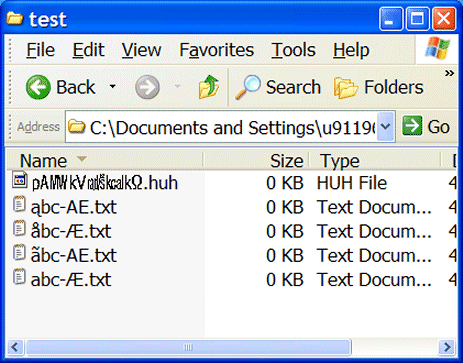
Take a look at these 5 test files.The first name is a bit hard to read, but take note that the root file name consists of only SIX (6) characters (actually special symbols) that you won't find in any listing of the 7bit or 8bit ansi synbols.Okrasa, why xtracks 3.1 after 3.9 – image 11The last four names are 'logically' the same, but since the os treats filenames in a folder to be discreet based upon binary character values, AFTER case has been eliminated, they are seperate entities.
But, if they were tags in a database, would you not 'expect' these to sort out phonetically the same? Note that two are only 5 characters wide and two are 6 characters wide as well.If you want to play some interesting games with this stuff (on NT based systems), use the Character Map applet to extraxt a number of unicode characters from korean, thai or chinese and build some text 'records' in notepad. Then sort them to see what goes where.Of couse, little of this is easily transported to systems like linux, as the most prevalent encoding these days is UTF-8, which consists of a variable number of bytes per character. Try 'sorting' out that mess!!!Martyn T. Griffin
martyn.t.griffin@mindspring.com
http://www.geocities.com/tcmrrc/
http://www.midlandrc.org

Alert | IP

Printer-friendly page | Edit | Reply | Reply With Quote | Top

Charter Member · 4626 posts

RE: Okrasa, why xtracks 3.1 after 3.9

LAST EDITED ON Apr-09-04 AT 08:23 AM (EDT)

Try 'sorting' out that mess!!!No thanks, Martyn ! Been thinking some more about this after posting my last message, like Chinese and Russian Characters having to be accounted for and the fact that many languages words using accented and similar characters are being mixed in Text Documents and has also happened in MSTS, German UMLAUTs being used as well.But you being versed in modern programming languages, which I am not and want to code a Track Pieces Array based on the Numbers and Letters used by their File Names, would their ASCII codes still be usable, also taking into account UPPER and lower case, also reflecting the Keyboard Scan Codes for them, based on the Country Specific Code file in operation, if this is what WINDOWS still does ?I suppose you could create a "Parser" forcing a Sort in accordance with what you want it to do ?O t t o

Alert | IP

Printer-friendly page | Edit | Reply | Reply With Quote | Top

Charter Member · 1355 posts

RE: Okrasa, why xtracks 3.1 after 3.9

Okrasa, why xtracks 3.1 after 3.9 – image 12

When I needed to organize all the track pieces, I did it a different way. I didn't create a fancy output view at the time, but that would have been easy enough I suppose.I made a pass over the tsection file, extracting each entry into a relatively flat record format. Then I 'calculated' the missing values for each shape based upon the supplied track sections it used.That way I could sort the records by any of the attributes and spit out the filename needed for the job. In fact, a simple excel file linked with an sql-like query would do the job in a pinch. You could use Access, or just simply keep the stuff in memory (stored in a set of objects from a class). A front end window that 'mimicks' the placement window with the new features would work, and then with some manipulation of the original placement window programatically, you have what you want.And all of this is independant of what characters were used to make the filename (as it should be). I have never been much of a fan of trying to record the meaning of the universe into every filename or label.Martyn T. Griffin
martyn.t.griffin@mindspring.com
http://www.geocities.com/tcmrrc/
http://www.midlandrc.org

Alert | IP

Printer-friendly page | Edit | Reply | Reply With Quote | Top

Charter Member · 4626 posts

RE: Okrasa, why xtracks 3.1 after 3.9

LAST EDITED ON Apr-09-04 AT 04:57 PM (EDT)

Martyn,I am an old DOSSER as you might have guessed and cut my Sorting and Indexing teeth on the old 8.3 File Names format and B-TREE Database Indexing.Being limited that way you soon learn to be economical and still make the best with what you got !Now with "Long Filenames" File Names verbal diarrhoea has set in and things are getting a bit out of hand. "Give them too much rope and they will hang themselves" as the saying goes ! O t t oP.S.: I used another method to Index all the File Names in an EXCEL Spreadsheet. I created another Data Field and gave it an Index Value designed to force all Track File Names to be sorted in line with these Index Values, omitting that Data Field from Print-Outs.

That way I got all the Straights together, followed by the Curves, the Switches and so on.

Alert | IP

Printer-friendly page | Edit | Reply | Reply With Quote | Top

Charter Member · 3381 posts

RE: Okrasa, why xtracks 3.1 after 3.9

>To give you a rough example of how
>I would design a Naming Format for Track Pieces, the number
>of Characters shown Top to Bottom to appear Left to Right in
>the File Name:I tossed around the naming for ScaleRail pieces quite a bit. While your method is straight forward and looks pretty simple to learn, I wanted something that would be easy to identify by visually scanning the names, rather than have a mulitude of characters bunched together; breaking up the name and separating with underscores:SR = ScaleRail
------------
1t/2t/3t/4t = Number of parallel tracks
------------
Brg = Bridge
Crv = Curve
Str = Straight
Swt = Switch
Tun = Tunnel
Xng = Crossing
+ others
------------
b = Branchline
c = Concrete ties
n = No ballast
w = Wood ties
+ others
------------
n = Numerical value for length, degree and/or radius
------------
Finally (if needed), an alpha-numeric identifier for special one-off custom piecesExamples:
- SR_1tStr_w_250m.s = ScaleRail, Single Track, Straight, Wood Ties, 250 Meters
- SR_2tCrv_c_00250r10d = ScaleRail, Double Track, Concrete Ties, 250 Meter Radius, 10 Degree
- SR_1tSwt_w_m06dL_Div.s = ScaleRail, Single Track, Switch, Wood Ties, Manual, 6 Degree, Left, DivergingOnce you view the list of pieces, it should be apparent that you'll only need to scan the first few characters of the name to find the sub-section needed. Also, single track pieces come before other multi track, and then sub-sections have concrete before wood, bridges before curves, curves before straights, etc. Everything separated into nice, easy to read partitions. Cheers!
Marc - 3DTrains
http://www.3dtrains.comOkrasa, why xtracks 3.1 after 3.9 – image 13Pro Series SuperPacks

Alert | IP

Printer-friendly page | Edit | Reply | Reply With Quote | Top

Charter Member · 4626 posts

RE: Okrasa, why xtracks 3.1 after 3.9

LAST EDITED ON Apr-09-04 AT 11:11 AM (EDT)

Yes Mark, there is a lot that can be achieved with giving this a bit more thought at the design stage of the NEXT MSTS and for guys like David Beach to make sure that the FORMAT decided upon is adhered to by Tracks Developers, before he accepts new additions to the Tsection.dat, if that one is going to survive the NEXT-MSTS, that is ! It would be a hell of an achievement to create a common denominator to cover all existing Track Versions as well as keeping future additions in mind. I have only just started thinking about this more seriously after adding U.K.-FINESCALE to my Track Shapes and testing it. What a mess their Naming Convention turned out to be ! Using some Track File Names Samples I tried some of my ideas in EXCEL a while ago, useful for sorting Data in a number of ways ! My attitude in Programming and in Life has always been "WHAT IF" and still is, testing a lot of stuff in MSTS. Y2K did not cause my Accounting Software any problems, having had to calculate dates using YYYY long before that ! It would also be a good idea for MSTS-NEXT to use it's own REGISTRY, storing COMMON GLOBAL Data required by all Routes, doing away with the need for INSTALLME.BAT Duplications. Other special Route specific Textures and Objects not used by other Routes to be stored in their own Folders as at present.Mind you, this would defeat my idea of MINI-MSTS Stand-Alone Routes, the idea of which also appealed to MICROSOFT. You would need to have this "Registry" in all of them. But then you can not have it all sometimes ! There is a lot more of this MICROSOFT's MSTS Programmers should pay attention to, making the next version of MSTS easily expandable and FUTURE PROOF to some extend ! HAPPY EASTER to all of you who believe that there could be an EASTER EGG hidden for you somewhere, such as the real MSTS-2 !!! TAKE CARE, O t t o.

Alert | IP


[ Home | MSTS Forum | MSTS FAQ | File Library ] Copyright © 2004 by Nels Anderson. All Rights Reserved.

Restored from the Train-Sim.Com archive, captured May 17, 2004. About this archive.