Message Areas - "Port Ogden and Northern version 2 posted."
Train-Sim.Com Message Areas
"Port Ogden and Northern version 2 posted."
Email this topic to a friend
Printer-friendly version of this topic
Bookmark this topic (Registered users only)
Previous Topic | Next Topic Conferences MSTS Route Design (Protected) Original message
sniper297 (221 posts)
Aug-15-01, 01:05 AM (EST) "Port Ogden and Northern version 2 posted." LAST EDITED ON Aug-15-01 AT 01:09 AM (EST)I uploaded the new version this afternoon, should be there in a couple days.
I finally found the problem with the install.bat, so the install for version two should work flawlessly. I also eliminated one of the major bugs by eliminating the entire quad it was in. Coal City, rest in peace. I replaced the nuked quad with a new one north of the coal mine, and made that a mountainous area too, cuz I like the look of it, and made a new city in the new north quad. I append here from the readme file the explanation for the missing OE textures. FAQ
Q. What the #%$^$%&! was all that about in the install batch file for version 1?!!!!!!A. No #^$%&%&! . I couldn't believe it myself. I have two computers in my house, the Athlon Thunderrbird 800 that this was created on, and my son's K6-2 450, which is connected to mine thru one of those LAN in a box kits. I bought MSTS the minute I saw it, which I think was the weekend after the 4th of July, and I bought two copies cuz I got a whole family full of train nuts. Opened one box, ran the setup program, which got a spastic case of software hiccups halfway thru the second disk, but gave me the succesful install message afterwards, and the sim ran fine, so I didn't think anything of it. Having an 11 year old boy breathing down my neck the whole time, I didn't even open the second box, but just copied the whole thing over to his computer via the LAN. The Innsbruck route crashed more frequently than the other routes, even after I upgraded the ram in both computers and stopped having as many problems with other routes. I did several reinstalls forced by all the corrupted files when the editor crashed, always with the same "hiccups" on the 2nd disk. So after I started getting the info about all the missing europe 2 textures, I finally discovered the reason. I didn't set it up to copy anything from europe two, because everything I used from europe two was duplicated in japan 1, and europe two didn't have most of the OE files that I did use. Didn't find THAT unusual either, because I had already discovered that stuff like the US2 black factory, US2 refinery, etc., were in the USA1 route but not in the USA2 route, so I had stopped being surprised at the weird way these objects are scattered about. When I went to try it on someone else's computer, he was fooling around with the cab editor and had a crash, corrupted missing errors after rebooting, so rather than hunting up his disks, we just transfered the backup copy from my system onto his. Beginning to get the picture? Worked flawlessly on three different systems, ALL WITH THE SAME BAD COPY OF THE GAME! So when I looked at the one system it DIDN'T work on, the fourth one, (AFTER I had already uploaded it, and started getting all the Whiskey Tango Fox messages), I finally noticed that the size of his routes were different from the others. So, opening up my one month old second box that I had stuck in a closet, I did a reinstall with a good set of disks, and was finally able to duplicate the problem. Anybody else having the same type of weirdness on yours, especially if you see anything weird during the install, or have a scratch or bubbles on one of your disks, check the following :
Double click on \routes. Right click on each of the original routes, select properties, look at the number of megabytes for each route. For fat32 disks you should have approximately:
Europe1 - 149 megabytes
Europe 2 - 184 megabytes
Japan 1- 139 megabytes
Japan 2 - 169 megabytes
USA 1 - 244 megabytes
USA 2 - 261 megabytesI say approximately because I don't have a fat16 disk to look at, and the size is going to increase by a meg or two depending on how many extra activities you have in it, but if you have a problem like I had it will stick out like a sore thumb - my Europe 2 was 138 megabytes when it should have been 184, and Japan 1 had inherited all the missing OE stuff, plus some orphans from who knows where, making it 331 megabytes when it should have been 139. Most stores have a no return policy on opened software, but they will allow an exchange for a defective disk. My disk number 2 had a couple of small air bubbles in the shiny part.As far as the typ\*.*\ing misteaks in ezstuff, and the two batch files that were based on it, I live in Chicago, which has crummy weather anyway, so after spending about an hour when I first got the game checking out the rain and snow and gloom of night, I went back to driving my trains in the summer sunshine which I don't see often enough in real life. Consequently, I never noticed the missing autumn and winter textures - who wants to see snow anyway if you don't have to? But this was an important lesson for me, and all you other route developers take note too - different strokes for different folks, so test thoroughly, and if you can find someone else to help have them test too, because you never know how many different ways people have of playing the game. My next new route ( and I am working on version three of PO&N, because I was surprised at how popular it was in spite of the bugs) will be a kids route for the little guys like mine who are crazy about Thomas the tank engine, and actually PREFER bad track sections so they can watch trains plunging off of bridges.I was trying out Jim Stevens' ALL_OBJECTS.REF on port ogden 2 after I uploaded it, and altho the sim runs fine (references the \world files rather than the ref, I believe- see "flying geeps in the archives) I got about 7 or 8 missing shape errors when I opened up the route editor. So I added the following lines to EZSTUFF:call xcopy ..\..\global\Shapes\*.* .\Shapes\*.*
call xcopy ..\..\global\Textures\*.* .\Textures\*.*That eliminated the error messages on load up, but when I tried to place one of the crossover slip switches, I got no extended shape data (couldn't find any on the disk either, so I'm no smarter than the editor) and the one I could place was a "ghost" - couldn't connect any track to it. So somebody needs to come up with a better way than ezstuff, believe me I'm not married to either one of those ugly things, it was just a question of that or nothing. One more thing, as Jim (Stevens, not me) pointed out, there are a lot of duplicate file names, so you need to be aware of that when you're using it - I haven't taken it apart and tested the order yet, but as an example, since each file copied is going to copy over any previous file in the same directory with the same name, the way those files are written you're always going to get USA2 track textures, because acleantrack1 and 2.ace are the same name, but different textures, in all the routes. If you want to see how this works, open stuffit2 in wordpad, cut all the references to JAPAN1 out and paste them on the bottom under USA2. Run the batch file.
Whoa! Japanese track!Now open the batch file again, cut and paste JAPAN1 back where it was, with USA2 on the bottom - SO IT WILL BE THE LAST SET OF FILES COPIED, get it? Then run the batch again.
Quang! Back to USA2 track. So if you're doing a UK route or something, you need to be aware of the fact that the last set of references is going to determine which type of textures you're going to get for all the common named files. I need to stress yet again - those files were meant to be modified, by you, to fit your particular need, so as I said before if you're not comfortable mucking around with that type of thing you probably shouldn't be using it.Jim "Sniper" Ward
Alert Edit | Reply | Reply With Quote | Top
Table of Contents
Subject Author Message Date ID RE: Port Ogden and Northern version... sniper297 Aug-15-01 1 RE: Port Ogden and Northern version... jkcooney Aug-15-01 3 RE: Port Ogden and Northern version... jkcooney Aug-17-01 9 RE: Port Ogden and Northern version... jkcooney Aug-15-01 2 RE: Port Ogden and Northern version... sniper297 Aug-16-01 4 RE: Port Ogden and Northern version... jkcooney Aug-16-01 6 RE: Port Ogden and Northern version... jkcooney Aug-16-01 5 RE: Port Ogden and Northern version... sniper297 Aug-16-01 7 RE: Port Ogden and Northern version... sniper297 Aug-16-01 8 RE: Port Ogden and Northern version... jkcooney Aug-18-01 10 RE: Port Ogden and Northern version... atl126 Aug-18-01 11 RE: Port Ogden and Northern version... jkcooney Aug-19-01 12 RE: Port Ogden and Northern version... RailroadKing Aug-19-01 13 RE: Port Ogden and Northern version... jkcooney Aug-19-01 14 RE: Port Ogden and Northern version... sniper297 Aug-20-01 15
Lobby | Topics | Previous Topic | Next Topic
Messages in this topic
sniper297 (221 posts)
Aug-15-01, 07:19 PM (EST) 1. "RE: Port Ogden and Northern version 2 posted." Just an addendum, all of the above reminds me - all you guys who actually got the thing to work by copying the europe 2 files are looking at european track. Now that I've studied it, I think I actually like it better than USA2 track. Too late for version 2, but if you want european track just edit the batch file the way i described above to put europe two references at the bottom, and that will give you europe 2 track textures. I'm working on creating those too, cause I think I'm halfway to figuring out how, so you may see custom track textures in version 3.
Jim Ward Remove | Alert Edit | Reply | Reply With Quote | Top
jkcooney (380 posts)
Aug-15-01, 08:38 PM (EST) 3. "RE: Port Ogden and Northern version 2 posted." I noticed that too. Actually, there seems to be more detail and rail definition in the european track than in USA2. Maybe thats because of who designed the program to begin with!!! LOL
Joe Cooney Remove | Alert Edit | Reply | Reply With Quote | Top
jkcooney (380 posts)
Aug-17-01, 08:24 PM (EST) 9. "RE: Port Ogden and Northern version 2 posted." Getting some error messages from version 2. Can't figure out why.... can't find some textures???
Any clues yet!
Joe cooney Remove | Alert Edit | Reply | Reply With Quote | Top
jkcooney (380 posts)
Aug-15-01, 08:36 PM (EST) 2. "RE: Port Ogden and Northern version 2 posted." Jim...started my own route this PM but can't get the TerrTex file in so the editor will recognize anything but the default terrain. I did finally get all the objects in by copying all the shape and texture files but the terrain textures keep giving me an error message. Any suggestions as to what I am omitting?
Joe cooney
jkcooney@hotmail.com Remove | Alert Edit | Reply | Reply With Quote | Top
sniper297 (221 posts)
Aug-16-01, 00:40 AM (EST) 4. "RE: Port Ogden and Northern version 2 posted." LAST EDITED ON Aug-16-01 AT 00:44 AM (EST)Yup. Above the \textures directory is the \Terrtex, which contains the files for the terrain textures. I only used 6 textures in the whole route, but found I had to add two more, terrain.ace and microtex.ace, because the editor won't load unless they're in there. I did it that way so the install size would be as small as possible, cuz i think there are something like 160 megs of terrain textures. If you are using the standard .ref file created by the extractor, you have to change it for another one, becuase the one it gives you is too anemic to do anything. I would suggest, if you're doing your first route, that you try using just the files from one route until you get the hang of it. I deleted a whole bunch of trial routes before it started to really click for me. Copy the \shapes, \textures, \sounds, and \terrtex folders from an original route, and also the ref file. let's say you're using the USA2, so copy marias.ref into your route, delete yourroutename.ref, and rename Marias.ref to yourroutename.ref. In YOUR routes folder, not in the USA2. I also reccomend you have plenty of disk space and make backup copies frequently. I think if you look at portogden.ref in wordpad, you'll see it's nothing more than combined.ref renamed. That's cuz I tried making my own ref file and gave up because I had so many duplicate entries. Remove | Alert Edit | Reply | Reply With Quote | Top
jkcooney (380 posts)
Aug-16-01, 02:42 AM (EST) 6. "RE: Port Ogden and Northern version 2 posted." I hear you loud and clear. The duplication in these files is unbelieveable and the terrain textures only show 9 in the window at a time but I read that you can "Q" key to display the next set of nine. I couldn't get it do that when I started from scratch. All I got was the default terrain. thanks for your help.
Joe Cooney Remove | Alert Edit | Reply | Reply With Quote | Top
jkcooney (380 posts)
Aug-16-01, 02:38 AM (EST) 5. "RE: Port Ogden and Northern version 2 posted." Looks even better than before Jim. I also need your help. Somehow I corrupted the snow texture files on my USA1 Route. Is there anyway I can go into the CDs and restore those winter related files .,. I can operate just fine in other types of weather but somehow in transferring stuff, the winter related files got zapped. Where would I look on the CDs for those files?
Joe Cooney......... Remove | Alert Edit | Reply | Reply With Quote | Top
sniper297 (221 posts)
Aug-16-01, 09:51 AM (EST) 7. "RE: Port Ogden and Northern version 2 posted." LAST EDITED ON Aug-16-01 AT 09:57 AM (EST)I honest to god dunno if there's an easy way to do it, I'm sure some WIN98 wiz somewhere knows of a way to extract the cab files with winace or something, but I'm still struggling with WIN98, even after using it for the last four years. I'm a REAL slow learner. One thing I did find was that doing a "dirty" install (opposite of a clean install, don't uninstall or delete anything, just reinstall over the existing) copies over all the stock files without deleting custom consists, so for instance my green burlington geep still has the physics update with the head out of cab view and all that, but the stock orange BNSF geep is back to the original. It replaces all the existing route files without touching any add on routes too. You could copy the \trains folder into a backup folder somwhere else on the disk so you don't have to hack the .eng files for the stock locos again, but I didn't think of that until it was too late - course, with the screwed up install I had I was happy to have a good install anyway. First time I've SEEN the Innsbruck Austria route in it's entirety - Gorgeous scenery!
As far as getting rid of the default texture, if I understand you correctly (and I'm not sure I do cuz it seems like you're having two different unrelated problems) once you reinstall to get the original route like they're supposed to be, the geo extractor preferences seems to have no effect on the default terrain texture, so what you have to do is open the texture select box, edit insert the one you want to use (you have to do this first, cuz it won't delete the cartoon astroturf texture without something to replace it). Your new texture should be in spot 2, with the terrain.ace in spot 1, looking at the fairway of the 7th green of the golf course in the editor window. Now make sure slot 1 is outlined and click edit, remove (or delete, I forget which - they need to get their terms and definitions together, cuz when they say "delete" most people think they're talking about wiping it from the hard disk forever, but that's not what it does) and your new texture moves to slot one. Now save the route and exit all the way to desktop to make sure it sticks. I think I posted a step by step "how to" on this somewhere, but I can't remember where. Remove | Alert Edit | Reply | Reply With Quote | Top
sniper297 (221 posts)
Aug-16-01, 10:01 AM (EST) 8. "RE: Port Ogden and Northern version 2 posted." Oh yeah I just remembered, any of you guys still using a FAT16 disk I'm curious to know what you have for number of megs in each route on a good install, cuz I think the size would be different. Remove | Alert Edit | Reply | Reply With Quote | Top
jkcooney (380 posts)
Aug-18-01, 11:47 AM (EST) 10. "RE: Port Ogden and Northern version 2 posted." LAST EDITED ON Aug-18-01 AT 11:48 AM (EST)Jim..... Think I found the cause of the "Failed to Find SMS File" error message on parts of the route. At the south end of the new trestle leaving Stevens Point you have two "Forest" areas bounded by red rectangles outlining the forest area on the hillside to the right. These rectangles extend over the track. There are two rectangles looking for SMS files (believe it or not each forest area has a sound or sounds connected with it and when the forest outline extends over trackage it asks for an accompanying SMS sound file). Checking the list of objects under sounds it appears there are several options. Soft sounds and hard sounds. I have no idea what they sound like. I think you could either scale back the rectangles or add an on track indicator calling for the sounds. I haven't tried this yet but it appears to be the only thing at that point of the track that could be asking for a sound file. Hope this helps. It sure helped me to avoid a future problem. The new route is great.
Joe Cooney
Ocala, FL
Oops, forgot to ask this.... I am having an awful time placing individual trees ... I get the shadow profile on the ground but no wire frame... yes, I am holding down the H key and I have the detail setting on 7 but no wireframe. Any suggestions.
jkcooney@hotmail.com Remove | Alert Edit | Reply | Reply With Quote | Top
atl126 (20 posts)
Aug-18-01, 02:08 PM (EST) 11. "RE: Port Ogden and Northern version 2 posted." I keep getting an erro message thhat says failed to open terrtex/OEmountb.ace. can you please help me.
Thanks
atl126 Remove | Alert Edit | Reply | Reply With Quote | Top
jkcooney (380 posts)
Aug-19-01, 01:36 PM (EST) 12. "RE: Port Ogden and Northern version 2 posted." Jim... When using PO&N2 I get 5 or 6 Failed to Find SMS file messages. Would this relate to your use of the combined files which could have missing sound files (SMS) that didn't load properly? Or should I just reload the program and start over. BTW.. when you we using trial and error to develop your route did you Delete the old Quad tree and start over from scratch or just use a single 2X2 over and over. If I try to delete a Route will it leave some residual files lurking on the hard drive somewhere waiting to jump up and bite me or is it a truly clean "Delete"? thanks for the help...the route looks better every time......now to add some searchlight signals to control access to all those Wyes of yours!
Joe Cooney Remove | Alert Edit | Reply | Reply With Quote | Top
RailroadKing (192 posts)
Aug-19-01, 01:51 PM (EST) 13. "RE: Port Ogden and Northern version 2 posted." This is a great route and I love that coal mine! This v2 all installed fine for me. Remove | Alert Edit | Reply | Reply With Quote | Top
jkcooney (380 posts)
Aug-19-01, 03:22 PM (EST) 14. "RE: Port Ogden and Northern version 2 posted." Do you think I may have a "dirty download"? Judging from the non-response to my posts about SMS files no one else is experiencing the same problems. I can still run the route. Guess I'll just try a clean install!
Joe Cooney Remove | Alert Edit | Reply | Reply With Quote | Top
sniper297 (221 posts)
Aug-20-01, 01:05 AM (EST) 15. "RE: Port Ogden and Northern version 2 posted." Sorry about being away so long, I took a day off, went riding trains.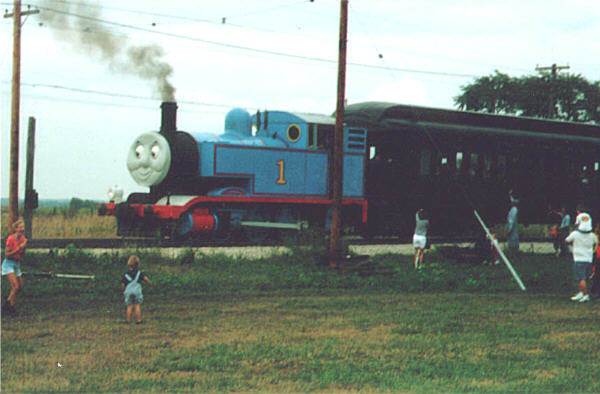 Illinois Railway Museum all day Saturday. Thomas is a 1913 Porter 060 that one of the railroad historic clubs rigged up into a beautiful facsimile of Thomas. I was expecting one of those fake little things run with a chevy V-6 and fake smoke generators, but this was the real mc coy, altho it has knuckle couplers to pull American equipment. Six old pullman coaches, about 200 tons worth, Thomas wasn't even panting hard. What a day.
Here's me and mike boarding the train our very own Don Shepley used to drive - The North Shore Limited.While I was gone, I left my foreman in charge, and he blew himself up along with the ridge he was supposed to be tunneling thru, as well as half of Stevens Point. Well, it was due for urban renewal anyway.
Anyway, gonna be another week or two before I'm ready to post version three, but at least I don't need a tunnel thru that ridge anymore, cause it ain't there to tunnel thru. I don't know what to tell you about missing SMS files, I didn't put any in, and if the game is looking for them in a forset region it's news to me, but not to take chances I'm moving them away from the tracks. yeah, Joe, the quad tree is in the \world and \tiles, and/or possibly \td, so when you delete the route folder the quad tree is gone too. What I did with Coal city was to select the route, load the quad tree, then zoomed in on the region. If you right click on a tile (there is a corresponding tile number in the route editor window somewhere, I forget where, for the tile you're over) there is a "delete" option, then I clicked two blank tiles, toggled the populated state on so they turn blue, and edit, generate flagged tiles, save quad tree. There's usually a slight clipping problem when you add new tiles to an existing route, Cured by leveling the terrain between the tiles, which if you look you'll see I did only where it would be visible.
Remove | Alert Edit | Reply | Reply With Quote | Top
Lock | Archive | Remove
Lobby | Topics | Previous Topic | Next Topic
Restored from the Train-Sim.Com archive, captured August 20, 2001. About this archive.