Message Areas - "Buried Wagon"
Train-Sim.Com Message Areas
"Buried Wagon"
Email this topic to a friend
Printer-friendly version of this topic
Bookmark this topic (Registered users only)
Previous Topic | Next Topic Conferences MSTS Locomotive Design (Protected) Original message
ruifonseca (17 posts)
Mar-12-02, 06:57 AM (EST) "Buried Wagon" the first time I loaded this wagon in MSTS it appeared in the vertical positin.... then, I reseted the Xform of every shape and I got this. How do I resolve this?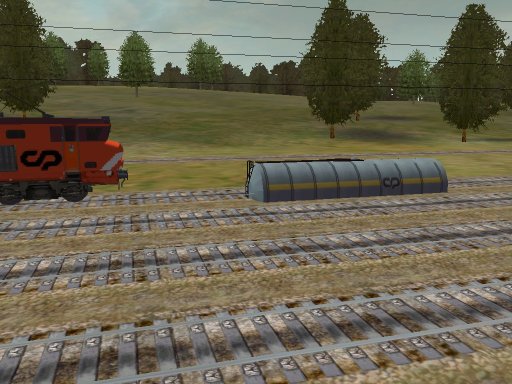 Alert Edit | Reply | Reply With Quote | Top
Table of Contents
Subject Author Message Date ID RE: Buried Wagon RvA1 Mar-12-02 1 RE: Buried Wagon LocoRo Mar-12-02 2 RE: Buried Wagon Andre Mar-12-02 3 type ruifonseca Mar-12-02 6 RE: Buried Wagon ruifonseca Mar-12-02 4 RE: Buried Wagon RvA1 Mar-12-02 5 Now a dragging wagon ruifonseca Mar-13-02 7 RE: Now a dragging wagon RvA1 Mar-13-02 8
Lobby | Topics | Previous Topic | Next Topic
Messages in this topic
RvA1 (373 posts)
Mar-12-02, 07:24 AM (EST) 1. "RE: Buried Wagon" Hello,It look like the main mesh's "center" is to high. Try moving it back down to the same hight as you wheels. And they re-export the model.Best,Roger
Do... or Do not... there is no try. (Yoda) Remove | Alert Edit | Reply | Reply With Quote | Top
LocoRo (380 posts)
Mar-12-02, 07:35 AM (EST) 2. "RE: Buried Wagon" Hi ruifonseca,Please let us (me) know if you have fixed the problem so we can download it That wagon looks very good !!!!!!
Greetings Roland
Netherlands
I am fan of Christrains
visit: www.christrains.com Remove | Alert Edit | Reply | Reply With Quote | Top
Andre (159 posts)
Mar-12-02, 07:49 AM (EST) 3. "RE: Buried Wagon" That wagon certainly looks great. What type is it?
André
www.mstrainstop.com Remove | Alert Edit | Reply | Reply With Quote | Top
ruifonseca (17 posts)
Mar-12-02, 08:16 AM (EST) 6. "type" It's a Zaes Remove | Alert Edit | Reply | Reply With Quote | Top
ruifonseca (17 posts)
Mar-12-02, 07:55 AM (EST) 4. "RE: Buried Wagon" Yeah... you're right, to high and not centered... But I do not know how to move the mesh's center in 3DS Max Remove | Alert Edit | Reply | Reply With Quote | Top
RvA1 (373 posts)
Mar-12-02, 08:14 AM (EST) 5. "RE: Buried Wagon" Hello ruifonseca,OK this is a piece of cake, go to the "Hierarchy" section of Max. Then select the main mesh so it's highlighted, then on the
Hierarchy menu choose "Affect Pivot Point Only" that will bring up the center of the mesh. You can them click on the move button and drag the center down to rail height. Your done.
Best,Roger
Do... or Do not... there is no try. (Yoda) Remove | Alert Edit | Reply | Reply With Quote | Top
ruifonseca (17 posts)
Mar-13-02, 07:52 AM (EST) 7. "Now a dragging wagon"  Done... Nice... I was looking for something that sayed 'origin' or something like that... I thought 'pivot' was something to do with movable parts... by the way... Now, that's the main problem.. the wheels just drag... they do not spin... and I think that the bogies do not turn in curves either... Now modeling was easy to auto-learn.... but animating.... can anyone give me any clues on this one?
And there's also that problem with the textures... see that there are some lines missing? Í'f you're wondering about the locomoive, that's a CP1550 built by MLW Remove | Alert Edit | Reply | Reply With Quote | Top
RvA1 (373 posts)
Mar-13-02, 08:39 AM (EST) 8. "RE: Now a dragging wagon" Hello ruifonseca,Well here's what needs to be done now.First make sure all your parts are named properly. The Bogies need to be Bogie1 & Bogie2. The wheels need to be assigned names per there bogie ie. Wheels11, Wheels12 and then Wheels21 and Wheels22 once you have the naming done then on the top left hand side of the Main Tool Bar there is a button that will say "Select and link" You will click one that them move to Wheels11 click and drag the line to the Bogie1 let go of the mouse and you've just linked Wheels11 to Bogie1 continue on by linking all the wheels to there Bogies and then link the Bogies to the main mesh and your done export and convert and the wheels and bogies should all work.Piece of cake Best,Roger
Do... or Do not... there is no try. (Yoda) Remove | Alert Edit | Reply | Reply With Quote | Top
Lock | Archive | Remove
Lobby | Topics | Previous Topic | Next Topic
Restored from the Train-Sim.Com archive, captured June 7, 2002. About this archive.