Message Areas - "Would you like to mat the textures for my crane"
Train-Sim.Com Message Areas
"Would you like to mat the textures for my crane"
Email this topic to a friend
Printer-friendly version of this topic
Bookmark this topic (Registered users only)
Previous Topic | Next Topic Conferences MSTS Locomotive Design (Protected) Original message
kwk100 (232 posts)
Mar-05-02, 03:04 AM (EST) "Would you like to mat the textures for my crane" Hi everybody,Well I have finally made it past the modeling stage on my borwnhoist crane (almost have a few small details to add and a problem to solve)I have created the textures for the crane, and I have been fiddling and playing with UVW mapping all night, and I am unable to get the textures to work how I want them. Is there somebody willing to apply the textures to my model?My problem with the model: The wheels of the crane are resting on the X axis in the 3DS MAX 4 windows. When I play the game, my cranee is half submerged in the rails. Heirarchy or the crane:
MainBogieWheels11Wheels12 The only problem that I see is that the Bogie's center is way below the x-axis, I will remodel the bogie and see the result...Thank you for any suggestions


Trains from http://tgs.railfan.net/kwk100 Alert Edit | Reply | Reply With Quote | Top
Table of Contents
Subject Author Message Date ID RE: Would you like to mat the textu... b101uk Mar-05-02 1 RE: Would you like to mat the textu... RvA1 Mar-05-02 2 RE: Would you like to mat the textu... kwk100 Mar-05-02 3 RE: Would you like to mat the textu... RvA1 Mar-05-02 4 RE: Would you like to mat the textu... b101uk Mar-06-02 5 RE: Would you like to mat the textu... FozzyBear Mar-06-02 6 RE: Would you like to mat the textu... RvA1 Mar-06-02 7 RE: Would you like to mat the textu... kwk100 Mar-06-02 8 RE: Would you like to mat the textu... RvA1 Mar-06-02 9 RE: Would you like to mat the textu... MJL Mar-08-02 10 RE: Would you like to map the textu... kwk100 Mar-08-02 11 RE: Would you like to map the textu... MJL Mar-08-02 12 RE: Would you like to map the textu... kwk100 Mar-12-02 13 RE: Would you like to map the textu... MJL Mar-13-02 14
Lobby | Topics | Previous Topic | Next Topic
Messages in this topic
b101uk (41 posts)
Mar-05-02, 04:08 PM (EST) 1. "RE: Would you like to mat the textures for my crane" hi
"I see is that the Bogie's center is way below the x-axis"
sounds odd X is left/right Y is for/aft Z is up/downit mite be the crane body pivot point that is to high and or an Xform prob with parts from editing (moveing,rotateing,morroring) in the 2D windows insted of prespective veue.a quik fix: 1st make a backup of your work!!!1: move the crain body to its corect place x,y,z2: make a small box at world 0,0,0 point about 0.01x0.01x0.01 in size, useing the prespective veue. the box name dose not mater.3: select the box and attach the crane body to the box, the crane body will now have the Xform & and world 0,0,0 pivot point of the box.4: select vertex mode and delete the 8 vertex of the small box from the world 0.0.0 point.5: rename the crane body back to corect name.6: reset Xform of crane body now just for good mesher.7: repet all the above for all the other parts boges,wheals BUT place the small box whare you wont that part to pivot in MSTS.8: link all parts in revers order to the mane node,
eg
wheal22 to bogie2
wheal21 to bogie2
wheal20 to bogie2
wheal12 to bogie1
wheal11 to bogie1
wheal10 to bogie1
bogie2 to main
bogie1 to mainwheal would have it the center point of the axle(y,z) with NO X off set and the lowest point of the wheals should be 0.0m high.bogies would also have NO x off set and the Z point shoud be at the hight of ware the bogie meets the under side of of the crane body and the Y point shoud be at the center of the wheal base for each bogie, both bogies shoud be the same distens eather side of world 0,0,0 along the y axis.tip: if you jump strat in with reset Xform you could end up with an odd looking model Remove | Alert Edit | Reply | Reply With Quote | Top
RvA1 (373 posts)
Mar-05-02, 04:11 PM (EST) 2. "RE: Would you like to mat the textures for my crane" Hello kwk100,What you need to do is go to the "hierarchy" section and reset the center's for the bogies. That should fix that problem.
Best,Roger
Do... or Do not... there is no try. (Yoda) Remove | Alert Edit | Reply | Reply With Quote | Top
kwk100 (232 posts)
Mar-05-02, 10:26 PM (EST) 3. "RE: Would you like to mat the textures for my crane" Hi,Well I followed both of your suggestions and I still get the crane to be submerged in the tracks. I have attached a couple of photos of a derailment:Notice its position relative to the rails: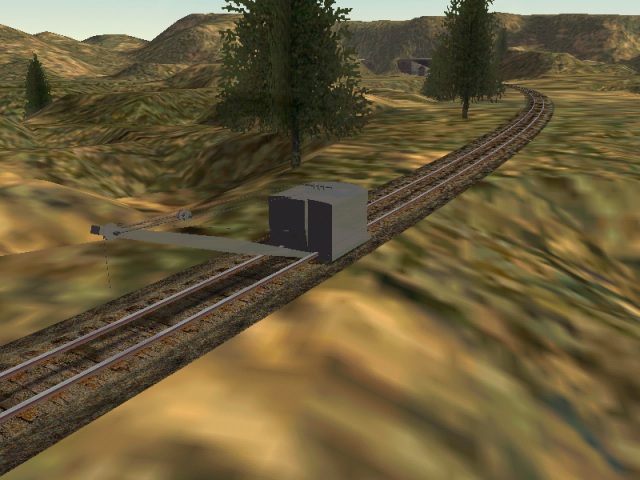


 You can see from the photos that the crane has a carbody, wheels, and most of the lower works. I was thinking that maybe the crane was submerged in the tracks due to and improper bounding box, the box goes down to the rails and then stops. The box is as long as the crane, about 3 times wider than the crane, and its height is from the highest point on the crane to the top of the rails.Thanks again
Trains from http://tgs.railfan.net/kwk100 Remove | Alert Edit | Reply | Reply With Quote | Top
RvA1 (373 posts)
Mar-05-02, 10:38 PM (EST) 4. "RE: Would you like to mat the textures for my crane" Hello KW,OK what I think needs to happen here.....Select the main crane mesh then go to the hierarchy section, center the go to the "Alignment" and "center to object" then once that is done move the center point to 0,0,0 and re export the model and try that.Best,Roger
Do... or Do not... there is no try. (Yoda) Remove | Alert Edit | Reply | Reply With Quote | Top
b101uk (41 posts)
Mar-06-02, 06:42 AM (EST) 5. "RE: Would you like to mat the textures for my crane" LAST EDITED ON Mar-06-02 AT 07:28 AM (EST)hi kwk100tri attaching the bogie to the crane body(main) so you ONLY have the the main node then rename the wheels to Wheels1 & Wheels2.
so its the same as the main drivers on a steem loco.
i think you also have to anomate thes wheels your self in max
throw 9 frames @ 30fps useing a "tbc" controler (9th frame should be the same as 1st frame). i whish i could spell!
eg
------main------
wheels1--wheels2if you wont to send a copy of the .max & the exported 3ds + texture files of the crane (in a .zip file) i will take a quik look at it for you to see ware the prob is as i have a fare bit of time free this week.email at b101uk@btinternet.comb101uk
Remove | Alert Edit | Reply | Reply With Quote | Top
FozzyBear (746 posts)
Mar-06-02, 07:24 AM (EST) 6. "RE: Would you like to mat the textures for my crane" LAST EDITED ON Mar-06-02 AT 07:44 AM (EST)
Sorry to jump in at this late stage but the answer to this is a simple one and everybody's missed it so far!DONT move your Main Object Axis to 0,0,0
The whole thing will be offset if you do.Move the axis to the centre of the object then drop the height of that axis until it is at or just slightly below rail level. That will cure your submerged loco problem. MSTS uses that axis to define where the horizontal centre of the object is in relation to the track and how far above or below the track it is.You also don't have to animate wheels at all! MSTS will do it for you as long as they are properly named.Best Regards,
Julian (Fozzy The Bear)
Remove | Alert Edit | Reply | Reply With Quote | Top
RvA1 (373 posts)
Mar-06-02, 08:09 AM (EST) 7. "RE: Would you like to mat the textures for my crane" Hey there Fozzy,How have you been?Any hoo, here is what I based my responce on... See I was helping this fellow before. heheheh 
Best,Roger
Do... or Do not... there is no try. (Yoda) Remove | Alert Edit | Reply | Reply With Quote | Top
kwk100 (232 posts)
Mar-06-02, 09:45 PM (EST) 8. "RE: Would you like to mat the textures for my crane" Thank you all for your suggestions, I have yet to try the later few. This is driving me nuts!!! I will post a message about the results in the next little while....
Trains from http://tgs.railfan.net/kwk100 Remove | Alert Edit | Reply | Reply With Quote | Top
RvA1 (373 posts)
Mar-06-02, 10:00 PM (EST) 9. "RE: Would you like to mat the textures for my crane" Hello,If it's still driving you NUTS send over the file and I'll take a look.Best,Roger
Do... or Do not... there is no try. (Yoda) Remove | Alert Edit | Reply | Reply With Quote | Top
MJL (206 posts)
Mar-08-02, 08:13 PM (EST) 10. "RE: Would you like to mat the textures for my crane" May I reccomend a blue color for the crane
(pic borrowed from RI color Guide to Freight and Pass Equipment book)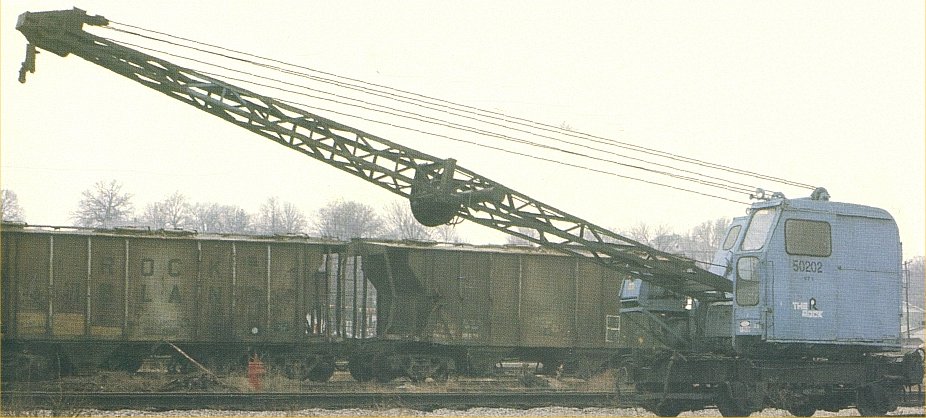 Matt
Matt
"Everything is proceeding as I have foreseen" Remove | Alert Edit | Reply | Reply With Quote | Top
kwk100 (232 posts)
Mar-08-02, 08:25 PM (EST) 11. "RE: Would you like to map the textures for my crane" Awesome! I was hoping the Rock operated 5 ton Brownhoists! I guess that this will have to be a second version, my crane seems to be an older design!Thanks,
Trains from http://tgs.railfan.net/kwk100 Remove | Alert Edit | Reply | Reply With Quote | Top
MJL (206 posts)
Mar-08-02, 09:36 PM (EST) 12. "RE: Would you like to map the textures for my crane" You could always use this pic, same source, and just forget the fact that its tracked instead of self propelled.
The description for this pic (main points)
RI DL5/2006
built by American Hoist and Derrick SN#GS-370 in 1939
40' boom, pictured 1966 in Blue Island
all Orange, with a small red RI shield logo, and white on red DL5 letters under the cab (if you cant see them)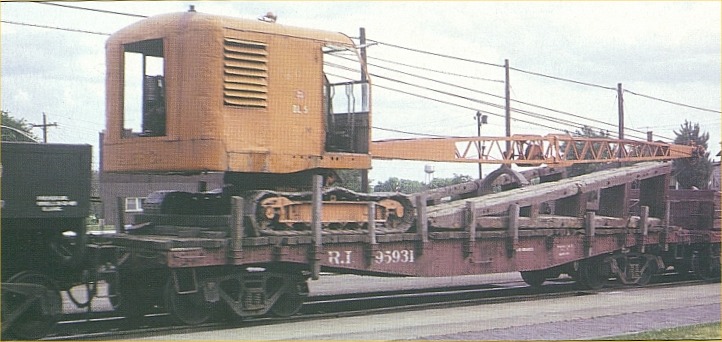 the previous pic
RI 50202 BURRO CRANE, self propelled, 35' Boom, purchased two other similar units in 1943/44 - those were painted in "work yellow" and numbered 2109, 2133
Pic March 1980, Silviswhat ever happened to that SW1500?
Matt
"If you only knew the power" Remove | Alert Edit | Reply | Reply With Quote | Top
kwk100 (232 posts)
Mar-12-02, 08:29 PM (EST) 13. "RE: Would you like to map the textures for my crane" Thanks for the pics... As luck would have it, I have a crawler mounted version of the Brownhoist on my computer somewehre! A few modifications here and there and I can create the yellow one as well. Is the yellow crane by change a dragline, I think I see a bucket under the boom but I am not sure?It is still somewhere on my computer... I just haven't got around to asking Mark for permission to upload it...Take care,
Trains from http://tgs.railfan.net/kwk100
Remove | Alert Edit | Reply | Reply With Quote | Top
MJL (206 posts)
Mar-13-02, 09:11 AM (EST) 14. "RE: Would you like to map the textures for my crane" consulting the book of information
"It could handle either a 3/4 yard drag bucket or clamshell."
Matt Remove | Alert Edit | Reply | Reply With Quote | Top
Lock | Archive | Remove
Lobby | Topics | Previous Topic | Next Topic
Restored from the Train-Sim.Com archive, captured June 7, 2002. About this archive.