Message Areas - "Serious Snow!"
Train-Sim.Com Message Areas
"Serious Snow!"
Email this topic to a friend
Printer-friendly version of this topic
Bookmark this topic (Registered users only)
Previous Topic | Next Topic Conferences Microsoft Train Simulator (Protected) Original message
stationmaster (238 posts)
Dec-24-01, 05:53 PM (EST) "Serious Snow!" Does anyone else think that the snow textures in Marias Pass depict a rather light snowfall for the Rockies in winter?
I decided to try replacing all of the snow textures in my TerrTex\Snow folder with the US2TarGnd.ace file to see how it looked (Back up the originals first!). Here is a comparison shot:
Just right for those Christmas card screenshots.Ron Paludan
http://www.railwaystation.com
stationmaster@railwaystation.com Alert Edit | Reply | Reply With Quote | Top
Table of Contents
Subject Author Message Date ID RE: Serious Snow! highguard Dec-24-01 1 RE: Serious Snow! lightbg Dec-25-01 2 RE: Serious Snow! stationmaster Dec-25-01 3 RE: Serious Snow! ChckHbrt Dec-25-01 4 RE: Serious Snow! ace6879 Dec-25-01 5 RE: Serious Snow! lightbg Dec-25-01 6 RE: Serious Snow! ace6879 Dec-25-01 10 RE: Serious Snow! lightbg Dec-25-01 12 RE: Serious Snow! stationmaster Dec-25-01 8 RE: Serious Snow! mdlaged Dec-25-01 7 RE: Serious Snow! stationmaster Dec-25-01 9 RE: Serious Snow! ace6879 Dec-25-01 11 RE: Serious Snow! stationmaster Dec-26-01 13 RE: Serious Snow - DOWNLOAD READY stationmaster Dec-26-01 14 RE: Serious Snow - DOWNLOAD READY cjmaclean Dec-26-01 15 RE: Serious Snow - DOWNLOAD READY georgi55 Dec-26-01 16
Lobby | Topics | Previous Topic | Next Topic
Messages in this topic
highguard (21 posts)
Dec-24-01, 08:31 PM (EST) 1. "RE: Serious Snow!" You da man!
awesome Remove | Alert Edit | Reply | Reply With Quote | Top
lightbg (241 posts)
Dec-25-01, 01:57 AM (EST) 2. "RE: Serious Snow!" I've got just the thing for that: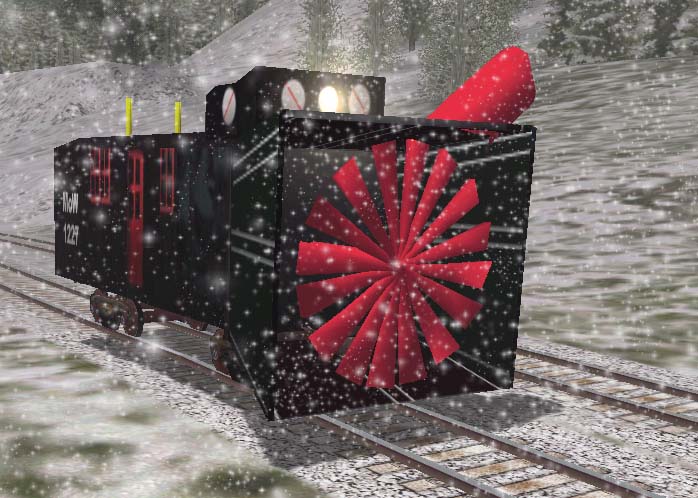 Once I get the files squared away, it'll be here.Jake. Remove | Alert Edit | Reply | Reply With Quote | Top
stationmaster (238 posts)
Dec-25-01, 02:40 PM (EST) 3. "RE: Serious Snow!" That should do the job! Here are some more heavy snow pics:
 Ron
Ron
Remove | Alert Edit | Reply | Reply With Quote | Top
ChckHbrt (482 posts)
Dec-25-01, 03:32 PM (EST) 4. "RE: Serious Snow!" Hey RonWhat files do you change for the Sim to use the US2TarGnd.ace?Also I have your GN Empire Builder F7A, Is the B available now?Chuck Remove | Alert Edit | Reply | Reply With Quote | Top
ace6879 (459 posts)
Dec-25-01, 04:11 PM (EST) 5. "RE: Serious Snow!" AWSOME!!!! We in the midwest need that as well!!! Can you upload the files? Or even send them to me please!!
Thanks!!Kelley Remove | Alert Edit | Reply | Reply With Quote | Top
lightbg (241 posts)
Dec-25-01, 04:44 PM (EST) 6. "RE: Serious Snow!" LAST EDITED ON Dec-25-01 AT 04:45 PM (EST)ACE6879;
I'd send you the file for the rotary plow, but your email is disabled. Get me an address and it's yours.
Jake Remove | Alert Edit | Reply | Reply With Quote | Top
ace6879 (459 posts)
Dec-25-01, 09:16 PM (EST) 10. "RE: Serious Snow!" LAST EDITED ON Dec-25-01 AT 09:23 PM (EST)LAST EDITED ON Dec-25-01 AT 09:16 PM (EST)Howdy, My e-mail is niceoneace@aol.com !!! Thanks!! I would LOVE the rotary!!! NICE work!!!Kelley Remove | Alert Edit | Reply | Reply With Quote | Top
lightbg (241 posts)
Dec-25-01, 09:25 PM (EST) 12. "RE: Serious Snow!" Kelley,
You've got mail!
Jake Remove | Alert Edit | Reply | Reply With Quote | Top
stationmaster (238 posts)
Dec-25-01, 08:06 PM (EST) 8. "RE: Serious Snow!" >Also I have your GN Empire
>Builder F7A, Is the B
>available now? The B unit is from the 3DTrains commercial A-B-B-A set. The GN skin for both A and B units is available at my site:
http://www.railwaystation.com/trainsim/index.html>What files do you change for
>the Sim to use the
>US2TarGnd.ace? I replaced all of the ace files in the TerrTex\Snow folder except for the microtex.ace file, which is a differnet size. To simplify the process, you can copy the following lines into a batch file (makesnow.bat) and run it.copy US2TarGnd.ace mntn_low.ace
copy US2TarGnd.ace US2DiagForest-Snow.ace
copy US2TarGnd.ace US2DiagPRock-Snow.ace
copy US2TarGnd.ace US2DiagSnow-Forest.ace
copy US2TarGnd.ace US2DiagSnow-PRock.ace
copy US2TarGnd.ace US2Farmland1.ace
copy US2TarGnd.ace US2Farmland2.ace
copy US2TarGnd.ace US2Forest.ace
copy US2TarGnd.ace US2Forestlo.ace
copy US2TarGnd.ace US2ForestSnow.ace
copy US2TarGnd.ace US2ForestSPatch.ace
copy US2TarGnd.ace US2Frmlndlo.ace
copy US2TarGnd.ace US2Grass.ace
copy US2TarGnd.ace US2Grasslo.ace
copy US2TarGnd.ace US2HalfForest-Grass.ace
copy US2TarGnd.ace US2HalfForest-Mount.ace
copy US2TarGnd.ace US2HalfForest-Scrub.ace
copy US2TarGnd.ace US2HalfForest-Snow.ace
copy US2TarGnd.ace US2HalfGrass-Scrub.ace
copy US2TarGnd.ace US2HalfMount-Scrub.ace
copy US2TarGnd.ace US2HalfMount-Snow.ace
copy US2TarGnd.ace US2HalfPRock-Forest.ace
copy US2TarGnd.ace US2HalfPRock-Scrub.ace
copy US2TarGnd.ace US2HalfPRock-Snow.ace
copy US2TarGnd.ace US2HalfScrub-Snow.ace
copy US2TarGnd.ace US2Mount.ace
copy US2TarGnd.ace US2MountSPatch.ace
copy US2TarGnd.ace US2PinkRock.ace
copy US2TarGnd.ace US2PRockSnow.ace
copy US2TarGnd.ace US2PRockSPatch.ace
copy US2TarGnd.ace US2QuartForest-Grass.ace
copy US2TarGnd.ace US2QuartForest-Mount.ace
copy US2TarGnd.ace US2QuartForest-PRock.ace
copy US2TarGnd.ace US2QuartForest-Scrub.ace
copy US2TarGnd.ace US2QuartForest-Snow.ace
copy US2TarGnd.ace US2QuartGrass-Forest.ace
copy US2TarGnd.ace US2QuartGrass-Scrub.ace
copy US2TarGnd.ace US2QuartMount-Forest.ace
copy US2TarGnd.ace US2QuartMount-Scrub.ace
copy US2TarGnd.ace US2QuartMount-Snow.ace
copy US2TarGnd.ace US2QuartPRock-Forest.ace
copy US2TarGnd.ace US2QuartPRock-Scrub.ace
copy US2TarGnd.ace US2QuartPRock-Snow.ace
copy US2TarGnd.ace US2QuartScrub-Forest.ace
copy US2TarGnd.ace US2QuartScrub-Grass.ace
copy US2TarGnd.ace US2QuartScrub-Mount.ace
copy US2TarGnd.ace US2QuartScrub-PRock.ace
copy US2TarGnd.ace US2QuartScrub-Snow.ace
copy US2TarGnd.ace US2QuartSnow-Forest.ace
copy US2TarGnd.ace US2QuartSnow-Mount.ace
copy US2TarGnd.ace US2QuartSnow-PRock.ace
copy US2TarGnd.ace US2QuartSnow-Scrub.ace
copy US2TarGnd.ace US2ScrbRcklo.ace
copy US2TarGnd.ace US2Scrub1.ace
copy US2TarGnd.ace US2Scrub2.ace
copy US2TarGnd.ace US2Scrublo.ace
copy US2TarGnd.ace US2ScrubRock.ace
copy US2TarGnd.ace US2ScrubRock2.ace
copy US2TarGnd.ace US2ScrubRock3.ace
copy US2TarGnd.ace US2ScrubSPatch.ace
copy US2TarGnd.ace US2SnowMount.ace
copy US2TarGnd.ace US2tarmac.ace
copy US2TarGnd.ace US2tarmacscrub2half.ace
copy US2TarGnd.ace US2tarmacscrub2quart.ace
copy US2TarGnd.ace US2tarmacscrub2quart2.ace
copy US2TarGnd.ace US2Whitefish.ace
copy US2TarGnd.ace US2Whitefishscrub2half.ace
copy US2TarGnd.ace US2Whitefishscrub2quart.ace
copy US2TarGnd.ace US2Whitefishscrub2quart2.ace Remove | Alert Edit | Reply | Reply With Quote | Top
mdlaged (29 posts)
Dec-25-01, 08:01 PM (EST) 7. "RE: Serious Snow!" where can i find the file for the new snow textures, I would like to put it in my game. If you could email me the file i would be really greatful. My email is cassie@webound.com Thanks again. Remove | Alert Edit | Reply | Reply With Quote | Top
stationmaster (238 posts)
Dec-25-01, 08:12 PM (EST) 9. "RE: Serious Snow!" The snow texture is already in the Routes\USA2\TerrTex\Snow folder (US2TarGnd.ace). I used it because it had the most solid snow cover and because it is already compressed, takes up less disk space than one that I created myself.Ron
Remove | Alert Edit | Reply | Reply With Quote | Top
ace6879 (459 posts)
Dec-25-01, 09:21 PM (EST) 11. "RE: Serious Snow!" Hi Ron, OK, I admit I am computer illiterate at times. I copied all of your files, but how do I make a bat file to get them in? Is that All i need to do? I agree MSTS snow cover is WAY to shallow. I would LOVE to have the deep snow on all my routes. Sorry to be a bother!!! Kelley Remove | Alert Edit | Reply | Reply With Quote | Top
stationmaster (238 posts)
Dec-26-01, 00:31 AM (EST) 13. "RE: Serious Snow!" LAST EDITED ON Dec-26-01 AT 00:32 AM (EST)I'll try to upload the file tomorrow. Meanwhile, here's how to make the batch file:1. Open NOTEPAD (usually Start->Programs->Accessories)
2. Copy the lines from the message above (hold down left mouse button and drag it over all the "copy US2TarGnd.ace ..." lines, then press the Ctrl+Ins keys)
3. Paste them into Notepad (Shift+Ins keys)
4. Save the file as "makesnow.bat" into your Routes\USA2\TerrTex\Snow folder.
5. Double click on makesnow.batI'll post again when the download is ready.Ron
http://www.railwaystation.com
Remove | Alert Edit | Reply | Reply With Quote | Top
stationmaster (238 posts)
Dec-26-01, 01:19 AM (EST) 14. "RE: Serious Snow - DOWNLOAD READY" OK, by popular demand, the batch file that replaces the snow textures is available for download here:http://www.railwaystation.com/trainsim/models.htmlStart your snowplows!Ron
stationmaster@railwaystation.com
http://www.railwaystation.com
Remove | Alert Edit | Reply | Reply With Quote | Top
cjmaclean (640 posts)
Dec-26-01, 04:26 AM (EST) 15. "RE: Serious Snow - DOWNLOAD READY" Many thanks for this great little extra! Isn't it true that it's often the small things that make a game more real?
D.M.
"Inter Arma Enim Silent Leges" Remove | Alert Edit | Reply | Reply With Quote | Top
georgi55 (406 posts)
Dec-26-01, 04:27 AM (EST) 16. "RE: Serious Snow - DOWNLOAD READY" Thnaks a lot man!
Georgi
JR Yamanote Line. (Tokyo, Japan)
22(25.0Km) Stations done 7(9.0km) to go.
(building RESUMED!! MSTS WORKING!I LOVE IT!)
Georgi Remove | Alert Edit | Reply | Reply With Quote | Top
Lock | Archive | Remove
Lobby | Topics | Previous Topic | Next Topic
Restored from the Train-Sim.Com archive, captured January 2, 2002. About this archive.