Train-Sim.Com
Microsoft Train Simulator

MARIAS 3 / 3.1 Coupler Problems

Notice to all visitors and members of the Train-Sim.Com message forums:
If you plan on using a signature banner in your posts, we would like to remind you that there is a maximum size for banners. That maximum is 450 pixels wide by 120 pixels high, and not to exceed 25k. Your compliance is appreciated. FORUM RULES Problems? There are two common reasons for problems with logging in and posting messages. The first is that you are running a firewall that prevents your messages from being sent to the server. The other is that you have cookies disabled; the DCForum software requires cookies to work properly.

Previous Topic | Next Topic

Printer-friendly copy Email this topic to a friend

Reading Topic #24905

Charter Member · 5929 posts

Had E-Mail from my friend Frank Carver who found a solution to the breaking couplers on the Cutbank to Java stretch. He deleted a certain road level crossing which was located between two twin-track crossover nodes and the problem ceased ! He wrote me all the details of where it was but stupid me deleted his message before going online to the forum. I do think sometimes that old age is catching up with me slowly, or is it the Cognac I am not having too much off ! I can't check it out, waiting for his CD with the MP-3.1, it would take me hours to download. Worth a try, but back up the route first !O t t o

Alert | IP

Printer-friendly page | Edit | Reply | Reply With Quote | Top

RE: MARIAS 3 / 3.1 Coupler Problems, drjoe, Sep-20-04, 08:16 PM, (1) RE: MARIAS 3 / 3.1 Coupler Problems, OTTODAD, Sep-20-04, 11:16 PM, (2) RE: MARIAS 3 / 3.1 Coupler Problems, nascarphan, Sep-21-04, 11:59 PM, (11) RE: MARIAS 3 / 3.1 Coupler Problems, Swissie, Sep-21-04, 05:33 AM, (3) RE: MARIAS 3 / 3.1 Coupler Problems, OTTODAD, Sep-21-04, 09:20 AM, (4) RE: MARIAS 3 / 3.1 Coupler Problems, centerail4, Sep-21-04, 10:37 AM, (5) RE: MARIAS 3 / 3.1 Coupler Problems, OTTODAD, Sep-21-04, 12:51 PM, (6) RE: MARIAS 3 / 3.1 Coupler Problems, DCRR1, Sep-21-04, 01:57 PM, (7) RE: MARIAS 3 / 3.1 Coupler Problems, Swissie, Sep-21-04, 05:12 PM, (8) RE: MARIAS 3 / 3.1 Coupler Problems, OTTODAD, Sep-21-04, 07:07 PM, (9) RE: MARIAS 3 / 3.1 Coupler Problems, Night Train, Sep-21-04, 09:02 PM, (10) RE: MARIAS 3 / 3.1 Coupler Problems, OTTODAD, Sep-22-04, 07:31 AM, (13) RE: MARIAS 3 / 3.1 Coupler Problems, Night Train, Sep-23-04, 05:10 AM, (14) RE: MARIAS 3 / 3.1 Coupler Problems, Emu Farmer, Sep-22-04, 05:03 AM, (12)

Conferences | Topics | Previous Topic | Next Topic
Member since Apr-23-03 · 293 posts

RE: MARIAS 3 / 3.1 Coupler Problems

Shame on you Otto. I certainly hope that he will be able to give you the info, or that the "changed" files will be posted somewhere. I anxiously await this. I would love to have MP3.1 without that problem at Cutbank.

Joe Morris CRR #2
Senior Engineer
Vice President, Equip. & Physics, OVS
Gen. Manager, OVS Shortlines
http://or4c.com/OVSTS//ShortLines.html

Alert | IP

Printer-friendly page | Edit | Reply | Reply With Quote | Top

Charter Member · 5929 posts

RE: MARIAS 3 / 3.1 Coupler Problems

O.K. Joe, I am going to ask Frank to send me that message again and hope that he is not as tidy minded as I am and has not deleted it yet ! O t to

Alert | IP

Printer-friendly page | Edit | Reply | Reply With Quote | Top

Charter Member · 200 posts

RE: MARIAS 3 / 3.1 Coupler Problems

I have not had any problems with couplers breaking at Cutbank using Marias 3.1 since adding m/s to the coupler damping settings.Nascarphan

Alert | IP

Printer-friendly page | Edit | Reply | Reply With Quote | Top

Member since Sep-27-02 · 1252 posts

RE: MARIAS 3 / 3.1 Coupler Problems

LAST EDITED ON Sep-21-04 AT 05:37 AM (EDT)

Hi Otto, this is correct, and I remember that I've myself asked about this about 18 months ago in a lengthy discussion about the breaking couplers issue (before the N/m/s fix was found), only to get the answer that this problem was already known. Me being a newby back then, I was told that the lower base line in the bounding boxes of some equipment was set to an altitude of 0 (the height of the railhead, I assume?). Which means that the car can collide with objects whose bb sticks out over the base-line & into the path of the train. If I remember that correctly from back then this could have been the issue here, as road sections, as well as track sections if you just place them across each other without an xover.s track piece, do indeed have a bb which could "come in your way". It was indeed true, I've found some cars and engines with a bb line where the equipment actually has no clearance at its base, exampleESD_Bounding_Box ( -1.4 0 -10.3 1.4 4.21 10.3 )

In order to avoid "hitting" something, or having the car scrap along the ground when it passes a change in the incline (grade) of your tracks, make that line readESD_Bounding_Box ( -1.4 0.1 -10.3 1.4 4.21 10.3 )The BB is one of the things I usually check on equipment before installing...Lukas a.k.a SwissieEdit: Btw Otto, the road crossing in question is the one inbetween the pair of switches letting you change from the East- to Westbound track and vv., just outside of Cutbank, when you approach Cutbank from Shelby.

Alert | IP

Printer-friendly page | Edit | Reply | Reply With Quote | Top

Charter Member · 5929 posts

RE: MARIAS 3 / 3.1 Coupler Problems

Thanks for that tip, Lukas !!!I did another test with my Santa-Fe Explorer and watching it from behind I could see it break up at the West of Java derailment spot but reassemble itself and carry on ! This would suggest that insufficient bottom BB clearance could be the problem and shall give it a try to change them all using the UltraEdit2 editor which can "Search and Replace" in all files.This is what Frank Carver found, not guaranteed to work with all MP-3 and 3.1 but worth a try, after BACKING-UP the route first !I ran a train over the section and it came uncoupled west of Cutbank on the Level crossing between the Crossover, I ran it again and the same happened, I went into RE at -112.31367 48.62793 ( tiles -12506+14779 ) and removed everything concerning the Level crossing. I have run the train over that section half a dozen times or more with no uncoupling, I did the same in MP 3.1 and ran that train without uncoupling.

Take Care, O t t o.

Alert | IP

Printer-friendly page | Edit | Reply | Reply With Quote | Top

Member since Jun-21-04 · 45 posts

RE: MARIAS 3 / 3.1 Coupler Problems

Click to send message via ICQ

This is a very informative thread. And I learned a lot here. But this
one line is worth more than gold.
"change them all using the UltraEdit2 editor which can "Search and Replace" in all files"Otto, I owe you a bottle of Cognac !!!!Sonny Powell
Roberts Rail Services
Servicing the North Eastern Railroad Corporation
and the MSTS Communityhttp://www.nerx.us/
http://www.vnerr.com/
http://www.glarr.com/
http://www.virtualrailz.com/
http://www.vparr.com/
http://www.vleu.org/

n/a

Alert | IP

Printer-friendly page | Edit | Reply | Reply With Quote | Top

Charter Member · 5929 posts

RE: MARIAS 3 / 3.1 Coupler Problems

LAST EDITED ON Sep-21-04 AT 01:28 PM (EDT)

Yes Sonny, that editor has paid me back handsomely in the past ! Used it recently to re-size FOREST bushes and change Forest tree shapes .ace files as well as their size in un-compressed World files, which can not be done in any other way once they have been placed according to their specifications in the FOREST.DAT .But changing the size of Forest items one has got to be careful not to create a size being the same as one used already for another shape. Difficult then to reverse the change without affecting that one as well ! Tough when hundreds of World files are involved.GOLDEN RULE: BACK-UP before changing anything !!! O t t o

Alert | IP

Printer-friendly page | Edit | Reply | Reply With Quote | Top

Member since Apr-17-03 · 128 posts

RE: MARIAS 3 / 3.1 Coupler Problems

Otto:
When changing your bounding box height, set the lower part of the box to 0.9 , This will put the bottom of the box at coupler height. Joe Morris has been doing a lot of testing with this and it seems to work well.JohnCYNDI RICHARDS
1938 * 2004
You will always
be here with us.

Alert | IP

Printer-friendly page | Edit | Reply | Reply With Quote | Top

Charter Member · 5929 posts

RE: MARIAS 3 / 3.1 Coupler Problems

LAST EDITED ON Sep-21-04 AT 07:09 PM (EDT)

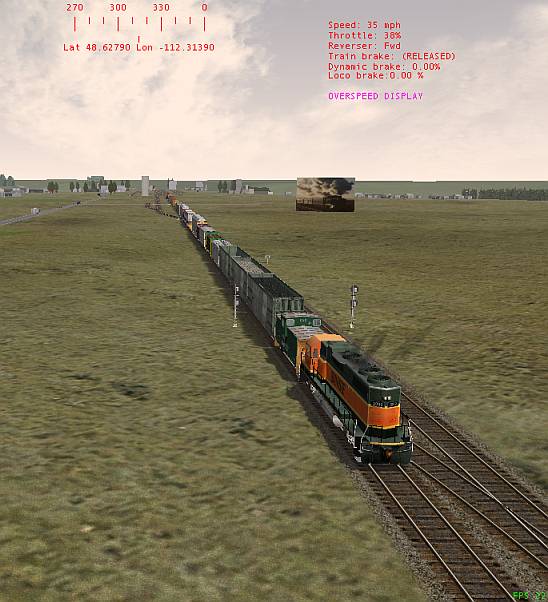
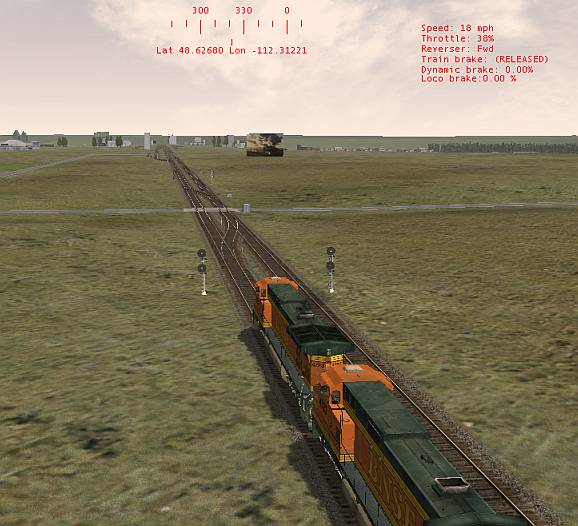
Thanks to both of you, Lukas and John !!! Did what Lukas suggested, finding some values prefixed with a "minus" - and there were no more problems West of Java going towards Essex and neither going East over the trestle towards Cutbank.The location Frank identified also gave no problems as you can see below.Increasing the lower clearance of the Bounding Box certainly will do no harm and should further improve the clearance tolerance towards imperfections at ground level. Watching the front of the train with the #2 view from a few waggons back and observing some of the bumps in the track, the train bouncing up and down, it's no wonder that weaker than Plainsman's or Swissie's coupler settings would cause some couplers to break !Now I got to go and re-do all the improvements I made to Frank's KOOTENAI extension because the MP-3 part of it started to cause "Send...", something going out of sync somewhere along the line, my lightweight SF-Explorer negotiating the MP-3 part without problems but heavier trains do not ! Back to the drawing board ! I can appreciate the SURFLINER crew having to deal with even greater challenges !!! But creating something new should be less of a struggle than changing an existing route, as I found out a long time ago, modifying the N.&.J.C..Take Care, O t t o.P.S. Forgot the pictures ! MARIAS 3 / 3.1 Coupler Problems – image 1MARIAS 3 / 3.1 Coupler Problems – image 2

Alert | IP

Printer-friendly page | Edit | Reply | Reply With Quote | Top

Member since Sep-8-04 · 11 posts

RE: MARIAS 3 / 3.1 Coupler Problems

Hi Otto, a small favour please regarding:>change them all using the UltraEdit2 editor which can "Search and >Replace" in all files.any chance you could type out a quick tutorial how this is achieved,
ive just downloaded ultraedit32, and having no such luck.My objective is to change the sound lines and cab line in my
eng files? (instead of all one by one)appreciate if can help.
Mark

Alert | IP

Printer-friendly page | Edit | Reply | Reply With Quote | Top

Charter Member · 5929 posts

RE: MARIAS 3 / 3.1 Coupler Problems

LAST EDITED ON Sep-22-04 AT 07:39 AM (EDT)

Hi Mark !First of all BACK-UP your TRAINSET folder, or better still COPY it to somewhere else to work on !!!!!!Select file endings with UltraEdit32 with "Advanced / Settings / File Associations" which will then OPEN a file in the editor when double-left clicking on it, or select "OPEN with UltraEdit32" after right-clicking on a file.This is an example of how to FIND a text string in files:MARIAS 3 / 3.1 Coupler Problems – image 3
MARIAS 3 / 3.1 Coupler Problems – image 4Now lets "FIND and REPLACE" a text string. In this case I am using the same text string which is not what you would normally do ! You must make sure that everything you type is CHARACTER PERFECT, especially the text which is to be used as the Replacement, to include the FULL PATH of where the replacement Sound .sms is located in your TRAINSET folders !MARIAS 3 / 3.1 Coupler Problems – image 5
MARIAS 3 / 3.1 Coupler Problems – image 6Read the comprehensive HELP section because this is not a program you can learn enough about quickly by just jumping in and trying something, asking a few questions ! O t t oP.S.: There is a problem trying to change Sound references in .eng files globally because many locos have their Sound.sms in their own TRAINSET folders, easier to alias to another sound and only a few are looking into the same Sound folder for them !

Alert | IP

Printer-friendly page | Edit | Reply | Reply With Quote | Top

Member since Sep-8-04 · 11 posts

RE: MARIAS 3 / 3.1 Coupler Problems

Hi Otto, thanks very much for your quick reply.
your post was very helpful, with having got the hang of things now.thanks again
Mark

Alert | IP

Printer-friendly page | Edit | Reply | Reply With Quote | Top

Member since Jul-8-02 · 75 posts

RE: MARIAS 3 / 3.1 Coupler Problems

Hi All
I think that I had better come in here, seeing that my name has been mentioned. Otto sent me a Co-ords of the route he is Beta testing for me, with a problem in the route, this bought me to Cutbank, that stirred my aged cells above my shoulders, I dropped a train in about 2 miles back and did the run, I had 2 uncouplings out of 3 runs all default cars, I noticed that it was directly above the Road crossing, after removing the crossing I had no uncoupling at that point, this letter below to Otto follows on from here.
(Cutbank uncoupling in MP3! I have tested and tested with all kinds of trains, no uncoupling now, but there was a small twitch in the couplings at that spot between the points, so I moved the X-over a 100 meters towards Cutbank and all the trains now run very smoothly through that section without any twitch or movement on the couplings, I have put the road back in, as its now a 100 meters from the points, it does not cause a problem now with any of the train runs, I have done a lot of runs on both tracks also switched tracks at that point, at all different speeds, I have not had a failure there yet, I will carry on running the test runs for a while to make sure there is no further uncoupling).

What I did find were a lot of 10 meter sections were used in that area, Where the X-over was I put a 100 meter straight and then used A1tPnt10d points for the X-over, with a 50 and a 30m straight spacing them, also the road crossing had one of those default Kuju level crossings that I did not put back in.

I must stress that this is MP3 that I have done this to and NOT MP3.1.
( My Route uses the MP3 because I did all the Demex work and a lot of track was put down a long time before the MP3.1 was launched.
I also did the test runs with a Dash 9 and default wagons )

And this is what I wrote to Otto in my next letter, as you can see I have had NO LUCK with MP 3.1

(Please don't go into the forum like that at the moment as I don't know if I have found the fault, it might be OK in MP3 at the moment, but MP 3.1 is a different fault, it seems to be the points that are causing it there, as there is a fault halfway through the yard as well at a set of points, and as there are dynamic tracks there, they cannot be deleted as I get the "Don't Send" if I try, and I have to copy my back-up back in, to get back into the RE. it looks like Bob and Paul had a go correcting it as well, as the level crossing has no lights and the default crossing is missing, if I remove the points completely there does not seem to be a fault, it seems like the data base for forward motion is momentary lost between the two sections of track, i.e. at the RED pole, and that is beyond my aged brain).
It does looks to me as if it the Points is causing this fault, the points are the A1tPnt5d-mnl, I like the idea of what Lukas (Swissies) has said about the Bounding Boxes, it seems very feasible, as if the Frog of the points are a little high it would hit the BB and that would cause the fault that is happening at those points, but why it does not happen at other points I have no idea, as I have used these points at every junction in my own route, it could be that I don’t use any default wagons, I shall have to test my route with default wagons. I hope this clears up a few things in this thread Frank

Alert | IP


[ Home | MSTS Forum | MSTS FAQ | How To... | File Library ] Copyright © 2004 by Nels Anderson. All Rights Reserved.

Restored from the Train-Sim.Com archive, captured November 22, 2004. About this archive.