Message Areas - "people on platforms"
Train-Sim.Com Message Areas
"people on platforms"
Email this topic to a friend
Printer-friendly version of this topic
Bookmark this topic (Registered users only)
Previous Topic | Next Topic Conferences Microsoft Train Simulator (Protected) Original message
casey (7 posts)
Aug-22-01, 07:01 AM (EST) "people on platforms" Does anybody know how to put people on platforms ? Alert Edit | Reply | Reply With Quote | Top
Table of Contents
Subject Author Message Date ID RE: people on platforms Nels_Anderson Aug-22-01 1 RE: people on platforms chuckzeiler Aug-22-01 2 RE: people on platforms jerseycentral Aug-23-01 3 RE: people on platforms Tinfish Aug-24-01 12 RE: people on platforms casey Aug-23-01 4 RE: people on platforms chuckzeiler Aug-23-01 5 RE: people on platforms casey Aug-23-01 6 RE: people on platforms chuckzeiler Aug-23-01 7 RE: people on platforms NickF Aug-23-01 8 RE: people on platforms casey Aug-23-01 9 RE: people on platforms NickF Aug-23-01 10 RE: people on platforms casey Aug-24-01 11 RE: people on platforms Tinfish Aug-24-01 13 RE: people on platforms casey Aug-24-01 14 RE: people on platforms casey Aug-24-01 15 RE: people on platforms Tinfish Aug-24-01 16 RE: people on platforms stationmaster Aug-24-01 17 RE: people on platforms LocoRo Aug-24-01 18
Lobby | Topics | Previous Topic | Next Topic
Messages in this topic
Nels_Anderson (467 posts)
Aug-22-01, 06:10 PM (EST) 1. "RE: people on platforms" You won't see people on the platforms. The designers intentionally did this as a trade-off; it would have affect frame rates too much. Remove | Alert Edit | Reply | Reply With Quote | Top
chuckzeiler (143 posts)
Aug-22-01, 11:41 PM (EST) 2. "RE: people on platforms" There is actually one person you can use to populate your platforms. In the Route Editor, under the catagory of Clutter, there is a Female Hiker. Also, somewhere in the Download Library, there are some 2D figures you can download. I have not tested them, so you're on you own. Remove | Alert Edit | Reply | Reply With Quote | Top
jerseycentral (270 posts)
Aug-23-01, 01:05 AM (EST) 3. "RE: people on platforms" i imagine it would look like BVE (for those of you who know it anyway) which is pretty respectable..hell, some routes look JUST AS GOOD as MSTS except for that cab and lack of other views...but hey, it's free and has a wider support of British & Austrailian items (if that's your thing). BVE never caught on here so as you can imagine when I was playing it I was stuck with non-American trains..(well ok, people did do quite a bit of the NYC Subway including my favorite, the 7 Line, maybe i should reinstall BVE, lack of NYC Subways is tarting to get to me) Remove | Alert Edit | Reply | Reply With Quote | Top
Tinfish (137 posts)
Aug-24-01, 04:50 AM (EST) 12. "RE: people on platforms" >i imagine it would look like
>BVE (for those of you
>who know it anyway) which
>is pretty respectable..hell, some routes
>look JUST AS GOOD as
>MSTS except for that cab
>and lack of other views...but
>hey, it's free and has
>a wider support of British
>& Austrailian items
=====I did try BVE, but felt it was like something from the 80s, ie. very basic graphics and pretty unconvincing - a million miles and twenty years away from MSTS, I reckon.Tin Remove | Alert Edit | Reply | Reply With Quote | Top
casey (7 posts)
Aug-23-01, 02:24 AM (EST) 4. "RE: people on platforms" Thank you for the info, i've got the hiker and those 2d people, but what i want to know is :
How do i manage in the route editor to place those people on the platform ?So, everytime i've tried i've got an error message saying: impossile to place her: "to far from the tracks/routes"Thank in advance for your help
Casey Remove | Alert Edit | Reply | Reply With Quote | Top
chuckzeiler (143 posts)
Aug-23-01, 08:50 AM (EST) 5. "RE: people on platforms" Are you sure you are trying to place the Female Hiker (Clutter Catagory) and not the Spotter (Hazard Catagory)? I just fired up the Route Editor, selected the Female Hiker, and was able to place her anywhere. On the other hand, the Spotter is placed on the tracks, like a crossing gate, then you select the Spotter, and move it off the tracks somewhere. If you're looking for the actual click by click instructions on how to do this in the Route Editor, reply back and I'll walk you through the procedure. Remove | Alert Edit | Reply | Reply With Quote | Top
casey (7 posts)
Aug-23-01, 09:59 AM (EST) 6. "RE: people on platforms" Many thanks for you help, i have finally placed some female hiker on platforms.So,i have downloaded other people "ready to be used".ut the instructionsare not that clear enough, and i can't find them in the objets panel.Someone can help ?
Regards.Casey Remove | Alert Edit | Reply | Reply With Quote | Top
chuckzeiler (143 posts)
Aug-23-01, 12:38 PM (EST) 7. "RE: people on platforms" I've copied the instructions below from the README that comes with the flat people. If you cannot figure it out, post here and I'll get you through it. Make sure you use WordPad and not NotePad (or any other word processor) to do the copy and paste for the .ref file part. Adding these models to Your Route1) Make a backup of your route folder!2) Copy the .s and .sd files to your route's Shapes folder.3) Copy flatpeople1.ace file to your route's Textures folder.4) Copy and paste the the contents of the "AddUS.ref" file into your route's .ref file so that it is aware of the new objects:Add the objects to your route using the Route Editor Remove | Alert Edit | Reply | Reply With Quote | Top
NickF (272 posts)
Aug-23-01, 12:42 PM (EST) 8. "RE: people on platforms" One additional note:
They are by god 2-D figures, so you can't see them in the route editor from the side or the back. You will need to place it, then rotate the camera view until you find the "front" of the object. Then you can select, move, rotate, whatever. Remove | Alert Edit | Reply | Reply With Quote | Top
casey (7 posts)
Aug-23-01, 12:47 PM (EST) 9. "RE: people on platforms" OK.No trouble with points 1.2.3.But i don't understand the point 4 thI jus don't know what to do !!!Thanx Remove | Alert Edit | Reply | Reply With Quote | Top
NickF (272 posts)
Aug-23-01, 01:39 PM (EST) 10. "RE: people on platforms" LAST EDITED ON Aug-23-01 AT 01:40 PM (EST)In your route folder you should see a file called "your route name".ref. For example, on my system I have a route called D&RGW; in that folder is a file named D&RGW.ref. Before doing anything else make a backup copy of this file!Open that file with WordPad. DO NOT use NotePad. Open a second copy of WordPad and load the file called AddUS.ref. Select and copy the entire text contents of that file. Go to the other WordPad session, go to the bottom of the file and paste the stuff you just copied. Save this file.In Route Editor you will now see a heading called <People> on your Object List. Remove | Alert Edit | Reply | Reply With Quote | Top
casey (7 posts)
Aug-24-01, 02:05 AM (EST) 11. "RE: people on platforms" I would like to thank as so as i can the people for helping hand.So,i am not able to place people on platforms and i havr been able to add new 2D people in the route editor.Many thanx Remove | Alert Edit | Reply | Reply With Quote | Top
Tinfish (137 posts)
Aug-24-01, 04:53 AM (EST) 13. "RE: people on platforms" >I would like to thank as
>so as i can the
>people for helping hand.
>
>So,i am NOT able to place
>people on platforms and i
>havr been able to add
>new 2D people in the
>route editor.
>
>Many thanx
-----Hi Casey,Do you mean that you HAVE been able to place people on platforms? ...and if so, how about posting us a screenshot?cheersTin
Remove | Alert Edit | Reply | Reply With Quote | Top
casey (7 posts)
Aug-24-01, 07:41 AM (EST) 14. "RE: people on platforms" Here is the screen shotCasey
Remove | Alert Edit | Reply | Reply With Quote | Top
casey (7 posts)
Aug-24-01, 07:43 AM (EST) 15. "RE: people on platforms" 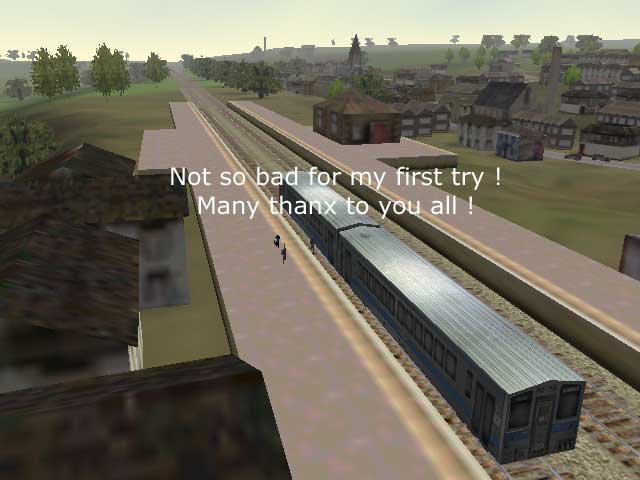 Remove | Alert Edit | Reply | Reply With Quote | Top
Tinfish (137 posts)
Aug-24-01, 07:49 AM (EST) 16. "RE: people on platforms"
Very nice! It makes the game look more real and lively with people on the platforms.Thanks for the pic.
Tin Remove | Alert Edit | Reply | Reply With Quote | Top
stationmaster (115 posts)
Aug-24-01, 08:28 AM (EST) 17. "RE: people on platforms" In case anyone missed them, the "Flat People" download is here:
http://www.railwaystation.com/trainsim/index.html Remove | Alert Edit | Reply | Reply With Quote | Top
LocoRo (124 posts)
Aug-24-01, 11:32 AM (EST) 18. "RE: people on platforms" That looks very nice, folks ..Maybe someone can make files that when we install them we see people on stations ..How would we call that new Train-sim.com messageforum: MSTS PEOPLE DESIGN
Greetings Roland
Netherlands Remove | Alert Edit | Reply | Reply With Quote | Top
Lock | Archive | Remove
Lobby | Topics | Previous Topic | Next Topic
Restored from the Train-Sim.Com archive, captured August 31, 2001. About this archive.