Message Areas - "Frames Per Second add on,,,Larger yellow Diggits"
Train-Sim.Com Message Areas
"Frames Per Second add on,,,Larger yellow Diggits"
Email this topic to a friend
Printer-friendly version of this topic
Bookmark this topic (Registered users only)
Previous Topic | Next Topic Conferences Microsoft Train Simulator (Protected) Original message
Nucleus1 (14 posts)
Aug-12-01, 07:23 AM (EST) "Frames Per Second add on,,,Larger yellow Diggits" I just whanted to Share this Great Utillitie with you all,This Add on is to Measure the Frames Per Second while in the Game,,Its Very easy to read,,LARGEER Yellow Diggits that you can see ,Unlike the Default TINY green FPS Gauge Down in the Lower Corner that i cant ever see worth a _____.All youll Need to Do is Turn this lillt program on and reduce down to Task bar before Starting the Train Sim,,After that Fire the game up and youll see it in what ever Corner you told it to show up in.You can use the Default one that came with the Sim at same time if you so desire. The Best part and only reason I had to have this was I get Over 100FPS,,this gauge Will go at least to 300 FPS,,,,I realy Doubt the Default one can do that,,MS Flight Sims FPS gauge Cant. Hope yall get a kick out of this,,Ive used it For days and it works Perfect. Get yours at this link below,SMALL down load
http://www.fraps.com/ Alert Edit | Reply | Reply With Quote | Top
Table of Contents
Subject Author Message Date ID RE: Frames Per Second add on,,,Larg... tcatania Aug-12-01 1 RE: Frames Per Second add on,,,Larg... dgauci Aug-12-01 2 RE: Frames Per Second add on,,,Larg... Jules74 Aug-12-01 3 RE: Frames Per Second add on,,,Larg... Nucleus1 Aug-12-01 4 RE: Frames Per Second add on,,,Larg... Nucleus1 Aug-12-01 5 RE: Frames Per Second add on,,,Larg... Familton Aug-12-01 6 RE: Frames Per Second add on,,,Larg... MuYa Aug-12-01 7 RE: Frames Per Second add on,,,Larg... Nucleus1 Aug-13-01 8 RE: Frames Per Second add on,,,Larg... pianonick9999 Aug-21-01 9 RE: Frames Per Second add on,,,Larg... Boweavel Aug-21-01 10 RE: Frames Per Second add on,,,Larg... dgauci Aug-21-01 12 RE: Frames Per Second add on,,,Larg... Familton Aug-21-01 11 RE: Frames Per Second add on,,,Larg... bandwidth Aug-22-01 13 RE: Frames Per Second add on,,,Larg... Familton Aug-22-01 14 RE: Frames Per Second add on,,,Larg... Nucleus1 Aug-22-01 15 RE: Frames Per Second add on,,,Larg... pianonick9999 Aug-23-01 18 RE: Frames Per Second add on,,,Larg... 4x4me2 Aug-23-01 20 RE: Frames Per Second add on,,,Larg... 4x4me2 Aug-22-01 16 RE: Frames Per Second add on,,,Larg... dgauci Aug-22-01 17 RE: Frames Per Second add on,,,Larg... meestertrainsim_2001 Aug-23-01 19 RE: Frames Per Second add on,,,Larg... dgauci Aug-23-01 21 RE: Frames Per Second add on,,,Larg... 4x4me2 Aug-24-01 22 RE: Frames Per Second add on,,,Larg... pirpen Aug-24-01 23 RE: Frames Per Second add on,,,Larg... Fodda Aug-24-01 24
Lobby | Topics | Previous Topic | Next Topic
Messages in this topic
tcatania (42 posts)
Aug-12-01, 08:08 AM (EST) 1. "RE: Frames Per Second add on,,,Larger yellow Diggits" >I just whanted to Share this
>Great Utillitie with you all,This
>Add on is to Measure
>the Frames Per Second while
>in the Game,,Its Very easy
>to read,,LARGEER Yellow Diggits that
>you can see ,Unlike the
>Default TINY green FPS Gauge
>Down in the Lower Corner
>that i cant ever see
>worth a _____.All youll Need
>to Do is Turn this
>lillt program on and reduce
>down to Task bar before
>Starting the Train Sim,,After that
>Fire the game up and
>youll see it in what
>ever Corner you told it
>to show up in.
>
>You can use the Default one
>that came with the Sim
>at same time if you
>so desire. The Best
>part and only reason I
>had to have this was
>I get Over 100FPS,,this gauge
>Will go at least to
>300 FPS,,,,I realy Doubt the
>Default one can do that,,MS
>Flight Sims FPS gauge Cant.
> Hope yall get a
>kick out of this,,Ive used
>it For days and it
>works Perfect. Get yours
>at this link below,SMALL down
>load
>
>
>http://www.fraps.com/
100FPS
How in God's name is that possible???????????
ALL details please.
machine specs, OS, in game specs (display, advanced display), activities you are in, view that you're in,
magic bullet you used, how much?
Thanks Remove | Alert Edit | Reply | Reply With Quote | Top
dgauci (127 posts)
Aug-12-01, 09:16 AM (EST) 2. "RE: Frames Per Second add on,,,Larger yellow Diggits" >100FPS
>How in God's name is that
>possible??????????? That would be easy to display, but who said it was accurate. Hehehehe.
Remove | Alert Edit | Reply | Reply With Quote | Top
Jules74 (48 posts)
Aug-12-01, 12:20 PM (EST) 3. "RE: Frames Per Second add on,,,Larger yellow Diggits" Maybe it's measuring the monitor's refresh rate Remove | Alert Edit | Reply | Reply With Quote | Top
Nucleus1 (14 posts)
Aug-12-01, 03:45 PM (EST) 4. "RE: Frames Per Second add on,,,Larger yellow Diggits" I run 2 64meg Hurculies Ultra Prophet DDR Cards,,the CPU speed on each is around 250Mhz,,,1 AGP card and another in a PCI Slot,I built this System around MS Flightsim better known as CFS2
best i can tell you ! Thats 128megs of Video Remove | Alert Edit | Reply | Reply With Quote | Top
Nucleus1 (14 posts)
Aug-12-01, 03:51 PM (EST) 5. "RE: Frames Per Second add on,,,Larger yellow Diggits" I forgot,,,about 8 months ago when I bought these Video cards they where the best out at the time and Newest,,So I wound up Shelling out $530 for each Card,,Well Worth it to me,And Im thinken about adding a 3rd card if i can get away with it, 2 of em was hard enough! Remove | Alert Edit | Reply | Reply With Quote | Top
Familton (197 posts)
Aug-12-01, 07:08 PM (EST) 6. "RE: Frames Per Second add on,,,Larger yellow Diggits" I downloaded it and ran it. TrainSim won't start. I deleted it. What gives? <Bob> Remove | Alert Edit | Reply | Reply With Quote | Top
MuYa (10 posts)
Aug-12-01, 10:26 PM (EST) 7. "RE: Frames Per Second add on,,,Larger yellow Diggits" If I ad that up that's 4 video cards? How can you possibly use 4 video cards at the same time? Remove | Alert Edit | Reply | Reply With Quote | Top
Nucleus1 (14 posts)
Aug-13-01, 05:54 PM (EST) 8. "RE: Frames Per Second add on,,,Larger yellow Diggits" It wasnt Easy by a long Shot! Remove | Alert Edit | Reply | Reply With Quote | Top
pianonick9999 (31 posts)
Aug-21-01, 01:25 PM (EST) 9. "RE: Frames Per Second add on,,,Larger yellow Diggits" Did you need special software or something running in the background to take advantge of your 2 or 3 video cards??? I asked on a Forum about multimonitors how I could add another video card and get a frame rate improvement. They said it wasn't possible, games can only use one video card at a time... Please tell me how you used 2 video cards at one time. I am guessing that is mainly why you get 100 fps. I am not expecting to get 100 fps but maybe an improvement. Do you know of any websites that tell about using 2 video cards at one time during games.
Thanks,
Nick
Remove | Alert Edit | Reply | Reply With Quote | Top
Boweavel (132 posts)
Aug-21-01, 01:58 PM (EST) 10. "RE: Frames Per Second add on,,,Larger yellow Diggits" yes details please...I wish my puter could even get 50 fps..let alone 300 !!!! was god having a sale ?? where else could a computer of that power come from ? ;}Keep tha wheels to tha steels boys n girls Remove | Alert Edit | Reply | Reply With Quote | Top
dgauci (127 posts)
Aug-21-01, 11:16 PM (EST) 12. "RE: Frames Per Second add on,,,Larger yellow Diggits" >Did you need special software or
>something running in the background
>to take advantge of your
>2 or 3 video cards???
>I asked on a Forum
>about multimonitors how I could
>add another video card and
>get a frame rate improvement.
>They said it wasn't possible,
>games can only use one
>video card at a time...
> Please
>tell me how you used
>2 video cards at one
>time. I am guessing that
>is mainly why you
>get 100 fps. I am
>not expecting to get 100
>fps but maybe an improvement. Windows 98 and later will support more than one monitor, by adding multiple video cards, one per monitor. What I have never heard of before, and I doubt it can be done, is increase your fps by supposedly grouping video cards together. Each video card is still going to run independent, one video card per monitor, so how would the fps be increased for any given monitor by that arrangement? This makes no sense at all. I could probally get 100 fps with my 64mb GeForce, by running MSTS with all of the sliders turned to the lowest settings, but what would be the point in that? Remove | Alert Edit | Reply | Reply With Quote | Top
Familton (197 posts)
Aug-21-01, 08:58 PM (EST) 11. "RE: Frames Per Second add on,,,Larger yellow Diggits" Has anyone got this program to work? I tried it and TrainSim would not load. Are the frame rates the same as monitored by the MS program? It doesn't sound like it does. Thanks, best regards, Bob. Remove | Alert Edit | Reply | Reply With Quote | Top
bandwidth (31 posts)
Aug-22-01, 01:31 AM (EST) 13. "RE: Frames Per Second add on,,,Larger yellow Diggits" It does work for me either, Game won't run. Remove | Alert Edit | Reply | Reply With Quote | Top
Familton (197 posts)
Aug-22-01, 01:34 AM (EST) 14. "RE: Frames Per Second add on,,,Larger yellow Diggits" Glad I'm not the only one! Has anyone got it to run??????? Regards to all, Bob. Remove | Alert Edit | Reply | Reply With Quote | Top
Nucleus1 (14 posts)
Aug-22-01, 07:23 AM (EST) 15. "RE: Frames Per Second add on,,,Larger yellow Diggits" Well i cant tell you why it wont work for you,,Does for me and a few Flight Sim Friends. As for My Video Card Set up,,Ill keep this a Secret,,But i will tell you its not in my PC case,,and i had it made for me . Remove | Alert Edit | Reply | Reply With Quote | Top
pianonick9999 (31 posts)
Aug-23-01, 02:52 PM (EST) 18. "RE: Frames Per Second add on,,,Larger yellow Diggits" You mean you had your computer made for you, or the "special something" that makes your computer run so fast made for you???
OH well....you won't tell me anyway....why not????? It so aggrivating that my computer was very fast 4 months ago and now its almost on the low end.
I only get an average of 15 or 20 fps and on the NEC it dips to below ten in populated areas. I wish i could get 100 fps but it would problably cost a ton to get it to run that fast. Remove | Alert Edit | Reply | Reply With Quote | Top
4x4me2 (18 posts)
Aug-23-01, 09:13 PM (EST) 20. "RE: Frames Per Second add on,,,Larger yellow Diggits" Might be a quad CPU RAID server? lol Remove | Alert Edit | Reply | Reply With Quote | Top
4x4me2 (18 posts)
Aug-22-01, 08:30 AM (EST) 16. "RE: Frames Per Second add on,,,Larger yellow Diggits" How do I find the one in MSTS? Remove | Alert Edit | Reply | Reply With Quote | Top
dgauci (127 posts)
Aug-22-01, 09:29 AM (EST) 17. "RE: Frames Per Second add on,,,Larger yellow Diggits" >How do I find the one
>in MSTS? Shift-Z, it shows up in the lower right corner.
Remove | Alert Edit | Reply | Reply With Quote | Top
meestertrainsim_2001 (49 posts)
Aug-23-01, 05:41 PM (EST) 19. "RE: Frames Per Second add on,,,Larger yellow Diggits" I've only got an 8mb SiS530 with me and here's my settings: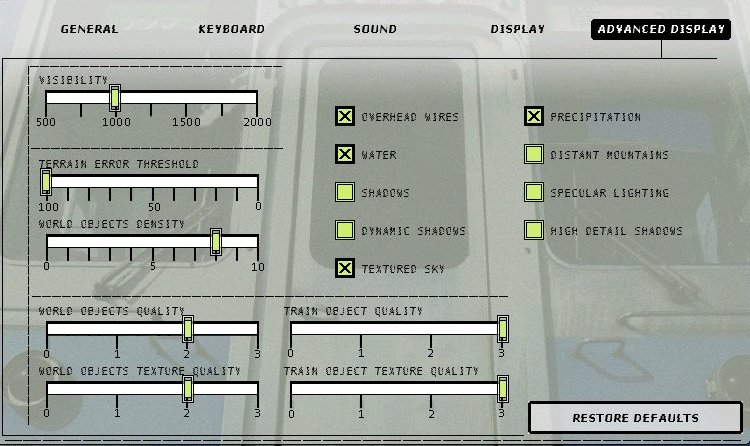 with these settings I get fps of 7 to 15 but I just love it this way and I don't mind. Why are people who are getting 20fps complaining? I'd love to have anything over 15!!! I alos have only 56mb of RAM!!! Matt -----------------------------------------------------------------Looking from all corners of the world for the best CP Rail and CN skins... Remove | Alert Edit | Reply | Reply With Quote | Top
dgauci (127 posts)
Aug-23-01, 11:46 PM (EST) 21. "RE: Frames Per Second add on,,,Larger yellow Diggits" Your right, it's all relative. Motion picture film runs at 24fps, television is at 30fps. Both mediums appear to the human eye as fluid motion, so anything higher than that is really just fluff that doesn't really make a bit of difference to what your eye really percieves as motion.So what if someone really could run at 100fps, it wouldn't look any different than 30fps. Remove | Alert Edit | Reply | Reply With Quote | Top
4x4me2 (18 posts)
Aug-24-01, 00:08 AM (EST) 22. "RE: Frames Per Second add on,,,Larger yellow Diggits" On the internet , you can be and have what ever you want... Remove | Alert Edit | Reply | Reply With Quote | Top
pirpen (15 posts)
Aug-24-01, 01:07 AM (EST) 23. "RE: Frames Per Second add on,,,Larger yellow Diggits" If you can´t tell us how to get 2 videocards runin,
why did you say anything at all. Just wanna brag about it?
I say people, braging and thinks they are better. Makes me sick!
/Pierre Remove | Alert Edit | Reply | Reply With Quote | Top
Fodda (2 posts)
Aug-24-01, 07:06 AM (EST) 24. "RE: Frames Per Second add on,,,Larger yellow Diggits" Spot on Pirpen...I bet he couldn't get the frame rate counter going either. But instead of keeping quiet, he digs a bigger and bigger hole for himself. Sad. Remove | Alert Edit | Reply | Reply With Quote | Top
Lock | Archive | Remove
Lobby | Topics | Previous Topic | Next Topic
Restored from the Train-Sim.Com archive, captured August 30, 2001. About this archive.