Train-Sim.Com
Microsoft Train Simulator

Sea View

Notice to all visitors and members of the Train-Sim.Com message forums:
If you plan on using a signature banner in your posts, we would like to remind you that there is a maximum size for banners. That maximum is 450 pixels wide by 120 pixels high, and not to exceed 25k. Your compliance is appreciated. FORUM RULES Problems? There are two common reasons for problems with logging in and posting messages. The first is that you are running a firewall that prevents your messages from being sent to the server. The other is that you have cookies disabled; the DCForum software requires cookies to work properly.

Previous Topic | Next Topic

Printer-friendly copy Email this topic to a friend

Reading Topic #16085

Member since Feb-17-03 · 3 posts

I'm both new to Train Simulator and anything to do with forums. I downloaded the route Seaview2 and found it to be very creative and lots of fun, however I was wondering if it would be difficult to turn it into a trolley route as the tight turns and steep grades would make it ideal for such. Is there a program that will preform this? Would the author be accepting to a trolley version? If there is not a simple install program what would be my best reference to try my hand at it? It would be great to see more routes of this nature. I know many would think it akin to an oval model railroad track as it's not as serious a route as others.
Thanks

Alert | IP

Printer-friendly page | Edit | Reply | Reply With Quote | Top

RE: SEA VIEW, ge44tonner, Feb-17-03, 10:39 AM, (1) RE: SEA VIEW, Tree Frog, Feb-17-03, 10:59 AM, (2) RE: SEA VIEW, Fred_Huntley, Feb-17-03, 12:35 PM, (3) RE: SEA VIEW, byobb, Feb-17-03, 02:10 PM, (4) RE: SEA VIEW, cody45, Feb-17-03, 02:14 PM, (5) RE: SEA VIEW, Tree Frog, Feb-17-03, 03:44 PM, (6) RE: SEA VIEW, cody45, Feb-17-03, 04:46 PM, (7) RE: SEA VIEW, Fred_Huntley, Feb-17-03, 05:03 PM, (8) RE: SEA VIEW, cody45, Feb-17-03, 05:52 PM, (9) RE: SEA VIEW, Tree Frog, Feb-17-03, 05:55 PM, (10) RE: SEA VIEW, OTTODAD, Feb-17-03, 05:58 PM, (11) RE: SEA VIEW, cody45, Feb-17-03, 06:31 PM, (12) RE: SEA VIEW, Tree Frog, Feb-17-03, 06:59 PM, (13) RE: SEA VIEW, calr, Feb-17-03, 07:26 PM, (14) RE: SEA VIEW, OTTODAD, Feb-17-03, 08:02 PM, (16) RE: SEA VIEW, cody45, Feb-17-03, 07:55 PM, (15) RE: SEA VIEW, Tree Frog, Feb-17-03, 08:12 PM, (17) RE: SEA VIEW, cody45, Feb-18-03, 00:00 AM, (18) RE: SEA VIEW, byobb, Feb-18-03, 09:03 AM, (19)

Conferences | Topics | Previous Topic | Next Topic

Charter Member · 493 posts

RE: SEA VIEW

Good Morning, and welcome to the forums.
The Seaview route, or for that matter any of the routes, can be 'electrified' by editing in the 'Route Editor'. Once it is 'electrified', then overhead wires and poles appear, and you can run trolleys and electric locomotives. However, the Route editor 'RE' is rather difficult for most any user, and I hesitate to suggest that a first-timer dive in. It's possible to mess up the route pretty badly. You might want to read up on the 'Route Design' forum before trying it.
As for whether the author might be 'accepting' of a trolley variation on his route, well, you are welcome to ask. His name is Bill Burnett, and he corresponds here under the screen name 'Tree Frog'. Incidentally, there is supposed a 'Seaview 3' version coming out soon.
Again, welcome to the forums.
Dan

Alert | IP

Printer-friendly page | Edit | Reply | Reply With Quote | Top

Member since Jun-26-02 · 460 posts

RE: SEA VIEW

Hi William,Welcome to the forum and thanks for your interest in Sea View. It is fine to make any changes to the route that you would like to.Sea View 3 beta is in the mail on the way to the beta testers in the US, England, and New Zealand. As soon as I get feedback and make corrections, SV3 will be uploaded to the file library.Bill Burnett

Alert | IP

Printer-friendly page | Edit | Reply | Reply With Quote | Top

Charter Member · 79 posts

RE: SEA VIEW

A quick way to "electrify" Sea View is to open the route in the Route Editor, select File/Properties, and select the radio button for Overhead Wires. Also, put in the wire height.
Sea View – image 1You will also have to turn on the Overhead wires in the Options of MSTS itself.
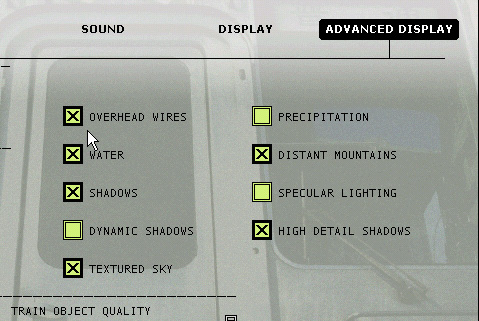
Sea View – image 2Unfortunately, there are no gantries (poles for the wires) in the Route Editor objects. So you will have to live with floating wires, unless you get ambitious. If so, post a message back here, and we will walk you through the installation of poles.
Sea View – image 3Should you decide later that you don't want the wires, you can simply uncheck the Overhead Wires in the Options. You won't need to go back into the Route Editor.

Alert | IP

Printer-friendly page | Edit | Reply | Reply With Quote | Top

Member since Feb-17-03 · 3 posts

RE: SEA VIEW

LAST EDITED ON Feb-17-03 AT 02:17 PM (EDT)

I'm not sure that I'm doing this right but just a note to say thanks for the help. Althought as I said before that I'm sure hard core railroaders might look down on this sort of thing I hope that there'll be more in the future.
Yes, I am interested in learning to install poles, as I would like to develope some routes of my own. One a fantasy route not unlike Sea view just a little more risque, and possibly the Boston and Albany route as I live just next to the tracks.

Alert | IP

Printer-friendly page | Edit | Reply | Reply With Quote | Top

Member since Jun-26-02 · 460 posts

RE: SEA VIEW

Joseph,It is in the Train-Sim file library. There is a link at the bottom of this page. The easiest way to find it in the library is to do a search for "Sea View".You might want to wait a few weeks until Sea View 3 is available.Bill Burnett

Alert | IP

Printer-friendly page | Edit | Reply | Reply With Quote | Top

Member since Feb-15-03 · 9 posts

RE: SEA VIEW

LAST EDITED ON Feb-17-03 AT 04:49 PM (EDT)

When I unzip the file into the routes folder I get a lot of small files instea of a new folder. I tried to use the install gear file and it does its thing but when I try to run the route I get all kinds of missing file errors and Train Sim shuts down. This is my first attempt at down loading any thing that does not have an auto install program.

Alert | IP

Printer-friendly page | Edit | Reply | Reply With Quote | Top

Charter Member · 1927 posts

RE: SEA VIEW

Hi Bill,I hope you didn't mind me letting the cat out of the bag, but I am an ardent SEAVIEW Fan and want others to have Fun with it too ! O t t o

Alert | IP

Printer-friendly page | Edit | Reply | Reply With Quote | Top

Member since Feb-15-03 · 9 posts

RE: SEA VIEW

Im downloading Sea View 2 now. Will version 3 over write Version 2 or will I have to remove it. In othe words should I just wait for the new one?

Alert | IP

Printer-friendly page | Edit | Reply | Reply With Quote | Top

Member since Jun-26-02 · 460 posts

RE: SEA VIEW

Joseph, Sea View 3 is an extension of SV2, but installs as a different route. It doesn't overwrite SV2 or require that you have SV2. If you install SV2 now and SV3 in a few weeks, you would have both routes on your hard drive. You could then delete SV2 and still have the entire route. SV3 uses 182MB of hard disk space, which is relatively little space for a large custom route. Don't know if that makes any sense.
Otto, No cats in the bag with SV. You can say anything and show anything you want. I think people have even posted hints of where the hidden area is. I am complimented that you enjoy SV.Thanks,
Bill Burnett

Alert | IP

Printer-friendly page | Edit | Reply | Reply With Quote | Top

Charter Member · 2094 posts

RE: SEA VIEW

Sea View – image 4

What hidden area? I tell you it's all a scam. They're playing with your mind. If you find something that you think is a hidden area, it will REALLY mess with your mind! Have fun. Just know that they are watching you! Who? The men in black, of course.Bill, please pass the coconuts and pineapple. I don't like root beer or I would ask for that, too. Incidentally, still haven't heard anything from Jim.Cal Rasmussen
Beaverton, OR
cal.rasmussen@verizon.netColumbia Gorge Route (Phase 1 track completed, road construction resumed.)

Alert | IP

Printer-friendly page | Edit | Reply | Reply With Quote | Top

Charter Member · 1927 posts

RE: SEA VIEW

Cal, if you are referring to Jim Ward, a recent post of mine about KUJU's half-yearly financial results and future Developments prompted a member to remind me that KUJU is planning to open a special Web Site for PAYWARE ADD-Ons, I completely forgot about.Who better then Jim Ward, Teemu Saukkonen and others to supply the Routes ? I bet that this is what they are doing here in England right now ?O t t o

Alert | IP

Printer-friendly page | Edit | Reply | Reply With Quote | Top

Member since Feb-15-03 · 9 posts

RE: SEA VIEW

Thanks for all your help. It's up and running. Great detail but tuff on My PII 400. How do I uninstall it, just delete the route folder?

Alert | IP

Printer-friendly page | Edit | Reply | Reply With Quote | Top

Member since Jun-26-02 · 460 posts

RE: SEA VIEW

Uninstall is easy. Just delete the route folder. A suggestion, when I had a PII, it really helped to cut the Visibility slider in the options menu down to 1000 or even 500 meters. You might want to try that first.Bill Burnett

Alert | IP

Printer-friendly page | Edit | Reply | Reply With Quote | Top

Member since Feb-15-03 · 9 posts

RE: SEA VIEW

I just took my first ride and what a ride it was. Thanks to all envolved. Ran fine on my PII. Best route by far, way better than anything I,ve paid for. Great work!

Alert | IP

Printer-friendly page | Edit | Reply | Reply With Quote | Top

Member since Feb-17-03 · 3 posts

RE: SEA VIEW

I ended up making consists with much of the swiss rolling stock for the albula line 2 route and I highly recommend it. The tight turns and fierce grades don't phase the swiss locomotives or thier couplers at all. As well much of the rolling stock looks just right. Might I suggest Doing a repaint specifically for sea view with this stock. I was tempted to use some of the colorful Kiha repaints but found the kiha couldn't make it up some of the grades so didn't use it. For electrification with Swiss stock you need to put the wire up at 5.2 metres and the voltage(see above for newbies like myself)at 25000.

Alert | IP


[ Home | MSTS Forum | MSTS FAQ | File Library ] Copyright © 2002 by Nels Anderson. All Rights Reserved.

Restored from the Train-Sim.Com archive, captured March 9, 2003. About this archive.