
Train-Sim.Com
Microsoft Train Simulator

'Ackin Hacktivities II: Drive What You Want

'Ackin Hacktivities II: Drive What You Want – image 1

Notice to all visitors and members of the Train-Sim.Com message forums:
If you plan on using a signature banner in your posts, we would like to remind you that there is a maximum size for banners. That maximum is 450 pixels wide by 120 pixels high, and not to exceed 25k. Your compliance is appreciated. FORUM RULES Problems? There are two common reasons for problems with logging in and posting messages. The first is that you are running a firewall that prevents your messages from being sent to the server. The other is that you have cookies disabled; the DCForum software requires cookies to work properly.

Previous Topic | Next Topic

Printer-friendly copy Email this topic to a friend

Reading Topic #14233

Charter Member · 3936 posts

I did a tutorial on this a long time ago, but it got lost in the server move. There's a new thingy out called conbuilder now:
conb_149.zip and conb_151.zip (you need both) in the file library.
We'll cover that first, since most computer dummies prefer it to the activity editor.First things first, open windows explorer, click on file, new, folder, and name the folder "Backup". Now browse to \Train Simulator, find and select the \Trains folder, click on "Copy". Browse back to your new backup folder, click "Paste". You now have a complete backup copy of the trainsets and consists, so if you botch anything up you can copy the \Trains folder from \Backup, paste it into \Train Simulator, and fix everything without having to reinstall MSTS. 'Ackin Hacktivities II: Drive What You Want – image 2
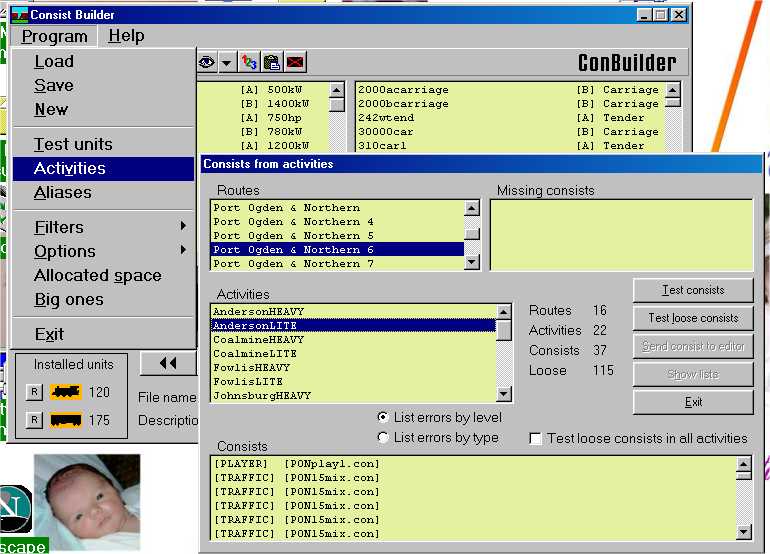
After installing and patching conbuilder, first thing is to click on program, activities, which brings up a second window,"consists from activities". Scroll down to the route and activity you want to change engines in, and the player consist shows up at the top of the consists window, with AI traffic consists (if any) below that. Double click on the player consist, which brings it up:'Ackin Hacktivities II: Drive What You Want – image 3
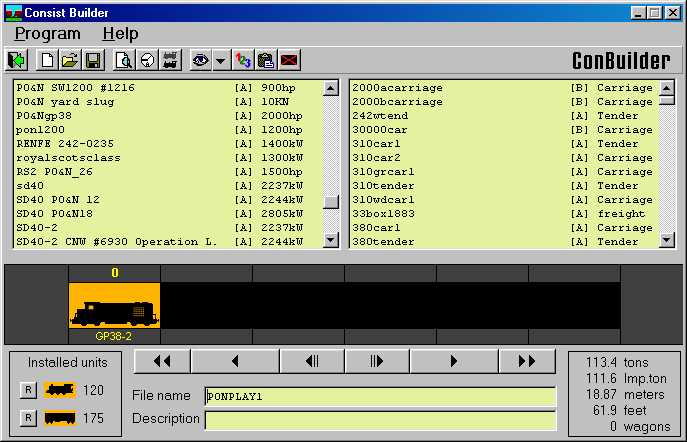
In the little window that shows the train, double click on the train icon to delete the GP38 from that spot.'Ackin Hacktivities II: Drive What You Want – image 4
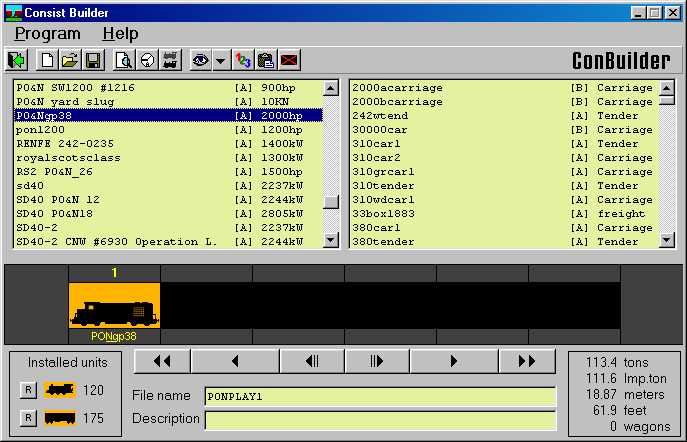
Next scroll down the left window, find the line for the engine you want to drive, and double click on the line. That drops the selected engine into the empty slot.
Click on Program, Save, and it will ask "overwrite this consist?" Answer yes, and all activities that use that consist file for a player engine will now use the one you replaced it with.Next thing is a little harder, replacing AI traffic trains. It's best to replace those with something that matches the horsepower to tonnage ratio as closely as possible, otherwise you'll have to go into the activity editor and edit the service to adjust the speed of the AI train by fiddling with the "expected performance" setting. If you can do all that you don't really need conbuilder or this tutorial anyway, so the best use of this would be to replace a BNSF SD40 with a Norfolk Southern SD40, for example. If you're replacing a geep with a dash 9, you'll probably want to add more cars to slow it down.So do step one again, this time select one of the traffic consists.'Ackin Hacktivities II: Drive What You Want – image 5
In the upper left window are all the engines, in the upper right all the cars. If you double click on one engine or car icon in the train window, then double click on a line in one of the upper windows, the engine or car you select in the upper window will be placed in the empty slot. If you haven't deleted any cars and there are no empty slots, it will start adding to the back of the train. 'Ackin Hacktivities II: Drive What You Want – image 6
You can replace just the engine(s) for now, and come back to replace all the KUJU cars with your CSX boxcars or UP reefers after a little practice.'Ackin Hacktivities II: Drive What You Want – image 7
After that try it out in the sim, see if you have any wierd visitors from foreign roads driving around your route.Well, one drawback to that, every activity that uses "PONPlay1.con" for the player service consist will use the K36 or whatever engine you replaced the default with, if you want variety you gotta get into creating your own consists and editing the different activities to use different engines. For that we're stuck with the activity editor itself, so after copying your \Trains folder to a backup, set your desktop to 1024x768 or above, grit your teeth and open the activity editor.'Ackin Hacktivities II: Drive What You Want – image 8
Wooo, scary. Well, you can ignore most of the stuff in here, we're only gonna use a couple of buttons. On the far right under "player service", click on the "use as template" button. That brings up the service editor, and automatically makes a new copy of that service, adding a number to the filename, so "Anderson.srv" becomes "Anderson0.srv", in this example. There's another "use as template" button in the service editor, clicking on that brings up the consist editor.
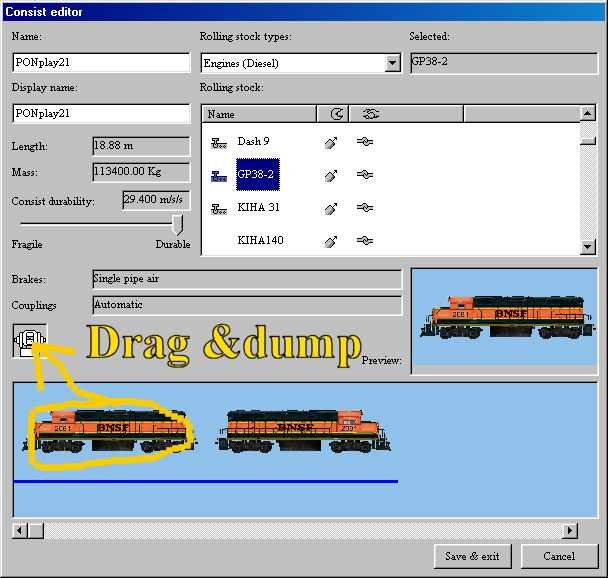
'Ackin Hacktivities II: Drive What You Want – image 9
Since you clicked on "use as template" it created a clone of the consist, so now to edit it click on the engine in the lower window, hold the mouse button down and drag it to the little coupler icon and dump it.'Ackin Hacktivities II: Drive What You Want – image 10
Now select the engine category, then the engine you want, and drag from the right side display window and drop into the bottom train window. Right clicking on the engine in the bottom window will reverse it, if you want one of them long hood forward. Save and exit, you have just created a new service with a new consist.
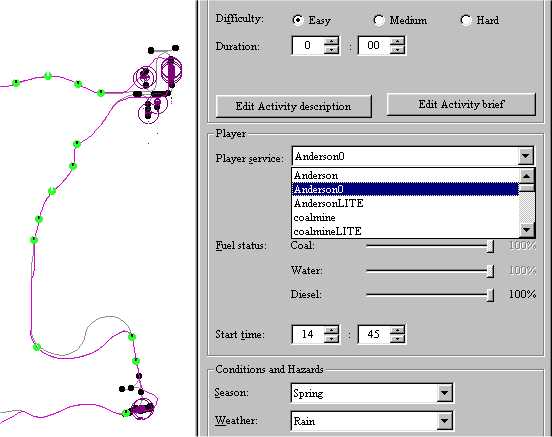
'Ackin Hacktivities II: Drive What You Want – image 11After clicking Okay to exit the service editor, go back to the "Player Service" on the right side, and click the drop down arrow. Select the new service you just created. Now click on File, Save, and exit the activity editor.'Ackin Hacktivities II: Drive What You Want – image 12
For that one activity you now have a player service that's different from the other activities, if you wish you can repeat these steps so that every activity uses a different engine or engines.'Ackin Hacktivities II: Drive What You Want – image 13You can get as crazy as you want with this type of thing, the only limitation being a finite number of .con files allowed in \Consists due to a sim bug, I think the max number of consists you can have in the \Trains\Consists folder is 899.

Alert | IP

Printer-friendly page | Edit | Reply | Reply With Quote | Top

RE: 'ACKIN HACKTIVITIES II: DRIVE WHAT YOU WANT, HawK53, Nov-29-02, 03:26 AM, (1) RE: 'ACKIN HACKTIVITIES II: DRIVE WHAT YOU WANT, squaregrass, Nov-29-02, 03:47 AM, (2) RE: 'ACKIN HACKTIVITIES II: DRIVE WHAT YOU WANT, niknak, Nov-29-02, 04:01 AM, (3) RE: 'ACKIN HACKTIVITIES II: DRIVE WHAT YOU WANT, SHEPLEY1935, Nov-29-02, 04:55 AM, (4) RE: 'ACKIN HACKTIVITIES II: DRIVE WHAT YOU WANT, robertreedy, Nov-29-02, 09:17 AM, (5) RE: 'ACKIN HACKTIVITIES II: DRIVE WHAT YOU WANT, sniper297, Nov-29-02, 11:22 AM, (6) RE: 'ACKIN HACKTIVITIES II: DRIVE WHAT YOU WANT, yellowdog, Nov-29-02, 11:46 AM, (7) RE: 'ACKIN HACKTIVITIES II: DRIVE WHAT YOU WANT, downside, Nov-29-02, 03:27 PM, (8) RE: 'ACKIN HACKTIVITIES II: DRIVE WHAT YOU WANT, HawK53, Nov-29-02, 03:35 PM, (9)

Conferences | Topics | Previous Topic | Next Topic

Member since Nov-6-02 · 82 posts

RE: 'ACKIN HACKTIVITIES II: DRIVE WHAT YOU WANT

'Ackin Hacktivities II: Drive What You Want – image 14

Great Jim, this will help a lot of people
one minor usefull adding on my side ,if you don't mind.
Conbuilder has one more usefull thingy, I should mention;
the ability to show the engine/wagon with the data like here:
'Ackin Hacktivities II: Drive What You Want – image 15right click on the engine/wagon(on the highlite)
and a picture+ data will show up.
Now before you all start screaming that it does not show an image,
there needs to be an gif image in the particulary trainfolder offcourse, and it should have the same name as the .eng or .wag file
i.e. in the Turkey steamloc folder a Turkey10.eng + turkey10.gif
or Turkey50ftleg.wag + Turkey50ftleg.gif.
it also would be nice if it is, a picture of that engine/wagon

~Computers aren't intelligent, they only think they are.~

Alert | IP

Printer-friendly page | Edit | Reply | Reply With Quote | Top

Charter Member · 631 posts

RE: 'ACKIN HACKTIVITIES II: DRIVE WHAT YOU WANT

Click to send message via ICQ

Jim, I'm not sure this is an addendum, or just a question to the above. As a last step, can you just select File, Save, or are you required to File, 'Compute and Save'?I've had TS crash quite a few times telling me to resave an activity after changing it without doing the compute bit. Just questioning if it's only on my system.

RobertR .. ADF-M&RM at http://www.adfrr.com

Alert | IP

Printer-friendly page | Edit | Reply | Reply With Quote | Top

Charter Member · 3936 posts

RE: 'ACKIN HACKTIVITIES II: DRIVE WHAT YOU WANT

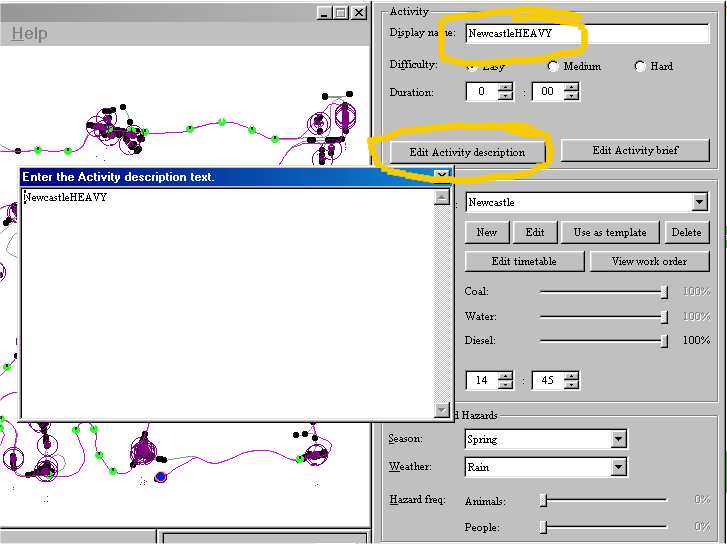
I dunno, Robert, the compute bit itself sometimes causes crashes too. I asked Rich Garber about that, but he don't know either, so I don't use the compute and save. What the compute and save does is generate a much larger .asv file from the .act, my guess is it's primarily designed for packaging the activity with that TSunpack thing, which was buggy itself to begin with. Wouldn't you just know it, KUJU didn't include any method to package routes or add-on cars&locos, we had to figure all that out ourselves, and the one thing they did include for activities didn't work. I finally got TSunpack to work by manually editing my system registry following a tip from another guy, since the patch for TSunpack didn't work either! Mostly when I package activities I use the winzip stored path function, I create an empty folder in the root of C: with the route name, copy the \Activities, \Paths, \Services, and \Traffic folders into it, then zip it up with the "save full path info" and "include subfolders" options checked on, with instructions to unzip it to \Routes.One other tip I forgot to include, if you want to leave the original activity untouched and create a hacked clone of that activity, edit the display name and activity description, then do file, "save as" instead of "save" and type in a different name, now it's a new activity and the original is unchanged.

Attachments
'Ackin Hacktivities II: Drive What You Want – image 16
http://www.train-sim.com/dcforum/User_files/3de794345b0ac18a.jpg

Alert | IP

Printer-friendly page | Edit | Reply | Reply With Quote | Top

Charter Member · 594 posts

RE: 'ACKIN HACKTIVITIES II: DRIVE WHAT YOU WANT

One irritating thing to me is when I download an activity, then go download all of the files necessary to run the activity only to check in Conbuilder to find out that the activity creator has changed the names of his/her folders so that what I downloaded doesn't show up in the consist. For instance, the activity may have called for a PO&N loco so I download the zip file and install it. The only problem is that the author of the activity has named the loco file "Crazy Jim's SD40 ( )." Well, I can usually go in and switch them out pretty easily using the method you describe for both AI and Player traffic. Then I'll fire up MSTS only to find out something else is "missing (i.e. named differently than on my system)" and I'll get the "Send/Don't Send" box. So I go back in to ConBuilder and test the loose consists, and yep- -files are "missing." It will even say where they're missing from. Double-click on the file and you get "Such and such can only be edited using the Activity Editor." Great, I'll fire up the AE then. Now here comes the really irritating part- -AE will say that such and such folder can't be found (just like MSTS) and I get the "Send/Don't Send" box. AARRRrrrgggghhhhh! ! ! ! ! ! Usually at this point I just delete the activity altogether. Any suggestions for this headache?

Clayton'Ackin Hacktivities II: Drive What You Want – image 17

Alert | IP

Printer-friendly page | Edit | Reply | Reply With Quote | Top

Charter Member · 1088 posts

RE: 'ACKIN HACKTIVITIES II: DRIVE WHAT YOU WANT

I have toyed with the idea of getting a beta test group going who will beta test any activity or rolling stock.Having recently spent a few frustrating hours getting a clean sheet on everything I have some of the items that have needed changing such as incorrectly named s files and missing sound files I think this is one way that I could contribute to the addons as I am not talented enough to put anything together worth uploading but have a mind keen and willing enough to test things and put together a list of the downloads and the folder names they should be in. I am aware that the LHW, Kevarc and others do this already but others do not.Hopefully there are others out there who would want to contribute in this way otherwise it will be a team of one.Bill

Alert | IP

Printer-friendly page | Edit | Reply | Reply With Quote | Top

Member since Nov-6-02 · 82 posts

RE: 'ACKIN HACKTIVITIES II: DRIVE WHAT YOU WANT

'Ackin Hacktivities II: Drive What You Want – image 18

>
>Hopefully there are others out there who would want to
>contribute in this way otherwise it will be a team of one.
>
>Bill I'm in, if you want me, I like to solve problems

~Computers aren't intelligent, they only think they are.~

Alert | IP


[ Home | MSTS Forum | MSTS FAQ | File Library ] Copyright © 2002 by Nels Anderson. All Rights Reserved.

Restored from the Train-Sim.Com archive, captured December 22, 2002. About this archive.