Train-Sim.Com
Microsoft Train Simulator

Port Ogden & Northern Version Six Now Available!

Port Ogden & Northern Version Six Now Available! – image 1

Notice to all visitors and members of the Train-Sim.Com message forums:
If you plan on using a signature banner in your posts, we would like to remind you that there is a maximum size for banners. That maximum is 450 pixels wide by 120 pixels high, and not to exceed 25k. Your compliance is appreciated. FORUM RULES Problems? There are two common reasons for problems with logging in and posting messages. The first is that you are running a firewall that prevents your messages from being sent to the server. The other is that you have cookies disabled; the DCForum software requires cookies to work properly.

Previous Topic | Next Topic

Printer-friendly copy Email this topic to a friend

Reading Topic #14173

Charter Member · 3927 posts

Get it while it's hot, PO&N V6 is now available in the file library! Bigger, better, user-customizeable!

Quote from Don "Stumpy Grump" Shepley:
"Almost as good as Ohio Rails!"Wait a minute, how'd that get in here? It's much better than Ohio Rails, don't pay any attention to that old geezer.Those of you with the slowpoke celerys, I feel your pain, so I included two sets of activities and two sets of \World scenery files, so after admiring the stunning scenery at 3 frames per second you can run Lite.bat and get a stripped down version with all the trees chopped down.Port Ogden & Northern Version Six Now Available! – image 2
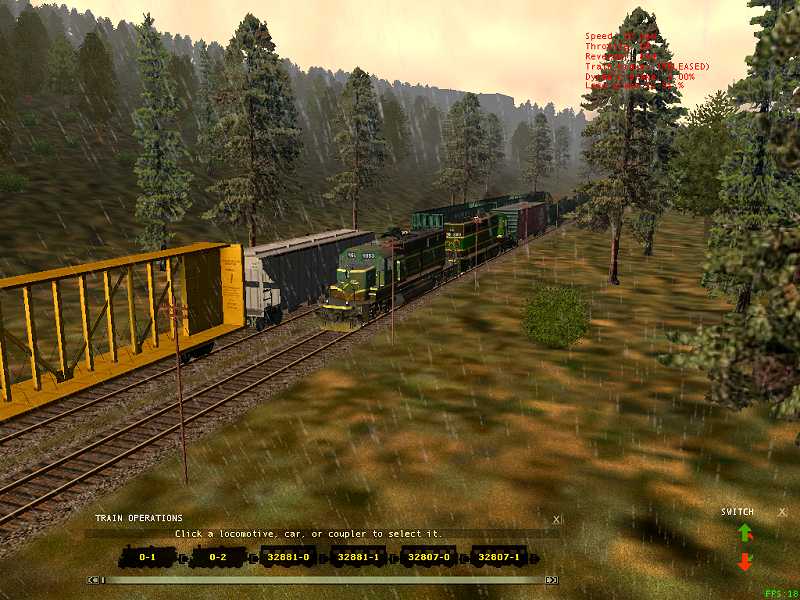
JohnsburgHEAVY activity with the default HEAVY scenery.Port Ogden & Northern Version Six Now Available! – image 3
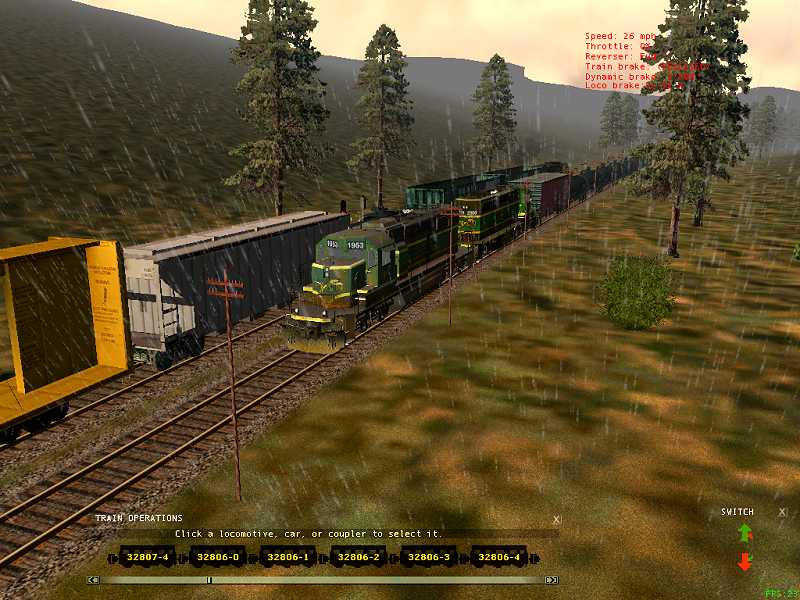
JohnsburgLITE activity, default HEAVY scenery, a few less loose consists in each yard.Port Ogden & Northern Version Six Now Available! – image 4
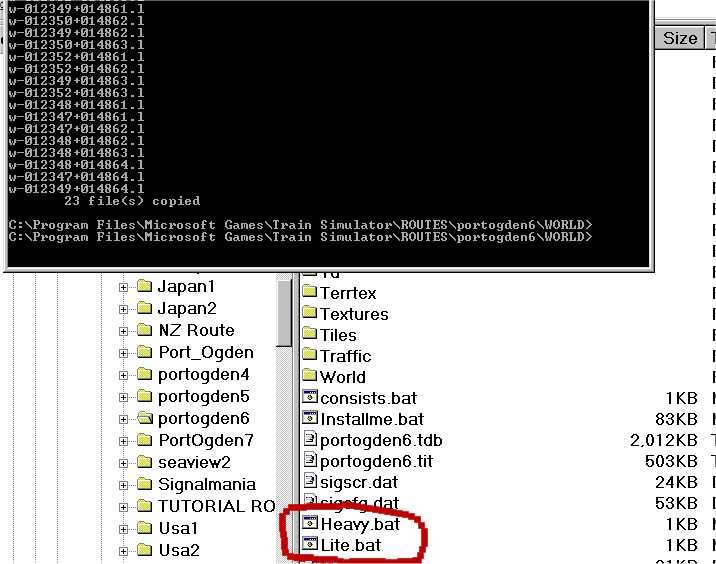
Going to \Train Simulator\Routes\Portogden6\ and running either Heavy.bat or Lite.bat, I can change the scenery to suit the speed of my computer.

Port Ogden & Northern Version Six Now Available! – image 5
JohnsburgHEAVY activity with the LITE scenery.Port Ogden & Northern Version Six Now Available! – image 6
JohnsburgLITE activity with the LITE scenery, best bet for them Celeron 300s.Also new in this version, all the activities still use default trainsets, but there are 8 AI traffic consists and 2 player consist files, so something like Conbuilder can be used to change the player engine and the AI trains to whatever you have downloaded.Port Ogden & Northern Version Six Now Available! – image 7
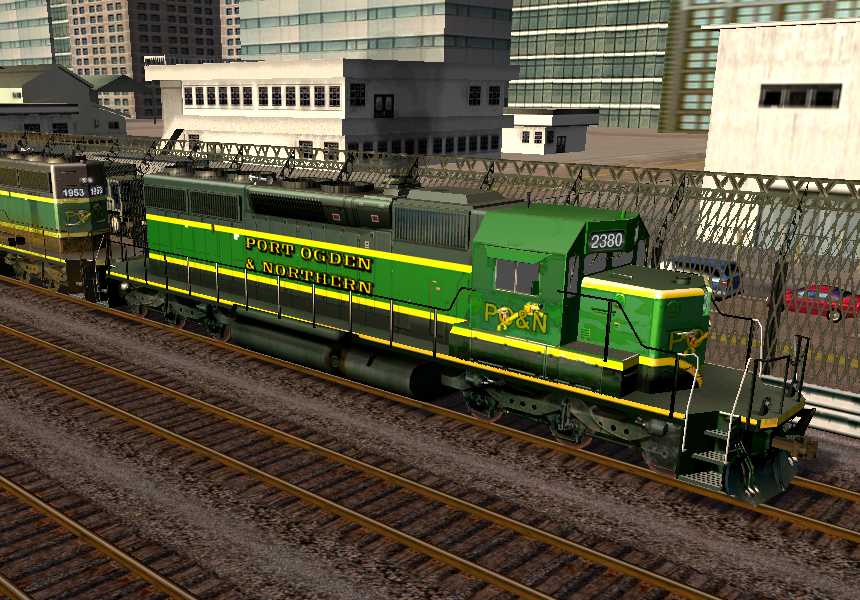
Be advised that can be tricky, with the AI trains following each other every ten minutes the speeds have to be fairly closely matched, so it's best to try and keep the horsepower to tonnage ratio about the same as the consists I used!

Alert | IP

Printer-friendly page | Edit | Reply | Reply With Quote | Top

RE: PORT OGDEN & NORTHERN VERSION SIX NOW AVAILABLE!, ssw_96, Nov-26-02, 03:58 PM, (1) RE: PORT OGDEN & NORTHERN VERSION SIX NOW AVAILABLE!, sniper297, Nov-26-02, 05:35 PM, (3) RE: PORT OGDEN & NORTHERN VERSION SIX NOW AVAILABLE!, trutta8, Nov-27-02, 11:00 AM, (10) RE: PORT OGDEN & NORTHERN VERSION SIX NOW AVAILABLE!, Cctoide, Nov-26-02, 05:25 PM, (2) RE: PORT OGDEN & NORTHERN VERSION SIX NOW AVAILABLE!, darkfyre, Nov-26-02, 09:39 PM, (4) RE: PORT OGDEN & NORTHERN VERSION SIX NOW AVAILABLE!, dejoh, Nov-26-02, 09:40 PM, (5) RE: PORT OGDEN & NORTHERN VERSION SIX NOW AVAILABLE!, edwardk, Nov-27-02, 00:30 AM, (8) RE: PORT OGDEN & NORTHERN VERSION SIX NOW AVAILABLE!, Paul1953, Nov-26-02, 11:29 PM, (6) RE: PORT OGDEN & NORTHERN VERSION SIX NOW AVAILABLE!, adamb, Nov-27-02, 00:28 AM, (7) RE: PORT OGDEN & NORTHERN VERSION SIX NOW AVAILABLE!, Paul1953, Nov-27-02, 00:55 AM, (9) RE: PORT OGDEN & NORTHERN VERSION SIX NOW AVAILABLE!, sniper297, Nov-27-02, 12:04 PM, (13) RE: PORT OGDEN & NORTHERN VERSION SIX NOW AVAILABLE!, xlspecial261, Nov-27-02, 11:22 AM, (11) RE: PORT OGDEN & NORTHERN VERSION SIX NOW AVAILABLE!, SHEPLEY1935, Nov-27-02, 12:02 PM, (12) RE: PORT OGDEN & NORTHERN VERSION SIX NOW AVAILABLE!, ssw, Nov-27-02, 09:01 PM, (14) RE: PORT OGDEN & NORTHERN VERSION SIX NOW AVAILABLE!, JivaGoswami, Nov-27-02, 09:23 PM, (15) RE: PORT OGDEN & NORTHERN VERSION SIX NOW AVAILABLE!, sniper297, Nov-28-02, 00:00 AM, (16) RE: PORT OGDEN & NORTHERN VERSION SIX NOW AVAILABLE!, ssw, Nov-28-02, 11:26 AM, (18) RE: PORT OGDEN & NORTHERN VERSION SIX NOW AVAILABLE!, JivaGoswami, Nov-28-02, 12:17 PM, (19) RE: PORT OGDEN & NORTHERN VERSION SIX NOW AVAILABLE!, quaia, Nov-28-02, 06:52 AM, (17) RE: PORT OGDEN & NORTHERN VERSION SIX NOW AVAILABLE!, trutta8, Nov-28-02, 12:53 PM, (20)

Conferences | Topics | Previous Topic | Next Topic

Charter Member · 312 posts

RE: PORT OGDEN & NORTHERN VERSION SIX NOW AVAILABLE!

I surely appreciate you thinking about us low end users. My PIII is doing good enough right now, but the first of the year, I plan to upgrade it, or better yet get a new one. When running the lite.bat, will that be for the entire route? But it will be a must have this time. And I sent you a PM a while back, did you get it? Thanks once again for another fine route.

Alert | IP

Printer-friendly page | Edit | Reply | Reply With Quote | Top

Charter Member · 3927 posts

RE: PORT OGDEN & NORTHERN VERSION SIX NOW AVAILABLE!

Took me a while to figure out what "PM" was, no, I rarely check the private message box unless I'm reminded, I completely forget I have one. Email usually works a lot better!"When running the lite.bat, will that be for the entire route?"Yes, what I did was copied all the .w files to whatever.h, then opened them all in wordpad, and deleted all the forest regions, saved as whatever.l. To avoid redundundundundancy I included all the .h and .l files in the \World folder, but no .w files, so the installme.bat calls heavy.bat to copy the Heavy (.h) files to .w, so you start out with the heavily detailed ones. Hopefully for V7 I'll be able to find some sort of balance, with the object linking & embedding garbage that the sim uses there is no "magic bullet" to get high framerates, but over the last year and a half I've found quite a few things that DON'T work! Treeblocks real close to the tracks are probably best, whatever you do to limit the viewing distance improves framerates. Problem being none of that stuff stands up to close scrutiny, and looks really awful. So billboard trees X number of meters away from the tracks with a real narrow forest region is the next thing to try, but I suspect MSTS 2 will be out, hopefully with a better graphics engine, by the time a really good framerate/detail formula gets worked out. Hopefully them Klutzy KUJU Klowns will get that godforsaken front coupler right next time too.

Attachments
Port Ogden & Northern Version Six Now Available! – image 8
http://www.train-sim.com/dcforum/User_files/3de3f6f76a2e877d.jpg

Alert | IP

Printer-friendly page | Edit | Reply | Reply With Quote | Top

Charter Member · 18 posts

RE: PORT OGDEN & NORTHERN VERSION SIX NOW AVAILABLE!

LAST EDITED ON Nov-27-02 AT 11:03 AM (EST)

Hi Sniper:
I just tried to run ponv6 and got the following message:
"Failed to open texture files....routes\portogden6\envfiles\textures\hitw-mercury.ace"
What have I done wrong?

Alert | IP

Printer-friendly page | Edit | Reply | Reply With Quote | Top

Member since Oct-13-02 · 82 posts

RE: PORT OGDEN & NORTHERN VERSION SIX NOW AVAILABLE!

What dare you say about Ohio Rails?? OR rips the head off you little PONney!! Just, don't throw @§§@£€@§ at OR, OK?

------------
Cctoide
Portugal, Railfan
Proud Owner of Ohio Rails v10

Alert | IP

Printer-friendly page | Edit | Reply | Reply With Quote | Top

Charter Member · 111 posts

RE: PORT OGDEN & NORTHERN VERSION SIX NOW AVAILABLE!

What the hey...? There's unique tidbits in each and every route. Makes MSTS intresting. Getting better all the time.Dejoh

Alert | IP

Printer-friendly page | Edit | Reply | Reply With Quote | Top

Charter Member · 101 posts

RE: PORT OGDEN & NORTHERN VERSION SIX NOW AVAILABLE!

I just wanted to say that this is one excellent route. For those people with the high end machines, what type of frame rates are you getting. On my AMD 1.2, using heavy, I would average about 15 fps, but there are those areas where it comes down to about 9 fps.Edward K.

Alert | IP

Printer-friendly page | Edit | Reply | Reply With Quote | Top

Charter Member · 347 posts

RE: PORT OGDEN & NORTHERN VERSION SIX NOW AVAILABLE!

Hello,Sniper, Just finished downloading v6 and am settling in for a nice little tour. Thank you for the kind mention, I only hope that at some point ,I'll be able to contibute something a little more substantial, on a future version. Off to play!

Alert | IP

Printer-friendly page | Edit | Reply | Reply With Quote | Top

Charter Member · 204 posts

RE: PORT OGDEN & NORTHERN VERSION SIX NOW AVAILABLE!

I installed it ok, looked at in the editor, the FPS was to low so i ran light.bat then when i wne to drive in the game i got the send, dont send. Help!!!!!
Also sniper what FPS do you get?

Port Ogden & Northern Version Six Now Available! – image 11

Alert | IP

Printer-friendly page | Edit | Reply | Reply With Quote | Top

Charter Member · 3927 posts

RE: PORT OGDEN & NORTHERN VERSION SIX NOW AVAILABLE!

Well, thanks for the kind words. Paul, "substantial" contribution is in the eye of the beholder, I was at Don Shepley's house last week watching him trying to run one of the six beta activities. He had somehow changed the yard_one_player_consist.con (the single geep 38) to Fozzy's K-36, and for some reason that didn't work in the activities. The conversation with you & Brad is what tickled my thinking cap into finding the solution for that, with all 10 services using custom made consist files the end user can use Conbuilder to customize to his own tastes without screwing up his default files. No graincars in the coalmine any more either, until you guys brought it up it never occured to me that loose consists didn't need the .con files once they were placed in the .act file. I'm waiting for feedback from Don on that modification, he's the perfect idiot to test these things on, since he can screw up a computer just by touching the keyboard! I learned to use the activity editor and consist editor long before Conbuilder came out, so I had never tried it, but I downloaded it and after taking half an hour to figure out how to use it (I'm a bit of an idiot myself sometimes), I changed all the BNSF engines to assorted different PO&N and C&NW engines with a few point & clicks, no fuss. The only thing missing for AI traffic is some way to make sure it runs at about the same speed, I replaced one SD40 with the ssw819 Northern, and the blasted thing was averaging 2 miles an hour with the drivers slipping like crazy trying to pull 20 cars downhill. xlspecial261, no, each new version is a complete route, PONv6.zip contains everything you need.Adam, gotta clarify here, " I installed it ok, looked at in the editor, the FPS was to low", there ain't no FPS in the editor, do you mean you tried it with the heavy files in the sim and it worked, then gave you send/don't send after running Lite.bat? The only thing I can figure would cause that is if you somehow got a corrupted set of .l files, or if you did something in the editor that changed one of the track database files so they were out of synch with the \World files. If that's the case, running PONv6.exe again should fix it up again.I said in the readme that swapping back and forth between heavy and light scenery files would probably screw up any save games. That was a logical assumption, I've done things like placing, deleting, or moving static objects in the route editor, which affects only the .w files and not the tracks database, then got "unable to restore" or something when trying to reload a saved activity. That turns out not to be the case here, I dunno why but I can save on the fly, switch world files, then load the saved activity with no errors. Port Ogden & Northern Version Six Now Available! – image 12
Meeting an AI train just west of Van den Hoven, heading toward Sundermeyer, HEAVY scenery, 18FPS.Port Ogden & Northern Version Six Now Available! – image 13
After saving and exiting, I ALT-TAB out of trainsim, run Lite.bat, then "Load Saved Activity", worked fine. Same spot, same time, 23FPS.My specs:Tower case, 350 watt power supply
Three 80mm 12v case fans
Motherboard: ASUS A7A-266
Processor: AMD Palimino XP1600+
Memory: 768MB PC-2100 DDR RAM
Video: NVIDIA GeForce 4 Ti-4400 128MB AGP (detonator 40.72)
Hard disk: WD Caviar Ultra ATA-100 7200rpm 80 gig hd 8mb buffer
Sound: Creative SB 512 PCI
OS: Windows 98 Second Edition, build 2222, DX 8.2Quick tip for the slower computers, go to options, advanced display, turn off specular lighting, distant mountains, and ALL shadows, slide the visibility down about halfway, and turn all the other details up all the way. That gives reasonable framerates with eye-pleasing detail up close. If you need more, the world object texture quality and train object texture quality are next, slide down one notch to 2.I haven't had a chance to do extensive testing on my son's T-bird 800 with the GEFORCE 2 GTS/PRO, but it does get reasonable framerates with full detail using the Lite scenery & activities, I'll try that today (we got a few inches of snow, so he's out playing in it!).

Alert | IP

Printer-friendly page | Edit | Reply | Reply With Quote | Top

Member since Oct-25-02 · 37 posts

RE: PORT OGDEN & NORTHERN VERSION SIX NOW AVAILABLE!

I pretty new around here, so here is a simple question with likely an obvious answer.Do I need to d/l the previous five?

Alert | IP

Printer-friendly page | Edit | Reply | Reply With Quote | Top

Charter Member · 999 posts

RE: PORT OGDEN & NORTHERN VERSION SIX NOW AVAILABLE!

Click to send message via ICQ

Honests Guys and Gals...I did not make the statement that this wee mean trouble making lad attributes to me. He prevaricates and his nose got longer! If anything I mite have said the Full Bucket!

Don Shepley-Chicago

Alert | IP

Printer-friendly page | Edit | Reply | Reply With Quote | Top

Charter Member · 580 posts

RE: PORT OGDEN & NORTHERN VERSION SIX NOW AVAILABLE!

Port Ogden & Northern Version Six Now Available! – image 14

Okay, partial bump, partially a question.
1. bump
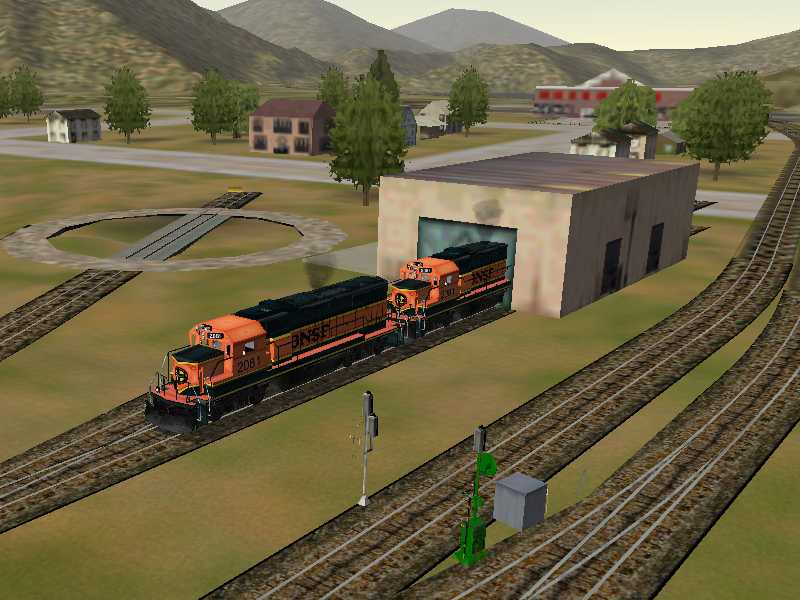
2. I ran lite.bat. ( I have a HP Pavillion 7850 w/ PIII 933 w/Intel 8210E 8MB Integrated "Graphics Controller" and a 40 GB HD, one partition. default TS install, with updates to v 1.2, XTracks 3.3, with standard tsection.dat 0009(note, it's the xtracks for non route developers){hope to get XP2400w/GF4Ti4600 soon, but that's beside the point}) My Question is should I have engine houses? Right before I wrecked the Trinity Railway Express(TRE) commuter at the end of Track at Sundermeyer, I noticed, "Hey, something ain't kosher here. I had a "Sundermeyer" sign floating in mid air over an empty concrete slab with four rails (two tracks) running through it. I guessed it was an engine house/shed/thing. Also, at somewhere else, (betcha didn't know you had a "somewhere else" did you? Maybe include in V7?)between Armstrong and CPR Malice... Paludan maybe? there was another sign floating in mid air over empty slab. Is this a consequence of running lite.bat? IF not, what do I need to do to correct the problem? My install procedure was to open the .zip, read the readme, run the .exe. I have XP Pro, and the .bat file DID start, run and complete, I think. I then ran lite.bat, then opened TS, started at ARmstrong, took a right at the wye instead of a left, and went full bore off of the end of the track at Sundermeyer. I went back to the shop, got another TRE commuter and this time took a left at the wye, and when I got to the next town, I saw the same phantom building with green sign and yellow letters suspended in mid air. I guess that must have been Paludan. (can you see a phantom building?) Also, coming into Van Den Hoven, I took the switch that shoots you around the loop. To the left of the left track, right before the first crossing at grade(5-6 carlengths after the switch)there seemed to be three "houses" there that seemed to be missing selected parts. Roofs, parts of sides.Have I done something wrong?/ AM I crazy? both?Bradley Linda
Waco, Texas


Port Ogden & Northern Version Six Now Available! – image 15

1938 Hiawatha with F7 Steam locomotive. Used by permission from http://www.geocities.com/skytop45

Alert | IP

Printer-friendly page | Edit | Reply | Reply With Quote | Top

Charter Member · 132 posts

RE: PORT OGDEN & NORTHERN VERSION SIX NOW AVAILABLE!

Port Ogden & Northern Version Six Now Available! – image 16

I offer this scenario for any who may have had similar “hangups” with PO6:
Downloaded and installed PO6 ... error message:
“Failure to load file envfiles\textures\hitw-sunset.ace “Then system halt followed by “send/don’t send” message.Search on system finds “hitw-sunset.ace” here and there. I copy and paste a sample in the proper directory ... now upon loaidng PO6, error message is the same but this time the file sought after is “hitw-stars.ace” followed by same lockout process.Run search in msts folder for all files named “hitw*.ace,” select all copy all paste in appropriate folder (envfiles\textures) taking care not to delete or overwrite anything.AND NOW! The glory of PO 6!! What a beautiful Route!! Once again!Respectfully submittedjivajiva

Alert | IP

Printer-friendly page | Edit | Reply | Reply With Quote | Top

Charter Member · 3927 posts

RE: PORT OGDEN & NORTHERN VERSION SIX NOW AVAILABLE!

Curious problem, jiva. Can you run the Innsbruck-St. Anton (Europe 2) route without those errors? "hitw" is "HowInTheWorld", so what you have is Sky Conductor .env files looking for Sky Conductor's textures. That happens when you install Sky Conductor 2, what it does is edit the \Envfiles\*.env files to access the HITW files instead of the default sky textures in the six default routes. I did test the installation with SKY 2, and the line;call xcopy ..\europe2\Envfiles\*.* .\Envfiles\*.* /s /ywould get all the hitw files along with the .env files. What you end up with is whatever set of SKY 2 environments was active at the time you installed PO&N6 instead of the default European skies, but no errors since the .env files and the sky textures get copied as a set. Adding PO&N 6 to Sky Conductor afterwards also works, since when you add a route to SKY 2 it copies all them HITW textures into \Envfiles\Textures, and edits the .env files to access the currently active environment. The only way I can figure that would happen is if the UKsun.env, UKrain.env, and UKsnow.env in \Europe2\Envfiles were looking for the \Europe2\Envfiles\Textures\HITW*.ace files and they weren't there, like from a partial installation or uninstallation of Sky Conductor or something.Bradley, of course you're whacko, you're from Waco. The only thing I can think of that would cause that would be if you start the sim, open options, then advanced display, and look at the world object density setting, it must be at 4 or less since the trainsheds are detail level 5. I didn't really look at the signs, but they're detail level zero, meaning they always show up, but the signal towers and the trainsheds are at 5, so won't be visible at 4. I never paid much attention to that, since I turn off all shadows, distant mountains and specular lighting, lower the visibility slider, then if all else fails drop the world object texture quality and train object texture quality down to notch 2, but the world object density slider stays up at 10 since I want all objects even if they look a little cruddy.
Port Ogden & Northern Version Six Now Available! – image 17My "disaster" settings for really slow computers and Brooksy's or Enocell's routes!You want to see something really funkadelic, try lowering the world objects quality slider, it's ugly as hell but really wierd, since it actually changes the shapes of buildings to reduce the polygon count!Port Ogden & Northern Version Six Now Available! – image 18Port Ogden & Northern Version Six Now Available! – image 19

Alert | IP

Printer-friendly page | Edit | Reply | Reply With Quote | Top

Charter Member · 580 posts

RE: PORT OGDEN & NORTHERN VERSION SIX NOW AVAILABLE!

Port Ogden & Northern Version Six Now Available! – image 20

LAST EDITED ON Nov-28-02 AT 11:27 AM (EST)

Sniper- My world object density is at level 7, highest it'll go w/o scarificing FPS too badly. Visibility is a smidge over 1000 Train object and texture quality maxed, and World object quality and texture quality set to two. I dunno.Bradley Linda
Waco, Texas


Port Ogden & Northern Version Six Now Available! – image 21

1938 Hiawatha with F7 Steam locomotive. Used by permission from http://www.geocities.com/skytop45

Alert | IP

Printer-friendly page | Edit | Reply | Reply With Quote | Top

Charter Member · 132 posts

RE: PORT OGDEN & NORTHERN VERSION SIX NOW AVAILABLE!

Port Ogden & Northern Version Six Now Available! – image 22

Now that I understand HTW means “how in the world” I’m a little clearer: Recent reinstall of MSTS did not include reinstalling Route Control or Sky!Conductor ... but simply copying and pasting. I did say “simply.” !!
Your route is just great. Went from Sundemayer (forgive possible bad SP) to the rerouted Vanderhoven ... able to whiz through there just fine ... lots of precious AI!! Oil tanker just dueling with me on the way to Tinker’s Dam! What a pleasure! Happy Thanksgiving! Glad to be alive!
jivajiva

Alert | IP

Printer-friendly page | Edit | Reply | Reply With Quote | Top

Member since Jul-17-02 · 172 posts

RE: PORT OGDEN & NORTHERN VERSION SIX NOW AVAILABLE!

GREAT NEWS, Sniper! Downloading has already started... about 40 min ext.
I'll let it run as usual. Is there something else I should download for your PO&N 6?
I've seen other packages with locos and other goodies in PO&N 6 livery, which are the coolest to download?====================================================================
ABOUT TREESMy experience with trees along the track has been the opposite of what you were saying (post 2, IIRC).Nearby trees make my Radeon 7500 work more.My conjecture is that, even if it's true that trees hide far way objects, it's true also that nearby trees pass by fast, so the graphic engine has an object which moves very fast, the hidden area varies fast and is bigger, so it has to make many calculations faster than when the tree is farther away and moves slower. If trees are many, that problem is multiplied.On Marias Pass, when I pass where trees are nearer, my FPS go down. When trees move farther away again, my FPS improve again.====================================================================My download has progressed while I'm writing... 72% completed, 10 min. remaining... Not bad.It's a good moment for download this one here in Italy. More than 3 Kb/sec constant. Probably because it's early morning there, so the site is not yet loaded... I logged in at first attempt. I'll make some tests when download has finished. I'll let you know, for sure.If there's some particular test you are interested with, let me know. Umberto

Alert | IP

Printer-friendly page | Edit | Reply | Reply With Quote | Top

Charter Member · 18 posts

RE: PORT OGDEN & NORTHERN VERSION SIX NOW AVAILABLE!

Hi Sniper:After reading much of the comment here relative to "hitw-mercury. ace" problems, etc. I decided to install Sky Conducter 2 immediately. Then, after I did that the program loaded beautifully. I must tell you that it is a remarkable effort. Running it either in "lite" or "heavy" is a very rewarding experience. I would like to use your repaint of the SD40-2 in PON colors....do your activities automatically use these engines, or do I have to make a consist using your download program ponsd402.zip?
Thanks again.

Alert | IP


[ Home | MSTS Forum | MSTS FAQ | File Library ] Copyright © 2002 by Nels Anderson. All Rights Reserved.

Restored from the Train-Sim.Com archive, captured December 1, 2002. About this archive.