Notice to all visitors and members of the Train-Sim.Com message forums: If you plan on using a signature banner in your posts, we would like to remind you that there is a maximum size for banners. That maximum is 450 pixels wide by 120 pixels high, and not to exceed 25k. Your compliance is appreciated. FORUM RULES Problems? There are two common reasons for problems with logging in and posting messages. The first is that you are running a firewall that prevents your messages from being sent to the server. The other is that you have cookies disabled; the DCForum software requires cookies to work properly.
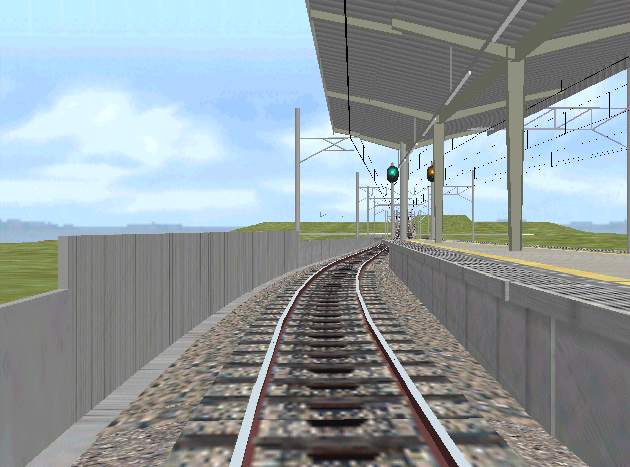
I worked some more on smace's curved object utility, and tried it on the standard left wallL.b3d and came up with this wall that follows the curved main line radius of 156.583. The wall curve is 160 degrees. However, for some unkniwn reason it is larger than the normal wall. Any ideas, anyone? Martin
RE: Some more on curved objects, smace, Oct-19-04, 08:50 PM, (1) RE: Some more on curved objects, mfonda, Oct-19-04, 10:52 PM, (2) RE: Some more on curved objects, ferrovipathe, Oct-21-04, 05:07 AM, (3) RE: Some more on curved objects, mfonda, Oct-21-04, 09:15 PM, (4) RE: Some more on curved objects, Robertj, Oct-22-04, 00:11 AM, (5) RE: Some more on curved objects, ferrovipathe, Oct-22-04, 05:11 AM, (6)
When you create you 2.5 meter basic unit, make sure it is the same height as the main object. The curve maker does not touch vert. measurments. Also you sometimes have to hand edit the product to get exactly what you want. Perhaps change the height from what it is in the new object to what it is in the original?
Hi! Don't forget that there is a difference of 0.30 m between zero vert. measurments in rw and zero in csv format. (-.30m and top of rail)So, if you are using an object writen in b3d with others objects writen in csv format, you always must adjust vertical vertix.All the best.
Thanks Jean-Louis. When I have a few spare moments I shall attempt to make another curved wall and find out what the problem was in the first place. On another matter, I still have your posting of Nov13th 2002, where you talk about Switch15. I have used this utility extensively since, but I am still unable to make curved switches. Since you said in this post that it would take only a little more work, could you give a hint, please? Davy Gijbels of Belgian BVE has given me permission to re-skin his coach to make a Dutch coach. Here is the result. The bottom part needs more work. The drawing is by Robert Huls of Nedrail1435.nl. Martin
Whoohooo, that looks good, seeing a Dutch coach. I don't know about the curved switches yet, i have Switch and played with it, but no curved switches so far.
Hi !Yes, it is quite simple to make a curved switch with Switch15. You can see some examples of long curved switches in "Loop" (Docks station)and an Y switch in Moorland junction. For example, you want to create a curved left hand switch, 50 m long, with a large radius of 1000 m, and an offset of 1.9 m (half of 3.8m) between left and right track. You only need to compute the offset of an 1000m radius' curved track: Offset = (length of curve)^2 / (2* radius) = (50*50) / (2*1000) = 2500/2000 = 1.25Then, open Switch15, select switch. Lenght = 50 m Xoffset right = -1.25 m Xoffset left = -(1.25+1.9) = -3.15 m ....and you got your object.You only need to put it with an small offset, and a little angle of rotation, until tracks merge.I wrote all the computes last year, (with last offset and angle), but I never published it. It may be somewhere on some hard disk..., like some other unpublished routes...Hope it will help you, and All the best.


 and an Y switch in Moorland junction.