Train-Sim.Com
BVE

Problem with graphics in all bve versions

Notice to all visitors and members of the Train-Sim.Com message forums:
If you plan on using a signature banner in your posts, we would like to remind you that there is a maximum size for banners. That maximum is 450 pixels wide by 120 pixels high, and not to exceed 25k. Your compliance is appreciated. FORUM RULES Problems? There are two common reasons for problems with logging in and posting messages. The first is that you are running a firewall that prevents your messages from being sent to the server. The other is that you have cookies disabled; the DCForum software requires cookies to work properly.

Previous Topic | Next Topic

Printer-friendly copy Email this topic to a friend

Reading Topic #1697

Member since Apr-14-03 · 37 posts

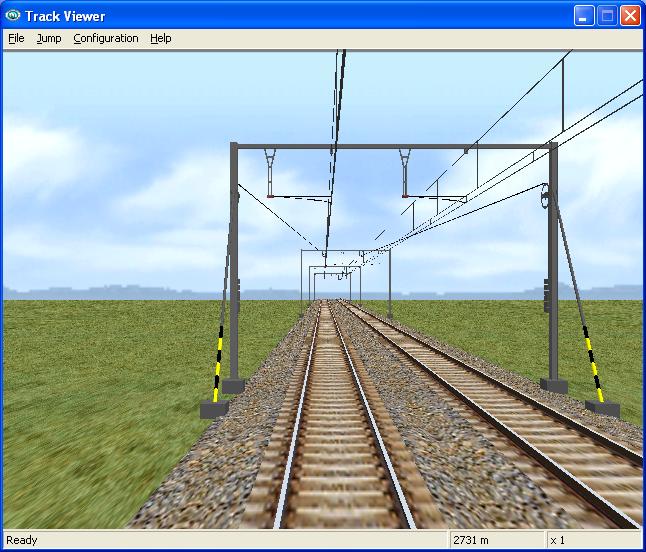
Hello, i have made a route and I have a problem. As soon as you pass one of the larger objects, the graphics become blurry, when that object is gone, the graphics become normal again. Here two screens to make it clear. Can anyone help me give a solution? Are the objects to heavy?before: you see the trainafter: the train is gone and it is all field you see (exept some cataneries)tnx, Davy
Visit the belgian BVE Website

http://www.bve.be.tf

Attachments
Problem with graphics in all bve versions – image 1
http://www.train-sim.com/dcforum/User_files/4108cd9b1f105b2a.jpg
Problem with graphics in all bve versions – image 2
http://www.train-sim.com/dcforum/User_files/4108cdb51f5caf3c.jpg

Alert | IP

Printer-friendly page | Edit | Reply | Reply With Quote | Top

RE: Problem with graphics in all bve versions, kayedj, Jul-29-04, 09:43 AM, (1) RE: Problem with graphics in all bve versions, nmbs, Jul-29-04, 05:21 PM, (2) RE: Problem with graphics in all bve versions, nmbs, Jul-31-04, 00:35 AM, (3) RE: Problem with graphics in all bve versions, call2, Jul-31-04, 03:56 AM, (4) RE: Problem with graphics in all bve versions, nmbs, Jul-31-04, 05:08 PM, (5) RE: Problem with graphics in all bve versions, call2, Jul-31-04, 05:34 PM, (6) RE: Problem with graphics in all bve versions, nmbs, Aug-09-04, 03:41 PM, (7)

Conferences | Topics | Previous Topic | Next Topic

Member since Apr-23-03 · 103 posts

RE: Problem with graphics in all bve versions

I had a similar problem which I spent about 3hours finding what was up and then correcting it.
First, make sure that every single texture on your route is in 256 colour depth. I find that this is best done using Jasc Paint Shop Pro. make sure that every texture is done (backgrounds etc.) Next, make sure that all your texture sizes are in powers of 2 e.g. 2, 4, 8, 16, 32, 64, 128, 256, 512, 1024. You can have any combination of these sizes, but make sure that you use nothing else.
Derek kaye

Problem with graphics in all bve versions – image 3http://bvesimulator.topcities.com
kayedj@hotmail.com

Alert | IP

Printer-friendly page | Edit | Reply | Reply With Quote | Top

Member since Apr-14-03 · 37 posts

RE: Problem with graphics in all bve versions

I tried it out, all images to 8 bit depth ( 256 colours ) and in powers of 2, but still know use. Sometimes it works, sometimes it doesn't and I get the blurry effect.
Visit the belgian BVE Website

http://www.bve.be.tf

Alert | IP

Printer-friendly page | Edit | Reply | Reply With Quote | Top

Member since Jun-27-04 · 104 posts

RE: Problem with graphics in all bve versions

LAST EDITED ON Jul-31-04 AT 05:35 PM (EST)

If it's only your route that gives problems why don't you experiment a little by using some other developers track objects to see what results you get. I'm not saying that you should publish anything without permissions, but just try different routes track objects and perhaps you will see why some work and some don't.BVE seems to like GeForce graphics cards better than most others, so I would use the machine that has the MX in it first. There have been some strange problems in the past that were caused by graphics cards, although BVE does not make great use of them at present.Tony H
Midlands 25Kv

Alert | IP

Printer-friendly page | Edit | Reply | Reply With Quote | Top

Member since Apr-14-03 · 37 posts

RE: Problem with graphics in all bve versions

I started all over with my route and now it works, maybe i'll find the problem later. Thanks all for your help! Some screens of the blank route:Problem with graphics in all bve versions – image 4
Problem with graphics in all bve versions – image 5
Problem with graphics in all bve versions – image 6
Problem with graphics in all bve versions – image 7
Visit the belgian BVE Website

http://www.bve.be.tf

Alert | IP


[ Home | MSTS Forum | MSTS FAQ | How To... | File Library ] Copyright © 2004 by Nels Anderson. All Rights Reserved.

Restored from the Train-Sim.Com archive, captured August 13, 2004. About this archive.