Train-Sim.Com
BVE

Dynamic Shadows in BVE 4 ( sort of)

Notice to all visitors and members of the Train-Sim.Com message forums:
If you plan on using a signature banner in your posts, we would like to remind you that there is a maximum size for banners. That maximum is 450 pixels wide by 120 pixels high, and not to exceed 25k. Your compliance is appreciated. FORUM RULES Problems? There are two common reasons for problems with logging in and posting messages. The first is that you are running a firewall that prevents your messages from being sent to the server. The other is that you have cookies disabled; the DCForum software requires cookies to work properly.

Previous Topic | Next Topic

Printer-friendly copy Email this topic to a friend

Reading Topic #1690

Member since Apr-6-03 · 355 posts

LAST EDITED ON Jul-24-04 AT 07:03 PM (EST)

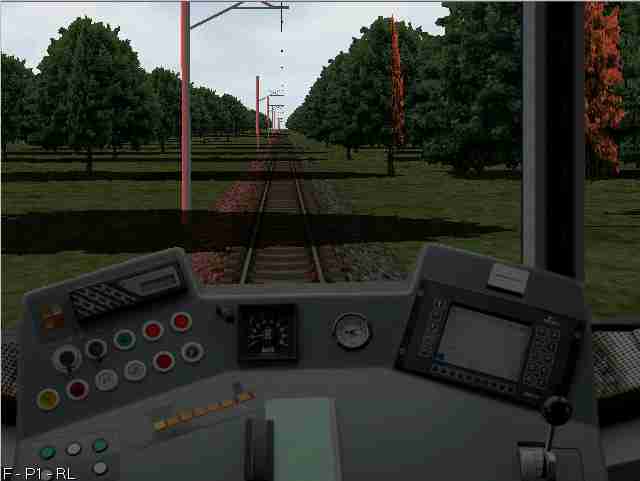
BVE 4.0 Beta now allow us to do Light effects that seem to be on par with the sound effects BVE is noted for. I built a small route to look at a way to do shadows crossing the cab from track side objects. The file is attached here.
You pass through about a km of trees on a grove with shadows. A very very simple test route. Next is to figure out what and how the light direction and environmental light commands do.
Unzip to the same folder you put the new Uchibo route and objects. This depends on some of those objects.
The route file is a very modified Uchibo route file use to start looking at the new light effects.
The shadow tree is from Bogdan Draghici. He posted it in this forum link:
http://www.train-sim.com/dcforum/DCForumID17/1547.html
Uses Martins new train.

Attachments
http://www.train-sim.com/dcforum/User_files/4102f7c41fdaa857.zip

Alert | IP

Printer-friendly page | Edit | Reply | Reply With Quote | Top

RE: Dynamic Shadows in BVE 4 ( sort of), Bogdan, Jul-25-04, 03:18 AM, (1) more light commands, smace, Jul-25-04, 10:06 AM, (2) RE: more light commands, Bogdan, Jul-25-04, 12:55 PM, (3) RE: more light commands, Robertj, Jul-25-04, 01:57 PM, (4) RE: more light commands, Robertj, Jul-25-04, 03:51 PM, (5) Updated version, smace, Jul-25-04, 09:29 PM, (6) RE: Updated version, Bogdan, Jul-26-04, 09:28 AM, (7) RE: Updated version, Ruede, Jul-27-04, 06:43 PM, (8) RE: Updated version, smace, Jul-27-04, 07:06 PM, (9)

Conferences | Topics | Previous Topic | Next Topic
Member since Jul-18-04 · 5 posts

RE: Dynamic Shadows in BVE 4 ( sort of)

BogdanIndeed, a BIG Thank You goes to Mr. Mackoy for this great feature. I'm trying at the moment to figure out which way is the easiest to build the objects that cast shadows. I'll come as soon as I'll sort it out

Alert | IP

Printer-friendly page | Edit | Reply | Reply With Quote | Top

Member since Apr-6-03 · 355 posts

more light commands

LAST EDITED ON Jul-25-04 AT 10:21 AM (EST)

I have modifyed the light test with the following commands:
Route.LightDirection 0; 90
Route.AmbientLight 100; 100; 100
Route.DirectionalLight 255;0;0First line controls where the direcitonal light comes from, this one is from the left and above
The second sets the "set" lighting ( set like stage set), the lighting on the route, in this case a dark gray.
The third sets the color of the directional light, here red. Dynamic Shadows in BVE 4 ( sort of) – image 1This gives the picture above. Looks like a red setting sun to the left in the late after noon. Notice the red highlights on the left facing parts of objects, including the track.
The cab color adjusts to the ambient light conditions, and is darker, as it would be in the after noon. I tried one whee I adjusted the ambient light to red, and the cab was highlighted as if it were in the afternoon sun also.
If some one who has an artist eye ( which is not me) can master these commands and generate the objects, I think BVE will have an element that is not in most other simulators.
Late edit: It gets better.BVE " remembers" where the directional light comes from at the start and adjust the lighting as you curve. Same track plan, but addes a curve. The light moves! Halfway through the curve the light is from behind and the cab lights as if from behind and the trees now are light so that all the tree is highlighted.

Alert | IP

Printer-friendly page | Edit | Reply | Reply With Quote | Top

Member since Jul-18-04 · 5 posts

RE: more light commands

LAST EDITED ON Jul-25-04 AT 01:04 PM (EST)

I did understand the three "magic" commands.
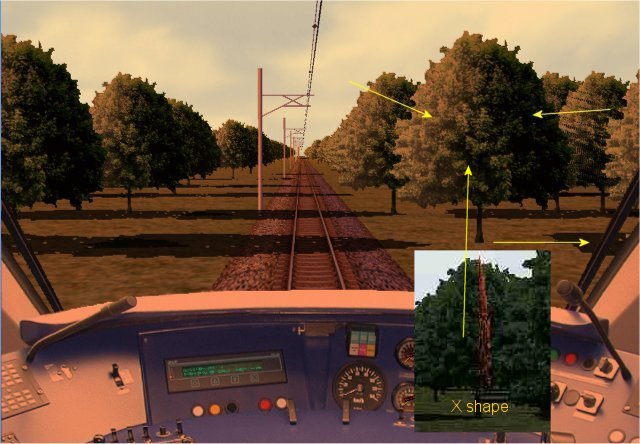
The "X" shapes -in our case the trees- don't look realistic at all when the sun faces perpendicular on one of the polygons. However, this can be fixed by avoiding the "X" shape objects and using just a flat polygon -2 faces- and aplying the right texture that coresponds to the direction of the shadow. To make it clear, I attached the screenshot below.Bogdan

Attachments
Dynamic Shadows in BVE 4 ( sort of) – image 2
http://www.train-sim.com/dcforum/User_files/4103f54e651d875a.jpg

Alert | IP

Printer-friendly page | Edit | Reply | Reply With Quote | Top

Member since Jul-25-04 · 3 posts

RE: more light commands

Mind you, i think that this whole X-format is something for the future of BVE, off course it is the future of BVE, but for things to come that are going to rival MSTS i guess, i do recall something like a stencill-function in most 3d-engines, wich is used to make shadows from 3d-objects, could that be one of those things?Further hints at this future can be taken from the three light-commands, ambiance is by the way the color of the shadows (wich in real live are almost never pitch black).And another hint can be taken from the inbuild route viewer. Besides the cursors to move forward and backwards, you can also use the cursorkeys (2,4,6,8) on the nummeric keyboard to move your view and in combination with CTRL you can pan straight up and straight down and right and left for the full 360 degrees, that something you could not with the old viewer. (but the track behind the train still dissappears)Another guess is that a lot of the old objects that where made are going to be obsolete in the future and that only objects that can be viewed from all sides are going used. If this is in combination with a full 360 view is going to be the case then i guess that virtual cabs and passengers view are not impossible either.

Alert | IP

Printer-friendly page | Edit | Reply | Reply With Quote | Top

Member since Apr-6-03 · 355 posts

Updated version

LAST EDITED ON Jul-25-04 AT 09:32 PM (EST)

I have played around with the commands and objects. I used Bogdan's suggestion to use a flat tree rather than an X shaped tree and I separated the shadow from the tree. This way I could move the shadow around and leave the tree. I was also sucessful in implimenting an ambient light command and a directional light command. The updated route makes a 6 km circle so that the light will go all around the train. The updated route is too big to put here so it is at the following link:http://home.cfl.rr.com/bvefl/Light-test.zipIncluded is the Excel spread sheet used to create this. No directions for it yet, if you want to discuss it, send a PM. It is late and at this point, I don't know exactly what I did. It contains some logic to help determine which way the shadow should go. NOTE there are way too many brightness commands and the exact location of the shadows in the cab are off. This is from the way I made the route, not the commands

Alert | IP

Printer-friendly page | Edit | Reply | Reply With Quote | Top

Member since Jul-18-04 · 5 posts

RE: Updated version

LAST EDITED ON Jul-26-04 AT 09:47 AM (EST)

Dynamic shadows in BVE is a hard task I must say it...Anyway it does worth it in the end because gives a lot of realism
to the scenery. It could be a lot easier if Mr.Mackoy would make BVE to do this automaticaly or at least to let us know
if it will be introduced in the next version of BVE. Anyway this is the way I would do the scenery objects the cast
shadows:As for .FreeObj command, this is how BVE knows to handle the scenery objects - I'm talking about rotating the objects in
degrees (*)Dynamic Shadows in BVE 4 ( sort of) – image 3As we can see, each object needs to have at least 8 shadows statements for each 45 degrees -in our case- but we can add even more
like every 5 degrees but that will ask for to much work indeed, so back to our case... in total we will have 8 objects
representing actually 1 scenery object. This can be simplified to only 1 object for example a tree that can just be
rotated to every 45 degrees without noticing any difference.But what will happen to a wall for example? Yes this can be
simplified aswell by using only 4 objects (0* to 180*) and then "mirror it". And finaly we have a building that we can not
rotate it or mirror it...in this case this object will ask for 8 different objects for every 45 degrees -this will take
the longest.I know this sounds "crazy" but what can we do?...until BVE will offer the real dynamic shadowing, this is the way that I
would do it. It will be a lot easier to someone who doesn't really care about the realism of the scenery, but what about
those who are interested? Do they always have to drive in cloudy conditions just to don't get worried about shadows - and foggy weather because we can see only up to only 600m "it is 2004 by the way..." - because who likes to see "popping up" the buidings just in front of the train?
Let's face it, we are all different and I'm sure that some of us are "blocked" in building "our dream route" just
because there is always something that we are not happy with it. I know we should have patience - and that is the only way
- but I was just trying to get an excuse for the reason that I will prefer to work longer just to have "dynamic shadows"
for our scenery.Anyway if anyone is still interested in "Dynamic shadows" here is a quick tip about the lenght of the shadows. As far as
I understood I did another drawing concerning this matter:Dynamic Shadows in BVE 4 ( sort of) – image 4As we can see at 40* the shadow has the same lenght with the object, at 60* is doubled and at 70* is tripled this
explains why in the morning/evening our shadow is very long.Route.LightDirection Rx; Ry , where Rx represents the 40*,60* and 70*
in our example.Please do understand that the drawings, examples and the strategy has not be taken for anywhere but from my mind.
So take it as it is. I don't know how clearly you do understand these things but it does make sense to me. In the end
all I wanted to do is just to give some help to the BVE comunity.
Sorry for any mistakes.Thank you.Bogdan

Alert | IP

Printer-friendly page | Edit | Reply | Reply With Quote | Top

Member since Apr-12-03 · 11 posts

RE: Updated version

Click to send message via ICQ

Hello!Those new light effects surely improve the overall appearance of outside scenery a lot, but what about underground lines?
I've tried my U15 route in BVE4 and got those effects even though I didn't put any additional command into the csv-file from BVE2.6.
Unfortunately I haven't yet found a solution to turn them off, as they don't make sense for an underground route and cause very unrealistic results there.
I have tried many values at "route.LightDirection"...always the same results...the light always changes with the curves of the track.Has anyone already found out if it's possible to bring the old train-related lighting back?Regards,
Rüdiger
http://home.t-online.de/home/r.hulsmann/

Alert | IP

Printer-friendly page | Edit | Reply | Reply With Quote | Top

Member since Apr-6-03 · 355 posts

RE: Updated version

Try setting the light from above and behind. 0,90, I think ( or maybe 0,180) This woudl give lighting from directly above. Also try leaving the commands out of the file. Do not know at this point, still guessing.

Alert | IP


[ Home | MSTS Forum | MSTS FAQ | How To... | File Library ] Copyright © 2004 by Nels Anderson. All Rights Reserved.

Restored from the Train-Sim.Com archive, captured August 21, 2004. About this archive.