Train-Sim.Com
BVE

New Route: A'dam to Arnhem

Notice to all visitors and members of the Train-Sim.Com message forums:
If you plan on using a signature banner in your posts, we would like to remind you that there is a maximum size for banners. That maximum is 450 pixels wide by 120 pixels high, and not to exceed 25k. Your compliance is appreciated. FORUM RULES Problems? There are two common reasons for problems with logging in and posting messages. The first is that you are running a firewall that prevents your messages from being sent to the server. The other is that you have cookies disabled; the DCForum software requires cookies to work properly.

Previous Topic | Next Topic

Printer-friendly copy Email this topic to a friend

Reading Topic #1660

Member since Jul-7-04 · 6 posts

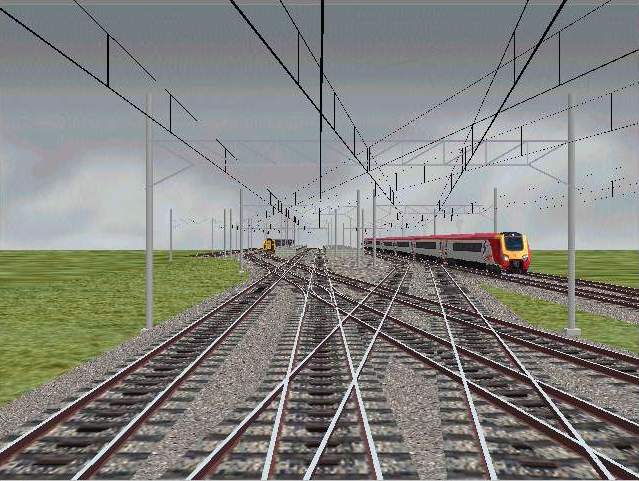
Hell all: At last I sat down and wrote myself a rudimentary railroad. It soon became clear why some say it took 40 days and 40 nights! I attempted to make the track as realistic as I could and copied (more or less) the route A'dam to Arnhem. Before I knew it, I found myself at Emmerich. There was no one to stop me.n I had a fairly good idea about tracks at Arnhem and Emmerich, and some of the smaller towns along the line. Coming into Arnhem, crossing a number of double slips is very rewarding. Now it is necessary to learn to make bitmaps for the decoration. So far I have used defaults and a few trains I found in other routes. There are a number of questions and observations I would appreciate some comments on. 1.When I iontroduced speed limits, the program indicates "exceeded the speed limit" even when not the case, and it stays forever. 2. Where aree the sounds going over switches? There are none going across Ruediger Huelsmann's fine switches. 3. Also flange sounds, and such. 4. When using multiple tracks, overhead spans are either too large or too small, and do not fit between the 4 meter tracks. Also, sometimes a single pole is needed between the 50m separation; the program will not allow this. 5. It seems necessary to place the "railtype" command close to the "rail" command, or the program will miss it. 6. I am still figuring out the approach tracks into Utrecht, and how to simplify it. 6. A great help has been Oskari Saarekas' BRR Route Randomizer program; this prints a chart of all track numbers, changes and x and y variables used. Fine for knowing which track is which. Also if shows a list of errors in the route. I t will even allow adifferent main line, but this gets complicated. It does a lot more. His url is: http://koti.mbnet.fi/lopomo/trainsoft
That's all for now. Thanks for reading this. Martin

Martin

Attachments
New Route: A'dam to Arnhem – image 1
http://www.train-sim.com/dcforum/User_files/40ec8ac502b3c06e.jpg

Alert | IP

Printer-friendly page | Edit | Reply | Reply With Quote | Top

RE: New Route: A'dam to Arnhem, OSaarekas, Jul-13-04, 10:41 AM, (1) RE: New Route: A'dam to Arnhem, cjh401, Jul-14-04, 12:18 PM, (2) RE: New Route: A'dam to Arnhem, bassv, Jul-17-04, 09:53 AM, (3) RE: New Route: A'dam to Arnhem, mfonda, Jul-23-04, 06:04 PM, (4) RE: New Route: A'dam to Arnhem, bassv, Jul-25-04, 07:39 AM, (5) RE: New Route: A'dam to Arnhem, Robertj, Jul-25-04, 03:12 PM, (6) RE: New Route: A'dam to Arnhem, mfonda, Jul-26-04, 08:27 AM, (7) RE: New Route: A'dam to Arnhem, mfonda, Jul-26-04, 08:33 AM, (8) RE: New Route: A'dam to Arnhem, OSaarekas, Jul-27-04, 11:50 AM, (9) RE: New Route: A'dam to Arnhem, mfonda, Jul-27-04, 08:51 PM, (10) RE: New Route: A'dam to Arnhem, mfonda, Jul-28-04, 07:37 AM, (11)

Conferences | Topics | Previous Topic | Next Topic

Member since Jun-27-03 · 22 posts

RE: New Route: A'dam to Arnhem

New Route: A'dam to Arnhem – image 2

I can hopefully provide a correct answer to some of your questions:1) Use the .Limit , -command to set the speed limits. Make sure you have the limit set right from the beginning. Some ATS-related commands may mix it up.2) The point sound is triggered by two .Rails crossing. If you use only the switch .Freeobj, no sound is heard. You can make an invisible .Rail to branch off at the site of the switch, and it should work.5) Don't use .Rail/start/end and .Railtype -commands concerning the same track in the same 25m block. Instead, put the type of the rail as the last parameter in the .Rail/start/end -command.6) Thanks! I'm glad the program has been helpful.

http://koti.mbnet.fi/lopomo/trainsoft/ - BVE Route Randomizer
http://koti.mbnet.fi/tocgame/ - TOC Game, free online multiplayer train company game

Alert | IP

Printer-friendly page | Edit | Reply | Reply With Quote | Top

Member since Jul-3-03 · 93 posts

RE: New Route: A'dam to Arnhem


>1) Use the .Limit , -command to set the speed
>limits. Make sure you have the limit set right from the
>beginning. Some ATS-related commands may mix it up.
>This may seems obvious to some, but the .limit commands are in Kph, so if you put in .limit 40, you can only go about 25mph before it complains! If this is the case, try multiplying the speed you have by 1.6 for a rough conversion!HTH

Chris H
------------------------
Ramsbury Route for BVE
www.freewebs.com/ramsburyBVE/index.htm

Alert | IP

Printer-friendly page | Edit | Reply | Reply With Quote | Top

Member since Apr-8-03 · 40 posts

RE: New Route: A'dam to Arnhem

New Route: A'dam to Arnhem – image 3

Hi Martin,Whoh, great to read that you are building a reallife DUTCH route! I've also started creating a Dutch route some years ago. I still have many Dutch object, like signals, cantenaries, buildings, trains (Sprinter, ICR etc) for BVE. If you want, I can email them to you.I'm already looking forward to drive your route!

Alert | IP

Printer-friendly page | Edit | Reply | Reply With Quote | Top

Member since Jul-7-04 · 6 posts

RE: New Route: A'dam to Arnhem

Thanks for your remarks, guys. Just came back from a short holiday to Fort Wayne, driving 24 hours in 3 days, and coming back driving on the 401 through Toronto at rush hour at 120 km /hour in a thunder storm downpour; talk about hairy! The signaling and limit commands will take me a while to assimilate. This is my first route and so far I have only layed track and borrowed a few trains to decorate the long stretches. The route is actually A'dam to Zwolle, not Arnhem; I will do that later.The attachment is a view of coming into Zwolle station; you can see there are no buildings as yet. Also the catenary is of improper length, but I don't know how to make it larger. In the mean time I have arrived in Leeuwarden; once i get going there is no stopping me. I would love to have some Dutch trains. Would you e-mail them to me, and I will send you my .rw file (63.7 kb) The objects take a few more. I have no website yet where you might download. Also I still have to get permission to use the few objects I have borrowed. Next I shall work on the wall and dike commands, and the relays. I sure wish there was a good handbook on how to program correctly, instead of having to figure all out myself. But it as a lot of fun.
OSaarekas, it seems your program will only print the trackage up to 111 km. Is that true? Thanks for the comments re the limits. cjh401 also. For now I shall indicate limits by the yellow traffic light. Bye for now. Martin

Martin

Attachments
New Route: A'dam to Arnhem – image 4
http://www.train-sim.com/dcforum/User_files/410199423383ce7a.jpg

Alert | IP

Printer-friendly page | Edit | Reply | Reply With Quote | Top

Member since Jul-25-04 · 3 posts

RE: New Route: A'dam to Arnhem

>Too bad I can't see any of your screenshots... Neither can i, btw: i am also very intrested in those Dutch BVE-objects.Maybe its better to hop over to http://www.cyberbasics-hosting.com/forum/index.php, a Dutch forum for MSTS and the HCC-trainsimgg (gg=gebruikergroep=usergroup) wich has recently opened a BVE-forum as well, its not yet on its rightfull place but that going to change somewhere in the middle of august.

Alert | IP

Printer-friendly page | Edit | Reply | Reply With Quote | Top

Member since Jul-7-04 · 6 posts

RE: New Route: A'dam to Arnhem

As you can see now, the trains are from Steve Green's Hammerwich route, and Uwe Post. Thanks to these guys. I shall request permission ( belatedly) to use them when and if I publish the route. Martin

Martin

Alert | IP

Printer-friendly page | Edit | Reply | Reply With Quote | Top

Member since Jun-27-03 · 22 posts

RE: New Route: A'dam to Arnhem

New Route: A'dam to Arnhem – image 8

There shouldn't be a limit of some 110km in the chart, but the feature is rather poorly programmed, so I wouldn't be suprised if such a limit would for some reason exist. Also, the HTML-code generated is appalling as well, and if the route is a very long one, the page may become too big for some browser to fully display.

http://koti.mbnet.fi/lopomo/trainsoft/ - BVE Route Randomizer
http://koti.mbnet.fi/tocgame/ - TOC Game, free online multiplayer train company game

Alert | IP

Printer-friendly page | Edit | Reply | Reply With Quote | Top

Member since Jul-7-04 · 6 posts

RE: New Route: A'dam to Arnhem

The limit was 111900m. I have split the route and this works well.
Also I discovered a branch not showing up on the chart. On the whole, though, I wouldn't want to do without your program. Martin

Martin

Alert | IP

Printer-friendly page | Edit | Reply | Reply With Quote | Top

Member since Jul-7-04 · 6 posts

RE: New Route: A'dam to Arnhem

Hello bassv: I am certainly interested in your Dutch objects, especially train objects to place along the route. I did find a NSMat64 train by Edwin van Bree as the train file. It runs very nicely. Martin

Martin

Alert | IP


[ Home | MSTS Forum | MSTS FAQ | How To... | File Library ] Copyright © 2004 by Nels Anderson. All Rights Reserved.

Restored from the Train-Sim.Com archive, captured August 13, 2004. About this archive.