Notice to all visitors and members of the Train-Sim.Com message forums: If you plan on using a signature banner in your posts, we would like to remind you that there is a maximum size for banners. That maximum is 450 pixels wide by 120 pixels high, and not to exceed 25k. Your compliance is appreciated. FORUM RULES Problems? There are two common reasons for problems with logging in and posting messages. The first is that you are running a firewall that prevents your messages from being sent to the server. The other is that you have cookies disabled; the DCForum software requires cookies to work properly.
Is it at all possible to copy the US2 sound folder to a route that lacks ambient sound? If so, is there anything that must be done, beyond just simple copying, such as making some kind of written entry to some other file somewhere?
I'm fairly certain that there's another file involved (sound.cfg, sound.dat?), but I'm away from my setup right now and can't tell for sure.Of even greater impact, I believe, is the fact that one would have to go into the Route Editor and place the sound sources as desired/required. Unless that part has already been done and the route builder simply forgot to include the necessary files.Henry
Thank you,henry3. I had also posted this question on the MSTS forum and have gotten similar advice. The concensus would appear that the route editor is involved, as you mentioned. Fingers crossed, will have a go at this later today.
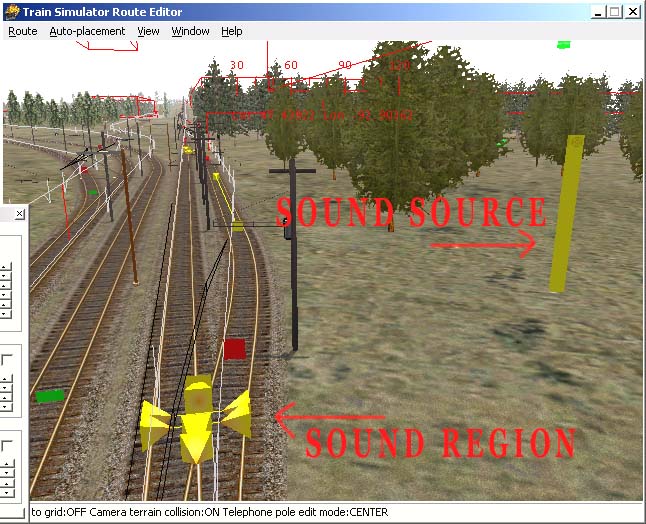
You have three different Sound sources available to you in MSTS: Sound Sources, Sound Regions, and general clanking and groaning that the engines and wagons make.The Sound Regions are placed on the tracks (yellow pyramids with yellow squares attached) to make the various track noises (tunnel sounds, bridge sounds, etc.). In my experience, the Sound Regions are unstable, and should only be placed after the route is finished. I have not observed this rule, and periodically, I have to go out on the route and place them back in their correct positions. If you are not editing a route, you can probably place Sound Regions. The actual .sms and .wav files are generally located in the global Sound folder (C:/Program Files/Train Simulator/Sound), and the associated .dat file is located in the route's root folder (USA2), named: ttype.dat.The engine and wagon sounds are also located in the global Sound folder, and are used in the .eng and .wag files to make the train noises.The Sound Sources are in the route's Sound folder, and are the sounds of the wind, birds, industry, traffic, etc., which are placed individually wherever you want a particular sound in the route. The Sound Source object looks like a yellow pillar with a speaker in the top of it.You can copy a Sound folder from one route to another, but if you overwrite the existing Sound folder, you make make some sounds unavailable in the route, unless you are careful to make certain that your new Sound folder contains all the sounds that were in the old folder. You must also copy the ssource.dat file, which contains the reference information about the sounds in the Sound folder. The ssource.dat file is located in the route's root folder. Again, the new source.dat file should contain all the entries of the old ssource.dat file, or some sounds will be lost. Be advised that not all the KUJU Sound Sources work correctly. You may place a particular nature sound, but not hear anything. I've managed to get mine working by tinkering with them, sometimes substituting a new .wav file for the one that doesn't work.After all this is done, you will have to place Sound Sources where you want them in the route. Just copying the folders and .dat files will not automatically place sounds in the route.
That as comprehensive a reply as I'll ever see, thank you for the response and for your time and expertise. The route in question has only 6 sound files within its sound folder. This is why I was thinking of expanding the sounds with the USA2 sound folder.Thank you again.