Train-Sim.Com
MSTS Sound Design

Engine passenger view sounds

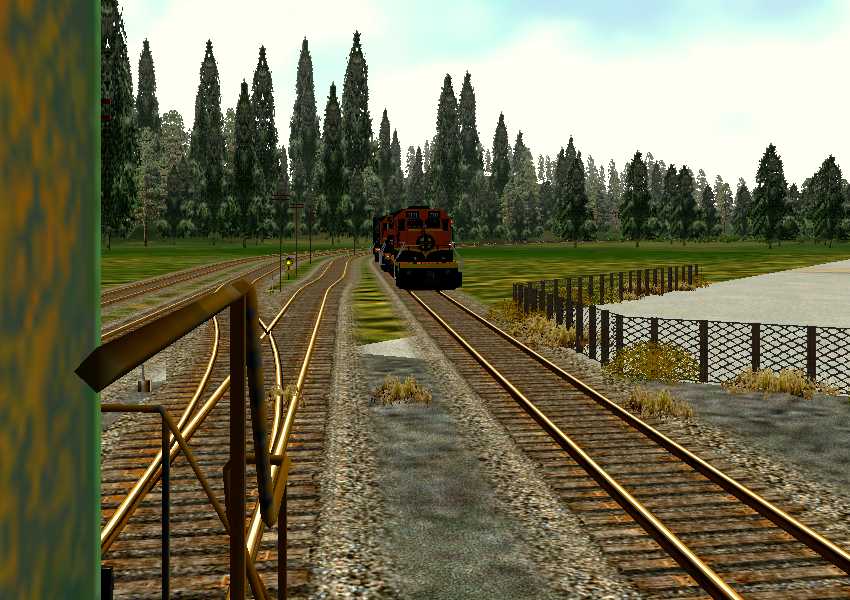
Engine passenger view sounds – image 1

Notice to all visitors and members of the Train-Sim.Com message forums:
If you plan on using a signature banner in your posts, we would like to remind you that there is a maximum size for banners. That maximum is 450 pixels wide by 120 pixels high, and not to exceed 25k. Your compliance is appreciated. FORUM RULES Problems? There are two common reasons for problems with logging in and posting messages. The first is that you are running a firewall that prevents your messages from being sent to the server. The other is that you have cookies disabled; the DCForum software requires cookies to work properly.

Previous Topic | Next Topic

Printer-friendly copy Email this topic to a friend

Reading Topic #261

Charter Member · 3891 posts

Somebody came up with a great hack for an additional view for engines, that uses the #5 passenger view key;Inside (
PassengerCabinFile ( gp38.s )
PassengerCabinHeadPos ( -1.8 3.6 -5.8 )
RotationLimit ( 175 175 0 )
StartDirection ( 0 180 0 )
Sound ( "GP38Cab.sms" ) )It's really nice cause it gives a view on the left side of the engine, so you can see backing around left hand curves. Trouble I have is that last line; Sound ( "GP38Cab.sms" )It don't work. The only sound I get in that view is the clickety-clack track sounds, no diesel, no air, horn, bell, sanders, nada.I suspect the activation/deactivation lines in the cab.sms might be a problem;
Activation ( CabCam () Distance (100) )
Deactivation ( ExternalCam () PassengerCam () Distance (100) )If I'm reading that correctly, the PassengerCam (which is what this is, being activated by the 5 key) would deactivate the sound. I tried changing to gp38eng.sms, but it has a similar line. For my next trick I tried cloning the gp38cab.sms, and swapping the activation/deactivation lines around, naming the file "engpass.sms" or something and changing the line in the eng file to point to it, but that don't work either - dead silence in that view.
So what am I missing?

Alert | IP

Printer-friendly page | Edit | Reply | Reply With Quote | Top

RE: Engine passenger view sounds., dutchtrain, Nov-09-02, 05:49 PM, (1) RE: Engine passenger view sounds., Lone_Gunman_SG, Nov-12-02, 09:10 AM, (5) RE: Engine passenger view sounds., scefhwil, Nov-10-02, 03:51 PM, (2) RE: Engine passenger view sounds., sniper297, Nov-11-02, 10:38 PM, (3) RE: Engine passenger view sounds., scefhwil, Nov-12-02, 02:24 AM, (4) RE: Engine passenger view sounds., sniper297, Nov-13-02, 07:19 PM, (6) RE: Engine passenger view sounds., scefhwil, Nov-14-02, 04:27 AM, (7) RE: Engine passenger view sounds., sniper297, Nov-16-02, 10:45 AM, (8)

Conferences | Topics | Previous Topic | Next Topic
Charter Member · 121 posts

RE: Engine passenger view sounds.

I got engine sounds in the KIHA-passview to work by using the KIHA31cab.sms for the Passengercam, and in that file moving PassengerCam () from Deactivation to Activation. This was just for testing purposes, but it worked.

Alert | IP

Printer-friendly page | Edit | Reply | Reply With Quote | Top

Charter Member · 157 posts

RE: Engine passenger view sounds.

Your best bet is to delete the whole of the Sound () statement from the Inside () one. Then make a copy of the gp38cab.sms and call it gp38cabpas.sms. In this new file move just the PassengerCam() statement from Deactivation to Activation. You should now hear exactly the same sounds in Key 5 as in Key 1 because they are the same sounds! Make sure of course that you move the PassengerCam() statement for the correct ScalibilityGroup, ie 5 if you have the main sounds selection set to High, 3 for Medium, and 1 for low.This may seem a little daft at first reading but it does work. I have uploaded whole sets of sms files on UKTrainSim with xxxxxxcabpas.sms, and xxxxxxengpas.sms variants for use with Key 5 'head-in cab' and 'head-out of cab' views.

Alert | IP

Printer-friendly page | Edit | Reply | Reply With Quote | Top

Charter Member · 3891 posts

RE: Engine passenger view sounds.

Thanks for the replies. Gotta try that with a plain jane geep38 I guess, I've been trying to do it with the SD40s, and with assorted wierd hacking I've had no luck at all. I've tried copying the entire activation/deactivation lines from the OEbarcar.wag, no luck. With or without the sound line in the "inside" section in the .eng file, with a copy of sd402eng.sms or sd402cab.sms renamed and altering all the activation/deactivation lines, nothing works. I get external sounds like clickety-clack track sounds or the generic diesel sound when an AI train goes by, but no sounds from the player engine at all in that view. Funny thing, I think the head out view uses the sd402eng.sms since it sounds similar to the 2 & 3 views, you hear the sanders louder and the actual diesel sounds instead of that muted whine you get inside the cab.

Alert | IP

Printer-friendly page | Edit | Reply | Reply With Quote | Top

Charter Member · 3891 posts

RE: Engine passenger view sounds.

Don't feel bad, Lone Gunman, obviously I'm lost too or I'd have it working by now.The loco.eng (whichever loco) has some entries in it for .sms files.
For the cabview it would be lococab.sms, for exterior views like 2 & 3 and the head-out it's locoeng.sms.
If you then go to the \Sound folder for that loco, opening the .sms files in wordpad reveals that they are the sound control files that define what .wav file gets played when.
Engines don't really have a passenger view, altho some clever hackers have come up with either an inside view (SW1200 or 1500 has one) or a second head out view by adding the "inside" data block to the .eng file similar to the passenger views in the .wag files for coaches and cabooses (cabeese?). Obvious drawback, only one working passenger view at a time, so having it in the engine would disable the caboose/coach passenger view.
What I'm trying to figure out right now is how to get the sound into the passenger view for the engine. It's not a general sound failure, when the engine is moving I get clickety-clack track sounds, and the noise from passing AI traffic trains, what I'm not getting is either the internal (lococab.sms) or external (locoeng.sms) sounds from the player engine itself.
The view is nice, but having the same sounds as I get from the headout view (which don't need an .sms reference) would be better.
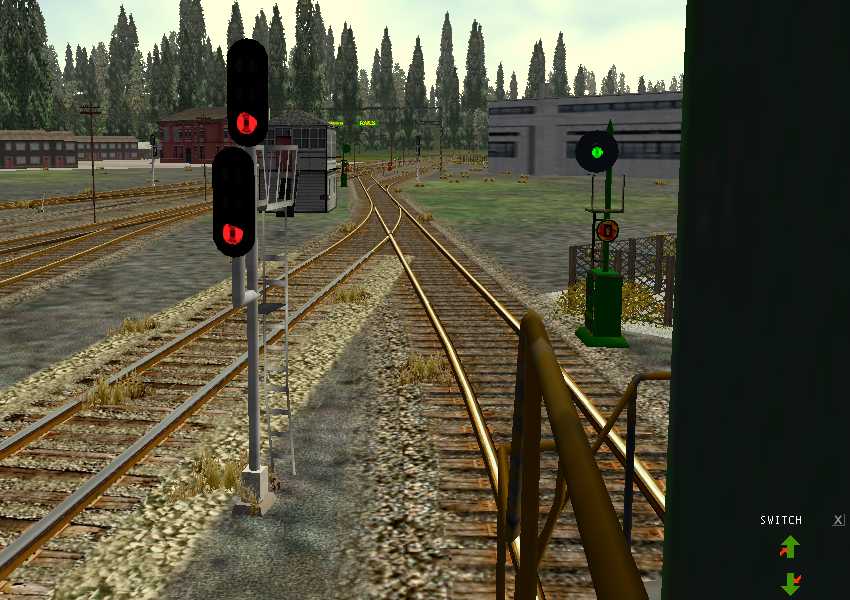
Engine passenger view sounds – image 3Engine passenger view sounds – image 4Standard head out view is useful for seeing around right hand curves, gives a 180 degree rotatable view on the right side.Engine passenger view sounds – image 5Engine passenger view sounds – image 6The passenger view hack gives a similar view on the left. Needless to say this comes in handy for switching (BR "shunting") work.
Alert | IP

Printer-friendly page | Edit | Reply | Reply With Quote | Top

Charter Member · 157 posts

RE: Engine passenger view sounds.

Sniper, there's nothing left to figure out. As I said above what you want to do has already been achieved by others elsewhere. If the following doesn't work then the problem is not in the sms/eng files, but must lie in general sound/sound hardware issues.If you want to hear the external sounds when using the Passenger, Key 5, view, then in your Player loco's .eng file you should have:-In the Wagon() section, an Inside() statement with no Sound() statement. ie.Inside (
PassengerCabinFile ( BRBlack5_01.s )
PassengerCabinHeadPos ( 1.7 3.0 -5.4 )
RotationLimit ( 60 210 0 )
StartDirection ( 0 0 0 )
)and a Sound() statement which points to an external sms ieSound ( "..\\..\\common.sound\\2cyl_generic\\2c-100b-engpas01.sms" )which has the following modified Activation/Deactivation statements Activation (
ExternalCam ()
PassengerCam ()
Distance ( 750 )
)
Deactivation (
CabCam ()
Distance ( 750 )
)Then in the Engine() section of your .eng file you need a Sound() statement which points to an internal sms ieSound ( "..\\..\\common.sound\\2cyl_generic\\2c-100b-cab01.sms" )which has the following unmodified Activation/Deactivation statements Activation (
CabCam ()
Distance ( 750 )
)
Deactivation (
ExternalCam ()
PassengerCam ()
Distance ( 750 )
)

Alert | IP

Printer-friendly page | Edit | Reply | Reply With Quote | Top

Charter Member · 3891 posts

RE: Engine passenger view sounds.

I'm screwing around with assorted other projects, I did copy your last but having trouble digesting it. Too many distractions from the other projects, I guess."In the Wagon() section, an Inside() statement with no Sound() statement. ie."I didn't know the .eng file was divided into sections, maybe that's the problem. Is there a double parenthesis or something that lets you know where the divisions are?"and a Sound() statement which points to an external sms ieSound ( "..\\..\\common.sound\\2cyl_generic\\2c-100b-engpas01.sms" )which has the following modified Activation/Deactivation statements"locoeng.sms" (
ExternalCam ()
PassengerCam ()
Distance ( 750 )
)
Deactivation (
CabCam ()
Distance ( 750 )
)"I think I see what you're saying there, the standard .eng file has two .sms entries, the locoeng.sms and lococab.sms (substitute actual engine name for "loco"). Maybe it ignores any additional .sms statements added in there, which is why I can't get clones of either .sms to work.So if I make a clone of the "locoeng.sms" file, for example, change the external "locoeng.sms" reference line in the loco.eng file to point to it, the external views and the #5 view should access the same file provided the Activation/Deactivation lines are correct within that .sms file.I thought I tried something similar with the sms files, problem is there are a number of different datablocks within each, for example using find in wordpad on gp38eng.sms yields no less than four:(1)
ScalabiltyGroup( 5
Activation ( ExternalCam () Distance (1000) )
Deactivation ( CabCam () PassengerCam () Distance (1000) )
Streams ( 9
Stream (
Priority ( 6 )
Triggers ( 11(2)
ScalabiltyGroup( 3
Activation ( ExternalCam () Distance (1000) )
Deactivation ( CabCam () PassengerCam () Distance (1000) )
Streams ( 7
Stream (
Priority ( 6 )
Triggers ( 7
(3)
ScalabiltyGroup( 1
Activation ( ExternalCam () Distance (1000) )
Deactivation ( CabCam () PassengerCam () Distance (1000) )
Streams ( 2
Stream (
Priority ( 6 )
Triggers ( 5
(4)
ScalabiltyGroup( 0
Activation ( ExternalCam () Distance (500) )
Deactivation (CabCam () PassengerCam () Distance (500) )
Streams ( 1
Stream (
Priority ( 4 )
Triggers ( 6
Having no clue which did what, I just moved PassengerCam () from deactivation to activation on all four.
Having a single cloned .sms file and changing the one-and-only external sms reference within the .eng file to point to it sounds like the simplest way to do it, so I'll give that a shot next.I just finished placing telegraph poles along the entire player mainline on PO&N6, so I definitely gotta get away from the route editor for a while!

Alert | IP


[ Home | MSTS Forum | MSTS FAQ | File Library ] Copyright © 2002 by Nels Anderson. All Rights Reserved.

Restored from the Train-Sim.Com archive, captured December 2, 2002. About this archive.